manuals.online logo
Brands
  1. Home
  2. •
  3. Brands
  4. •
  5. Moxa Technologies
  6. •
  7. Media Converter
  8. •
  9. Moxa Technologies ME61 User manual

Moxa Technologies ME61 User manual

This manual suits for next models

2

Other Moxa Technologies Media Converter manuals

Moxa Technologies ME50-M-SC User manual

Moxa Technologies

Moxa Technologies ME50-M-SC User manual

Moxa Technologies VPort D361 User manual

Moxa Technologies

Moxa Technologies VPort D361 User manual

Moxa Technologies ICF-1150 series User manual

Moxa Technologies

Moxa Technologies ICF-1150 series User manual

Moxa Technologies IMC-21GA-T Manual

Moxa Technologies

Moxa Technologies IMC-21GA-T Manual

Moxa Technologies UPORT 1200 series User manual

Moxa Technologies

Moxa Technologies UPORT 1200 series User manual

Moxa Technologies MGate 5118 Series User manual

Moxa Technologies

Moxa Technologies MGate 5118 Series User manual

Moxa Technologies NPort 5410 User manual

Moxa Technologies

Moxa Technologies NPort 5410 User manual

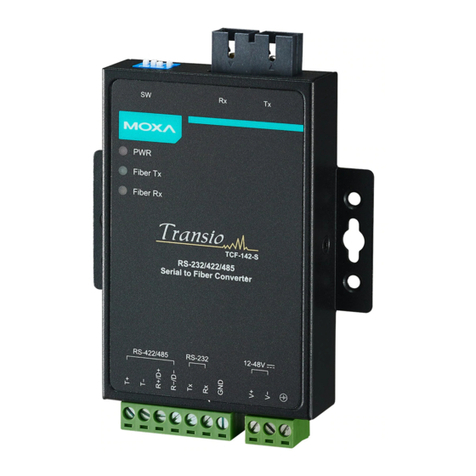
Moxa Technologies TCF-142-S User manual

Moxa Technologies

Moxa Technologies TCF-142-S User manual

Moxa Technologies ICF-1170I-M-ST User manual

Moxa Technologies

Moxa Technologies ICF-1170I-M-ST User manual

Moxa Technologies Transio A52 User manual

Moxa Technologies

Moxa Technologies Transio A52 User manual

Moxa Technologies Transio TCC-80 V2.2 User manual

Moxa Technologies

Moxa Technologies Transio TCC-80 V2.2 User manual

Moxa Technologies TCF-142-S User manual

Moxa Technologies

Moxa Technologies TCF-142-S User manual

Moxa Technologies TCF-142-M-ST User manual

Moxa Technologies

Moxa Technologies TCF-142-M-ST User manual

Moxa Technologies Media Converter User manual

Moxa Technologies

Moxa Technologies Media Converter User manual

Moxa Technologies NPort 5100A Series User manual

Moxa Technologies

Moxa Technologies NPort 5100A Series User manual

Moxa Technologies NPort 5110A User manual

Moxa Technologies

Moxa Technologies NPort 5110A User manual

Moxa Technologies VPort 2141 User manual

Moxa Technologies

Moxa Technologies VPort 2141 User manual

Moxa Technologies IMC-21GA Manual

Moxa Technologies

Moxa Technologies IMC-21GA Manual

Moxa Technologies VPort 451 User manual

Moxa Technologies

Moxa Technologies VPort 451 User manual

Moxa Technologies NE-4100 Series User manual

Moxa Technologies

Moxa Technologies NE-4100 Series User manual

Moxa Technologies ICF-1280I Series Manual

Moxa Technologies

Moxa Technologies ICF-1280I Series Manual

Moxa Technologies NPort 5000 Series User manual

Moxa Technologies

Moxa Technologies NPort 5000 Series User manual

Moxa Technologies VPort 364A Series User manual

Moxa Technologies

Moxa Technologies VPort 364A Series User manual

Moxa Technologies Transio TCC-82 User manual

Moxa Technologies

Moxa Technologies Transio TCC-82 User manual

Popular Media Converter manuals by other brands

TR-Electronic CMS582M-4096/4096 IOL DMS 14H7 KRF Assembly instructions

TR-Electronic

TR-Electronic CMS582M-4096/4096 IOL DMS 14H7 KRF Assembly instructions

Korenix JetCon 2301S user manual

Korenix

Korenix JetCon 2301S user manual

StarTech.com ET91000LCOAM manual

StarTech.com

StarTech.com ET91000LCOAM manual

Alesis AI-3 Reference manual

Alesis

Alesis AI-3 Reference manual

Caton Vpro 5100 user guide

Caton

Caton Vpro 5100 user guide

Cypress CSC-5500 Operation manual

Cypress

Cypress CSC-5500 Operation manual

H&B TX-100 Installation and instruction manual

H&B

H&B TX-100 Installation and instruction manual

Bolin Technology D Series user manual

Bolin Technology

Bolin Technology D Series user manual

IFM Electronic Efector 400 RN30 Series Device manual

IFM Electronic

IFM Electronic Efector 400 RN30 Series Device manual

GRASS VALLEY KUDOSPRO ULC2000 user manual

GRASS VALLEY

GRASS VALLEY KUDOSPRO ULC2000 user manual

Linear Technology DC1523A Demo Manual

Linear Technology

Linear Technology DC1523A Demo Manual

Lika ROTAPULS I28 Series quick start guide

Lika

Lika ROTAPULS I28 Series quick start guide

Weidmuller IE-MC-VL Series Hardware installation guide

Weidmuller

Weidmuller IE-MC-VL Series Hardware installation guide

Optical Systems Design OSD2139 Series Operator's manual

Optical Systems Design

Optical Systems Design OSD2139 Series Operator's manual

Tema Telecomunicazioni AD615/S product manual

Tema Telecomunicazioni

Tema Telecomunicazioni AD615/S product manual

KTI Networks KGC-352 Series installation guide

KTI Networks

KTI Networks KGC-352 Series installation guide

Gira 0588 Series operating instructions

Gira

Gira 0588 Series operating instructions

Lika SFA-5000-FD user guide

Lika

Lika SFA-5000-FD user guide

manuals.online logo
manuals.online logoBrands
  • About & Mission
  • Contact us
  • Privacy Policy
  • Terms and Conditions

Copyright 2025 Manuals.Online. All Rights Reserved.

ME61 Single-Strand Fiber Converter
First Edition, February 2004
1. Overview
MOXA ME61, Single-Strand Fiber Converter, is a standalone
physical layer device that converts between 10/100BaseT(X)
and 100BaseFX segments of the same network.
ME61 is designed with an optic Wavelength Division
Multiplexing (WDM) technology that transports bi-directional
and full duplex signals over a single-strand fiber cable
simultaneously. ME61 is powered by an external power
adapter or by the USB port of the host (e.g., PC or NB).
2. Package Checklist
MOXA ME61 products are shipped with the following items:
•1 ME61A or 1 ME61B
•AC-DC Power Adapter
•ME61 User's Manual
Please notify your sales representative immediately if any of
the above items is missing or damaged.
3. Model Descriptions
Model TX, RX Wavelength
TX (Transmit) 1310 nm
ME61A RX (Receive) 1550 nm
TX (Transmit) 1550 nm
ME61B RX (Receive) 1310 nm
Panel Layout of ME61 series
•Front Panel View
•Side Panel View
•Rear Panel View
4. Wiring the Power Inputs
Using ME61 with the AC-DC Power Adapter
1. Use DIP switch settings to enable power through the
AC-DC Power Adapter (refer to Part 6. for DIP switch
settings).
2. Verify that the AC-DC adapter conforms to your country’s
AC power requirements and then insert the power plug.
3. Connect ME61 to the network.
Note Wear a grounding device to safeguard against
injury due to electrostatic discharge.
Using ME61 with Power over USB
1. Use DIP switch settings to enable power from the USB
port (refer to Part 6. for DIP switch settings).
Note Please ensure that the DIP switch is positioned
on the USB side of the slider.
2. Install the USB cable. Plug the type Aconnector in the
PC’s USB port and the type B connector in the ME61’s
USB port (see Fig. 1).
3. Connect ME61 to the network.
Warning Make sure that the PC’s power is turned on.
Otherwise, the ME61 will not receive power.
Fig.1 ME61 with USB power source (Type B-to-Type A Plug)
and FX/TP connection
Fig. 2 Basic Network Connection
5. Communication Connection
ME61 models have one 10/100BaseT(X) Ethernet port, and
one 100 BaseFX (SC) fiber port.
10/100BaseT(X) Ethernet Port Connection
ME61 supports auto MDI/MDI-X. Below we show pinouts for
both MDI (NIC-type) ports and MDI-X (HUB/Switch-type)
ports, as well as cable wiring diagrams for straight-through
and cross-over Ethernet cables.
RJ45(8-pin) to RJ45(8-pin) Straight-Through Cable Wiring
RJ45 (8-pin) to RJ45(8-pin) Cross-Over Cable Wiring
6. DIP Switch Settings
Power input settings
•Power source fromAC-DC
Power Adapter enabled •Power over USB enabled
5VDC USB
DIP Switch
USB
5VDC
DIP Switch
RJ-45 Jack
Cat. 5 Cable
USB Cable
Fiber Optic
USB A Type Jack
USB B Type Jack
—1——3——2—
100FX Fiber
Network
10/100 Ethernet
Switch/NIC
TX-1310/RX-1550
ME61A
WDM Single Fiber
Single-Strand Fibe
r
TX-1550/RX-1310
ME61B
WDM Single Fiber
FDX
/COL
LNK
/ACT
100
FX TP
TX R
X
Bridge Media Converter
10/100Base-TX to 100Base-FX
PWR
FD
X
LFP
FD
X
100
A
UTO
HDX-FX
LFP DIS
HDX
10
FORCE
1 2 3 4 5
TP
Communication settings
DIP Switch DIP Function
FDX FX at full duplex (default)FX HDX FX at half duplex
LFP Enable Link Fault Pass-through (default)
LFP DIS Disable Link Fault Pass-through
FDX TP at full duplex (default)
HDX TP at half duplex when TP at Force
100 TP at 100M (default)
10 TP at 10M when TP at Force
AUTO TP at auto-negotiation (default)
TP
FORCE Force TP at 10M or at half duplex
Note:  You must set DIP Switch 1 to "FORCE" when DIP
Switches 2 and 3 are set to "10" and "HDX,"
respectively
 For ME61, DIP Switch 5 must be set to "FDX."
 After resetting the DIP Switches, you must reboot
ME61 to activate the new settings.
7. Link Fault Pass-through
This media converter supports Link Fault Pass-through (LFP)
for TX/FX converter applications.
Link status on one port is propagated to the other port to
notify remote nodes. If the TP port is unplugged, the ME61
stops transmitting over the fiber port, causing the remote
fiber node link to fail. The LED will show link failure on both
the TP and fiber ports. If the fiber link fails, the ME61 restarts
auto-negotiation on the TP port, but stays in the link failure
state. This causes the remote TP node link to fail. The LED
also shows the link failure on both the TP and fiber ports.
The figures below show normal status when the link succeeds,
and the error status when TP Cable A, Fiber Cable B, or Fiber
Cable C fails to connect.
Note The Link Fault Pass-through (LFP) function is
enabled by DIP switch. Disable the LFP function by
setting the DIP switch to the LFP DIS position.
Normal status via a pair of LFPs
Status if TPA is broken
Status if Fiber Cable B or C is broken
Note ●indicates LNK/ACT LED Lit
○indicates LNK/ACT LED Off
Warning The LFP (Link Fault Pass Through) function works
only when two converters working in pairs have
this capability. Furthermore, both LFP converters
should be supplied by the same
manufacturer/vender. The connection comes from
LFP converters with odd models or non-LFP
converters will cease the LFP function.
8. LED Description
LED Color Function
FX LNK
/ACT Green Lit when FX port is linking
Blinks when FX port is transmitting data
FX FDX
/COL Amber Lit when full-duplex mode is active
Off when half-duplex is active
Blinks when a collision occurs
TP LNK
/ACT Green Lit when TP port is linking
Blinks when FX port is transmitting data
TP 100 Green Lit when TP port is transmitting data
at 100 Mbps
Off when TP port is transmitting data
at 10 Mbps
PWR Green Lit when +5V power is supplied
9. Technical Specifications
 Standards: IEEE802.3u 10/100Base-TX, 100Base-FX
 Flow Control: IEEE802.3x compliant for full-duplex
Back pressure flow control for half-duplex
 TP Cable Limitations: Cat. 5 and up to 100m
 Fiber Optic Cable: Single-Strand Fiber Cable
Recommended: 9/125
µ
m single-mode, Optional: 8.3/125,
8.7/125 or 10/125
µ
m
 Wavelength: ME61ATX: 1310 nm/RX: 1550 nm,
ME61B TX: 1550 nm/RX: 1310 nm
 Min. TX Output: -10 dBm
 Max. TX Output: -7 dBm

Sensitivity: -32 dBm
 Power Requirement: 1A@+5VDC from AC-DC Adapter
0.5A@+5VDC from USB port
 Ambient Temperature: 0°to 50°C
 Humidity: 5% to 90%
 Dimensions: 26.2(H) ×70.3(W) ×94(D) mm
 Complies with FCC Part 15 Class Aand CE Mark
Copyright 2004
Moxa Technologies Co., Ltd.
All rights reserved.
Reproduction without permission is prohibited.
Tel: +886-2-2910-1230
Fax: +886-2-2910-1231
www.moxanet.com

support@moxa
net
com
AUTO 100 FDX LFP FDX
123 45
FORCE 10 HDX LFP HDX
DIS
TP F
X
B
10/100
Switch LFP
●TP ●●
TP
●●
Remote
Station
●●
A
C
Fiber
Cable
10/100
Switch
LFP
B
10/100
Switch LFP
○TP ○●
TP
○○
Remote
Station
●○
A
C
Fiber
Cable
10/100
Switch
LFP
B
10/100
Switch LFP
○TP ○●
TP
○○
Remote
Station
○○
A
C
Fiber
Cable
10/100
Switch
LFP
P/N: 18020006100
—4——6——5—