manuals.online logo
Brands
  1. Home
  2. •
  3. Brands
  4. •
  5. Nuu
  6. •
  7. Cell Phone
  8. •
  9. Nuu F2 User manual

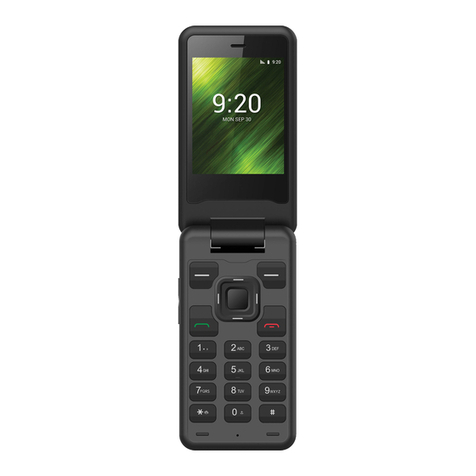
Nuu F2 User manual

Other Nuu Cell Phone manuals

Nuu X1 User manual

Nuu

Nuu X1 User manual

Nuu X5 User manual

Nuu

Nuu X5 User manual

Nuu X6mini User manual

Nuu

Nuu X6mini User manual

Nuu A5X User manual

Nuu

Nuu A5X User manual

Nuu A11L User manual

Nuu

Nuu A11L User manual

Nuu Z8 User manual

Nuu

Nuu Z8 User manual

Nuu NU3S Parts list manual

Nuu

Nuu NU3S Parts list manual

Nuu F4L User manual

Nuu

Nuu F4L User manual

Nuu F3 User manual

Nuu

Nuu F3 User manual

Nuu X1 User manual

Nuu

Nuu X1 User manual

Nuu A5X User manual

Nuu

Nuu A5X User manual

Nuu B10 User manual

Nuu

Nuu B10 User manual

Popular Cell Phone manuals by other brands

Nokia 6700 classic user guide

Nokia

Nokia 6700 classic user guide

LG L34C user guide

LG

LG L34C user guide

Ericsson T60d manual

Ericsson

Ericsson T60d manual

Zte Score M user manual

Zte

Zte Score M user manual

Sony Xperia Z1 Compact Startup guide

Sony

Sony Xperia Z1 Compact Startup guide

AT AT-Q5 user manual

AT

AT AT-Q5 user manual

Vingtor ACM-M-A-V2 Installation/configuration

Vingtor

Vingtor ACM-M-A-V2 Installation/configuration

Olitech EasyFlip 2 Quick setup guide

Olitech

Olitech EasyFlip 2 Quick setup guide

Zte Atrium Z793C user manual

Zte

Zte Atrium Z793C user manual

Alcatel IDEAL manual

Alcatel

Alcatel IDEAL manual

Zte BLADE A520 quick start guide

Zte

Zte BLADE A520 quick start guide

switel M222 user manual

switel

switel M222 user manual

LG LG-P503 user guide

LG

LG LG-P503 user guide

LG F2410 user guide

LG

LG F2410 user guide

Argom E500 manual

Argom

Argom E500 manual

Hisense U30 user manual

Hisense

Hisense U30 user manual

Argom Tech E401 user manual

Argom Tech

Argom Tech E401 user manual

Nokia 3595 - Cell Phone - GSM Manual Del Usuario

Nokia

Nokia 3595 - Cell Phone - GSM Manual Del Usuario

manuals.online logo
manuals.online logoBrands
  • About & Mission
  • Contact us
  • Privacy Policy
  • Terms and Conditions

Copyright 2025 Manuals.Online. All Rights Reserved.

User manual
Model:F2
Brand:NUU
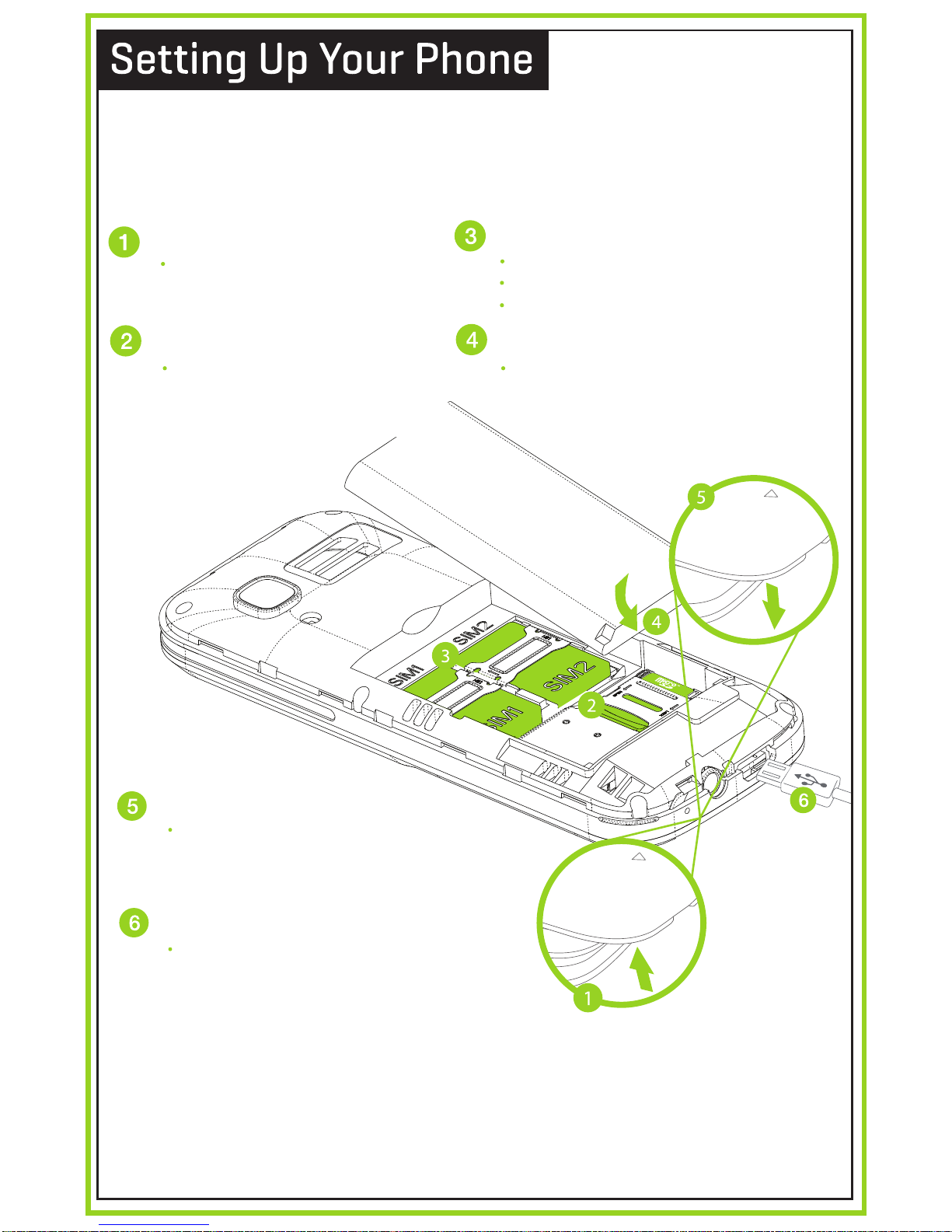
Follow these step-by-step instructions to set up your F2.
Power off the phone and remove battery before inserting
any cards!
Warning: SIM cards are small enough to become a
choking hazard, so please keep them away from children.
SIM cards are also quite delicate. Please be careful when
handling your card.
After installing the SIM card, memory
card, and battery, align the cover and press it
closed. Make sure you press all around the
edge to ensure a secure fit.
Plug in the microUSB connector to charge
the phone or transfer data.
Remove Back Cover
Insert microSD™Memory Card
Replace Back Cover
Charge/Sync
Insert SIM (Dual SIM Standby)
Insert the Battery
Remove the back cover by prying
the back cover up with your
fingers.
Power off the phone and remove
battery before inserting memory
card. Slide the SD clip to unlock,
tilt to open, insert card, close and
slide to lock again.
Orient SIM card to match diagram on slot.
SIM 1 (Mini) supports GSM connections.
SIM 2 (Mini) supports GSM connections.
Align the battery contacts, then insert the
battery contact-first.
THANK YOU!
For Your Purchase
of the
F2
ABC D E F
G
P Q R S W X Y Z
T U V
H I JKLM N O
ABC D E F
G
P Q R S W X Y Z
T U V
H I JKLM N O
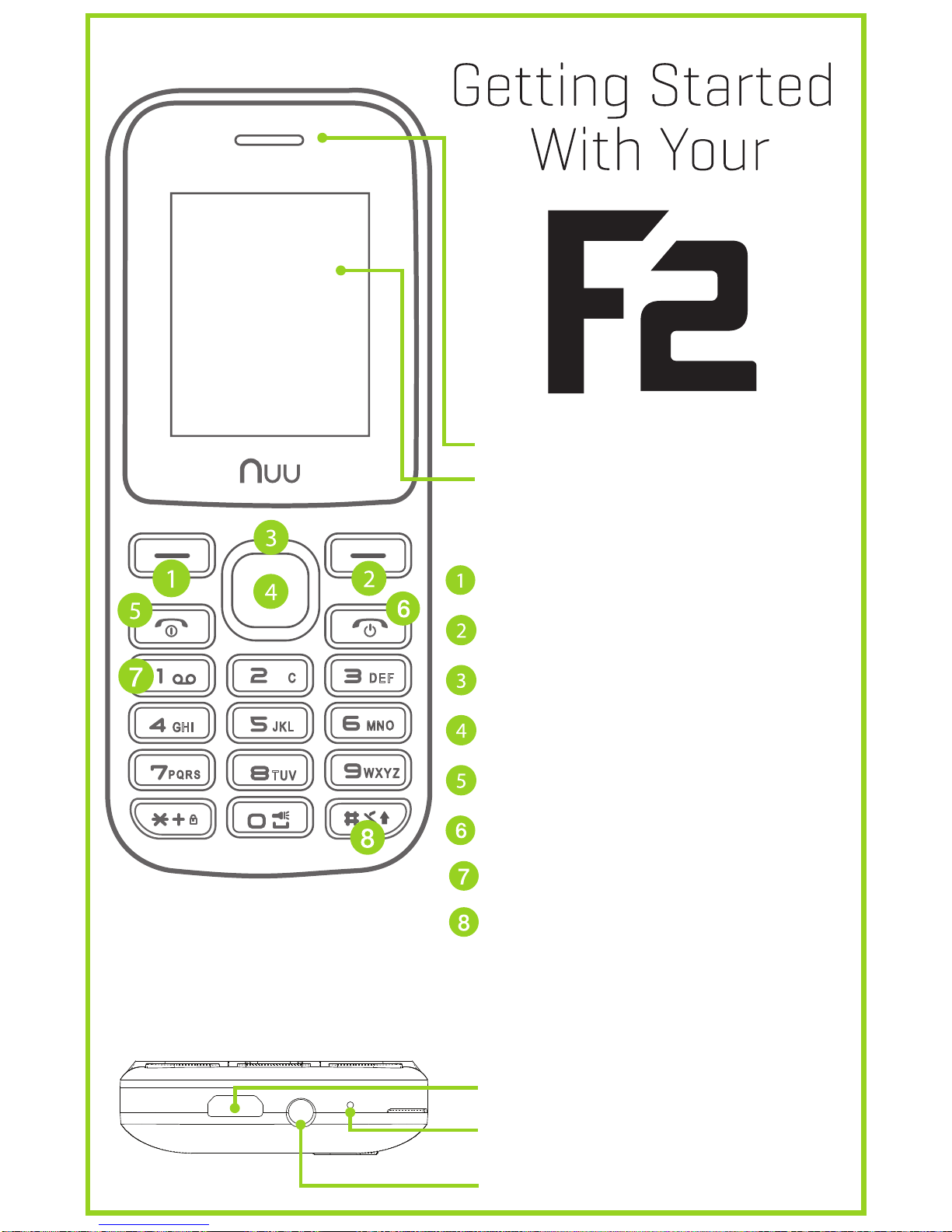
Earpiece
LCD Screen
The Keypad
AUX-In/Headset jack
Hold 1 for Voicemail Call
microUSB connector
Microphone
Menu
Contacts/Back
Arrow Keys
Menu/Action
Answer Call
End Call/Power On/Off
Holding #key swaps
between GENERAL and
SILENT mode
FCC Warning
This device complies with part 15 of the FCC Rules. Operation is subject
to the condition that this device does not cause harmful interference.
Any Changes or modifications not expressly approved by the party
responsible for compliance could void the user's authority to operate the
equipment.
Note: This equipment has been tested and found to comply with the
limits for a Class B digital device, pursuant to part 15 of the FCC Rules.
These limits are designed to provide reasonable protection against
harmful interference in a residential installation. This equipment
generates uses and can radiate radio frequency energy and, if not
installed and used in accordance with the instructions, may cause
harmful interference to radio communications. However, there is no
guarantee that interference will not occur in a particular installation. If
this equipment does cause harmful interference to radio or television
reception, which can be determined by turning the equipment off and on,
the user is encouraged to try to correct the interference by one or more
of the following measures:
-Reorient or relocate the receiving antenna.
-Increase the separation between the equipment and receiver.
-Connect the equipment into an outlet on a circuit different from that to
which the receiver is connected.
-Consult the dealer or an experienced radio/TV technician for help.
Specific Absorption Rate (SAR) information:
This Mobile phone meets the government's requirements for exposure
to radio waves. The guidelines are based on standards that were
developed by independent scientific organizations through periodic and
thorough evaluation of scientific studies. The standards include a
substantial safety margin designed to assure the safety of all persons
regardless of age or health.
FCC RF Exposure Information and Statement
The SAR limit of USA (FCC) is 1.6 W/kg averaged over one gram of tissue.
Device types: Mobile phone (FCC ID: 2ADINNUUF2) has also been tested
against this SAR limit. The highest SAR value reported under this
standard during product certification for use at the ear is 0.730W/kg and
when properly worn on the body is 0.656W/kg. This device was tested
for typical body-worn operations with the back of the handset kept
10mm from the body. To maintain compliance with FCC RF exposure
requirements, use accessories that maintain a 10mm separation distance
between the user's body and the back of the handset. The use of belt
clips, holsters and similar accessories should not contain metallic
components in its assembly. The use of accessories that do not satisfy
these requirements may not comply with FCC RF exposure requirements,
and should be avoided.
Body-worn Operation
This device was tested for typical body-worn operations. To comply with
RF exposure requirements, a minimum separation distance of 10mm
must be maintained between the user’s body and the handset, including
the antenna. Third-party belt-clips, holsters, and similar accessories used
by this device should not contain any metallic components. Body-worn
accessories that do not meet these requirements may not comply with
RF exposure requirements and should be avoided. Use only the supplied
or an approved antenna.
IC Warning
This device complies with Industry Canada licence-exempt RSS
standard(s). Operation is subject to the following two conditions: (1) This
device may not cause interference, and (2) This device must accept any
interference, including interference that may cause undesired operation
of the device.
RF Exposure Information and Statement
The SAR limit of USA is 1.6 W/kg averaged over one gram of tissue.
Device types: Mobile phone (IC: 20782-NUUF2) has also been tested
against this SAR limit. The highest SAR value reported under this
standard during product certification for use at the ear is 0.730W/kg and
when properly worn on the body is 0.656W/kg. This device was tested
for typical body-worn operations with the back of the handset kept
10mm from the body. To maintain compliance with IC RF exposure
requirements, use accessories that maintain a 10mm separation distance
between the user's body and the back of the handset. The use of belt
clips, holsters and similar accessories should not contain metallic
components in its assembly. The use of accessories that do not satisfy
these requirements may not comply with IC RF exposure requirements,
and should be avoided.
Body-worn Operation
This device was tested for typical body-worn operations. To comply with
RF exposure requirements, a minimum separation distance of 10mm
must be maintained between the user’s body and the handset, including
the antenna. Third-party belt-clips, holsters, and similar accessories used
by this device should not contain any metallic components. Body-worn
accessories that do not meet these requirements may not comply with
RF exposure requirements and should be avoided. Use only the supplied
or an approved antenna.
Le présent appareil est conforme aux CNR d'Industrie Canada applicables
aux appareils radio exempts de licence. L'exploitation est autorisée aux
deux conditions suivantes:
(1) l'appareil ne doit pas produire de brouillage, et
(2) l'utilisateur de l'appareil doit accepter tout brouillage
radioélectrique subi, même si le brouillage est susceptible d'en
compromettre le fonctionnement
RF exposition Information et Déclaration
La limite SAR des Etats-Unis est de 1,6 W / kg en moyenne par gramme
de tissu. Types d'appareil: Mobile phone (IC: 20782-NUUF2) a également
été testé contre ces valeurs. La valeur SAR la plus élevée déclarée en
vertu de cette norme lors de la certification de produit pour une
utilisation à l'oreille est 0.730W / kg et lorsqu'il est correctement porté
sur le corps est 0.656W / kg. Ce dispositif a été testé pour les opérations
typiques portés sur le corps avec le dos du combiné gardé 10mm du
corps. Afin de maintenir la conformité aux exigences de la IC, utilisez des
accessoires qui maintiennent une distance de séparation 10mm entre le
corps de l'utilisateur et le dos du combiné. L'utilisation de pinces de
ceinture, étuis et accessoires similaires ne doivent pas contenir de
composants métalliques dans son ensemble. L'utilisation d'accessoires
qui ne satisfont pas à ces exigences ne peuvent pas se conformer aux
exigences de la IC, et devrait être évitée.