manuals.online logo
Brands
  1. Home
  2. •
  3. Brands
  4. •
  5. Panasonic
  6. •
  7. Control Unit
  8. •
  9. Panasonic CF-BAC02GU User manual

Panasonic CF-BAC02GU User manual

Other Panasonic Control Unit manuals

Panasonic KX-NT307 User manual

Panasonic

Panasonic KX-NT307 User manual

Panasonic CARICAM AU-VSHL2G User manual

Panasonic

Panasonic CARICAM AU-VSHL2G User manual

Panasonic S-LINK V SL-VMC1 User manual

Panasonic

Panasonic S-LINK V SL-VMC1 User manual

Panasonic PAN4620 User manual

Panasonic

Panasonic PAN4620 User manual

Panasonic CF-BAC04GU User manual

Panasonic

Panasonic CF-BAC04GU User manual

Panasonic GPKS822H - COLOR CAMERA HEAD User manual

Panasonic

Panasonic GPKS822H - COLOR CAMERA HEAD User manual

Panasonic 10GBASE-SR SFP+ User manual

Panasonic

Panasonic 10GBASE-SR SFP+ User manual

Panasonic eUniStone Guide

Panasonic

Panasonic eUniStone Guide

Panasonic CZ-280PAH1 User manual

Panasonic

Panasonic CZ-280PAH1 User manual

Panasonic SF-AC User manual

Panasonic

Panasonic SF-AC User manual

Panasonic CF-BAP0256U User manual

Panasonic

Panasonic CF-BAP0256U User manual

Panasonic AK-MSU1000G User manual

Panasonic

Panasonic AK-MSU1000G User manual

Panasonic AK-HCU3550EA User manual

Panasonic

Panasonic AK-HCU3550EA User manual

Panasonic ELC500 User manual

Panasonic

Panasonic ELC500 User manual

Panasonic GPKS162CUD - CONTROL UNIT User manual

Panasonic

Panasonic GPKS162CUD - CONTROL UNIT User manual

Panasonic BMED500 - CAMERA CONTROL UNIT User manual

Panasonic

Panasonic BMED500 - CAMERA CONTROL UNIT User manual

Panasonic GP-KS162CUDE User manual

Panasonic

Panasonic GP-KS162CUDE User manual

Panasonic GP-KH232CUE User manual

Panasonic

Panasonic GP-KH232CUE User manual

Panasonic PAN9026 User manual

Panasonic

Panasonic PAN9026 User manual

Panasonic WVPS104C - CAMERA DRIVE UNIT User manual

Panasonic

Panasonic WVPS104C - CAMERA DRIVE UNIT User manual

Panasonic PAN1326C Owner's manual

Panasonic

Panasonic PAN1326C Owner's manual

Panasonic SF-C10 Series User manual

Panasonic

Panasonic SF-C10 Series User manual

Panasonic CF-BAD04GU User manual

Panasonic

Panasonic CF-BAD04GU User manual

Panasonic HIT VBHN340SA17E User manual

Panasonic

Panasonic HIT VBHN340SA17E User manual

Popular Control Unit manuals by other brands

Seitz 14A80 user manual

Seitz

Seitz 14A80 user manual

Wilo RS485 Installation and operating instructions

Wilo

Wilo RS485 Installation and operating instructions

Becker CentralControl CC41 Commissioning Instruction

Becker

Becker CentralControl CC41 Commissioning Instruction

SICK CDB650 operating instructions

SICK

SICK CDB650 operating instructions

Panduit NetKey NKP5E88M Series installation instructions

Panduit

Panduit NetKey NKP5E88M Series installation instructions

MX Options Concentric Petite Fitting instructions

MX

MX Options Concentric Petite Fitting instructions

Clean Water Systems Fleck 2510 Installation & start?up guide

Clean Water Systems

Clean Water Systems Fleck 2510 Installation & start?up guide

Fairchild FSB44104A user guide

Fairchild

Fairchild FSB44104A user guide

LEGRAND Wattstopper LMIN-104 installation instructions

LEGRAND

LEGRAND Wattstopper LMIN-104 installation instructions

PMK ATT10BNCS instruction manual

PMK

PMK ATT10BNCS instruction manual

Tektronix TDS3FFT user manual

Tektronix

Tektronix TDS3FFT user manual

Woodward easYgen Technical manual

Woodward

Woodward easYgen Technical manual

Balluff BNI EIP-502-105-R015 user guide

Balluff

Balluff BNI EIP-502-105-R015 user guide

NXP Semiconductors TWR-LS1021A Getting started

NXP Semiconductors

NXP Semiconductors TWR-LS1021A Getting started

Advantech PCM-3117 Startup manual

Advantech

Advantech PCM-3117 Startup manual

Danfoss MCO 101 manual

Danfoss

Danfoss MCO 101 manual

Moons' Lin Engineering R701P user manual

Moons'

Moons' Lin Engineering R701P user manual

Aventics RV1 operating instructions

Aventics

Aventics RV1 operating instructions

manuals.online logo
manuals.online logoBrands
  • About & Mission
  • Contact us
  • Privacy Policy
  • Terms and Conditions

Copyright 2025 Manuals.Online. All Rights Reserved.

OPERATING INSTRUCTIONS
BEDIENUNGSANLEITUNG
INSTRUCTIONS D’UTILISATION
取扱説明書
RAM Module / RAM-Modul
Module RAM / RAM モジュール
Model No./Modell-Nr.
Numéro de modèle/ 品番 CF-BAC02GU
HS0110-0
DFQX5730ZA
PrintedinJapan
ENGLISH
Thank you for purchasing the RAM module for the Panasonic
notebook computer series.
CAUTION
Before use, read this Operating Instructions and the relevant portions of
the computer’s Operating Instructions and Reference Manual carefully.
●
DEUTSCH
Wir freuen uns, daß Sie sich für den Kauf eines RAM-Moduls für
Ihr Panasonic-Notebook entschieden haben.
VORSICHT
Lesen Sie vor dem Gebrauch des R AM-Moduls sorgfältig diese
Bedienungsanleitung und die entsprechenden Abschnitte der
Bedienungsanleitung und des Reference Manual des Computers.
●
FRANÇAIS
Merci d’avoir choisi le module RAM pour la serie d’ordinateurs
portables Panasonic.
ATTENTION
Avant d’utiliser le module RAM, lisez attentivement ces instructions d’
utilisation, ainsi que les sections correspondantes des instructions d’
utilisation et du Reference Manual de l’ordinateur.
●
日本語
このたびは、パナソニック製品をお買い上げいただき、まことにあ
りがとうございます。
この RAM モジュールは当社製パソコンに使用するものです。
取扱説明書をよくお読みのうえ、正しく安全にお使いください。
ご使用の際には、この取扱説明書とあわせて、当社製パソコン
本体の取扱説明書をよくお読みください。
保証書は「お買い上げ日・販売店名」などの記入を確かめ、
取扱説明書とともに大切に保管してください。
●
●
●
ENGLISH
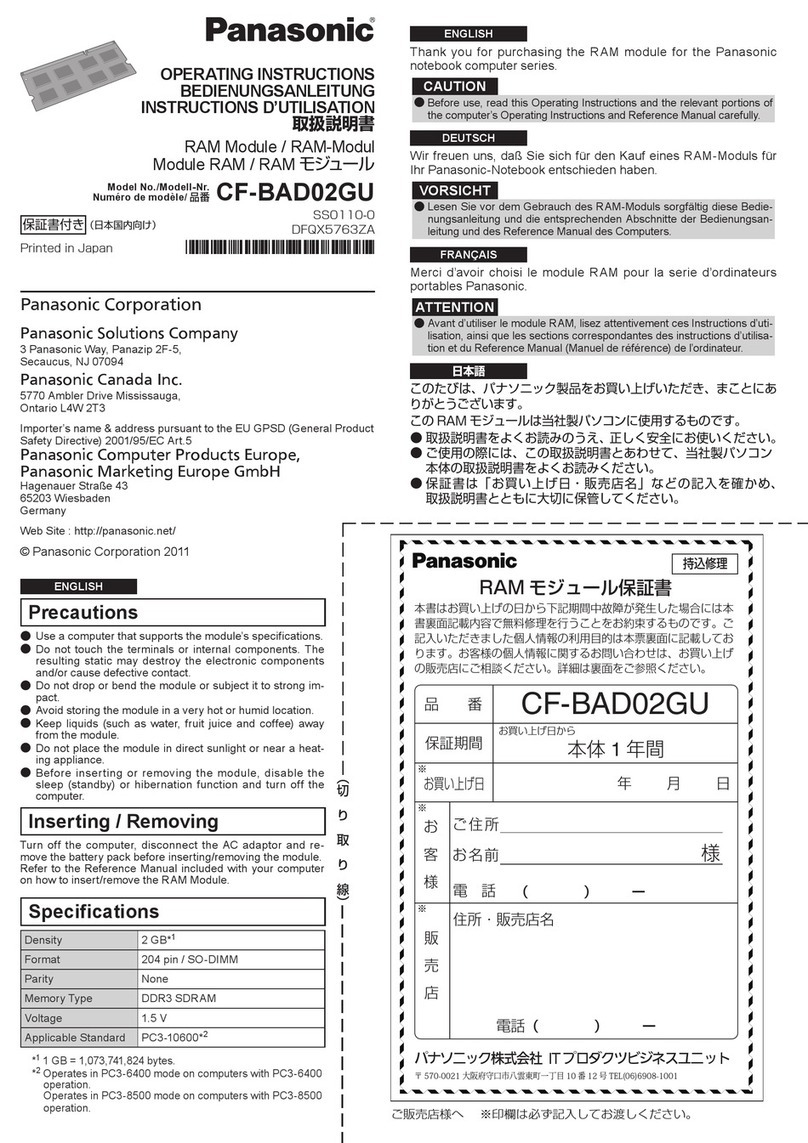
Precautions
Use a computer that supports the module’s specifications.
Do not touch the terminals or internal components. The
resulting static may destroy the electronic components
and/or cause defective contact.
Do not drop or bend the module or subject it to strong im-
pact.
Avoid storing the module in a very hot or humid location.
Keep liquids (such as water, fruit juice and coffee) away
from the module.
Do not place the module in direct sunlight or near a heat-
ing appliance.
Before inserting or removing the module, disable the sleep
(standby) or hibernation function and turn off the com-
puter.
Inserting / Removing
Turn off the computer, disconnect the AC adaptor and remove
the battery pack before inserting/removing the module.
Refer to the Reference Manual included with your computer
on how to insert/remove the RAM Module.
Specifications
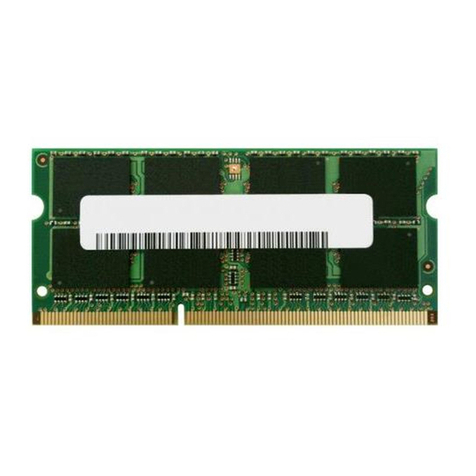
Density 2 GB*1
Format 204 pin / SO-DIMM
Parity None
Memory Type DDR3 SDRAM
Voltage 1.5 V
Applicable Standard PC3-8500*2
*11 GB = 1,073,741,824 bytes.
*2Operates in PC3-6400 mode on computers with PC3-6400
operation.
●
●
●
●
●
●
●
お買い上げ日から
持込修理
ご販売店様へ ※印欄は必ず記入してお渡しください。
※
※
お
客
様
販
売
店
ご住所
お名前 様
電話
電話(    )   ー
(    )   ー
住所・販売店名
保証期間
お買い上げ日
          年月日
本書はお買い上げの日から下記期間中故障が発生した場合には本
書裏面記載内容で無料修理を行うことをお約束するものです。ご
記入いただきました個人情報の利用目的は本票裏面に記載してお
ります。お客様の個人情報に関するお問い合わせは、お買い上げ
の販売店にご相談ください。詳細は裏面をご参照ください。
品  番
RAMモジュール保証書
本体 1年間
CF-BAC02GU
パナソニック株式会社 IT プロダクツ事業部
※
〒 570-0021大阪府守口市八雲東町一丁目 10 番 12 号TEL(06)6908-1001
︵切
 り
 取
 り
 線︶

保証書付き(日本国内向け)
Panasonic Corporation
Panasonic Computer Solutions Company
3 Panasonic Way, Panazip 2F-5,
Secaucus, NJ 07094
Panasonic Canada Inc.
5770 Ambler Drive Mississauga,
Ontario L4W 2T3
Importer’s name & address pursuant to the EU GPSD (General Product
Safety Directive) 2001/95/EC Art.5
Panasonic Computer Products Europe,
Panasonic Marketing Europe GmbH
Hagenauer Straße 43
65203 Wiesbaden
Germany
Web Site : http://panasonic.net/
© Panasonic Corporation 2010
DEUTSCH
Vorsichtshinweise
Verwenden Sie dieses RAM-Modul ausschließlich mit einem Computer,
der die Spezifikationen des Moduls unterstützt.
Vermeiden Sie eine Berührung der Kontakte und internen Bauteile.
Anderenfalls wird statische Aufladung erzeugt, die elektronische Bauteile
zerstören und/oder einen schlechten Kontakt verursachen kann.
Lassen Sie das RAM-Modul nicht fallen, verbiegen Sie es nicht, und
schützen Sie es vor starken Erschütterungen.
Vermeiden Sie eine Aufbewahrung des RAM-Moduls an sehr heißen
oder feuchten Orten.
Halten Sie Flüssigkeiten (Wasser, Behälter mit Getränken, Kaffee
usw.) vom RAM-Modul fern.
Setzen Sie das RAM-Modul keiner direkten Sonneneinstrahlung aus,
und bringen Sie es nicht in die Nähe von Heizkörpern.
Bevor Sie das RAM-Modul einfügen oder entfernen, schalten Sie Energiespar-
(Standby-) oder Ruhezustandsfunktion aus und stellen Sie den Computer aus.
Einsetzen / Entfernend
Schalten Sie den Computer aus, trennen Sie den Netzadapter ab und
entfernen Sie das Akkupack, bevor Sie das RAM-Modul einsetzen/
Entfernend.
Einzelheiten zum Einsetzen/Entfernen des RAM-Modul finden Sie in dem
Reference Manual Ihres Computers.
Technische Daten
Speicherkapazität 2 GB
*1
Bauart 204 Stifte / SO-DIMM
Parität Keine
Speichertyp DDR3 SDRAM
Spannung 1,5 V
Zutreffende Norm PC3-8500
*2
*11 GB = 1.073.741.824 bytes.
*2Läuft auf Computern mit PC3-6400-Betrieb im PC3-6400-Modus.
●
●
●
●
●
●
●
〈無料修理規定〉
1.
取扱説明書、本体貼付ラベル等の注意書に従った使用状態で保証期間
内に故障した場合には、無料修理をさせていただきます。

(イ)
無料修理をご依頼になる場合には、商品に取扱説明書から切り離
した本書を添えていただきお買い上げの販売店にお申しつけくだ
さい。

(ロ)
お買い上げの販売店に無料修理をご依頼にならない場合には、お
近くの修理ご相談窓口にご連絡ください。
2.
ご転居の場合の修理ご依頼先等は、お買い上げの販売店またはお近く
の修理ご相談窓口にご相談ください。
3.
ご贈答品等で本保証書に記入の販売店で無料修理をお受けになれない
場合には、お近くの修理ご相談窓口へご連絡ください。
4.保証期間内でも次の場合には原則として有料にさせていただきます。

(イ)
使用上の誤り及び不当な修理や改造による故障及び損傷

(ロ)
お買い上げ後の輸送、落下などによる故障及び損傷

(ハ)
火災、地震、水害、落雷、その他天災地変及び公害、塩害、ガス
害(硫化ガスなど)、異常電圧、指定外の使用電源(電圧、周波数)
などによる故障及び損傷

(ニ)
車両、船舶等に搭載された場合に生ずる故障及び損傷

(ホ)
本書のご添付がない場合

(へ)
本書にお買い上げ年月日、お客様名、販売店名の記入のない場
合、あるいは字句を書き替えられた場合

(ト)
持込修理の対象商品を直接修理窓口へ送付した場合の送料等はお
客様の負担となります。また、出張修理を行った場合には、出張
料はお客様の負担となります。
5.本書は日本国内においてのみ有効です。
6.本書は再発行いたしませんので大切に保管してください。
7.
お近くのご相談窓口はコンピューター本体の取扱説明書の「修理ご相
談窓口」をご参照ください。
修理メモ
※
お客様にご記入いただいた個人情報(保証書控)は、保証期間内の無
料修理対応及びその後の安全点検活動のために利用させていただく場
合がございますのでご了承ください。
※
この保証書は、本書に明示した期間、条件のもとにおいて無料修理を
お約束するものです。従ってこの保証書によって、保証書を発行して
いる者(保証責任者)、及びそれ以外の事業者に対するお客様の法律
上の権利を制限するものではありませんので、保証期間経過後の修理
についてご不明の場合は、お買い上げの販売店またはお近くの修理ご
相談窓口にお問い合わせください。
※
保証期間経過後の修理や補修用性能部品の保有期間についてはコン
ピューター本体の取扱説明書の「保証とアフターサービス」をご覧く
ださい。
※ThiswarrantyisvalidonlyinJapan.
FRANÇAIS
Précautions
Utilisez un ordinateur qui peut prendre en charge les spécifications du
module.
Ne touchez ni les bornes, ni les composants internes. L’électricité
statique risquerait de détruire les composants électroniques et/ou
d’endommager les contacts.
Manipulez avec précaution le module afin de ne pas l’endommager.
Évitez de ranger le module dans un endroit très chaud ou humide.
Gardez les substances liquides (telles que l’eau, les jus de fruit et les
cafés) à l’écart du module.
Ne placez pas le module sous les rayons directs du soleil ou près d’un
appareil de chauffage.
Avant d’insérer ou de retirer le module, désactivez la fonction “Mettre
en veille” ou de veille prolongée et éteignez l’ordinateur.
Insertion / Retrait
Fermez l’ordinateur, débranchez l’adaptateur secteur et retirez la batterie
avant d’insérer/retirer le module.
Reportez-vous aux Reference Manual fournies avec votre ordinateur pour
la manière d’insérer/retirer le Module RAM.
Spécifications
Mémoire vive 2 Go*1
Format 204 broches / SO-DIMM
Parité Sans
Type de mémoire DDR3 SDRAM
Tension 1,5 V
Norme applicable PC3-8500*2
*11 Go = 1 073 741 824 octets.
*2Fonctionne en mode PC3 -6400 sur les ordinateurs fonctionnant avec
PC3-6400.
●
●
●
●
●
●
●
日本語
取り扱い上のお願い
仕様にあったパソコンでお使いください。
端子部や部品に触れないでください。静電気による電子部
品の破壊や接触不良の原因になります。
落としたり、曲げたりして、RAM モジュールに強い衝撃を
与えないでください。
高温になる場所、湿度の高い場所には保管しないでください。
液体 (水、ジュース、コーヒーなど )で濡らさないでください。
直射日光の当たる場所や暖房器具の近くに置かないでください。
RAM モジュールの取り付け/取り外しは、スリープ(または
スタンバイ)/休止状態機能を無効にし、パソコン本体の電源
スイッチを切った状態で行ってください
。
取り付け/取り外し
RAM モジュール取り付けの前にパソコンの電源を切り、AC
アダプターを抜き、バッテリーパックを外してください。
詳しい取り付け/取り外しの方法については、パソコン本体
の『取扱説明書基本ガイド』の「メモリー容量を増やす」を
ご覧ください。
仕様
メモリー容量 2 GB*1
形状 204 ピン / SO-DIMM
パリティー なし
メモリータイプ DDR3 SDRAM
電圧 1.5 V
適応規格 PC3-8500*2
*11 GB = 1,073,741,824 バイト。
*2PC3-6400動作のパソコンでは、PC3-6400で動作します。
保証とアフターサービス
ご不明な点については、お買い上げの販売店または、ご相談
窓口にご相談ください。
詳しくは、パソコン本体に付属の『取扱説明書準備と設定ガ
イド』をご覧ください。
●
●
●
●
●
●
●
パナソニック株式会社 IT プロダクツ事業部
〒570-0021大阪府守口市八雲東町一丁目 10 番12 号
︵切
 り
 取
 り
 線︶