manuals.online logo
Brands
  1. Home
  2. •
  3. Brands
  4. •
  5. Panasonic
  6. •
  7. Radio
  8. •
  9. Panasonic RF-2800LBS Manual

Panasonic RF-2800LBS Manual

This manual suits for next models

1

Other Panasonic Radio manuals

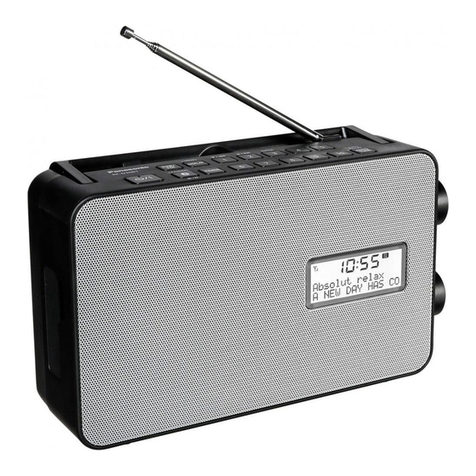
Panasonic RF-D10 User manual

Panasonic

Panasonic RF-D10 User manual

Panasonic RF-D10EB User manual

Panasonic

Panasonic RF-D10EB User manual

Panasonic RF-D20BT User manual

Panasonic

Panasonic RF-D20BT User manual

Panasonic RF-D20U User manual

Panasonic

Panasonic RF-D20U User manual

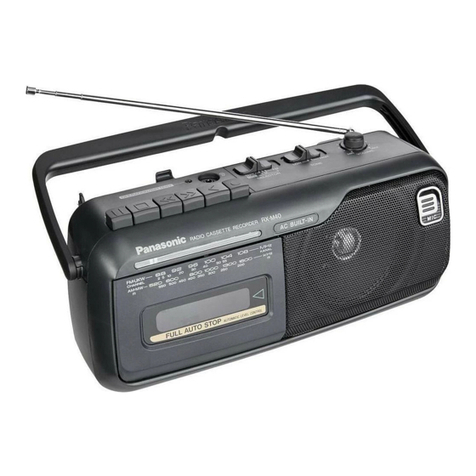
Panasonic RX-M40 User manual

Panasonic

Panasonic RX-M40 User manual

Panasonic TBB 120335 User manual

Panasonic

Panasonic TBB 120335 User manual
Panasonic RF-542 User manual

Panasonic

Panasonic RF-542 User manual

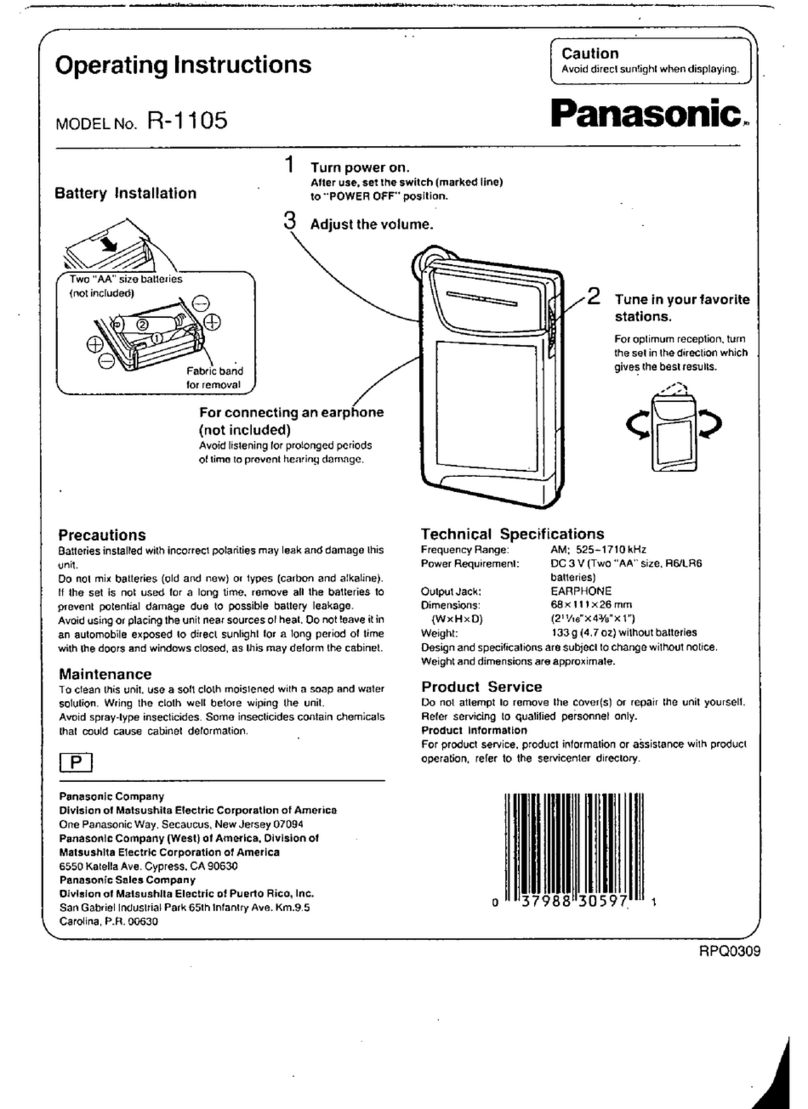
Panasonic R-1105 User manual

Panasonic

Panasonic R-1105 User manual

Panasonic RC-800 User manual

Panasonic

Panasonic RC-800 User manual

Panasonic RF-D1 User manual

Panasonic

Panasonic RF-D1 User manual

Panasonic RF-562DGU User manual

Panasonic

Panasonic RF-562DGU User manual

Panasonic SE-5508 User manual

Panasonic

Panasonic SE-5508 User manual
Panasonic RF-521 User manual

Panasonic

Panasonic RF-521 User manual

Panasonic RF-D10EG User manual

Panasonic

Panasonic RF-D10EG User manual

Panasonic RF-2400 User manual

Panasonic

Panasonic RF-2400 User manual

Panasonic RF-SW70 User manual

Panasonic

Panasonic RF-SW70 User manual

Panasonic RF-D100BT User manual

Panasonic

Panasonic RF-D100BT User manual

Panasonic RF-B65 Instruction sheet

Panasonic

Panasonic RF-B65 Instruction sheet

Panasonic RF-3100 User manual

Panasonic

Panasonic RF-3100 User manual

Panasonic RF-B600 User manual

Panasonic

Panasonic RF-B600 User manual

Panasonic RF-SW70 User manual

Panasonic

Panasonic RF-SW70 User manual

Panasonic RF-ND200R User manual

Panasonic

Panasonic RF-ND200R User manual
Panasonic SG-5090 User manual

Panasonic

Panasonic SG-5090 User manual

Panasonic RF-U350 User manual

Panasonic

Panasonic RF-U350 User manual
Popular Radio manuals by other brands

Grundig G6 AVIATOR owner's manual

Grundig

Grundig G6 AVIATOR owner's manual

Makita DMR114 instruction manual

Makita

Makita DMR114 instruction manual

PURE Move R3 manual

PURE

PURE Move R3 manual

Motorola CP040 Detailed service manual

Motorola

Motorola CP040 Detailed service manual

Bosch GPB18V-5C Operating/safety instructions

Bosch

Bosch GPB18V-5C Operating/safety instructions

Ocean Digital WR-230 user manual

Ocean Digital

Ocean Digital WR-230 user manual

Realistic TRC-457 owner's manual

Realistic

Realistic TRC-457 owner's manual

Uniden AX 144 owner's manual

Uniden

Uniden AX 144 owner's manual

SIGNIFY EA2173 instruction manual

SIGNIFY

SIGNIFY EA2173 instruction manual

auna multimedia 10026443 user manual

auna multimedia

auna multimedia 10026443 user manual

GME TX680 instruction manual

GME

GME TX680 instruction manual

Motorola MTM5 00 Series Basic service manual

Motorola

Motorola MTM5 00 Series Basic service manual

Tivoli Audio ONE+ owner's manual

Tivoli Audio

Tivoli Audio ONE+ owner's manual

Sirius Satellite Radio SDVK1 installation guide

Sirius Satellite Radio

Sirius Satellite Radio SDVK1 installation guide

Sirius XM RAdio EDGE user guide

Sirius XM RAdio

Sirius XM RAdio EDGE user guide

Trevi XF 100 user guide

Trevi

Trevi XF 100 user guide

EisSound KBSound iSelect user manual

EisSound

EisSound KBSound iSelect user manual

Kirisun DM588-02 user manual

Kirisun

Kirisun DM588-02 user manual

manuals.online logo
manuals.online logoBrands
  • About & Mission
  • Contact us
  • Privacy Policy
  • Terms and Conditions

Copyright 2025 Manuals.Online. All Rights Reserved.

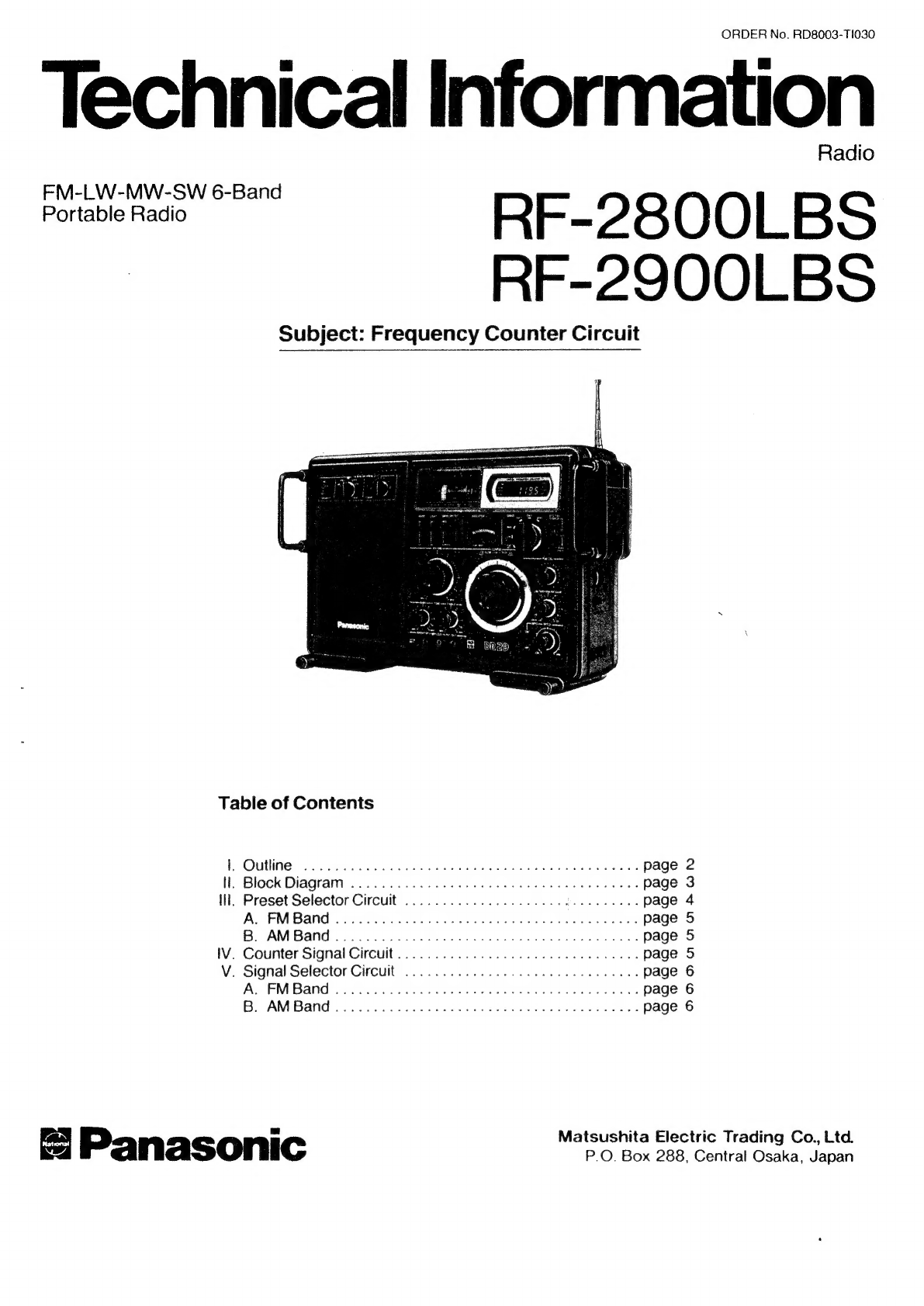
ORDER
No.
RD8003-T1030
Technical
Information
Radio
Poriable
ado
RF-2800LBS
RF-2900LBS
Subject:
Frequency
Counter
Circuit
Table
of
Contents
P<
Outline
223.028
ahat
on
ahecs
ge
added
ele agp
emoe
awaits
page
2
il,
Block
Diagram
...
0...
cece
eee
page
3
ill,
Preset
Selector
Circuit
............0.0.00.00
00.0
c
eee
eee
page
4
As
EM
Bands
scsi.
t.ccccissed
ia
ian
baeeoned
deals
ees
page
5
Be
AM
Band
8
ste
ice
tie
x
Rateiciati
se
es
Sota
Dacia
page
5
iV.
Counter
Signal
Circuit...........
0.0022,
page
5
V.
Signal
Selector
Circuit
........000.0.0
00.0.
eee
page
6
Aes
PM
Band
ssid
thse
see
ies
oar
sdaagt
Sobel
Pod
hi
weches
Gl
tee
de,
page
6
Bs
‘AM
Bands.
felts
ote
ilar
ot
ee
dae
ne
beeen
keels
page
6
tae
o
Matsushita
Electric
Trading
Co.,
Ltd.
Panasonic
P.O.
Box
288,
Central
Osaka,
Japan
RF-2800/RF-2900
Frequency
Counter
Circuit
4
|.
Outline:
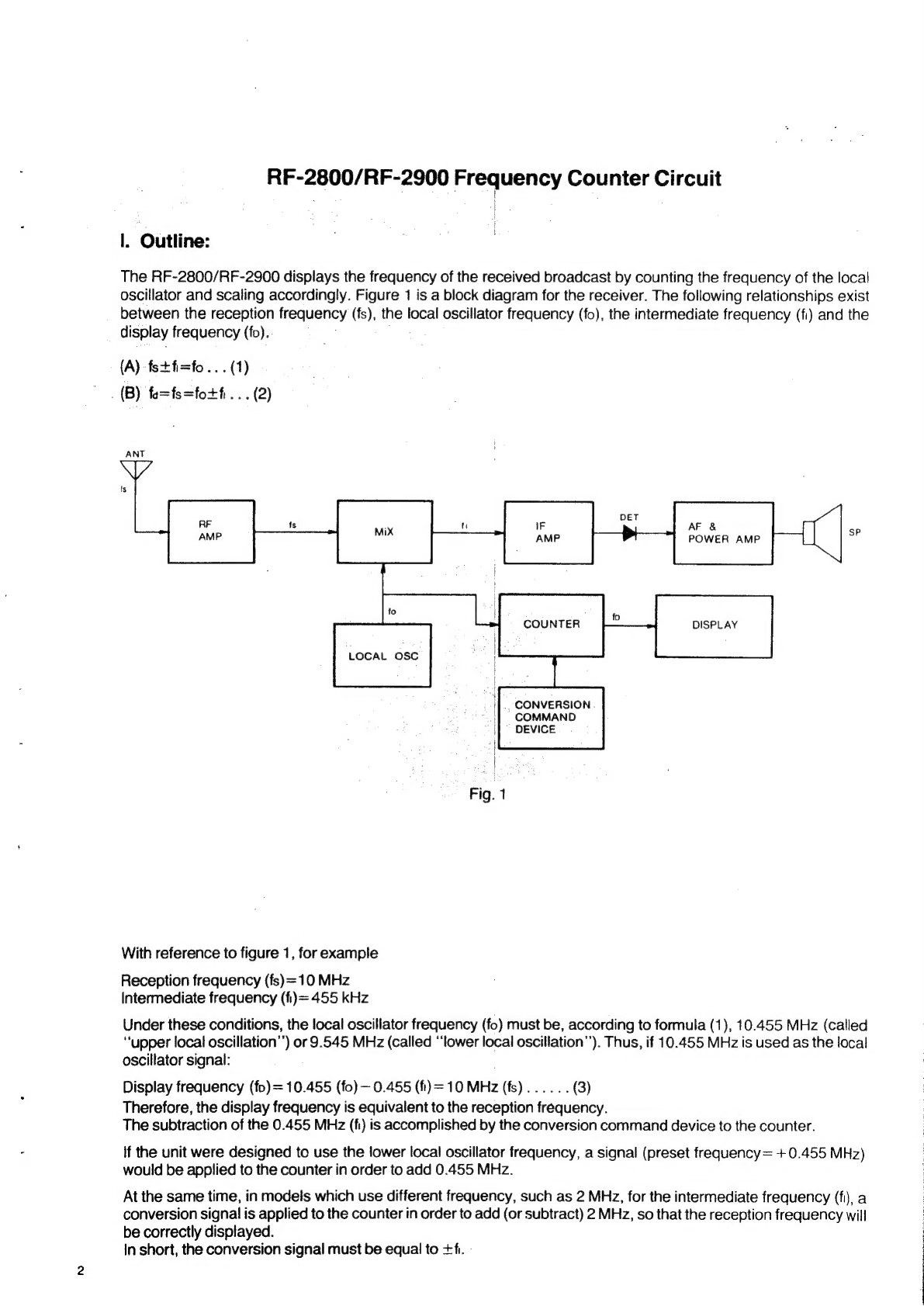
The
RF-2800/RF-2900
displays
the
frequency
of
the
received
broadcast
by
counting
the
frequency
of
the
local
oscillator
and
scaling
accordingly.
Figure
1
is
a
block
diagram
for
the
receiver.
The
following
relationships
exist
between
the
reception
frequency
(fs),
the
local
oscillator
frequency
(fo),
the
intermediate
frequency
(fi)
and
the
display
frequency
(fo).
(A)
fs+fi=fo...(1)
.
(B)
fo=fs=fotfi...
(2)
LOCAL
OSC
.,
CONVERSION
COMMAND
DEVICE
Fig.
1
With
reference
to
figure
1,
for
example
Reception
frequency
(fs)=10
MHz
Intermediate
frequency
(fi)=455
kHz
Under
these
conditions,
the
local
oscillator
frequency
(fo)
must
be,
according
to
formula
(1),
10.455
MHz
(called
“upper
local
oscillation’’)
or
9.545
MHz
(called
“lower
local
oscillation’’).
Thus,
if
10.455
MHz
is
used
as
the
local
oscillator
signal:
Display
frequency
(fo)=
10.455
(fo)
—
0.455
(f)=
10
MHz
(fs)......
(3)
Therefore,
the
display
frequency
is
equivalent
to
the
reception
frequency.
The
subtraction
of
the
0.455
MHz
(fi)
is
accomplished
by
the
conversion
command
device
to
the
counter.
if
the
unit
were
designed
to
use
the
lower
local
oscillator
frequency,
a
signal
(preset
frequency=
+
0.455
MHz)
would
be
applied
to
the
counter
in
order
to
add
0.455
MHz.
At
the
same
time,
in
models
which
use
different
frequency,
such
as
2
MHz,
for
the
intermediate
frequency
(fi),
a
conversion
signal
is
applied
to
the
counter
in
order
to
add
(or
subtract)
2
MHz,
so
that
the
reception
frequency
will
be
correctly
displayed.
In
short,
the
conversion
signal
must
be
equal
to
+fi.
-
ll.
Block
Diagram
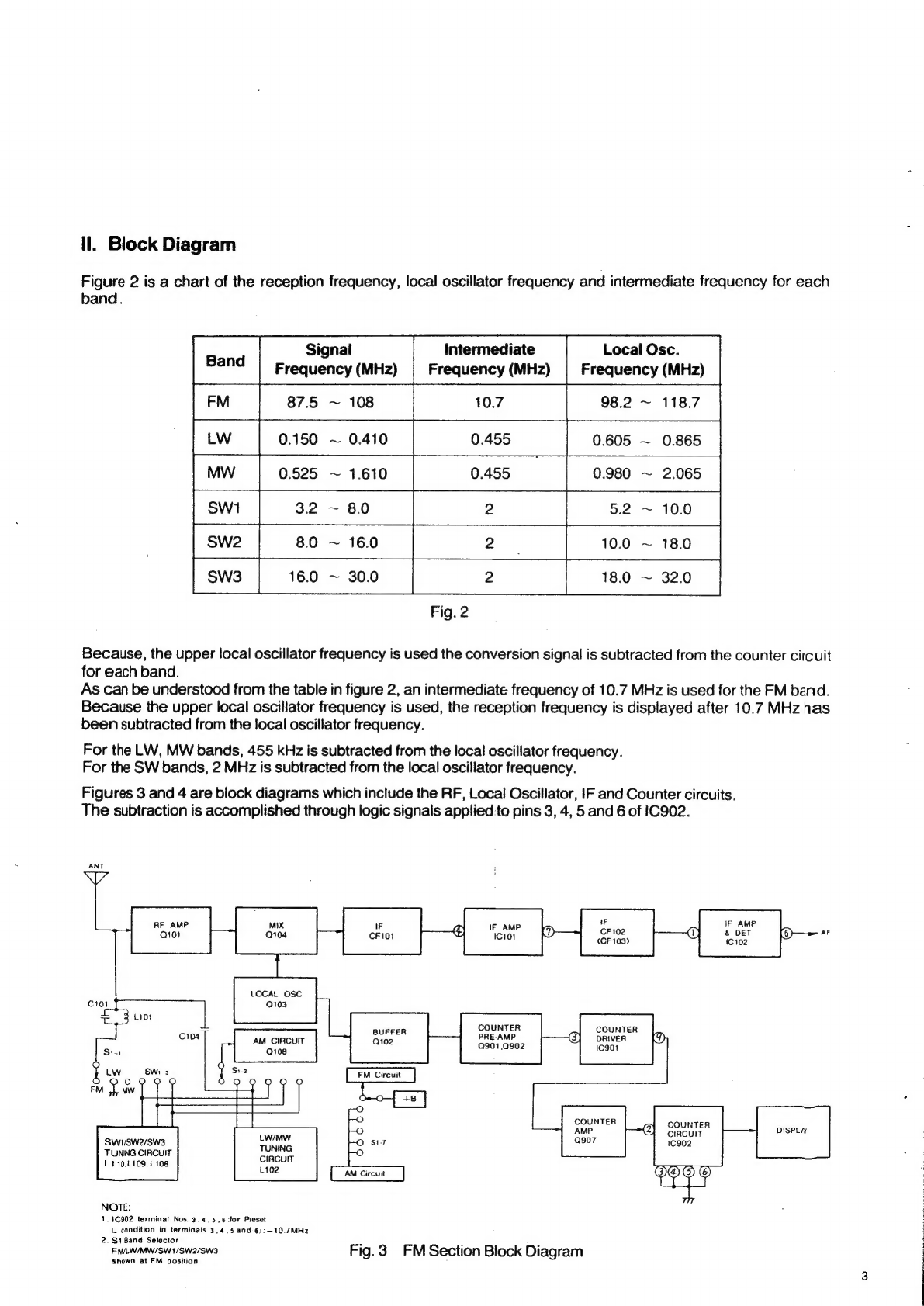
Figure
2
is
a
chart
of
the
reception
frequency,
local
oscillator
frequency
and
intermediate
frequency
for
each
band.
Intermediate
Local
Osc.
Frequency
(MHz)
Frequency
(MHz)
Frequency
(MHz)
10.7
98.2
~
118.7
LW
0.150
~
0.410
0.605
~
0.865
8.0
~
16.0
2.
|
10.0
16.0
~
30.0
2
|
18.0
Fig.
2
Because,
the
upper
local
oscillator
frequency
is
used
the
conversion
signal
is
subtracted
from
the
counter
circuit
for
each
band.
As
can
be
understood
from
the
table
in
figure
2,
an
intermediate
frequency
of
10.7
MHz
is
used
for
the
FM
band.
Because
the
upper
local
oscillator
frequency
is
used,
the
reception
frequency
is
displayed
after
10.7
MHz
has
been
subtracted
from
the
local
oscillator
frequency.
For
the
LW,
MW
bands,
455
kHz
is
subtracted
from
the
local
oscillator
frequency.
For
the
SW
bands,
2
MHz
is
subtracted
from
the
local
oscillator
frequency.
Figures
3
and
4
are
block
diagrams
which
include
the
RF,
Local
Oscillator,
IF
and
Counter
circuits.
The
subtraction
is
accomplished
through
logic
signals
applied
to
pins
3,
4,
5
and
6
of
IC902.
ANT
F
RF
AMP
IF
;
\F
AMP
'
IF
AMP
LOCAL
OSC
C101
Q103
3
1101
COUNTER
COUNTER
BUFFER
e164
PRE-AMP
(3)
River
AM
CIRCUIT
Q901,0902
1C901
0000
FM
Circuit
0
O
©
is
COUNTER
O
AMP
(2)
Ree
DISPLAY
O
si7
Q907
1c902
2)
Swt/Swe/Sw3
TUNING
CIRCUIT
L410,L109,
L108
CIRCUIT
£102
EP
NOTE:
1.8902
terminal
Nos.
3.4.5,6:for
Preset
L.
condition
in
terminals
3,4..5
and-6):—10.7MHz
2.
$1:Band
Selector
FMLW/MW/SW1/SW2/SW3
Fi
ig.
3
FM
Section
Block
Diagram
shown
at
FM
position
C101
FM
O
==
©
.
SW
2nd
MIX
2)
T102
—™
1102
15
O
RF
AMP
Q108
:
SWITCHING
Ei
Q105,
Q106
000000
“oO
l
O
TUNING
O
CIRCUIT
a
COUNTER
COUNTER
COUNTER
COUNTER
PRE-AMP
G}
oriver
(8)
AMP
@}
circuit
DISPLAY
Nore
Q901,0902
Ic901
a908
1C902
$1
Band
Selector
o
FM/LW/MW/SW1/SW2/SW3
(Q)@&E)
shown
in
MW
position.
OSC
COILS
L118,L117,
L1t6,0115.
L114
IC902
terminals
'3)..4),.5':and
6,
For
Preset
Fig.4
LW/MW/SW
Section
Block
Diagram
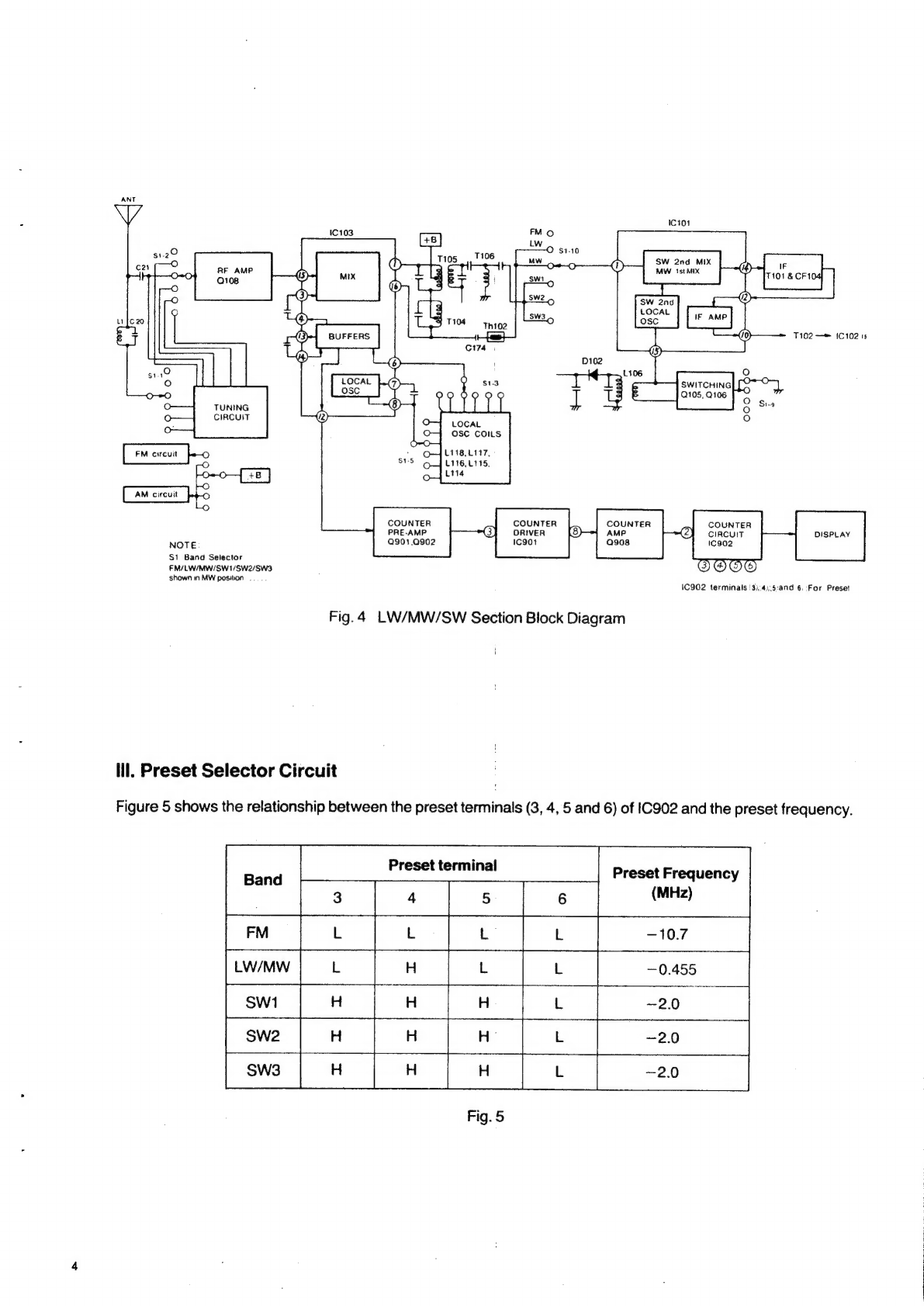
lll.
Preset
Selector
Circuit
Figure
5
shows
the
relationship
between
the
preset
terminals
(3,
4,
5
and
6)
of
IC902
and
the
preset
frequency.
Preset
terminal
Band
|
Preset
Frequency
(MHz)
Fig.
5
Figure
6
shows
the
preset
selector
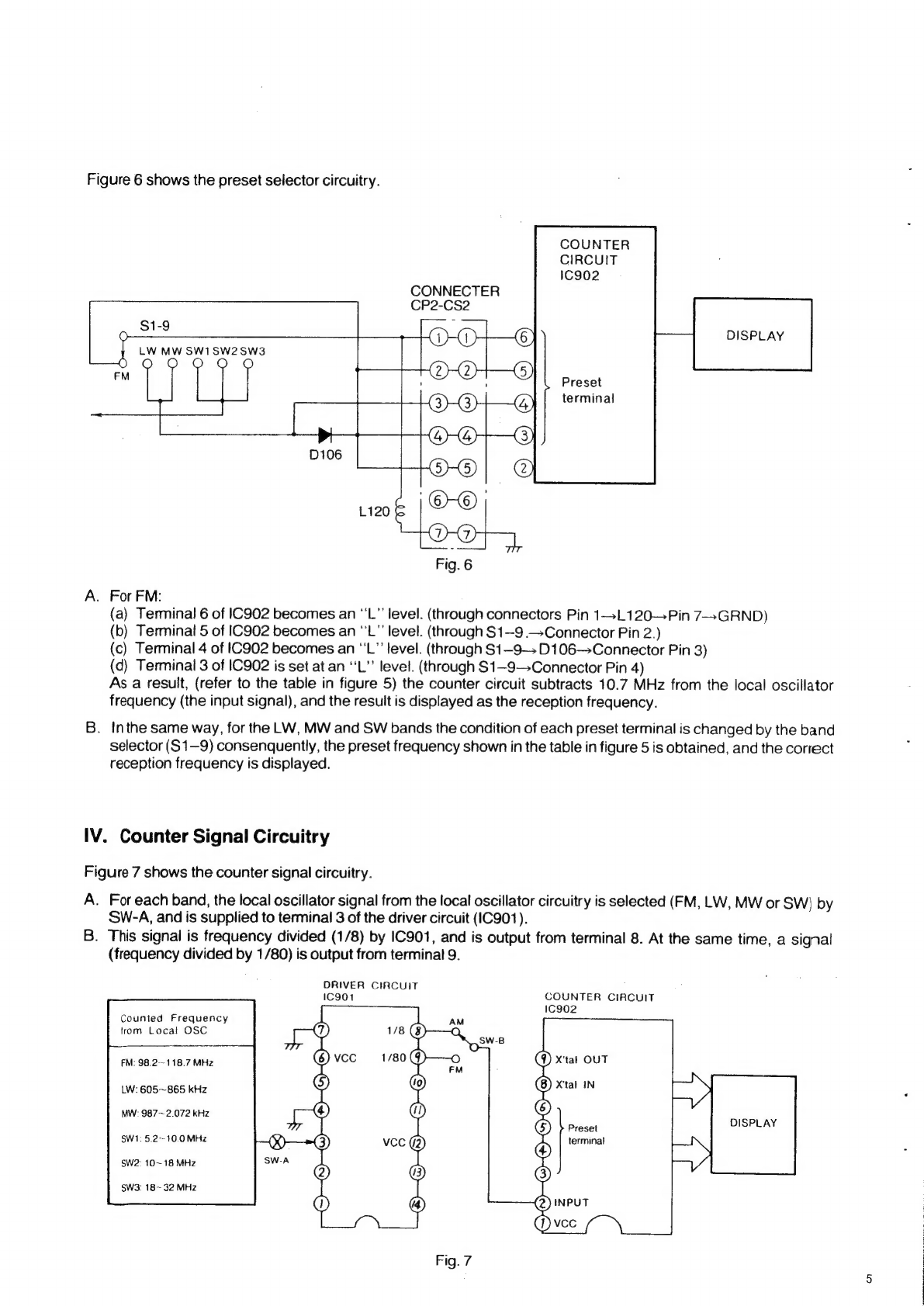
circuitry.
COUNTER
CIRCUIT
IC902
CONNECTER
CP2-CS2
$1-9
:
O
LW
MW
SW1SW2SW3
a
or
oy
DISPLAY
Preset
terminal
A.
For
FM:
(a)
Terminal
6
of
IC902
becomes
an
‘'L”
level.
(through
connectors
Pin
1—-L120—Pin
7-+GRND)
(b)
Terminal
5
of
IC902
becomes
an
‘'L"
level.
(through
S1—9
.—Connector
Pin
2.)
(c)
Terminal
4
of
C902
becomes
an
“'L”’
level.
(through
S1—-9—»
D106—+Connector
Pin
3)
(d)
Terminal
3
of
IC902
is
set
at
an
‘‘L”’
level.
(through
S1—9->Connector
Pin
4)
As
a
result,
(refer
to
the
table
in
figure
5)
the
counter
circuit
subtracts
10.7
MHz
from
the
local
oscillator
frequency
(the
input
signal),
and
the
result
is
displayed
as
the
reception
frequency.
B.
Inthe
same
way,
for
the
LW,
MW
and
SW
bands
the
condition
of
each
preset
terminal
is
changed
by
the
band
selector
(S1—9)
consenquently,
the
preset
frequency
shown
in
the
table
in
figure
5
is
obtained,
and
the
correct
reception
frequency
is
displayed.
IV.
Counter
Signal
Circuitry
Figure
7
shows
the
counter
signal
circuitry.
A.
For
each
band,
the
local
oscillator
signal
from
the
local
oscillator
circuitry
is
selected
(FM,
LW,
MW
or
SW)
by
SW-A,
and
is
supplied
to
terminal
3
of
the
driver
circuit
(IC901).
B.
This
signal
is
frequency
divided
(1/8)
by
IC901,
and
is
output
from
terminal
8.
At
the
same
time,
a
signal
(frequency
divided
by
1/80)
is
output
from
terminal
9.
DRIVER
CIRCUIT
C901
COUNTER
CIRCUIT
IC902
Counted
Frequency
from
Local
OSC
(9)
X'tat
OUT
FM:
98.2--118.7
MHz
LW:
605~865
kHz
MW:
987~2.072
kHz
Preset
DISPLAY
terminal
SW1:
5.2--
10.0
MHz
SW2:
10~18
MHz
SW3:
18~
32
MHz
C.
These
two
output
signals
are
selected
(by
SW-B):
the
1/8
frequency
divided
output
(from
terminal
8)
for
the
LW,
MW
band
and
SW:~SWSs
bands,
and
the
1/80
frequency
divided
output
(from
terminal
9)
for
the
FM
band
are
applied
to
the
input
terminal
(terminal
2)
of
the
counter
circuit
(IC902).
D.
These
frequencies
are
converted,
by
!C902,
into
the
original
local
oscillator
frequencies.
Moreover,
depending
upon
the
signal
applied
to
the
preset
terminals,
the
necessary
frequency
for
each
band
is
subtracted
from
the
derived
local
oscillator
frequencies
and
the
resulting
frequency
is
supplied
to
the
display.
V.
Signal
Selector
Circuitry
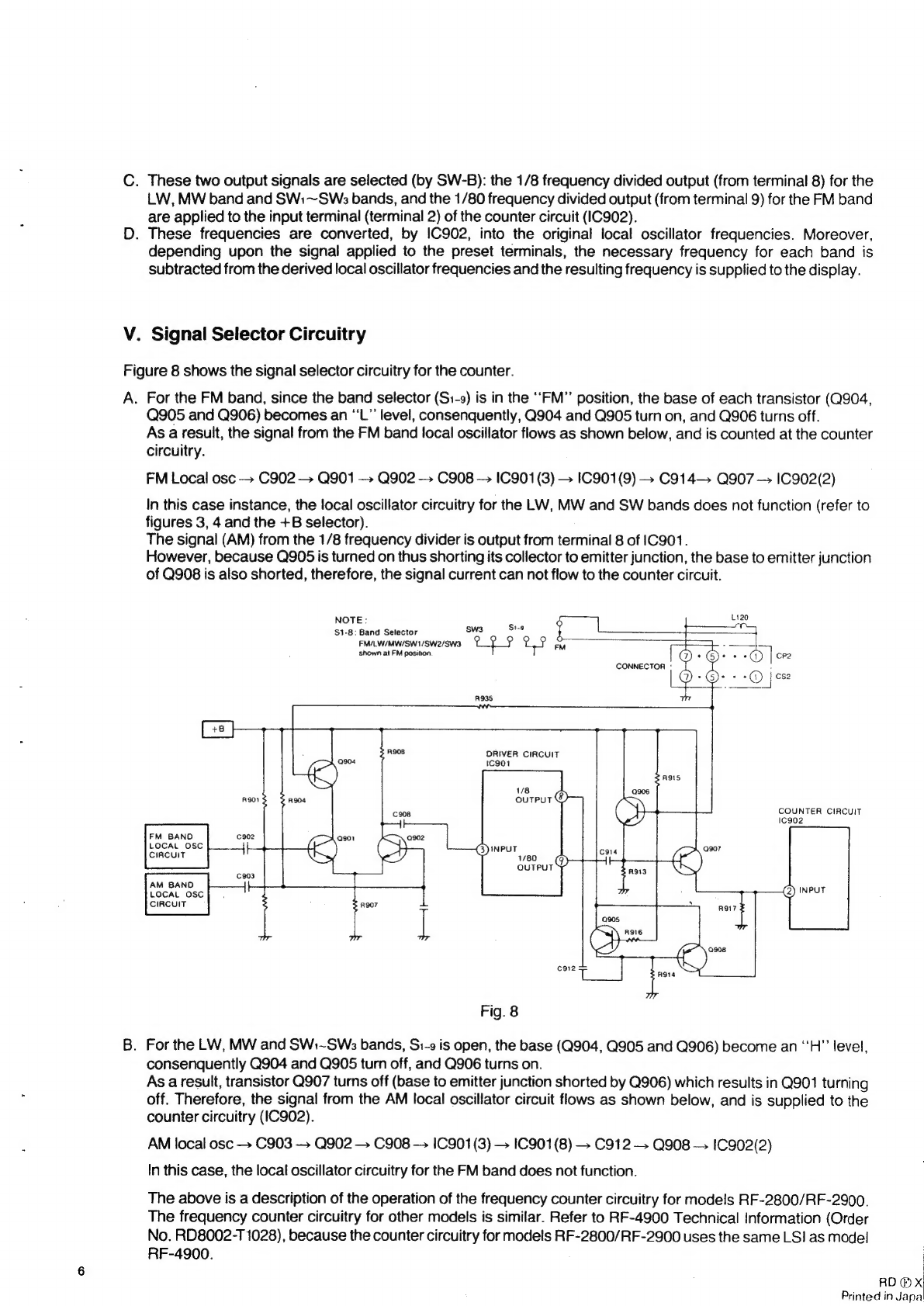
Figure
8
shows
the
signal
selector
circuitry
for
the
counter.
A.
For
the
FM
band,
since
the
band
selector
(S1-9)
is
in
the
‘‘FM”’
position,
the
base
of
each
transistor
(Q904,
Q905
and
Q906)
becomes
an
‘‘L”’
level,
consenquently,
Q904
and
Q905
turn
on,
and
Q906
turns
off.
As
a
result,
the
signal
from
the
FM
band
local
oscillator
flows
as
shown
below,
and
is
counted
at
the
counter
circuitry.
FM
Local
osc
+
C902
—
Q901
—»
Q902
-»
C908
—
IC901(3)
—
IC901(9)
+
C914—»
Q907
—
IC902(2)
In
this
case
instance,
the
local
oscillator
circuitry
for
the
LW,
MW
and
SW
bands
does
not
function
(refer
to
figures
3,
4
and
the
+B
selector).
The
signal
(AM)
from
the
1/8
frequency
divider
is
output
from
terminal
8
of
|C901.
However,
because
Q905
is
turned
on
thus
shorting
its
collector
to
emitter
junction,
the
base
to
emitter
junction
of
Q908
is
also
shorted,
therefore,
the
signal
current
can
not
flow
to
the
counter
circuit.
NOTE:
é
ot
$1-8:
Band
Selector
Sw3
Se
te
a
FM/LW/MW/SW1/SW2/SW3
CLP
UP
Ail
FS.
shown
at
FM
position.
@)
+
G):
ee
»)
|
cp2
CONNECTOR
'
©
6)
O|
a
R908
DRIVER
CIRCUIT
—>
Q904
1c901
/8
R901
COUNTER
CIRCUIT
Ic902
FM
BAND
C902
Q901
Q902
LOCAL
OSC
i)
(Sh
CIRCUIT
ss
el
c303
AM
BAND
LOCAL
Osc].
CIRCUIT
R907
(2)
INPUT
Fig.
8
B.
For
the
LW,
MW
and
SW:~SWs
bands,
Si-9
is
open,
the
base
(Q904,
Q905
and
Q906)
become
an
‘‘H”
level,
consenquently
Q904
and
Q905
turn
off,
and
Q906
turns
on.
As
a
result,
transistor
Q907
turns
off
(base
to
emitter
junction
shorted
by
Q906)
which
results
in
Q901
turning
off.
Therefore,
the
signal
from
the
AM
local
oscillator
circuit
flows
as
shown
below,
and
is
supplied
to
the
counter
circuitry
(IC902).
AM
local
osc
—
C903
—
Q902
—
C908
—
1C901(3)
—
1C901(8)
—
C912
—.
Q908
—.
IC902(2)
In
this
case,
the
local
oscillator
circuitry
for
the
FM
band
does
not
function.
The
above
is
a
description
of
the
operation
of
the
frequency
counter
circuitry
for
models
RF-2800/RF-2900.
The
frequency
counter
circuitry
for
other
models
is
similar.
Refer
to
RF-4900
Technical
Information
(Order
No.
RD8002-T
1028),
because
the
counter
circuitry
for
models
RF-2800/RF-2900
uses
the
same
LSI
as
model
RF-4900.
|
RD
®
x!
Printed
in
Japa
EM/LVW/MW/SW
6-BAND
PORTABLE
RADIO
Mi
SPECIFICATIONS
Frequency
Range:
FM
LW
MW
SW:
SW2
SWs3
Intermediate
FM
87.5~108
MHz
150~410
kHz
(2000~731m)
525~1610
kHz
(571~186m)
3.2~8
MHz
(93.8-~37.5m)
8~16
MHz
(37.5~18.7m)
16~30
MHz
(18.7~10m)
10.7
MHz
Frequency:
AM
(LW,
MW
&
SW)
455
kHz
Sensitivity
:
FM
LW
MW
SW;
SW2
SWs
2.5uV
(S/N
26
dB),
2uV
(3
dB
down
limitter
sens.)
704V/m
(S/N
6
dB),
600zV/m
(S/N
26
dB)
302V/m
(S/N
6
dB),
400“V/m
(S/N
26
dB)
1.8uV
(S/N
6
dB),
192V
(S/N
26
dB)
0.82V
(S/N
6
dB),
92V
(S/N
26
dB)
1.24V
(S/N
6
dB),
134V
(S/N
26
dB)
Power
Output:
3W
DC
Maximum
National
Panasonic
Power
Source:
Power
Consumption:
Speaker:
Dimensions:
Weight:
Impedance:
ORDER
NO.
RD7803-1549
ervice
Manual
Radio
RF-2800LBS
AC
110~125V/220—~240V
50-60
Hz
or
9V
(Six
‘‘D”
Size
Flashlight
Batteries)
(National
UM-1
or
equivalent)
11W
(AC
Only)
10
cm
(4’’)
PM
Dynamic
Speaker
381(Wide)
x
246(High)
x
120(Deep)mm
(15°
x
942"'
x
43")
2.3
kg.
(8
Ib.
10
oz.)
without
batteries
Speaker
2.0.0...
.....ccccceccccue
suas
BQ
Earphone
Jack.....................
ixe)
Multiplex
Out
Jack
.........
10k.
(40mV)
FM
Antenna
Terminal
.........
752
Phono
Jack..................
500k
(50mV)
Recording
Out
Jack
......
80ka2
|
100mvV)
Specifications
are
subject
to
change
without
notice
for
further
improvement.
Matsushita
Electric
Trading
Co.,
Ltd.
P.O.
Box
288,
Central
Osaka,
Japan
M@
TO
REMOVE
CABINET
COVER
1.
Remove
the
battery
cover.
2.
Remove
the
six
(6)
screws
(nos.
1~6)
for
the
cabinet
cover,
tf
as
shown
in
fig.
1.
.
Remove
the
cabinet
cover.
.
Pull
out
sockets
from
PC
board.
.
To
reassemble,
reverse
the
above
procedure.
M@
TO
REMOVE
PC
BOARD
(IF,
RF
Circuit)
1.
Onno
7.
8.
Remove
the
cabinet
cover.
(Refer
to
cabinet
cover
removal
instruction.)
.
Remove
the
band
knob.
(To
remove
the
knob,
wind
a
cord
around
the
control
and
pull
it
outward.)
.
Turn
the
tuning
knob
fully
counter-clockwise.
.
Pull
out
the
sockets
from
PC
board.
.
Unsolder
lead
from
PC
board.
Remove
the
eight
(8)
screws
(nos.
1~8)
for
the
PC
board,
as
shown
in
fig.
2.
Remove
the
PC
board.
To
reassemble,
reverse
the
above
procedure
and
note
the
followings.
Notes
1.
2.
Turn
the
tuning
knob
fully
counter-clockwise.
Turn
the
tuning
capacitor
shaft
fully
counter-clockwise.
M@
TO
REMOVE
FREQUENCY
COUNTER
1.
o
Remove
the
PC
board
(IF,
RF
circuit).
(Refer
to
PC
board
removal
instruction.)
.
Remove
the
two
(2)
screws
(nos.
1
&
2)
for-the
frequency
counter,
as
shown
in
fig.
3.
.
Remove
the
frequency
counter.
To
reassemble,
reverse
the
above
procedure.
@
TO
REMOVE
PC
BOARD
(Frequency
Counter)
1.
Remove
the
frequency
counter.
(Refer
to
frequency
counter
removal
instruction.)
2.
Remove
the
four
(4)
screws
(nos.
1~4)
for
the
frequency
counter
cover,
as
shown
in
fig.
4.
3.
Remove
the
two
(2)
screws
(nos.
1
&
2)
for
the
PC
board,
as
shown
in
fig.
5.
4.
Remove
the
PC
board.
5.
To
reassemble,
reverse
the
above
procedure.
Screw
No.1
(XTN3+6F)
Screw
No.2
XTN3-+6F)
Fig.
5
[2]
rr-2800LBS
Screw
No.1(CA17)
Screw
No.2(CAi7)
Screw
No.3
(CA17)
Screw
No.4
(CA)
Screw
No.5
(CAt7)
~~
Screw
No.6
(CAi7)
Fig.
1
Screw
No.1
Screw
No.2
Screw
No.3
Screw
No.4
(XTN3-+6F)
(XTN3+6F)
(XTW3-++10F)
(XTW3+10F)
a
a
Screw
No.5
Screw
No.6
Screw
No.7
Screw
No.8
(XTW3-++10F)
(XTW3-+10F)
(XTW3+10F)
—
(XTW3-++-10F)
Fig.
2
Screw
No.
1
Screw
No.2
Screw
No.3
Screw
No.4
(XTW3+10F) (XTW3+10F)
(XTW3-++10F)
(XTW3+-10F)
acre
Screw
No.5
Screw
No.6
Screw
No.7
Screw
No.8
(XTW3+10F)
(XTW3-+-10F)
(XTW3+10F)
—
(XTW3-++10F)
Fig.
3
Screw
No.1
Screw
No.3
(XTN3+6F)
XTN3+6F)
:
Screw
No.4
Screw
No.2
XTN3-+-6F)
(XTN3-+6F)
Fig.
4
M@
TO
REMOVE
DIAL
SCALE
CHASSIS
1.
Remove
the
PC
board
(IF,
RF
circuit).
(Refer
to
PC
board
removal
instruction.)
Remove
the
tuning
knob.
Remove
the
six
(6)
screws
(nos.
3~8)
for
the
dial
scale
chassis,
as
shown
in
fig.
3.
Remove
the
dial
scale
chassis.
M
TO
REMOVE
DIAL
MECHANISM
1.
Remove
the
dial
scale
chassis.
(Refer
to
dial
scale
removal
instruction.)
2.
Remove
the
dial
belt,
as
shown
in
fig.
7.
3.
Remove
the
two
(2)
screws
(nos.
1
&
2)
for
the
dial
mech-
anism,
as
shown
in
fig.
6.
4.
To
reassemble,
reverse
the
above
procedure
and
note
the
followings.
Notes
1.
Turn
the
tuning
shaft
fully
counter-clockwise.
2.
Set
the
dial
scale
at
the
position,
as
shown
in
fig.
7.
3.
Attach
the
dial
belt.
4.
Refer
to
dial
scale
removal
instruction.
@
TO
REMOVE
DIAL
SCALE
1.
Remove
the
dial
scale
chassis.
(Refer
to
the
dial
scale
chassis
removal
instruction.)
2.
Remove
the
one
(1)
screw
for
the
dial
scale
spring,
as
shown
in
fig.
7.
3.
Remove
the
dial
scale.
4.
To
reassemble,
reverse
the
above
procedure
and
note
the
followings.
Notes:
1.
Loosen
the
two
(2)
screws
(nos.
1
&
2)
for
the
dial
scale
gear,
as
shown
in
fig.
8.
2.
Set
the
catch
of
dial
scale
gear
to
the
start
point
of
dial
scale,
as
shown
in
fig.
9.
3.
Turn
the
tuning
shaft
fully
counter-clockwise.
4.
After
mounting
the
PC
board
(IF,
RF
circuit),
turn
the
dial
scale
by
pushing
the
catch
of
dial
scale
and
set
the
start
point
of
dial
scale
to
the
catch
of
cabinet,
as
shown
in
fig.
10.
5.
Tighten
the
two
(2)
screws
(nos.
1
&
2)
for
the
dial
scale
gear,
as
shown
in
fig.
10.
Screw
No.1
Catch
of
Cabinet
Start
Ponint
(XXAR3H6S)
Fi
Bie
S.
se
Screw
No.2
(XXAR3H6S)
Fig.
10
Seiew
No.1
‘a
Sorew
No.2
(XTW3-++10F)
(XTW3+10F)
Fig.
6
0d.
Screw
(XTN23-+6C)
:
a
ae
in
OS
Dial
Belt
©
Sg
ae’
ge
.
5
RSGBIBS
eas
Fig.
7
Screw
No.1
Screw
No.2
(XXAR3H6S)
(XXAR3H6S)
Kw
Kw
|
qed
-|
SWI
|
SW2'
Syvads
2
My
Catch
Start
Point
Fig.
9
RF-2810L-BS
[3]
M@
TO
REMOVE
PC
BOARD
(AF
Circuit)
Srey
:
een
(
Subp
:
e
XTW3-+10F
XTW3-+10F,
1.
Remove
the
dial
scale
chassis.
(Refer
to
the
dial
scale
(
)
chassis
removal
instruction.)
2.
Remove
the
six
(6)
knobs
for
the
RADIO,
LIGHT,
BAND
WIDTH,
VOLUME,
BASS
and
TREBLE.
3.
Remove
the
five
(5)
screws
(nos.
2, 3, 5,
6
&
7)
for
the
PC
board,
as
shown
in
fig.
11.
.
Unsoider
lead
from
PC
board.
.
Pull
out
sockets
from
PC
board.
.
Remove
the
PC
board.
:
.
To
reassemble,
reverse
the
above
procedure.
NOOO
Screw
No.4
“Screw
No.5
Screw
No.6
Screw
No.7
(XTW3-++H10F)
(XTW3-+10F)
(XTW3-F10F)
(XTW3-+10F)
@
TO
REMOVE
PC
BOARD
(Control
Circuit)
1.
Remove
the
dial
scale
chassis.
(Refer
to
the
dial
scale
Fig.
11
chassis
removal
instruction.)
2.
Remove
the
three
(3)
knobs
for
the
SW
CAL,
RF
GAIN
and
Indicator
PITCH.
(To
remove
those
control
knobs
wind
a
cord
around
the
control
and
pull
it
outward.)
3.
Remove
the
two
(2)
screws
(nos.
1
&
4)
for
the
PC
board.
.
Remove
the
PC
board.
5.
To
reassemble,
reverse
the
above
procedure.
>
@
TO
REMOVE
INDICATOR
1.
Remove
the
PC
board
(AF
circuit).
(Refer
to
PC
board
removal
instruction.)
2.
Unsolder
the
terminal
of
indicator,
as
shown
in
fig.
12.
3.
Remove
the
indicator.
4.
To
reassemble,
reverse
the
above
procedure.
M@
HOW
TO
REPLACE
CHIP
1.
Remove
solder
for
chip
completely.
Cc
:
:
;
Pe
|
Color
|
Original
Parts
Name
Service
Parts
Name
2.
Remove
chip
by
nippers,
as
shown
in
fig.
13.
hie
Resistor
Garbon
Fegictor
3.
Use
tube
for
service
parts
as
shown
in
fig.
14
and
solder
)
service
parts
according
to
following
table.
(please
refer
Blue
Shi
Sapa
rerarie
Capecner
to
Circuit
Board
Wiring
View
for
the
value
of
resistor
and
capacitor).
Ceramic
Capacitor
Carbon
Resistor
Fig.
13
Fig.
14
[4]
pr-2800LBs