manuals.online logo
Brands
  1. Home
  2. •
  3. Brands
  4. •
  5. Petrainer
  6. •
  7. Pet Care Product
  8. •
  9. Petrainer PET998N Programming manual

Petrainer PET998N Programming manual

Other Petrainer Pet Care Product manuals

Petrainer PET910 User manual

Petrainer

Petrainer PET910 User manual

Petrainer CVJC-G340-2GEN User manual

Petrainer

Petrainer CVJC-G340-2GEN User manual

Petrainer IS-PET998DRU User manual

Petrainer

Petrainer IS-PET998DRU User manual

Petrainer GGBPet No Bark Collar PET853 Instruction Manual

Petrainer

Petrainer GGBPet No Bark Collar PET853 Instruction Manual

Petrainer IS-PET998DB User manual

Petrainer

Petrainer IS-PET998DB User manual

Petrainer PET803 User manual

Petrainer

Petrainer PET803 User manual

Petrainer PET619A User manual

Petrainer

Petrainer PET619A User manual

Petrainer PET900D User manual

Petrainer

Petrainer PET900D User manual

Popular Pet Care Product manuals by other brands

PitPat PP02 user manual

PitPat

PitPat PP02 user manual

Schwinn Rascal owner's manual

Schwinn

Schwinn Rascal owner's manual

K&H Small Animal quick start guide

K&H

K&H Small Animal quick start guide

SHOR-LINE 006.3230.00 Product guide

SHOR-LINE

SHOR-LINE 006.3230.00 Product guide

Petsafe Stubborn Dog Receiver Collar operating guide

Petsafe

Petsafe Stubborn Dog Receiver Collar operating guide

juwel Rio 240 instruction manual

juwel

juwel Rio 240 instruction manual

Datamars OMNI MAX user manual

Datamars

Datamars OMNI MAX user manual

Trixie 24444 instructions

Trixie

Trixie 24444 instructions

Roverpet 30DDPP Assembly instructions

Roverpet

Roverpet 30DDPP Assembly instructions

SportDOG SD-105S-C manual

SportDOG

SportDOG SD-105S-C manual

Staywell 400 Series Magnetic user guide

Staywell

Staywell 400 Series Magnetic user guide

Dogtek Sonic Birdhouse user guide

Dogtek

Dogtek Sonic Birdhouse user guide

Togfit Deluxe Trigger Lock Door Gate Instructions for use

Togfit

Togfit Deluxe Trigger Lock Door Gate Instructions for use

Girafus 227PA user manual

Girafus

Girafus 227PA user manual

ubbink KoiFeeder Solar operating instructions

ubbink

ubbink KoiFeeder Solar operating instructions

Petsafe ST-100 operating guide

Petsafe

Petsafe ST-100 operating guide

CADOCA Deuba 106911 instructions

CADOCA

CADOCA Deuba 106911 instructions

Dogtra RR Deluxe owner's manual

Dogtra

Dogtra RR Deluxe owner's manual

manuals.online logo
manuals.online logoBrands
  • About & Mission
  • Contact us
  • Privacy Policy
  • Terms and Conditions

Copyright 2025 Manuals.Online. All Rights Reserved.

The Collar should fit snugly, yet loose enough to allow one finger
to fit between the strap and your pet's neck (3C).
PET998N Quick Start
Instructions – Get Training Immediately
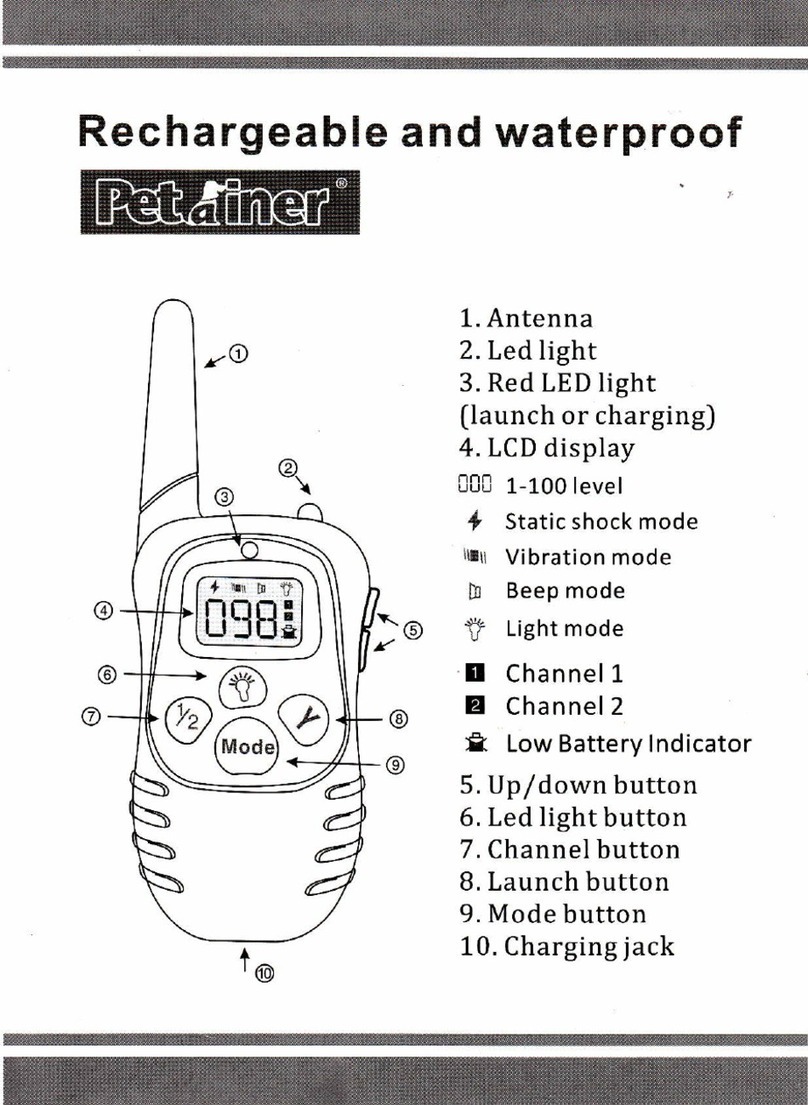
Key Definition
1. Antenna
2. Led light
3. LED Indicator
4. LCD Screen
1-10 level
Vibration mode
Beep mode
Channel 1
Channel 2
Low Battery Indicator
Y
Features
1.
with 2 training modes: vibration and beep.
2.10 levels of vibration.
3.2 levels of beep.
4.Rechargeable remote transmitter.
5.
Remote transmitter has a range up to 200 Meters (218 yards / 650ft)
Rechargeable and waterproof receiver, your dog can swim underwater.
Fit the Receiver Collar with your dogs:
effective training. The contact points must have direct contact with your
pet's skin on the underside of the dog's neck.
To assure a proper fit, please follow these steps:
1. Have your pet standing comfortably (3A).
2.
3.
4.
thread the part of the collar which includes the antenna through the
buckle. It will be a tight fit.
Centre the Contact Points underneath your pet's neck, touching
the skin (3B).
3A
3B
3C
4 1
the fit. Check the fit again as your pet becomes more comfortable with
the Collar. If your pet's neck is less than 12” around, you will need to
Allow your pet to wear the collar for several minutes then recheck
Important: The proper fit and placement of your collar is important for
LIMITED 90 DAYS WARRANTY
Petrainer warrants this product to be free of defects in parts, materials
and workmanship for a period of 90 days, from date of purchase.
ship the product to Petrainer.
Should any repairs or servicing under this warranty be required, contact
Customer Service by phone or email for instructions on how to pack and
Petrainer CUSTOMER SERVICE
Telephone: 1-866-877-7949
Email:
Hours: Weekdays 9:00 AM- 5:00 PM EST
This warranty gives you specific legal rights and you may also have
other rights which vary from state to state.
service@ipets-mall.com
10.Main body of the transmitter & receiver made of ABS material.
11.The system can be used for 1 or 2 Receiver Collars (optional).
Charge the Remote Transmitter:
1.
2. Plug the charger into a standard wall outlet.
3. A red light will appear on the Transmitter.
4.
time.
5. The red light will disappear after the transmitter is fully charged.
first time.
6. When the unit is fully charged, the red LED light will disappear (B).
7. Put the rubber cover back into place to keep charging jack clean.
Convenient, easy-to-read Blue Backlight LCD screen that shows the
If there is no movement for 5 min., the collar will enter sleep mode to
Insert the charging connector into the charging hole on the transmitter.
Charge the Transmitter for around 2 hours when charging for the first
23
Charge the Receiver Collar:
1.
sound; the red LED light will turn on and flash every 2 seconds.
2.
To turn on the Receiver Collar, press the on/off button, a beep will
Open the rubber cover on the receiver, and insert the charging connector
A B
Pair together Remote Transmitter and Receiver Collar:
1. Power on the Remote Transmitter by pressing the Mode Button.
2. Select channel 1 or 2 by pressing the ½ button.
3. Power on the Receiver collar by pressing the on/off button.
4. Press and hold the on/off button for 3 seconds, a beep will sound and
the LED light will begin to flash.
5.
6. A second beep will sound from the Receiver Collar, indicating pairing
is successful.
7. For a 2nd Receiver Collar Pairing, repeat steps 2 to 5, please be sure
to choose a different channel from the first pairing sequence.
Test the function:
Test Vibration Function
1. Press Mode button on the Remote Transmitter, switch to Vibration
mode, and make sure that the stimulation level is not set to 0, you
can press UP/DOWN button on the right side to adjust.
2.
Function works.
Press Y button, Receiver Collar will vibrate, that means Vibration
Test Beep Function
into the charging hole.
3. Plug the charger into a standard wall outlet.
4. The red LED will appear (A).
5. Charge the Receiver Collar for around1 hour when charging for the
1. Press Mode button on Remote Transmitter, switch to Beep Mode.
seconds).
Press Y button on the Remote Transmitter immediately(within 5
2. Press Y button, Receiver Collar will beep, that means Beep Mode
works.