8
Troubleshooting
✦ Telephone troubleshooting.....
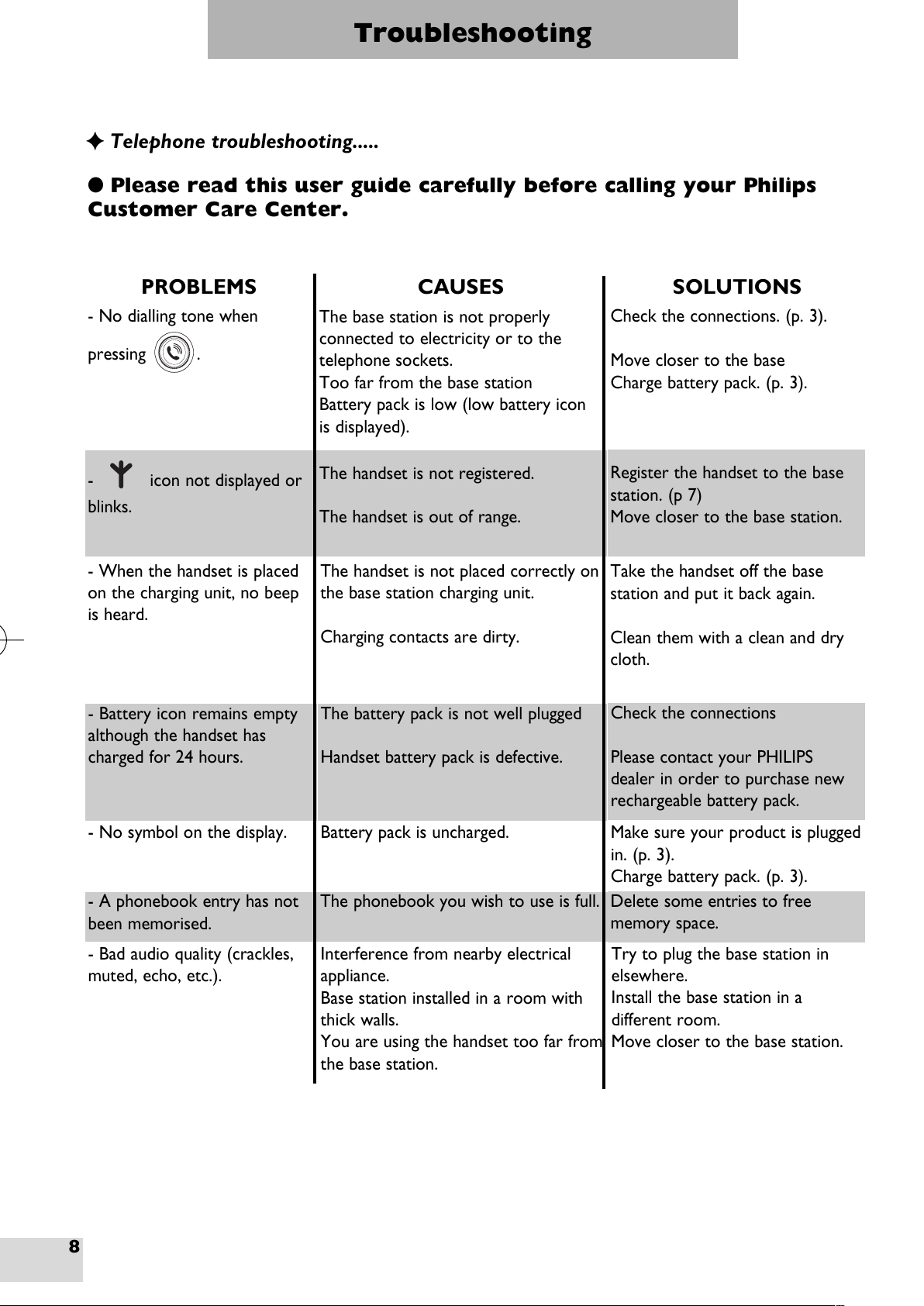
PROBLEMS CAUSES SOLUTIONS
- No dialling tone when
pressing .
The base station is not properly
connected to electricity or to the
telephone sockets.
Too far from the base station
Battery pack is low (low battery icon
is displayed).
Check the connections. (p. 3).
Move closer to the base
Charge battery pack. (p. 3).
- icon not displayed or
blinks.
The handset is not registered.
The handset is out of range.
Register the handset to the base
station. (p 7)
Move closer to the base station.
- When the handset is placed
on the charging unit, no beep
is heard.
The handset is not placed correctly on
the base station charging unit.
Charging contacts are dirty.
Take the handset off the base
station and put it back again.
Clean them with a clean and dry
cloth.
- Battery icon remains empty
although the handset has
charged for 24 hours.
The battery pack is not well plugged
Handset battery pack is defective.
Check the connections
Please contact your PH L PS
dealer in order to purchase new
rechargeable battery pack.
- No symbol on the display. Battery pack is uncharged. Make sure your product is plugged
in. (p. 3).
Charge battery pack. (p. 3).
- A phonebook entry has not
been memorised.
The phonebook you wish to use is full. Delete some entries to free
memory space.
- Bad audio quality (crackles,
muted, echo, etc.).
nterference from nearby electrical
appliance.
Base station installed in a room with
thick walls.
You are using the handset too far from
the base station.
Try to plug the base station in
elsewhere.
nstall the base station in a
different room.
Move closer to the base station.
●Please read this user guide carefully before calling your Phili s
Customer Care Center.
Kala 300 UK extra handset EMEA.qxd 09/10/02 16:19 Page 8