4
●There are safety cord holes at the bottom of the base of a projector. In view of safety, please run the safety
cord supplied throughthe safetycord holesfor safetysupport.
●Before any installation, maintenance and cleaning work, please ensure the projector is disconnected from
powermains.
●After runningfor 30minutes, thetemperature ofthe housingoftheprojector is 45℃.Afterstableoperation ,
its max.temperatureis120℃.
●Whilethelamp isstrickenfor the firsttime,there willbesmokeand strangesmell.It’s normal and does not
meantheprojectorhassome defects.
●Donot mounttheprojector directlyoninflammablesurface.
●Donotproject thebeamstraightlyoncombustibleitems andtheminimumdistancebetweentheprojector
andilluminateditemsis18 m.
●Aprojector should be installed with good ventilationand the minimum distance between the projector and
wallsis50cm.Atthesame time,pleaseensurethe fansandairinletsandoutlets are workable.
2. INSTRUCTIONS
●CLEANINGANDMAINTENANCE
If a projector can’t start. Please check if the fuse is blown up. If it does, replace it with a new fuse with same ratings. And the
projector has over-temperature protective device. If the temperature is too high, the protective device will be triggered to shut the
projector off. When it happens, please check if the fans run normally or fan shield is blocked by dust. After the issue is solved,
restart theprojector.
The accumulationof oil, smoke and dust on the lenswill compromise the light output. Cleaning a projector is verynecessary to
ensure areliable use of it. Cooling fans need to be cleaned every15days. Internal lens, reflectorand hotmirror need to be cleaned
periodically tooptimize lightoutput.
Cleaning frequencyis to be decided by operationsand its environment. Use soft clothand normal detergentfor glassfor cleaning
work. It’s advised external optical system be cleaned every 20days and internal optical systems every 30/60days. Keep lens clean
and do not touchoptical parts with bare hands.
●Beforeanymaintenanceandcleaning, pleaseensuretheprojectisoffthepower.
●Onlyqualifiedperson isallowedtodomaintenance.
●During maintenanceandbeforemaintenance, theprojectormustbeoffpower.
●To avoid internal damage, sun light or other light mustn’t penetrate into the projector via front lens
whetheritrunsor not.
●Do not use alcohol or otherorganic solvent to cleanthe housingto avoid damage.
●Do not use anysolvent withchemical elementsto clean colorfiltersor hot mirror.
●LUBRICATION
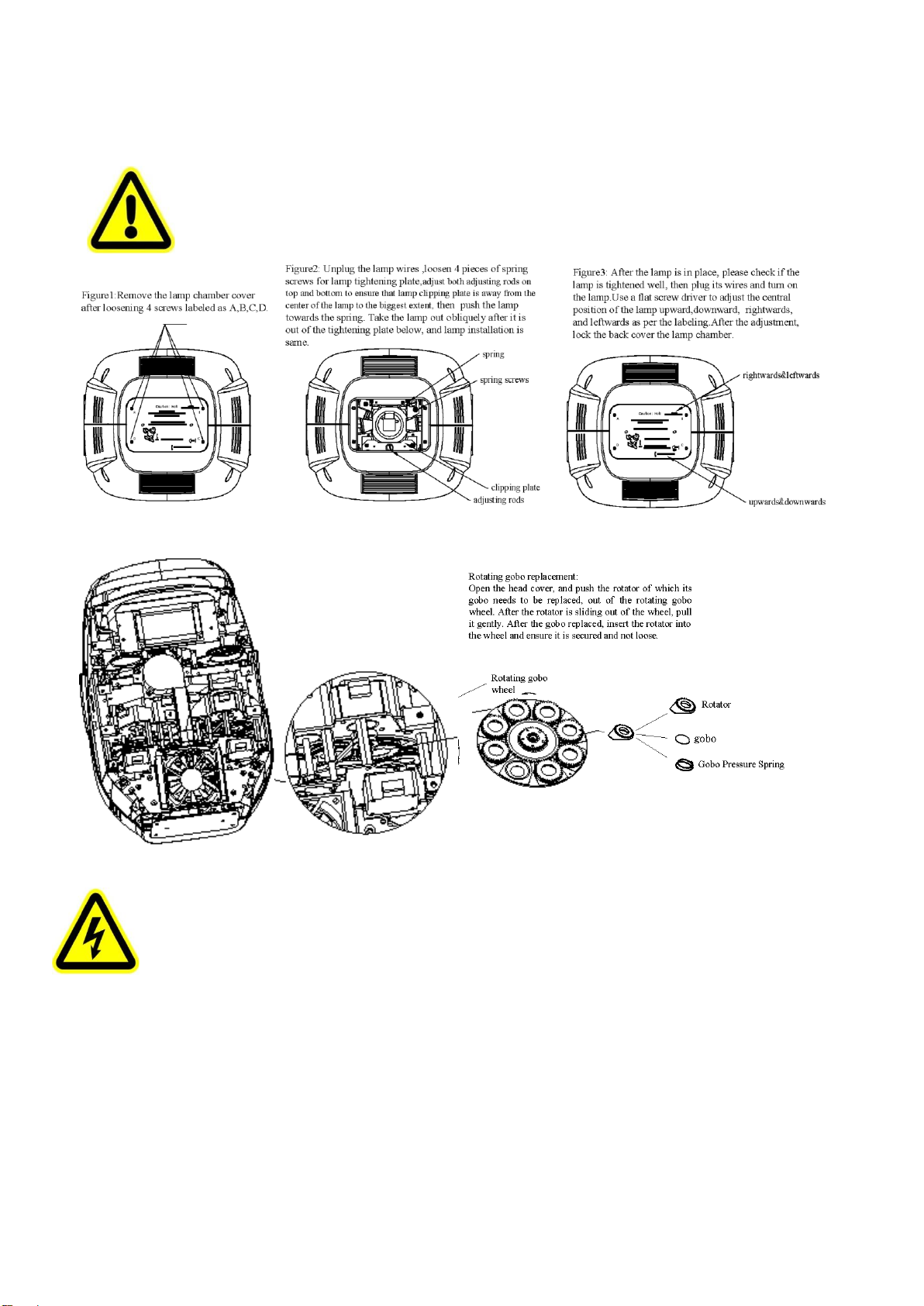
To ensure smooth movement of gobos and zoom and focus lens, it’s advised rotators’ bearings and 2 sliding bars for zoom and
focuslens be lubricated every2 months. Highqualityand hightemperature lubricant/grease is advised..
●TROUBLESHOOTING
The projector doesn’t switch on
Checkthe fuseonthe powersocket.
Checkthelamp.
Thelampison but the projector doesn’t respond
tothecontroller
Makesurethatthe fixture’s start address is right
ReplaceorrepairtheXLR signalcable.
Theprojectorfunctionsintermittently
Makesurethefanisworkingwellorfansandtheirshieldsarenotblocked
Beamappearsdim, Low inbrightness
Make sure the lamp is within itslifespan
Removedust or grease fromthelenses.
Theprojectimageappearsto haveahalo
Carefullycleanthelamp, opticallensesandothercomponents.
Checkif lensare in good condition(not cracked)