-3-
2.2
2.2 Descriptions
Descriptions of
of Status
Status Indicators
Indicators
Action
Performed Indicator
status Details
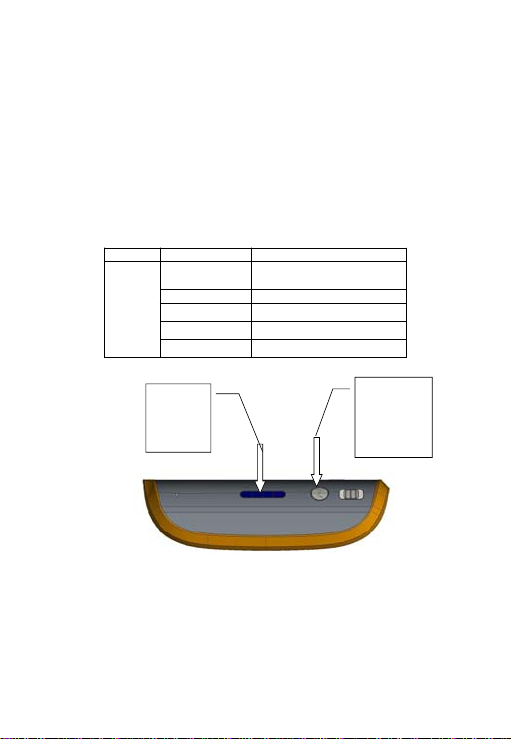
Turn On the
power
Blue light
always on Slide the power switch to C to power on unit
Removable
storage
inserted
Equipment
Blue light
flashes slowly
(1.5 seconds
each time)
When U disk, mobile hard drives and other removable storage
devices are plugged in to the USB port, you can see the blue
light flash slowly after 8-10 seconds, indicating that the
removable storage devices are loaded normally and can be
accessed.
Blue light
always on Removable storage devices are not loaded successfully
3G card
inserted
Blue light
flashes quickly
(0.5 seconds
each time)
When 3G USB modems are inserted, you can see the blue light
flash quickly after about 30 seconds (0.5 seconds each time),
indicating the router is in the 3G dialing state;
Blue light
flashes slowly
(1.5 seconds
each time)
Blue light flashes slowly (1.5 seconds each time), indicating that
the router has dialed-up via 3G successfully, and you can
access the Internet.
Blue light
always on Dial not successful
Insert ADSL
network cable
(PPPOE Mode)
Green light
always on
With the Ethernet cable plugged in, if you can see the green
light is always on after 5 seconds, this indicates that the network
connection is normal;
Blue light
flashes slowly
(1.5 seconds
each time)
After green light is on for a while, if you see the blue light flash
slowly, this indicates that the router ADSL has dialed-up
successfully, and you can access the Internet
Network cable
plugged into
the router
(Dynamic IP
mode)
Green light
always on Indicates that the network cable is connected properly
Green light
flashes slowly
(1.5 seconds
each time)
Indicates that network cable is connected properly, also
meaning that the router has successfully retrieved IP addresses
dynamically assigned on the upper router.
Network cable
plugged into
the router
(Static IP mode)
Green light
always on Indicating that the network cable is connected properly