manuals.online logo
Brands
  1. Home
  2. •
  3. Brands
  4. •
  5. RCH
  6. •
  7. Medical Equipment
  8. •
  9. RCH PM100N User manual

RCH PM100N User manual

Popular Medical Equipment manuals by other brands

Itamar Medical WatchPAT Operation manual

Itamar Medical

Itamar Medical WatchPAT Operation manual

PROTEOR 1P650 KNEE Assembling and adjustment instructions

PROTEOR

PROTEOR 1P650 KNEE Assembling and adjustment instructions

Liberate Medical VentFree user manual

Liberate Medical

Liberate Medical VentFree user manual

Dicarre DA20 user guide

Dicarre

Dicarre DA20 user guide

Stryker Medical M Series Operation manual

Stryker Medical

Stryker Medical M Series Operation manual

Invacare ScanBed 750 user manual

Invacare

Invacare ScanBed 750 user manual

Getinge Arjohuntleigh Nimbus 3 Professional Instructions for use

Getinge

Getinge Arjohuntleigh Nimbus 3 Professional Instructions for use

Mettler Electronics Sonicator 730 Maintenance manual

Mettler Electronics

Mettler Electronics Sonicator 730 Maintenance manual

Pressalit Care R1100 Mounting instruction

Pressalit Care

Pressalit Care R1100 Mounting instruction

Denas MS DENAS-T operating manual

Denas MS

Denas MS DENAS-T operating manual

bort medical ActiveColor quick guide

bort medical

bort medical ActiveColor quick guide

AccuVein AV400 user manual

AccuVein

AccuVein AV400 user manual

agiliti NP Trio user manual

agiliti

agiliti NP Trio user manual

Rocket Medical Rocket Digital Oocyte Aspiration Pump Service manual

Rocket Medical

Rocket Medical Rocket Digital Oocyte Aspiration Pump Service manual

Monteris Medical Neuroblate Instructions for use

Monteris Medical

Monteris Medical Neuroblate Instructions for use

Otto Block 8E33 7 manual

Otto Block

Otto Block 8E33 7 manual

ADVANCED HOME CARE Helios Guide

ADVANCED HOME CARE

ADVANCED HOME CARE Helios Guide

NeuLog NUL-208 Guide

NeuLog

NeuLog NUL-208 Guide

manuals.online logo
manuals.online logoBrands
  • About & Mission
  • Contact us
  • Privacy Policy
  • Terms and Conditions

Copyright 2025 Manuals.Online. All Rights Reserved.

RCH @ Home, Royal Children's Hospital.
This document is subject to a disclaimer, see
http://www.rch.org.au/uploadedFiles/Main/Content/hacc/home_care_manuals/RCH@Home%20Disclaime
r.pdf
Page 1of 4
RCH@Home Manual: Using a pulse
Oximeter PM100N
Table on Contents
1. What is a pulse oximeter?.................................................................... 2
2. Connecting the child to the pulse oximeter ................................... 2
Setting alarm limits ................................................................................................... 2
Apply the probe .......................................................................................................... 3
3. Oximeter alarms ...................................................................................... 3
Version
3.0
Date revised
January 2015
Next revision date
January 2015
RCH @ Home, Royal Children's Hospital.
This document is subject to a disclaimer, see
http://www.rch.org.au/uploadedFiles/Main/Content/hacc/home_care_manuals/RCH@Home%20Disclaime
r.pdf
Page 2 of 4
1. What is a pulse oximeter?
A pulse oximeter is a machine that measures the amount of oxygen in the blood. It also
measures the child’s heartbeat.
2. Connecting the child to the pulse oximeter
Setting alarm limits
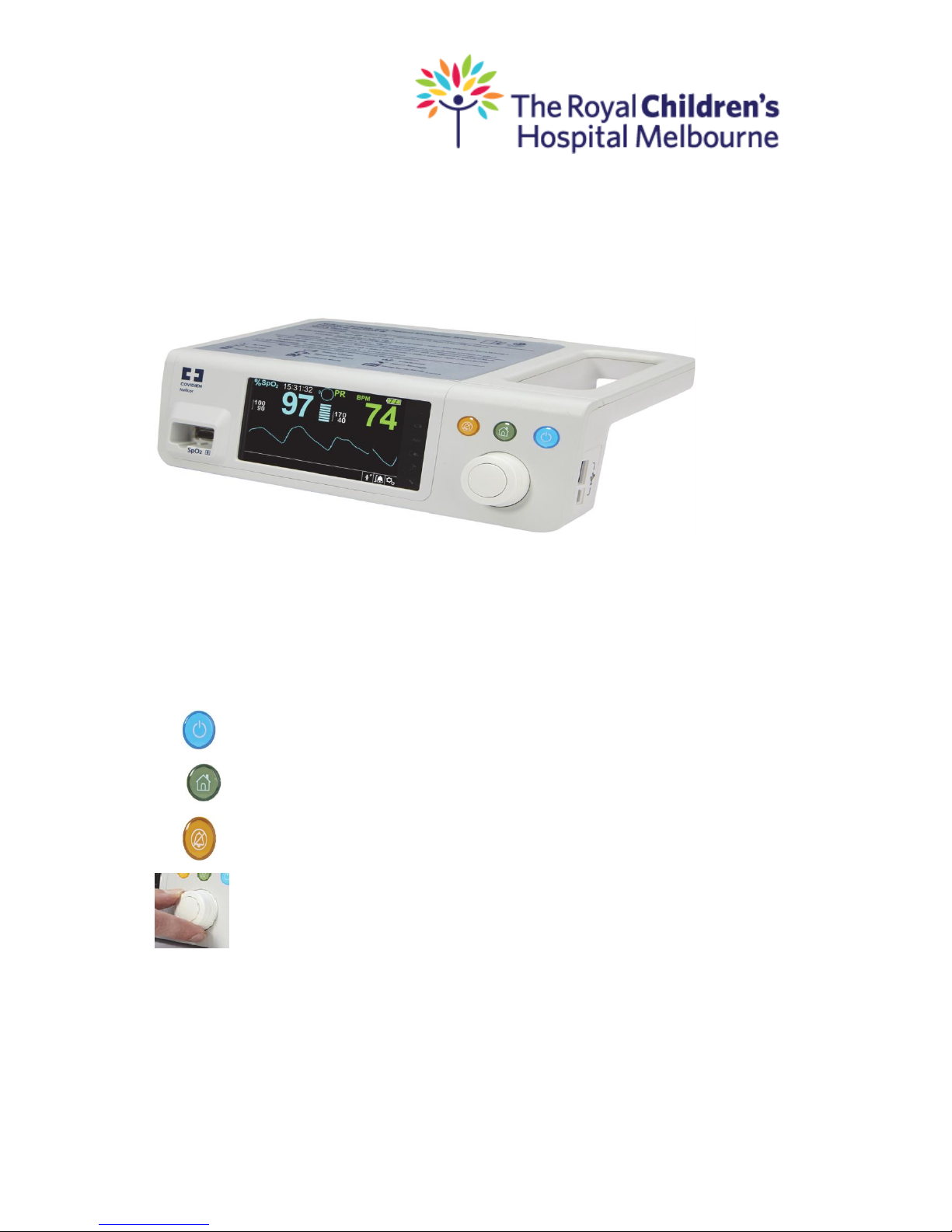
There are a variety of oximeters used in the community and there are slight differences in
the way to set the alarms. Navigating the menu options on the device requires manual
manipulation of 3 buttons and the turnstile knob on the front of the monitor.
Power On/Off button
Home Button
Alarm Audio Paused Button
Turnstile knob
Turn on the oximeter making sure it is plugged into mains power & press the
On/Off button for at least one second (blue button)
Press the home button (green button) for less than 2 seconds to display the
options menu
Using turnstile knob highlight alarm bell symbol at bottom right of screen to
alter both Oxygen and heart rate limits
RCH @ Home, Royal Children's Hospital.
This document is subject to a disclaimer, see
http://www.rch.org.au/uploadedFiles/Main/Content/hacc/home_care_manuals/RCH@Home%20Disclaime
r.pdf
Page 3 of 4
Select this icon by pressing centre of turnstile
Set the high and low oxygen limits as per the child specific oximetry care
page
Set the high and low heart beat limits as per the child specific oximetry care
page
Press the home button (green button) to exit the menu settings and return to
the main monitoring screen.
Press the Alarm Audio (orange button) button for less than 2 seconds to
ensure that alarms are audible for the safety and protection of the child you
are caring for.
To increase volume for alarm settings select settings icon using turnstile knob
Select this icon by pressing centre of turnstile
Apply the probe
Ensure to use the correct Spo2 adhesive sensor, this automatically applies
correct patient mode (i.e. Adult/Paediatric/Neonatal)
Ensure the skin is clean, dry and warm
Apply the probe to the foot, toe or finger
Ensure that the two sides (light and sensing) of the probe are opposite one
another over the site
Do not apply the probe too tightly. Too much pressure will decrease the
blood flow to the site and can cause the readings to be incorrect and may also
cause a pressure area sore
Move the probe 3-4 hourly to a different area on the child’s foot/hand to
prevent pressure areas and burns from the red light
A new probe is used when the old probe no longer works (approx. 5-7 days of
use)
To ensure you have the correct patient mode selected. Move turnstile to the
right selecting the patient mode Icon
Select this icon by pressing centre of turnstile, there will be a red tick beside
selected patient mode
3. Oximeter alarms
Oximeter alarms can go off for different reasons, some of which may not be related to
the child’s medical condition. When an alarm sounds the carer must always look at the
child and check their breathing, colour and level of consciousness before silencing the
alarm and rechecking all of your equipment and connections.

RCH @ Home, Royal Children's Hospital.
This document is subject to a disclaimer, see
http://www.rch.org.au/uploadedFiles/Main/Content/hacc/home_care_manuals/RCH@Home%20Disclaime
r.pdf
Page 4 of 4
Why the alarm is ringing?
What to do if you hear the alarm
Low oxygen (O2)
The oxygen level of the child is lower than
the low alarm setting for oxygen.
Check child.
If the child is ok, then check:
oIs the probe connected properly?
Follow plan on oximetry care page for
management of low oxygen
Low pulse
The pulse rate of the child is lower than the
low alarm setting for pulse.
Check the child.
If the child is ok, then check:
oIs the probe connected properly?
oFollow plan for management of
low pulse on the child specific care
page:
If the child is not responsive
oCommence Basic Life Support
High pulse
The pulse rate of the child is higher than the
high alarm setting for pulse.
Check the child.
If the child is ok, then check:
oChild may be upset or unwell
oAttempt to settle the child
oIf unable to settle the child or
they appear unwell, ask the
parent/guardian for advice
If a medical emergency
oCall an ambulance
Disconnection or poor contact of probe
Check the child
Check if probe is connected
Reposition Probe
Alarm beeping every couple of seconds
Check probe is attached to child
Check oximeter is plugged into mains
power
Skin around probe white and cool
Probe may be applied too firmly
Reposition probe to another finger or
foot
No red light on probe
Check probe is plugged in
Apply a new probe