manuals.online logo
Brands
  1. Home
  2. •
  3. Brands
  4. •
  5. Samsung
  6. •
  7. Cell Phone
  8. •
  9. Samsung SGH-X480C User manual

Samsung SGH-X480C User manual

Other Samsung Cell Phone manuals
Samsung SM-F900U User manual

Samsung

Samsung SM-F900U User manual

Samsung SM-G988UZAASPR User manual

Samsung

Samsung SM-G988UZAASPR User manual

Samsung SM-J120G/DS User manual

Samsung

Samsung SM-J120G/DS User manual
Samsung Rant SPH-m540 User manual

Samsung

Samsung Rant SPH-m540 User manual
Samsung Galaxy S7 Edge User manual

Samsung

Samsung Galaxy S7 Edge User manual
Samsung SM-A530N User manual

Samsung

Samsung SM-A530N User manual

Samsung SGH-A157 User manual

Samsung

Samsung SGH-A157 User manual
Samsung SGH-T629 User guide

Samsung

Samsung SGH-T629 User guide

Samsung OfficeServ WIP-5000M User manual
Samsung

Samsung OfficeServ WIP-5000M User manual

Samsung Verizon Galaxy Note7 User manual

Samsung

Samsung Verizon Galaxy Note7 User manual

Samsung Mesmerize SCH-I500 User manual

Samsung

Samsung Mesmerize SCH-I500 User manual

Samsung SM-J600L User manual

Samsung

Samsung SM-J600L User manual
Samsung GALAXY SIII User manual

Samsung

Samsung GALAXY SIII User manual
Samsung E2210 User manual

Samsung

Samsung E2210 User manual
Samsung GT-S5680 User manual

Samsung

Samsung GT-S5680 User manual
Samsung Intercept SPH-M910 User manual

Samsung

Samsung Intercept SPH-M910 User manual

Samsung sm-g928v User manual

Samsung

Samsung sm-g928v User manual
Samsung SM-G316HU/DS User manual

Samsung

Samsung SM-G316HU/DS User manual
Samsung SGH-N288AA User manual

Samsung

Samsung SGH-N288AA User manual

Samsung SGH-p705 User manual

Samsung

Samsung SGH-p705 User manual
Samsung Galaxy S Blaze 4G User manual

Samsung

Samsung Galaxy S Blaze 4G User manual

Samsung SGH-C450 User manual

Samsung

Samsung SGH-C450 User manual

Samsung SGH-E768 User manual
Samsung

Samsung SGH-E768 User manual

Samsung B2100V User manual

Samsung

Samsung B2100V User manual

Popular Cell Phone manuals by other brands

Nokia 6700 classic user guide

Nokia

Nokia 6700 classic user guide

LG L34C user guide

LG

LG L34C user guide

Ericsson T60d manual

Ericsson

Ericsson T60d manual

Zte Score M user manual

Zte

Zte Score M user manual

Sony Xperia Z1 Compact Startup guide

Sony

Sony Xperia Z1 Compact Startup guide

AT AT-Q5 user manual

AT

AT AT-Q5 user manual

Vingtor ACM-M-A-V2 Installation/configuration

Vingtor

Vingtor ACM-M-A-V2 Installation/configuration

Olitech EasyFlip 2 Quick setup guide

Olitech

Olitech EasyFlip 2 Quick setup guide

Zte Atrium Z793C user manual

Zte

Zte Atrium Z793C user manual

Alcatel IDEAL manual

Alcatel

Alcatel IDEAL manual

Zte BLADE A520 quick start guide

Zte

Zte BLADE A520 quick start guide

switel M222 user manual

switel

switel M222 user manual

LG LG-P503 user guide

LG

LG LG-P503 user guide

LG F2410 user guide

LG

LG F2410 user guide

Argom E500 manual

Argom

Argom E500 manual

Hisense U30 user manual

Hisense

Hisense U30 user manual

Argom Tech E401 user manual

Argom Tech

Argom Tech E401 user manual

Nokia 3595 - Cell Phone - GSM Manual Del Usuario

Nokia

Nokia 3595 - Cell Phone - GSM Manual Del Usuario

manuals.online logo
manuals.online logoBrands
  • About & Mission
  • Contact us
  • Privacy Policy
  • Terms and Conditions

Copyright 2025 Manuals.Online. All Rights Reserved.

* Some of the contents of this manual may differ from your phone,
depending on the software installed or your service provider.
World Wide Web
http://www.samsungmobile.com
Printed in Korea
Code No.:GH68-06750A
English. 03/2005. Rev 1.1
X480C.book Page 1 Wednesday, March 23, 2005 3:40 PM
SGH-X480C
User’s Guide
X480C.book Page 2 Wednesday, March 23, 2005 3:40 PM
Use road safety at all times
Do not use a hand-held phone while driving. Park
the vehicle first.
Switch off the phone when refuelling
Do not use the phone at a refuelling point (service
station) or near fuels or chemicals.
Switch off in an aircraft
Wireless phones can cause interference. Using them
in an aircraft is both illegal and dangerous.
Switch off the phone near all medical
equipment
Hospitals or health care facilities may be using
equipment that could be sensitive to external radio
frequency energy. Follow any regulations or rules in
force.
Important
safety
precautions
Failure to comply with the following
precautions may be dangerous or illegal.
X480C.book Page 3 Wednesday, March 23, 2005 3:40 PM
Important safety precautions
1
Interference
All wireless phones may be subject to interference,
which could affect their performance.
Be aware of special regulations
Meet any special regulations in force in any area and
always switch off your phone whenever it is forbidden
to use it, or when it may cause interference or danger.
Water resistance
Your phone is not water-resistant. Keep it dry.
Sensible use
Use only in the normal position (held to the ear). Avoid
unnecessary contact with the antenna when the phone
is switched on.
Emergency call
Key in the emergency number for your present
location, then press [ ].
Keep your phone away from small children
Keep the phone and all its parts, including accessories,
out of the reach of small children.
Accessories and batteries
Use only Samsung-approved accessories and
batteries. Use of any unauthorised accessories could
damage your phone and may be dangerous.
Qualified service
Only qualified service personnel may repair your
phone.
For more detailed safety information, see "Health and
safety information" on page 58.
• The phone could explode if the battery is
replaced with an incorrect type.
• Dispose of used batteries according to the
manufacturer’s instructions.
X480C.book Page 1 Wednesday, March 23, 2005 3:40 PM
2
About this Guide
This User’s Guide provides you with condensed
information about how to use your phone. To quickly
learn the basics for your phone, please refer to
“Getting started.”
In this guide, the following instruction icons appear:
Indicates that you need to pay careful
attention to the subsequent information
regarding safety or phone features.

Indicates that you can get more
information on the referenced page.
→
Indicates that you need to press the
Navigation keys to scroll to the specified
option and then select it.
[key name] Indicates a key on the phone. For
example,
[]
<soft key> Indicates a soft key, whose function is
displayed on the phone screen. For
example, <
Menu
>
•Tri-bandoperation
Use your phone in worldwide GSM networks, in
any of 900, 1800, and 1900 bands.
Special
features of your phone
• Simple, compact design with Intenna
Samsung’s powerful intenna technology allows
the best call quality without an annoying
external antenna.
•WAPbrowser
Access the wireless web and
access various services and up-
to-the-minute information.
X480C.book Page 2 Wednesday, March 23, 2005 3:40 PM
3
Special features of your phone
•Phonebook
Store up to 2000 contact
numbers.
• Multimedia Message Service (MMS)
Send and receive MMS messages with a
combination of text, images, and sounds.
• Melody composer
Create your own melodies and
set them as your call ringer.
• Calendar and To do list
Keep track of your daily, weekly,
and monthly schedules and
tasks.
• Voice recorder
Record memos or sounds.
•Java
Enjoy Java
™
-based embedded
games and download new
games.
X480C.book Page 3 Wednesday, March 23, 2005 3:40 PM
4
Contents
Unpack 6
Make sure you have each item
Your phone 6
Buttons, features, and locations
Get started 7
First steps to operate your phone
Install and charge the phone ................................... 7
Power on or off ...................................................... 8
Keys and display.................................................... 9
Access menu functions.......................................... 11
Customise your phone .......................................... 12
Make/answer calls................................................ 13
Step outside the phone 13
Begin with your WAP, melody composer, messages, and oth-
er special features
Browse WAP ........................................................ 13
Use Phonebook .................................................... 14
Send messages.................................................... 14
View messages .................................................... 15
Compose your melody .......................................... 16
Enter text 17
Pinyin, Stroke, English, Quick English (T9), Number, and
Symbolic modes
Call functions 21
Advanced calling features
Menu functions 25
All menu options listed
Solve problems 56
Health and safety information 58
X480C.book Page 4 Wednesday, March 23, 2005 3:40 PM
5
Overview of menu functions
To access Menu mode, press <
Menu
> from the idle screen.
1 SIM AT

p.25
2
2 Call records

p.25
1 Missed calls
2 Received calls
3 Dialled calls
4 Delete all
5 Call time
6 Call costs
*

p.26

p.26

p.26

p.26

p.26

p.27
3 Network services

p.27
1 Call diverting
2 Call barring
3 Call waiting
4 Network selection
5 Caller ID
6 Closed user group
7 Band selection

p.27

p.28

p.28

p.29

p.29

p.29

p.30
4 Sound settings

p.30
1 Ring tone
2 Ring volume
3 Alert type
4 Keypad tone
5 Message tone
6 Folder tone
7 Power on/off
8 Alert on call
9 Extra tones

p.30

p.30

p.30

p.31

p.31

p.31

p.31

p.31

p.31
5 Messages

p.32
1 Text messages
2 Multimedia messages
3 Push messages
4 Delete all
5 Voice mail
6 Broadcast messages
7 Memory status

p.32

p.35

p.38

p.39

p.39

p.39

p.40
6 Funbox

p.40
1 WAP browser
2 Games
3 Sounds
4 Images
5 Delete all
6 Memory status
7 Melody composer

p.40

p.42

p.43

p.43

p.43

p.44

p.44
7 Organiser

p.45
1 Alarm
2 Calendar
3 Time & date
4 Calculator
5 To do list
6 Voice memo
7 Currency exchange

p.45

p.46

p.47

p.48

p.48

p.49

p.50
8 Phonebook

p.50
1 Search
2 Add entry
3 Group search
4 Group edit
5 Speed dial list
6 Delete all
7 Memory status

p.50

p.51

p.51

p.51

p.52

p.52

p.52
9 Phone settings

p.52
1 Display settings
2 Greeting message
3 Own number
4 Language
5 Security
6 Extra settings
7 Short cut
8 Reset settings

p.53

p.53

p.53

p.54

p.54

p.55

p.55

p.56
*Shows only if supported by your
SIM card.
X480C.book Page 5 Wednesday, March 23, 2005 3:40 PM
6
Unpack
Make sure you have each item
You can obtain various accessories from your local
Samsung dealer.
Phone Travel adapter
Battery User’s manual
The items supplied with your phone and the accessories
at your Samsung dealer may vary, depending on your
country or service provider.
Your phone
Buttons, features, and locations
Left soft key
Volume keys
Dial key
Special
function keys
Headset jack
Earpiece
Display
Power on/off/
Menu exit key
Alphanumeric
keys
Right soft key
Microphone
Navigation keys
(Up/Down/Left/
Right)
WAP access/
Confirm key
Cancel/Correct
key
X480C.book Page 6 Wednesday, March 23, 2005 3:40 PM
7
Get started
Get started
First steps to operate your phone
SIM card information
When you subscribe to a cellular network, you receive
a plug-in SIM (Subscriber Identity Module) card
loaded with your subscription details, such as your
PIN, and available optional services.
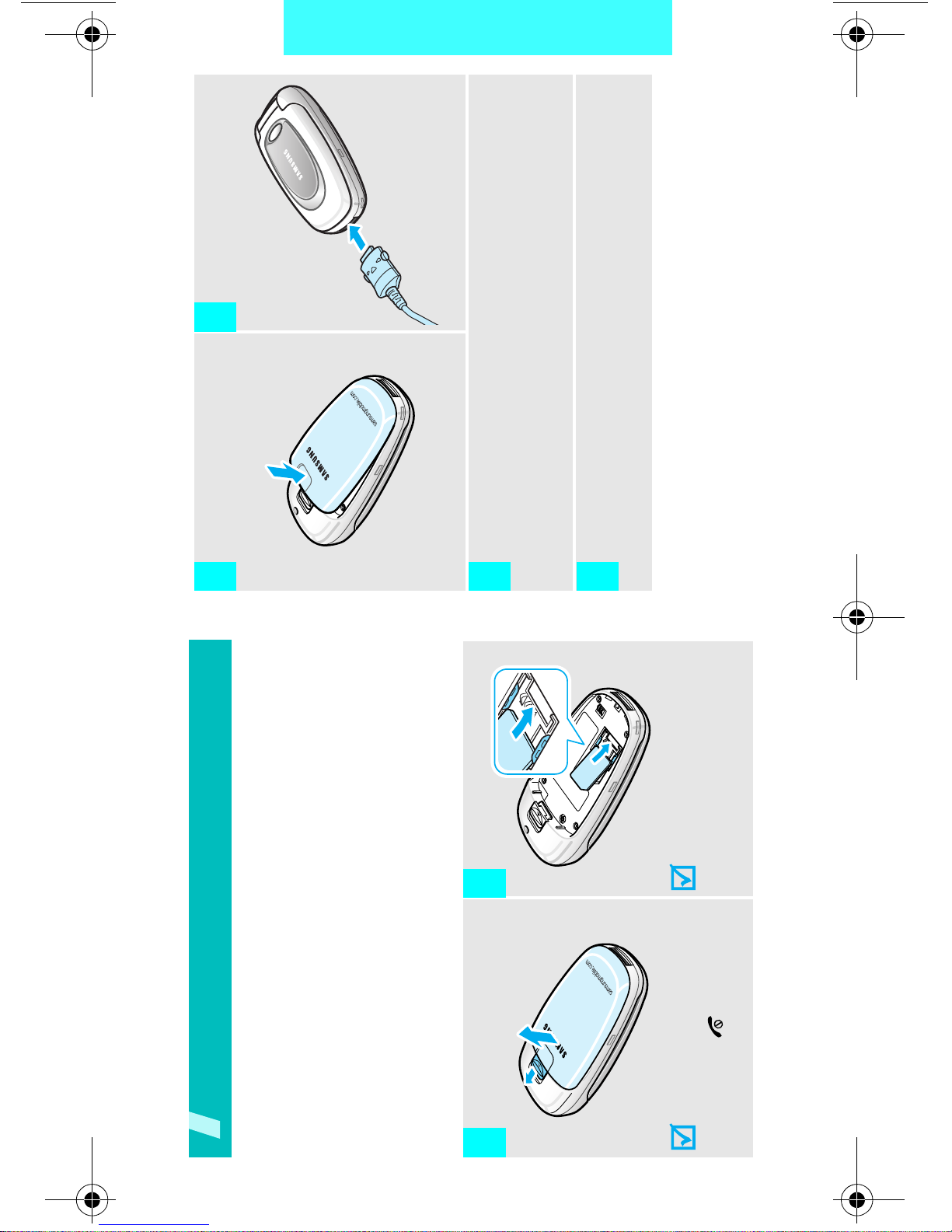
Install and charge the phone
Remove the battery.
If the
phone is already
on, first turn it off by
holding [ ].
Insert the SIM card.
Make sure that the gold-
coloured contacts on the
card face down into the
phone.
1
➀➁
2
Install the battery. Plug the travel adapter
into the phone.
Plug the adapter into a standard AC wall outlet.
When the phone is completely charged (the battery
icon stops blinking), unplug the adapter from the
power outlet.
3 4
5
6
X480C.book Page 7 Wednesday, March 23, 2005 3:40 PM