Speco VL-10 User manual

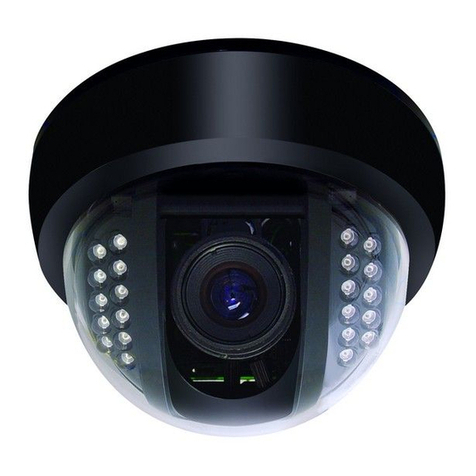
VL-10 AND VL-11
IR CCD WATER RESISTANT
COLOR CAMERA
SAFETY PRECAUTIONS FEATURES
CONTENTS
CONTENT……….…………………………………………..………………. 2
SAFETY PRECAUTIONS………………………………………................. 3
FEATURES…………………………………………………………………… 4
CDS …………………………………………………..……………. 4
AWS ………………………………………..……………………… 4
IR LENS ………………………………..………………………….. 4
Mount….………………………………………………………….. 5
Sunshade………………………….……………………………….. 5
Power and Video Output Jack…………………………………… 5
INSTALLATION……….. …………………………………………………….. 6
SPECIFICATIONS …….…………………………………………………….. 7
DIMENSIONS………………………………………………………………... 8
2
AWB: The camera includes auto white balance mode and auto capture
color temperature. The range is 2400k~9400K
CDS:The IR LED: only activate when needed.
Illumination is 4 LUX±2LUX (LED on) / 8LUX±2LUX(LED off)。
LENS:Super sensitivity BOARD LENS for optimum low light pictures..
IR LED:Super power LED IR light,wavelength is 840nm for maximum
illumination.
4
CDS SENSOR
LENS
IR LEDS
The lightning flash with arrowhead symbol, within an
equilateral triangle, is intended to alert the user to the
presence of insulated dangerous Voltage within the
product’s enclosure that may be sufficient magnitude
to constitute risk of electrical shock to persons.
The exclamation point within an equilateral triangle is
intended to alert the user to the presence of important
operation and maintenance (servicing) instructions in
the literature accom
p
an
y
in
g
the a
pp
liance.
Please read before using
1. Please read the service manual in details before using.
2. Do not disassemble the camera-no user serviceable parts inside
3. The product is IP-66 waterproof rated.
4. Do not attempt to service the unit yourself unless you are
authorized to do so. Opening cover may expose you to
dangerous voltage or other hazards. Refer all servicing to
qualified personnel only.
5. Turn off the power before cleaning the camera body; use only a
clean damp cloth. Do not use any soap or cleaners.
3
200 New Highway. Amityvill, NY 11701
1-800-645-5516 FAX:631-957-9142 or 631-957-3880
www.specotech.com

Model VL-10 VL-11
Pick Up Device 1/3” Interline transfer CCD
Resolution 420TV Lines
Lens 4.3mm
Total Pixels NTSC:537(H) x 505(V)
PAL:537(H) x 597(V)
Sync system 2:1 Internal Internal
Scanning system 525 line / 60 frames
Video Output Composite 1.0 Vp-p / 75 ohms
Minimum Illumination 0.5 lux color / 0 lux with IR on
IR Radiant Distance 65 feet 50 feet
S/N Ratio 50dB or more
Electronic Shutter Auto 1/60sec. to 1/100,000dec.
Horizontal Frequency 15.734KHz
Vertical Frequency 59.94Hz 60Hz
Backlight Compensation Built-in (Option
Jumper ON / OFF )
ON / OFF
switchable
Power Supply Regulated 12V DC power supply
required-model PSW-5
Consumption Current Max. 300mA Max. 280mA
Weight 0.46kg convert to
lbs.
0.505kg / 0.56kg
convert to lbs.
Dimensions 2.7” dia x 3.7” H 2.25” dia x 3.25” H
Operating Temp -14 to 122℉
Wall / Ceiling Mount
Included
Included
Housing Silver / Aluminum
7
SPECIFICATIONS
INSTALLATION
1. Attach bracket to wall or ceiling.
2. Attach camera to bracket.
3. Aim camera and tighten mounting.
4. Attach a 75 ohm coaxial cable (95% copper shield recommended) to
the BNC output.
5. Apply regulated 12 Volts DC to the power connector.
6
Mount:
Rotate the camera angle as required tighten thumbscrew.
Sunshade:
Adjust as necessary to prevent the sun from hitting the camera
lens, make sure that the sunshade is not in the camera’s field of
view.
Power and video connections:
Power: Regulated 12 Volts DC, center pin is positive (+)
Video: BNC, 1 Volt p-p
5
Scaffold
Sunshade
DC Power
BNC Video Output
8
DIMENSIONS
VL-10
VL-11
This manual suits for next models
1
Other Speco Security Camera manuals
Speco
Speco CVC-865DN/24 User manual
Speco
Speco ONSIP O2D3 User manual
Speco
Speco HTFB4TM User manual
Speco
Speco O3VLD1 User manual
Speco
Speco VL5700BPVF User manual
Speco
Speco O4iD2 User manual
Speco
Speco O4P4X2 User manual

Speco
Speco HT-INTB1 User manual
Speco
Speco CVC-7705DNV User manual
Speco
Speco CVC-628M User manual

Speco
Speco CVC-1724 User manual
Speco
Speco O4P4X2 User manual
Speco
Speco CVC-3805 User manual
Speco
Speco VL-66 User manual
Speco
Speco VL644K User manual

Speco
Speco HT-647HRTP User manual
Speco
Speco 700Line IntensifierH CVC6246H User manual
Speco
Speco O2LPR67 User manual
Speco
Speco VL-60 User manual
Speco
Speco CVC-648IRHQ Original operating instructions