Taylor 1479 User manual

1
1479 / 532 / 817
Wireless Thermometer with
Remote Pager plus Timer
Instruction Manual

2
Thank you for purchasing a Taylor® Wireless
Thermometer with Remote Pager plus Timer
This product helps to eliminate over-cooking or under-
cooking foods. Presetting the thermometer to the
recommended cooking temperatures and/or cooking
times is simple and ensures that food will be cooked to
your preferred taste. Please read this instruction manual
carefully before use. Keep these instructions handy for
future reference.
Battery Information
The base thermometer unit operates on 2 AAA batteries
(included).
The remote unit operates on 2 AAA batteries (included).
The thermometer units are equipped with a low battery
warning:
Base Unit: A low battery icon appears in the upper right
corner of the LCD.
Remote Sensor:
The low battery light illuminates.
If these warnings appear, or if readings grow dim or
irregular, the batteries may need to be replaced.
To install or replace the batteries on both units:
1. Use 2 AAA batteries for each unit. Always replace all
batteries at the same time; do not mix old and new
batteries. Do not mix alkaline, standard (carbon-zinc)
or rechargeable (ni-cad, ni-mh, etc.) batteries.
2. Remove the battery compartment cover, located on
the back of the unit.
3. Remove the old batteries from the battery
compartment (if applicable).
4. Place the new batteries into the compartment as
indicated.
5. Replace the battery compartment cover.
2

On/Off Operation
1. Place the base unit as close as
possible to the remote sensor. This
will ensure easy synchronization
between the base and remote.
After set up is complete, keep the
units within effective transmission
range (within 200 feet).
2. Turn on the base unit first by pressing
the On/Off button. The LCD will turn
on and the unit will beep.
3. Turn on the remote unit by pressing
the On/Off button (located on the
back). The remote will
vibrate, beep and the “ ” light will
blink.
4. Set volume on remote: Off–Low–
High. The volume switch is located
on the top of the
remote.
5. The remote will automatically
search for a
signal from the base. The remote’s
ready light “ ” will blink, indicating
the remote is receiving a signal
from the base. The ready light will
continue to blink every 8 seconds
again indicating that the remote is
receiving signals from the base.
Press “On/Off” on
remote
Press “On/Off” on
base unit
Select volume
level
Green light =
transmission OK
3
No green light &
remote vibrates=
Press “ ” on base

6. If transmission is interrupted, the ready light will stop
blinking and the remote will vibrate 3 times every 30
seconds. To synchronize the units again, place the base
and remote near each other and press and hold the
“ ” button located on the back of the base unit.
7. Auto off feature to conserve battery power: The base
unit will automatically turn off after 30 minutes if there is
no change in temperature or no buttons are pressed.
The remote unit will vibrate then automatically turn off
if the transmission signal is lost for 5 minutes. The remote
unit will also turn off automatically if the base is turned
off.
NOTE: Please recycle or dispose of batteries per local
regulations.
WARNING: Batteries may pose a choking hazard. As with
all small items, do not let children handle batteries. If
swallowed, seek medical attention immediately.
PRECAUTION: Do not dispose of batteries in fire. Batteries
may explode or leak. Remove the battery if the scale
will not be used for a long period of time.
Positioning the thermometer units
1.The base unit may be placed on a flat surface
using the clip stand on the back of the unit. It
may also be attached to a metal surface using
the magnets on the back.
2.The remote sensor’s clip stand may be used to stand
the remote on a flat surface or clip on a belt loop. The
magnets may be used to attach it to a metal surface.
Use the lanyard to wear it around the neck (take care
not to allow the remote to touch hot items or working
appliances). Simply thread the lanyard through the
opening on the remote and loop the lanyard through
itself.
3.During use, keep the base unit and remote sensor
within effective transmission range, which is 200 feet in
usual circumstances. 4

4.Do Not stick to surfaces that exceed
200°F (100°C).
Thermometer Programming Operation
1. Your thermometer is preset to read
temperatures in Fahrenheit. To switch
to Celsius, push the switch on the
back of the base unit to ºC.
2. If necessary, press the “On/Off”
buttons.
The default setting “Beef” appears.
3. Press the “Meat” button to scroll
through the meat choices. Press
the “Select” button to select the
displayed meat type. The default
taste setting “Medium” flashes.
4. Press the “Taste” button to scroll
through the taste choices. Press
the “Select” button to select the
displayed taste. The Set Temperature
digits will blink.
5. Press the “Select” button to accept
the Set Temperature displayed. Or
change the temperature manually.
Press the “Hr/+” button to increase
the temperature by 1 degree or press
the “Min/-” button to decrease the
temperature by 1 degree. (Note:
when the temperature is manually
changed, a “CUST” icon will appear
to note a custom temperature has
been programmed.)
5
°F/°C selection
Can press “Hr/+” or
“Min/-” to change
temperature
Press “Select”.
Unit beeps and is set.
Press “Taste”
then “Select”

6. Press “Select” when the desired temperature is
displayed. The Set Temperature digits stop flashing. The
unit will beep, indicating the thermometer is set.
7. To change the programming, press the Meat button
and repeat the steps above.
General Cooking Procedures
1.Preheat the grill or oven to desired cooking
temperature. Place the food in the oven or grill.
2.Sterilize the metal probe by inserting it into
an appropriate solution such as boiling water for several
minutes. Make sure the sensor plug on the end of the
cord is plugged into the thermometer base unit. (Note:
if the probe is not plugged in properly, the display will
show “LL.L”.)
3. Insert the metal probe into the thickest
part of the food to be cooked. Do not
come in contact with bone, fat or gristle,
as these areas will not provide accurate
temperature readings.
4. Place the food into the oven or grill. The
thermometer display unit must be placed outside of the
oven or grill (do not put the plastic display unit in the
oven or grill). The probe cord will be held in place by
the oven/grill door. Note: Be careful not to excessively
bend or crease the cord during use. The cord should
not come into direct contact with
cooking surface or flame.
5. The current internal temperature
of the food appears on the LCD
screen of the base unit. As cooking
progresses, the base and remote
units will signal temperature alerts in
the following manner:
6
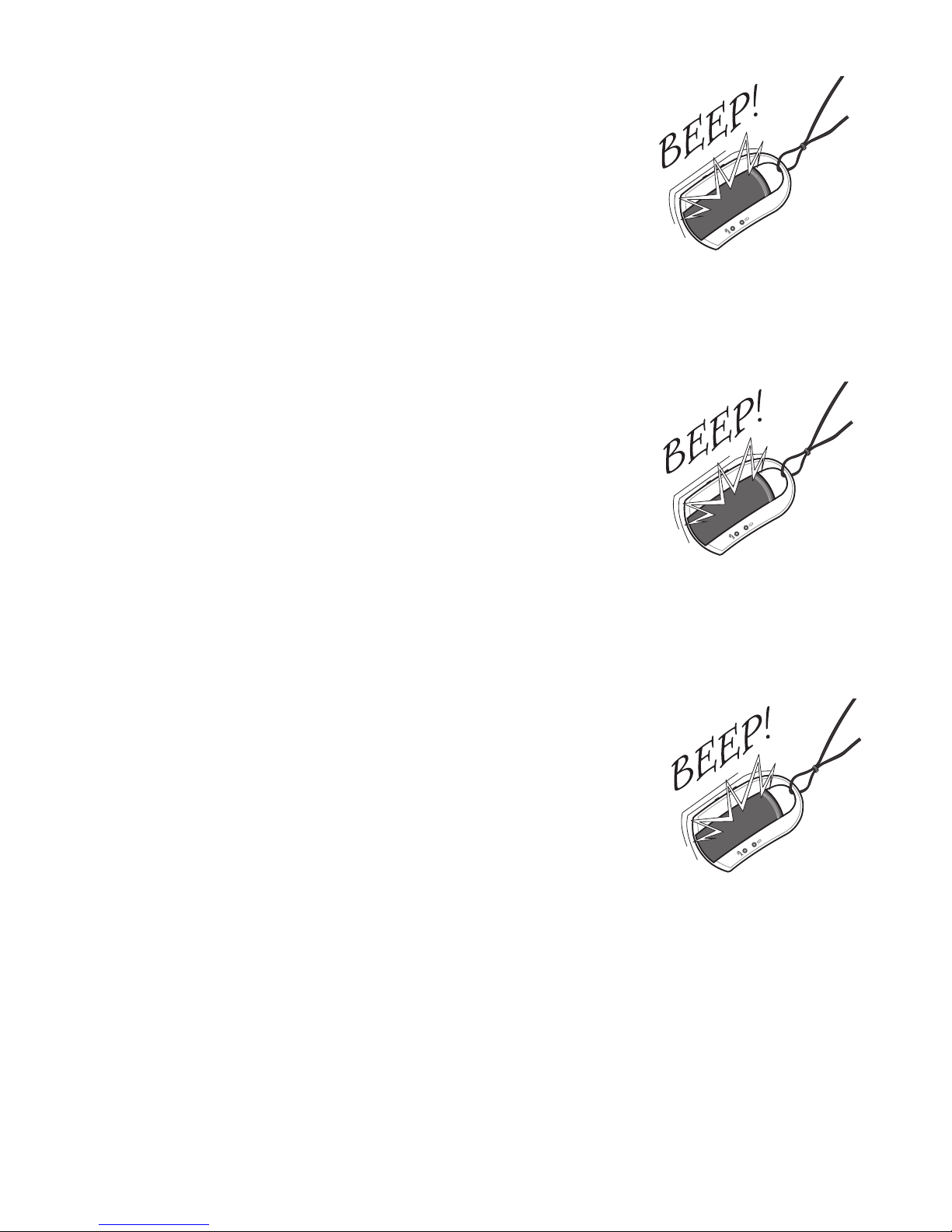
• When the current temperature is within
20 degrees of the target temperature,
the remote will beep 3 times, vibrate
and flash; the base will beep 3 times
and flash. Note: the unit uses to different
beep tones to help you identify between
thermometer and timer notifications.
Only the remote will vibrate.
• When the current temperature is within
10 degrees of the target temperature,
the remote will beep 5 times, vibrate
and flash. The base will beep 5 times and
flash.
• When the current temperature and
target temperature are equal (indicating
the food is done), the units consistently
beep, vibrate and flash (base will not
vibrate). Press the “Start/Stop” button to
turn off the alarm.
6.When the food is ready, remove it from
the oven or grill with a heat resistant
glove. DO NOT TOUCH THE HOT PROBE
OR FOOD WITH YOUR BARE HANDS!
7.The base unit has a convenient backlight
feature for easy temperature viewing.
While the unit is on, press the Backlight
button to turn on the backlight for 10
seconds.
8. The food may continue to cook after
removed from heat. The probe may be
left in the food to continue monitoring
internal temperature.
7
3 beeps =
20 degrees from
done
5 beeps =
10 degrees from
done
Constant beeps =
done.
Press “Start/Stop
to stop beeps.

Timer Operation
This unit is also equipped with a convenient timer. It can
operate as an independent timer or work along with the
thermometer function.
1. If necessary, turn the base and remote on (see on/off
operation).
2. Press the “Timer/Thermometer” button.
The Timer digits flash.
3. Press the “Hr/+” button to set the hours.
Press the “Min/-” button to set the
minutes. Press “Start/Stop” to confirm.
Press and hold the buttons to advance
the digits quickly.
4. Press the “Start/Stop” button to start timer countdown.
5. Press the “Start/Stop” button to pause timer. Press
“Start/Stop” again to resume timer countdown. To add
extra time, press “Start/Stop” to pause, “Hr/+” or “Min/-”
to increase time, and “Start/Stop” to resume. To reset
timer to zero, first pause the timer, then press “Hr/+” and
“Min/-” at the same time to clear.
6. As time progresses, the base and remote units will
signal timer alerts in the following manner:
• 10 minutes before the time is up, the remote will beep 3
times, vibrate and flash. The base will beep 3 times and
flash.
Note: that the unit uses to different beep tones to
help you identify between thermometer and timer
notifications. Only the remote will vibrate.
8

• 5 minutes before the time is up, the remote will beep 5
times, vibrate and flash. The base will beep 5 times and
flash.
• When the timer reaches zero, the units consistently
beep, vibrate and flash (only remote vibrates)
7.Press the “Start/Stop” button on the base
unit to stop the alarm and timer.
8.The timer will time up to 39 hours, 59
minutes and 59 seconds. (The seconds
will appear when remaining time is less
than one minute).
Clock Feature
To program the clock:
1.While the base unit is off, press the “Select”
button. The clock digits flash.
2.Press the “Hr/+” button to change the
hour. Press the “Min/-” button to change
the minutes. Press and hold the buttons
to advance the digits quickly.
3.Press “Select”. The clock is set.
RESET: If you are having problems with the unit, you can
press the reset button on the back of the base. This will
cause the same effect as taking the batteries out. The
unit will reset itself.
9

Care and Precautions
1. Always wear a heat resistant glove when touching the
metal probe or cord during or just after cooking. DO
NOT TOUCH WITH BARE HANDS!
2. Keep the metal probe and cord away from children.
3. Sterilize metal probe each time before use.
4. Do not expose the thermometer to: water, direct heat,
a hot surface or direct sunlight for an extended period
of time. This may cause damage to the plastic casing
or the electric circuits and components inside.
5. Do not expose the probe directly to flames. Do not put
the probe in foods to exceed cooking temperatures of
500°F (260°C), as this may reduce the life and accuracy
of the thermometer sensor.
6. Do not use this thermometer in a microwave oven.
7. Moisture inside the plug-in opening of the thermometer
will result in an incorrect temperature reading. Dry the
sensor plug with a cloth every time before plugging it
into the thermometer.
8. DO NOT USE THE CORD AND PROBE FOR OVEN
TEMPERATURES HIGHER THAN 500°F (260 °C).
9. Do not dispose of batteries in fire. Batteries may
explode or leak. Do not mix old and new batteries.
Do not mix Alkaline, carbon-zinc (standard) or Nickel-
Cadmium (rechargeable) batteries. Remove the
batteries if the thermometer will not be used for a long
period of time.
10
This manual suits for next models
2
Table of contents
Other Taylor Thermometer manuals
Taylor
Taylor 1478 User manual
Taylor
Taylor 1471N/808N User manual

Taylor
Taylor Five Star 1479 User manual
Taylor
Taylor 5458 User manual
Taylor
Taylor 9526 User manual
Taylor
Taylor TruTemp Manual
Taylor
Taylor 522 User manual

Taylor
Taylor 5296652 User manual
Taylor
Taylor WeatherGuide System User manual
Taylor
Taylor 519 User manual
Taylor
Taylor 2750 User manual

Taylor
Taylor SmarTemp Operating manual

Taylor
Taylor 5286498 User manual
Taylor
Taylor WeatherGuide 1520 User manual
Taylor
Taylor 6700 User manual
Taylor
Taylor 9848FDA / 806 User manual
Taylor
Taylor 518 User manual
Taylor
Taylor 9940N User manual
Taylor
Taylor 9842FDA User manual
Taylor
Taylor 1730 User manual