EnglishDeutsch
 logo
Brands
  1. Home
  2. •
  3. Brands
  4. •
  5. VDO
  6. •
  7. Marine Equipment
  8. •
  9. VDO WIND User manual

VDO WIND User manual

This manual suits for next models

1

Other VDO Marine Equipment manuals

VDO DEPTH SOUNDER User manual

VDO

VDO DEPTH SOUNDER User manual

VDO AcquaLink User manual

VDO

VDO AcquaLink User manual

VDO SUMLOG User manual

VDO

VDO SUMLOG User manual

VDO Logic Close Hauled User manual

VDO

VDO Logic Close Hauled User manual

Popular Marine Equipment manuals by other brands

Clarion CMS2 Owner's manual & installation manual

Clarion

Clarion CMS2 Owner's manual & installation manual

EBS M7000 installation manual

EBS

EBS M7000 installation manual

Kongsberg M3 Bathy installation manual

Kongsberg

Kongsberg M3 Bathy installation manual

NPK SCS-1002 operating manual

NPK

NPK SCS-1002 operating manual

Furuno FE-800 installation manual

Furuno

Furuno FE-800 installation manual

Harken 1561 instructions

Harken

Harken 1561 instructions

Simrad DD15 manual

Simrad

Simrad DD15 manual

Notifier FS-BSO Installation and maintenance instructions

Notifier

Notifier FS-BSO Installation and maintenance instructions

Raymarine ST40 Quick reference guide

Raymarine

Raymarine ST40 Quick reference guide

E2S E2XS112UL Instructions/service manual

E2S

E2S E2XS112UL Instructions/service manual

R2Sonic 2026 Operation manual

R2Sonic

R2Sonic 2026 Operation manual

COBHAM SAILOR 6000 installation manual

COBHAM

COBHAM SAILOR 6000 installation manual

Raymarine Maxiview ST80 Owner's handbook

Raymarine

Raymarine Maxiview ST80 Owner's handbook

GUIDANCE MARINE 20- Series Installer's guide

GUIDANCE MARINE

GUIDANCE MARINE 20- Series Installer's guide

Raymarine ST60 Tridata Owner's handbook

Raymarine

Raymarine ST60 Tridata Owner's handbook

Sonic 2024 Operation manual

Sonic

Sonic 2024 Operation manual

Quicksilver 88688A25 Installation, operation and maintenance instructions

Quicksilver

Quicksilver 88688A25 Installation, operation and maintenance instructions

Furuno Navtex NX-700-A Operator's manual

Furuno

Furuno Navtex NX-700-A Operator's manual

https://manuals.online logo
https://manuals.online logoBrands
  • About & Mission
  • Contact us
  • Privacy Policy
  • Terms and Conditions

Copyright 2026 Manuals.Online. All Rights Reserved.

VDO Kienzle Vertrieb und Service GmbH
Montage- und Bedienungsanleitung
Installation and Operating Instructions
Wind
olwind~1.qxd 09.11.99 08:34 Seite 1
Installation and Operating Instructions
Page 22 - 40
21
olwind_e.qxd 21.06.99 13:35 Seite 21
22
olwind_e.qxd 21.06.99 13:35 Seite 22
Table of contents
Preface . . . . . . . . . . . . . . . . . . . . . . . . . . . . . . . . . . . . . . . . . . 24
Safety instructions . . . . . . . . . . . . . . . . . . . . . . . . . . . . . . . . 25
for installation . . . . . . . . . . . . . . . . . . . . . . . . . . . . . . . . . 25
for maintenance . . . . . . . . . . . . . . . . . . . . . . . . . . . . . . . 26
The VDO Ocean Line Wind . . . . . . . . . . . . . . . . . . . . . . . . . . 27
Components of the system . . . . . . . . . . . . . . . . . . . . . . . . . . . 28
Accessories . . . . . . . . . . . . . . . . . . . . . . . . . . . . . . . . . . . . . . . 28
Spare parts . . . . . . . . . . . . . . . . . . . . . . . . . . . . . . . . . . . . . . . 28
Display functions of the VDO Ocean Line Wind
anemometer system . . . . . . . . . . . . . . . . . . . . . . . . . . . . . . . 29
Maintenance of the VDO Ocean Line Wind. . . . . . . . . . . . . 30
Troubleshooting . . . . . . . . . . . . . . . . . . . . . . . . . . . . . . . . . . 30
Installing the VDO Ocean Line Wind . . . . . . . . . . . . . . . . . . 31
Installing the indicating instrument . . . . . . . . . . . . . . . . . . . . . 31
Installing the wind sensor . . . . . . . . . . . . . . . . . . . . . . . . . . . . 33
Electrical installation. . . . . . . . . . . . . . . . . . . . . . . . . . . . . . . 36
Setting the instrument for wind speed indication. . . . . . . . . . . 36
System power supply . . . . . . . . . . . . . . . . . . . . . . . . . . . . . . . 37
Connecting an analog wind speed indicating instrument . . . . 38
Connecting a secondary indicating instrument . . . . . . . . . . . . 40
Key for circuit diagram. . . . . . . . . . . . . . . . . . . . . . . . . . . . . . . 41
Cable lengths. . . . . . . . . . . . . . . . . . . . . . . . . . . . . . . . . . . . . . 41
Technical data . . . . . . . . . . . . . . . . . . . . . . . . . . . . . . . . . . . . 41
23
CONTENTS
olwind_e.qxd 21.06.99 13:35 Seite 23
24
PREFACE
Preface
Thank you for selecting an instrument from the VDO Marine program
range; a high-quality, state-of-the-art product providing invaluable
assistance and safety at sea. Our advanced production methods and
the conformance of our products to the relevant quality assurance
standards ensure that our products are dispatched in excellent
condition.
Please take the time to study this manual carefully. It will tell you all you
need to know about the functions of your VDO anemometer system and
ensure that it is straightforward and safe to use.
If you have any further queries or problems, please do not hesitate to
contact your VDO Kienzle agent who will be pleased to help you.
Yours sincerely
VDO Kienzle Vertrieb und Service GmbH
© Copyright by VDO Kienzle Vertrieb und Service GmbH 1999
All rights reserved
Manual should always be kept
on board!
olwind_e.qxd 21.06.99 13:35 Seite 24
Safety instructions
Please respect all instructions in this manual.
Please pay particular attention to text marked with
this symbol, which indicates an important aspect of
system operation and safety.
Using the compass system does not relieve you of the responsibility for
your ship, and requires good seamanship.
Always rely on your nautical experience for the interpretation of the
indicated values.
Safety Instructions for installation:
The anemometer system should be installed by your shipyard or by a
specialist.
Adequate working clothes should be worn if you install it yourself. Avoid
loose clothing and use a hair net if your hair is long. Clothing and hair
may be caught in moving parts.
Remove all metallic or electrically conducting jewelry, such as chains,
bracelets, rings, etc. when working on the on-board electrical system.
Disconnect the minus polarity of the battery before starting your work to
prevent the risk of a short-circuit. Short-circuits can cause harness fires,
battery explosions and damages of other electronic memory systems.
Please note that all volatile electronic memories will lose their contents,
and will have to be re-programmed if you disconnect the battery.
VDO instruments are not equipped with volatile memories.
Risk of explosion! Run the engine blower for a certain time before
starting work in a gasoline engine compartment.
Check for sufficient clearance behind the mounting hole when selecting
the location for the indicating instrument. Pre-drill the hole and finish with
hole or keyhole saw (respect the safety instructions of the tool
manufacturer).
25
SAFETY INSTRUCTIONS

olwind_e.qxd 21.06.99 13:35 Seite 25
If you must work without disconnecting the power supply, insulated tools
should be used.
The electrical outputs of the anemometer system indicating instrument
and the cables connected to them must be protected against direct
contact or damage. This means that the cables must have a sufficient
insulation resistance or voltage rating, and that touching the contact
points is prevented.
Adequate measures are taken to ensure that electrically conducting
parts of the connected consumers are protected against direct contact.
The use of non-insulated wires and contacts is strictly forbidden.
Safety Instructions for maintenance
Anemometer system components can only be repaired by specialists
authorized by VDO Kienzle. The VDO LOGIC anemometer system
fulfills the applicable safety regulations.
Note: Capacitors in the unit can retain their charge, even if the unit is
separated from its power supply.
Check that replacement fuses are of the indicated type and current
rating. The use of temporarily repaired fuses or jumpering the fuse
holder is strictly forbidden.
26
SAFETY INSTRUCTIONS

olwind_e.qxd 21.06.99 13:35 Seite 26
The VDO Ocean Line Wind
The VDO Ocean Line Wind is a reliable anemometer system designed
for use in yachting.
When in operation, the system displays the apparent wind direction on
the analog dial. The apparent wind speed is shown on the LCD.
A maximum of 3 additional subsidiary indicating instruments can be
connected to the indicating instrument, for example a wind speed
indicating instrument.
An NMEA Interface VDO Number N01 610 506 is also available as an
accessory. This can be used to transmit data to the VDO LOGIC MAP or
to the PC.
27
VDO OCEAN LINE WIND
Display
Analog dial
olwind_e.qxd 21.06.99 13:35 Seite 27
Components of the system
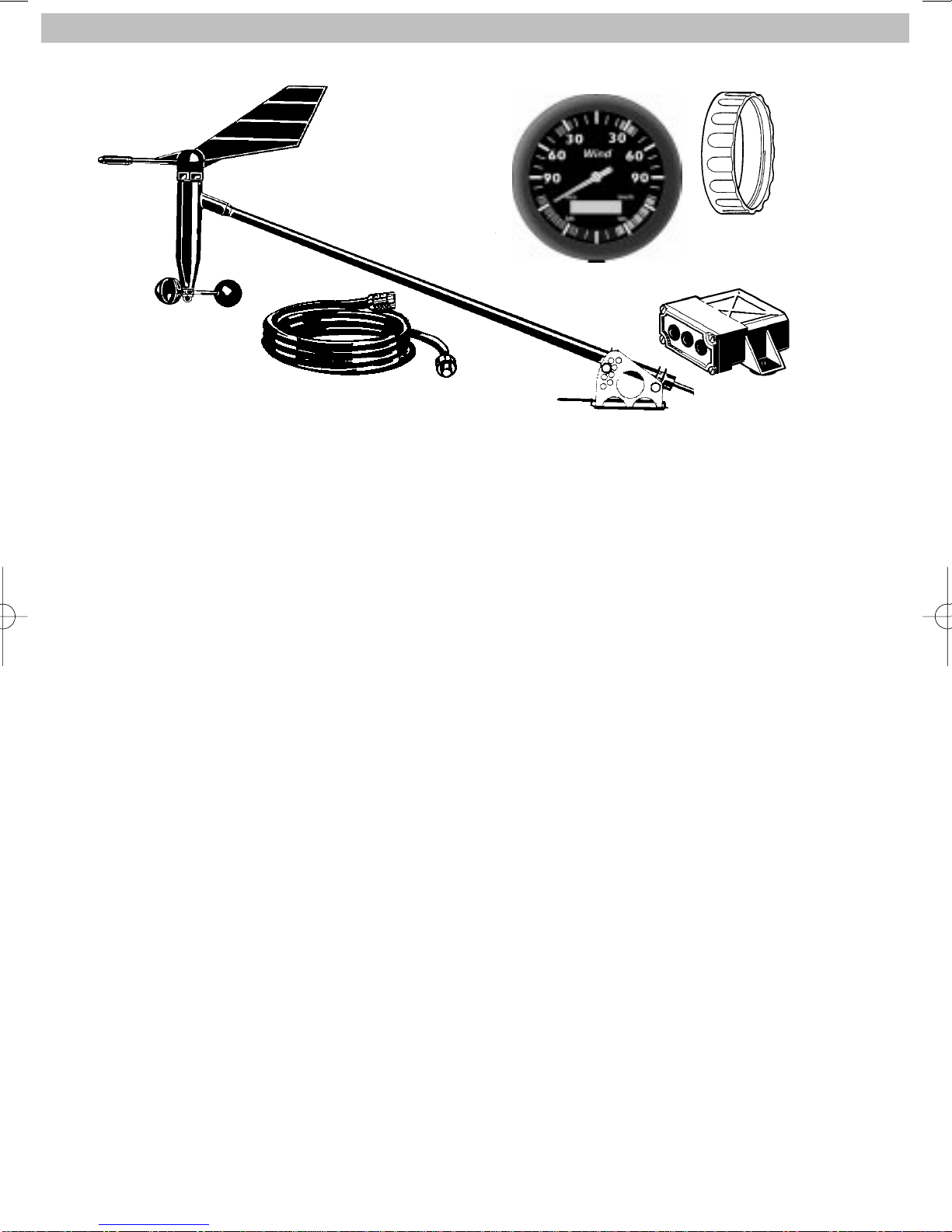
The supplied kit contains:
- Indicating instrument
- Union nut for instrument fixation
- Anemometer sensor with fixation base plate
- Mast cable from sensor to display unit, length 30 m
- Strain relief for mast cable
- Connecting socket
- Product certificate
- Installation and operating instructions
Accessories (must be ordered separately)
- Fixation kit (bracket) N05 800 792
- Lighting kit (24 V / 1.2 W) N05 800 550
-Analog wind speed indicating instrument N01 310 502
- NMEA Interface N01 610 506
Spare parts:
- Lighting kit (12 V / 1.2 W) N05 800 552
Other spare parts are available on request.
28
VDO OCEAN LINE WIND
olwind_e.qxd 21.06.99 13:35 Seite 28
Display functions of the VDO Ocean Line anemometer
system
1. Apparent wind direction
The needle on the indicating instrument indicates the apparent
wind direction. The colored area on the dial marks the optimum
wind angle at which the best possible speed can be expected,
either against or with the wind.
2. Apparent wind speed
The wind speed is shown on the LCD in the unit specified during
setup (m/s, km/h, bft or kts). The selected unit will be marked on
the display with a small angle (in the above illustration, for
example, the wind speed will be displayed in knots). On
connection to the boats supply system, the unit in which the wind
speed should be displayed in the LCD should be set (see the
Installation section).
29
DISPLAY FUNCTIONS
Apparent
wind speed
Angle giving unit for wind
speed
Apparent wind direction
olwind_e.qxd 21.06.99 13:35 Seite 29