Wolf 24 E Series User manual

24" E Series Oven
Use and Care Guide
CLEANING, MAINTENANCE,
AND MORE

2 | Wolf Customer Care 800.222.7820
Contents
324" E Series Oven
4Safety Precautions
624" E Series Oven Features
7Oven Operation
15 Care Recommendations
17 Troubleshooting
19 Wolf Warranty
24" E Series Oven

wolfappliance.com | 3
Customer Care
The model and serial number are printed on the enclosed
product registration card. Both numbers are also listed
on the product rating plate. Refer to page 6 for rating
plate location. For warranty purposes, you will also need
the date of installation and name of your authorized Wolf
dealer. Record this information below for future reference.
SERVICE INFORMATION
Model Number
Serial Number
Date of Installation
Certified Service Name
Certified Service Number
Authorized Dealer
Dealer Number
If your product ever needs attention, be sure to use a
Wolf Factory Certified Service provider recommended
by our Customer Care Center, or select one from our list
of providers available at wolfappliance.com/locator. All
Factory Certified Service providers are carefully selected
and thoroughly trained by us.
24" E Series Oven
Important Note
To ensure this product is installed and operated as safely
and eciently as possible, take note of the following types
of highlighted information throughout this guide:
IMPORTANT NOTE highlights information that is especially
important.
CAUTION
Indicates a situation where minor injury or product
damage may occur if instructions are not followed.
WARNING
States a hazard that may cause serious injury or
death if precautions are not followed.
IMPORTANT NOTE: Throughout this guide, dimensions in
parentheses are millimeters unless otherwise specified.

4 | Wolf Customer Care 800.222.7820
Safety Precautions
• Be sure that the oven cool air intake (located
below the door) and oven exhaust vent (located
above the door) are unobstructed at all times.
• Always use dry pot holders when removing
pans from this appliance. Wet or damp pot
holders can cause steam burns. Do not use a
towel or bulky cloth in place of pot holders.
• Position oven racks in the desired locations
when the oven is cool. If a rack must be repo-
sitioned after the oven is already hot, be sure
the pot holder does not contact a hot heating
element in the oven.
• Do not repair or replace any part of this appli-
ance unless specifically recommended in litera-
ture accompanying this appliance.
• Do not use aluminum foil to line any part of this
appliance.
• Never use this appliance to warm or heat the
room.
• Do not use water on grease fires. Smother
the flame or use a dry chemical or foam-type
extinguisher.
• Do not leave children alone or unattended in
the area where this appliance is in use. Never
allow children to sit or stand on the appliance.
• Do not store items of interest to children above
or at the back of this appliance, as they could
climb on the appliance to reach items and be
injured.
IMPORTANT INSTRUCTIONS
GENERAL SAFETY PRECAUTIONS
• Read this guide carefully before using this
appliance to reduce risk of fire, electric shock,
or injury.
• This appliance must be properly installed
and serviced by a qualified installer or service
agency and grounded by a qualified technician.
• Clean only those parts listed in this guide.
• Do not use oven cleaners. No commercial oven
cleaner or oven liner protective coating of any
kind should be used in or around any part of
the oven.
• Do not touch heating elements or interior
surfaces of oven. Heating elements may be
hot even though they are dark in color. Inte-
rior surfaces become hot enough to cause
burns. During and after use, do not touch or let
clothing or other flammable materials contact
heating elements or interior surfaces of the
oven until they have had sucient time to cool.
Other surfaces of the appliance may become
hot enough to cause burns (for example, oven
vent openings and surfaces near these open-
ings, oven doors, and windows of oven doors).
• Exercise caution when opening the oven door.
Let hot air or steam escape before looking or
reaching into the oven.

wolfappliance.com | 5
Safety Precautions
IMPORTANT INSTRUCTIONS
GENERAL SAFETY PRECAUTIONS
• Do not heat unopened food containers, such as
baby food jars and cans. Pressure build-up may
cause the container to burst and cause injury.
• Do not store or use gasoline or other flamma-
ble vapors and liquids in the vicinity of this
or any other appliance.
• Do not clean the oven gasket; rubbing or
moving the gasket may compromise the door
seal.
• Wear proper apparel. Loose-fitting or hanging
garments should never be worn while using this
appliance.
• During use the appliance becomes hot. Care
should be taken to avoid touching heating
elements inside the oven.
• Do not use harsh abrasive cleaners or sharp
metal scrapers to clean the oven door glass.
• Only use the temperature probe recommended
for this oven.
• Do not use a steam cleaner to clean the
appliance.
• Before starting the Clean cycle, excess spillage
must be removed from the oven cavity.
CAUTION
Before using Clean, remove broiler pan,
oven racks, oven rack guides, and any other
utensils.
WARNING
Accessible parts may become hot during use.
Young children should be kept away.
WARNING
Ensure that the appliance is switched o
or unplugged before replacing the lamp to
avoid the possibility of electric shock.
WARNING
PROPOSITION 65 FOR CALIFORNIA RESIDENTS
Cancer and Reproductive Harm—
www.P65Warnings.ca.gov
SAVE THESE INSTRUCTIONS

6 | Wolf Customer Care 800.222.7820
24" E Series Oven Features
24" E Series Oven Features
FEATURES
1Product Rating Plate
2Touchscreen
3All O Button
4Adjustable Oven Rack
5Adjustable Oven Pan
6Convection Fan
7Temperature Probe Receptacle
8LED Lighting
Getting Started
We know you are eager to start cooking, but before you
do, please take some time to read this use and care guide.
Whether you are an occasional cook or an expert chef, it
will be to your benefit to familiarize yourself with the safety
practices, features, operation, and care recommendations
of your Wolf E Series Oven.
To ensure the best results, review the cooking modes and
special features on page 12.
Prior to Use
Follow the steps below to ensure all residual oil from the
manufacturing process has been removed.
Prior to Use:
1 Clean the oven thoroughly with hot water and a mild
detergent.
2 Rinse and dry with a soft cloth.
3 Turn on ventilation. Some smoke and odor is normal.
4 Select the desired language, date, clock, temperature
units, and initiate the burn-in process. The burn-in
process takes approximately 30 minutes.
24" E Series Oven
6
3
1
4
7
8
5
2
wolfappliance.com | 7
Touchscreen
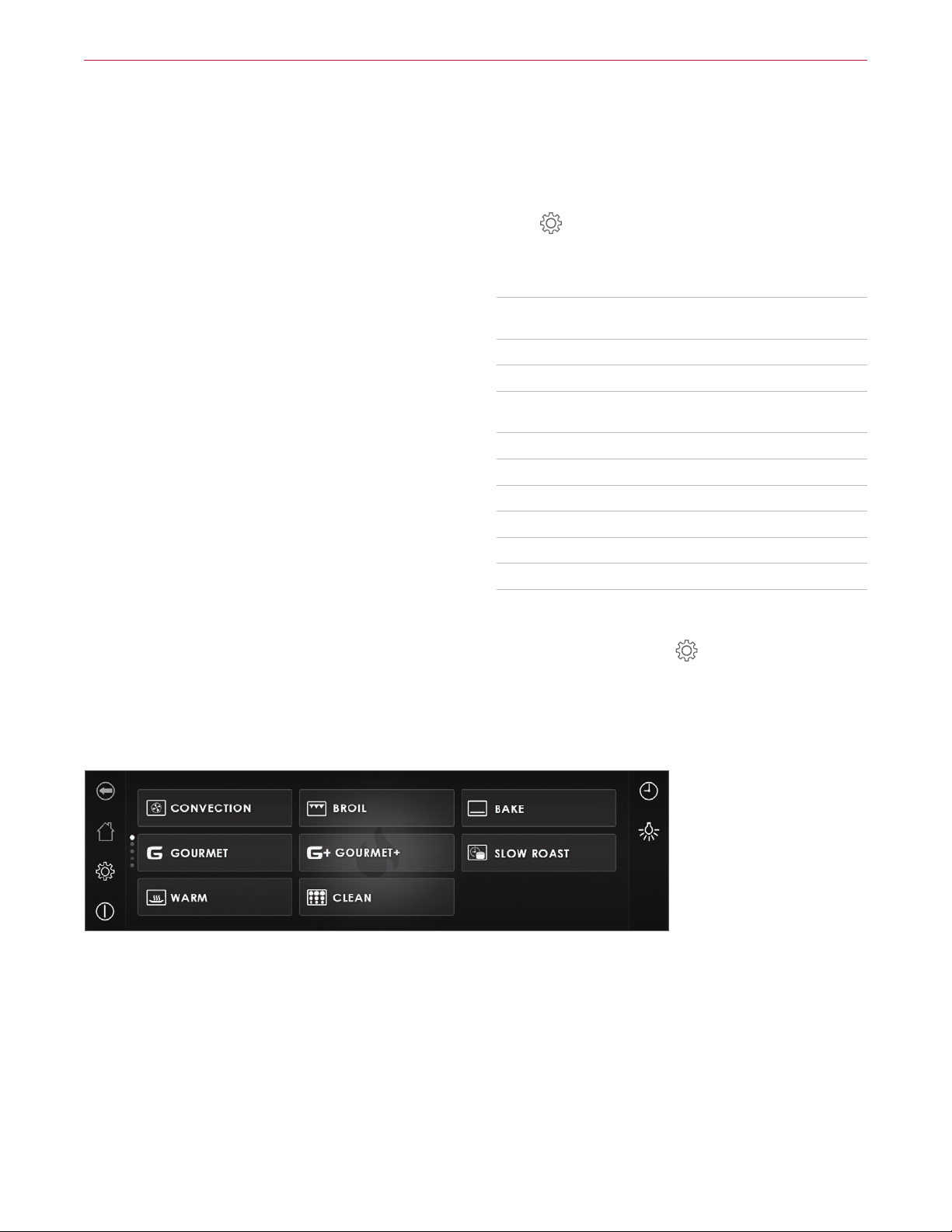
The touchscreen utilizes touch technology to select cook-
ing modes and other functions. Refer to the illustration
below.
To reposition modes, press and hold the mode on the
display, then move to the desired location.
NOTE: If an existing mode is in the desired location, it must
be moved first.
Extended Options
Touch to access the extended options, then touch the
desired option.
SETTING OPTIONS
Language Select: English, Spanish, French, Italian,
German, Dutch, or Chinese.
Display Lock Lock touchscreen for cleaning.
Display Select brightness and standby screen.
Signals and Tones Select quiet mode, frequencies, touch
pad volume, and feedback tones.
Individual Settings Adjust temperature units.
Assistance Functions Select illumination and preheat tone.
Date and Clock Set date and select 12 hour or 24 hour.
Appliance Information Access product information.
Factory Settings Reset to factory settings.
Service For service only.
Setting Extended Options:
1 With the oven on, touch .
2 Touch the desired setting.
3 Follow the instructions on the display.
Oven Operation
Home screen

8 | Wolf Customer Care 800.222.7820
Oven Operation
Options
Timed Cook: Set a timed cook or delayed start.
Preheat: Turn preheat on or o (not available on all modes).
Food Probe Temperature: Set food probe temperature.
Cooking Modes
Selecting a Cooking Mode:
1 Select the desired cooking mode.
2 Touch the red box containing the current temperature
set point.
3 Use the number pad to input the desired temperature,
then touch Set. "---" appears for temperature outside of
the temperature range.
4 Touch Start.
FAVORITES
Commonly used cooking modes or foods can be saved for
easy access. Up to 50 favorites can be stored at a time.
Creating a Favorite:
1 Select the desired cooking mode and temperature.
2 Touch .
3 Use the keypad to enter a name.
4 Touch Set.

wolfappliance.com | 9
Oven Operation
DELAYED START
Delayed start automatically turns the oven on and o at
specified times. The oven remains idle until the desired
start time and turns o at the desired stop time. If preheat
is required, the preheat time must be accounted for when
determining the cooking duration. The clock must be set
to the correct time to function properly. Use in any cook-
ing mode except Warm.
Setting Controls:
1 Touch the desired mode, then enter the desired
temperature.
2 Touch Options.
3 Touch Timed Cook.
4 Enter the desired stop time and cooking duration,
then touch Set.
5 Touch Ok, then touch Start.
6 The oven turns o automatically when the cook time
is complete.
Auto Program
TIMED COOK
Timed Cook automatically turns the oven o at a specified
time. The oven begins to heat immediately and turns o
at the desired stop time. If preheat is required, the pre-
heat time must be accounted for when determining the
cooking duration. The clock must be set to the correct
time to function properly. Use in any cooking mode except
Gourmet+.
Setting Controls:
1 Touch the desired mode, then enter the desired
temperature.
2 Touch Options.
3 Touch Timed Cook.
4 Enter the desired cooking duration, then touch Set.
5 Touch Ok, then touch Start.
6 The oven turns o automatically when the cook time
is complete.

10 | Wolf Customer Care 800.222.7820
SABBATH
Setting controls:
1 Touch .
2 Touch Individual Settings.
3 Touch Sabbath Mode.
4 Touch On or O.
When On, Sabbath Mode appears on the display. Select
between Sabbath Bake and Sabbath Bake Humid. The oven
will remain on for up to 78 hours while in Sabbath Mode.
Oven Operation
Oven Operation
TIMER
The timer can be set for a maximum of 9 hours and 59
minutes. Once the timer is set, the countdown appears on
the display. The timer is independent from the oven.
Setting Timer:
1 Touch .
2 Touch the user input box.
3 Use the keypad to enter the desired time.
4 Touch Start.
5 Touch Stop to cancel the timer.
To adjust the timer, touch the countdown timer count-
down on the display. Enter the desired time, then touch
Start.
Other manuals for 24 E Series
1
Table of contents
Languages:
Other Wolf Oven manuals
Wolf
Wolf SO30-2F/S-TH User manual

Wolf
Wolf CSO3050CMB User manual

Wolf
Wolf CSO30PM/S/PH User manual
Wolf
Wolf E Series SO30-2F/S Owner's manual

Wolf
Wolf SO30CM/S User manual

Wolf
Wolf M Series User manual

Wolf
Wolf SO36U User manual

Wolf
Wolf M Series User manual
Wolf
Wolf CSO30TE/S/TH User manual

Wolf
Wolf E Series Guide

Wolf
Wolf ICBDF366 User manual

Wolf
Wolf M Series Operating instructions
Wolf
Wolf L Series SO30F Owner's manual

Wolf
Wolf WGCO100S User manual

Wolf
Wolf e Series User manual
Wolf
Wolf M Series Guide

Wolf
Wolf DO30F User manual
Wolf
Wolf Speed Oven User manual
Wolf
Wolf 24 E Series User manual
Wolf
Wolf e Series User manual