For more information on the Xerox
DocuTech®6100/6115/6135 Production
Publishers and the PowerPlus Series,
call 1-800 ASK XEROX or visit us on
the Web at: www.xerox.com
Printer Control Module
• Sun BladeTM 2500
• 1.28 GHz UltraSparc III processor
• 36 GB system disk
• 2 GB memory
• DVD-ROM Drive
• 17.0" color flat panel display
• Keyboard and mouse
• Ethernet interface (10/100BaseT)
• Controller stand (optional)
Printer Module
• Xerographic Engine
• Print speeds:
- DocuTech 6100: Up to 96 ppm (8.5" x 11"/A4)
- DocuTech 6115: Up to 115 ppm (8.5" x 11"/A4)
- DocuTech 6135: Up to 135 ppm (8.5" x 11"/A4)
• On-site upgrades are available for the DocuTech
6100 and 6115*
• Simplex or duplex printing
• Enhanced 600 x 600 dpi laser raster output
• ImageSense Technology with redesigned
85+ and 106+ line screens and new 121 and
140 line screens
• On-line, right and left side stitching/binding
• Optional Interposers:
- 2 Tray Interposer
or
- 3 Tray Interposer
Throughput Materials
(Printing and finishing)
• Stock weights: 16 lb. bond to 110 lb. index
(60 g/m2to 200 g/m2)
• Sizes: 8" x 10" to 14.33" x 17"
(203 mm x 254 mm to 363 mm x 432 mm)
• Narrow format option available for 7" width
• Extra large format option available for up to
14.33" x 19.2"*
• Lightweight paper option available for 13 lb. bond*
PowerPlus Series Options**
• 3 Tray Interposer
• PowerPlus Large format option available for
up to 14.33" x 18.5" (364 mm x 470 mm)
- Tray 3 14.0” x 18.0” (356mm x 457mm)
- Tray 4,5,(6) up to 14.33" x 18.5"
(364 mm x 470 mm)
Paper Input Capacity
(Sheet capacity all at 20 lb./75 g/m2)
• Tray 1 1,100 sheets; 8" x 10" to 9" x 14.33"
(203 mm x 254 mm to 229 mm x 364 mm)
• Tray 2 600 sheets; 8" x 10" to 9" x 14.33"
(203 mm x 254 mm to 229 mm x 364 mm)
• Tray 3 2,600 sheets of up to 14.33" x 17"
(364 mm x 432 mm)
Paper Input Option – Interposers
• 2 Tray Interposer (for a total of 5 input paper trays
with auto tray switching and document inserts):
- Tray 4*** 550 sheets of up to 14.33" x 17"
(364 mm x 432 mm)
- Tray 5 2,600 sheets of up to 14.33" x 17"
(364 mm x 432 mm)
• 3 Tray Interposer (for a total of 6 input paper trays
with auto tray switching and document inserts):
- Tray 4*** 550 sheets of up to 14.33" x 17"
(364 mm x 432 mm)
- Tray 5 550 sheets of up to 14.33" x 17"
(364 mm x 432 mm)
- Tray 6 550 sheets of up to 14.33" x 17"
(364 mm x 432 mm)
Paper Output Options
• Stacker: 3,000 sheets at 20 lb. (75 g/m2)
Optional: 5,000 sheets at 20 lb. (75 g/m2)
(with one High Capacity Stacker)
Optional: 10,000 sheets at 20 lb. (75 g/m2)
(with two High Capacity Stackers)
• Stitcher: 2 - 70 sheets at 20 lb. (75 g/m2)
1 or 2 adjustable stitches
• Binder: 15 - 125 sheets at 20 lb. (75 g/m2)
- Tape colors: Black, blue, red, brown, gray,
white or green
- 425 11" binds per tape reel
• SquareFold Booklet Maker (optional)
- Fully automatic booklet making system
- All operator settings are made with the
push of a few buttons
- Up to 22 sheets at 20 lb., 26 sheets at 16 lb
- Paper sizes:
Width Length
Min. 8" (203 mm) 10" (254 mm)
Max. 12.3" (312 mm) 18.2" (462 mm)
- Cover Insertion Module (CIM) (optional)
- Adjustable saddle stitch heads, folder, trimmer
• Supports Level 1 Document Finishing
Architecture (DFA)
Client Environments Supported
• Windows 95/98, NT, 2000, XP
• Mac OS 7.6 and above
• Sun OS 4.1.3 / Solaris 1.1.1B
• Solaris 2.3 / 2.4 / 2.5.1 / 2.6 / 8.x
PDLs and Data Formats
• Adobe PostScript Level 3/PDF
• PCL 6 • TIFF • ASCII • Optional LCDS
• FreeFlowTM Variable Information Suite
Native Network Environments
• TCP/IP • AppleTalk • HTTP
• Novell (SPX-IPX) • IPP • SNMP
• Optional Channel Connectivity
Electrical Requirements
• Printer Controller:
- 100/240 VAC + 10%, 47-63 Hz
• Printer Module:
- 120/208 or 120/240 VAC, 60 Hz, 50 amp
service, NEMA 14-30 R (domestic)
- 200/240 VAC ± 10%, 50 Hz or 3 phase
WYE connection, 380 VAC ± 10%, 50 Hz
- 380 VAC ± 10%, 50 Hz
- KVA rating: Standby: 2.73; Operating: 6.45
(without Interposer). Standby: 2.80;
Operating: 7.65 (with Interposer)
- Agency certification: UL 1950 IEC 950, CSA
22.2 - 950, FCC (Class A), EN55022 (Class A),
CISPR22 (Class A), EN50082-1: 1992 (Generic
Immunity Standard), and ICES003 (Class A)
• Interposer (optional):
- 100/240 VAC + 10%, 47-63 Hz, 10A
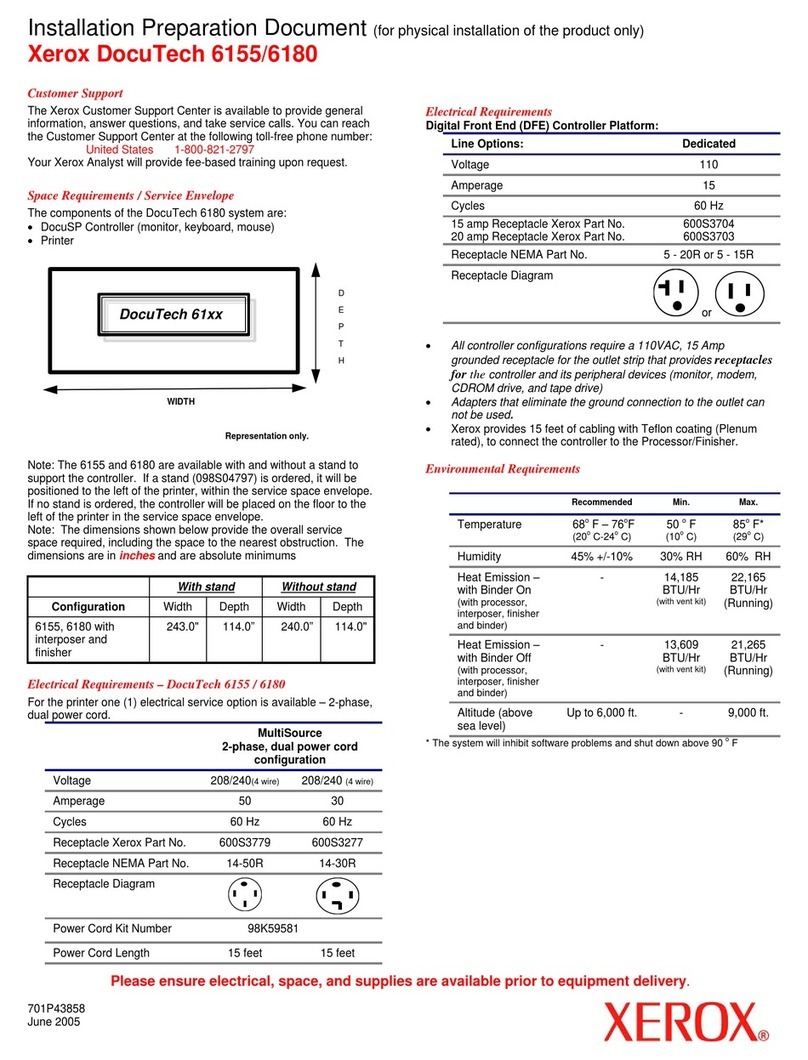
Physical Characteristics
Width Depth Height Weight
Printer Controller - Processor Module
10" (254 mm) 24" (610 mm) 17.9" (455 mm) 70 lbs. (32 kg)
Printer Controller - Controller Stand
30" (762 mm) 30" (762 mm) 38" (965 mm) 170 lbs. (76.8 kg)
Printer Controller - 17.0" Flat Panel Display
18" (475 mm) 9.5" (241 mm) 19.25" (489 mm) 22 lbs. (10 kg)
Printer Module (without optional Interposer)
133" (3379 mm) 46" (1165 mm) 48.3" (1226 mm) 2502 lbs. (1136 kg)
Interposer (optional)
45.9" (1165 mm) 32.3" (821 mm) 49.0" (1240 mm) 710 lbs. (322 kg)
Xerox DocuTech 6100/6115/6135 Production Publisher and the PowerPlus Series Specifications
*Contact your Xerox Sales Representative for more details.
**PowerPlus features available for new printer installations only. Each option sold separately.
***Tray 4 only accepts sheets which do not need to be imaged, i.e., covers and inserts.
©2005 XEROX Corporation. All rights reserved. XEROX®, FreeFlowTM, and DocuTech®are trademarks of or licensed to Xerox Corporation. Sun and Sun Blade are trademarks or registered trademarks of Sun Microsystems, Inc. in the United States and other countries.Product appearance,
build status and/or specifications are subject to change without notice. The Xerox Total Satisfaction Guarantee applies to equipment under a Xerox warranty or a Full Service Maintenance Agreement and is subject to certain conditions. 04/05. 610P714020C
The PowerPlus Series extends DocuTech’s industry-leading capabilities
with enhancements that expand the media latitude and complex job
capabilities of the system such as a 3 Tray Interposer and support for
large format and coated stocks.