(P/N) 7032.0316 Rev B
05/17 • © copyright 2017-2018 2
2. Press the “0” key
3. Enter your NEW combination two times (plus eKey, if enabled). You must insert and remove eKey each time, if enabled.
4. If a mistake is made, wait thirty (30) seconds and repeat steps 1-3.
5. Test lock operation using new combination (+ eKey) several times before closing the door.
CAUTION: When selecting a combination, do not use birthday or other predictable data that could give correlation
between user and combination. Once the new combination has been set, do not share the combination. It is a secret
• Valid Combination Entry - Double signal after valid combination is entered.
• Invalid Combination Entry - Triple signal indicates the old combination is still valid.
KEYPAD BACKLIGHT
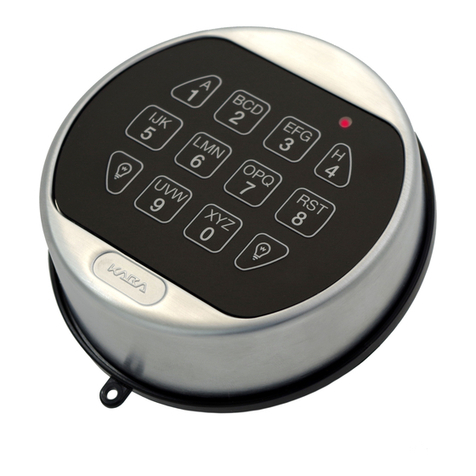
• Press either lightbulb icon.
• Panel keys will remain backlighted for approximately 8 seconds.
• The backlight feature will not adversely affect battery life if done in conjunction with normal anticipated keypad usage.
BATTERY LOW WARNING
• Repeated LED flashing and beeping during an opening indicates that the battery is low and needs immediate
replacement.
• Uses one (1) 9-Volt alkaline battery. (Recommended: Duracell™ or Eveready™ alkaline batteries.) It is recommended that
batteries be replaced at least once a year.
If battery is depleted and will not allow lock to open, follow instructions below. Lock contains a non-volatile memory. Even
with batteries removed, the lock will retain all programming.
CHANGING YOUR BATTERY
1. Open the battery door (black plastic compartment cover located at the bottom of the keypad) by gently pulling the tab
down and to the right.
NOTE: If the battery door as permanently installed using the hinge pin, the battery door will swing open but stay
attached to the Entry Device. If the battery door was installed without the hinge pin, it will detach from the Entry Device
when it is opened.
2. Allow the battery and its attached leads to drop down and out of the battery compartment. If it does not drop, gently
pull on the battery until it drops out.
3. Remove the connector by unsnapping it from the two terminals on the top of the battery.
CAUTION! Hold on to battery terminal connector to avoid pulling the wires out of the housing.
4. Press and hold the zero (0) key for ten (10) seconds before installing a battery.
5. Connect a new 9-Volt Alkaline battery to the battery clip.
6. Gently push the battery and the leads completely into the battery compartment.
7. If the battery door is permanently attached, simply swing the battery door closed ensuring the handle is secured inside
the left edge of the battery opening of the keypad housing. If the battery door is detached, reinstall the battery door by
orienting the hinge hook to the right, place the hinge hook onto the battery door post of the keypad, and rotate clockwise
to the left until the handle is secured inside the left edge of the battery opening of the keypad housing. See Figure 1.
NOTE: The audit features, the software features, features associated with peripheral devices and systems, optional
interconnect devices and their associated features, features involving the use of user keys, the duress feature, monitoring
features, remote features, and other additional features have not been evaluated by UL. Models 8130 and 3190 keypads
are not certified by UL, are not UL listed, and not approved for UL applications.”
Mounting Instructions available at www.dormakaba.us.
Figure 1