1
is guide is intended for easy set-up of e-pill® Medimi™ the rst time e-pill® Medimi™ is used. All set-
tings are available from the e-pill® Medimi™ menu under the “Tools” heading. To change settings and
perform more advanced settings, please refer to the User Guide.
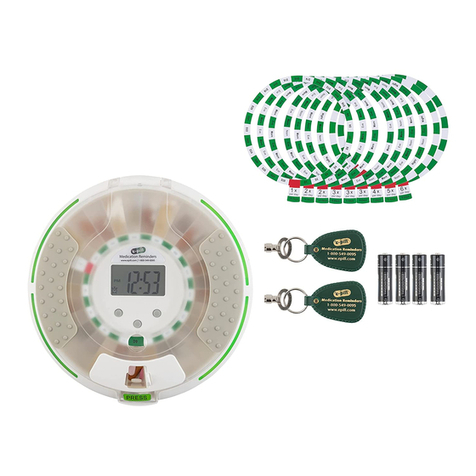
Package contents
e-pill®Medimi™ component parts
Getting started with your e-pill®Medimi™.
e-pill®Medimi™ start-up guide
GettingstartedwithyourMedimi.2011‐03‐11 Page1of7
Medimistart‐upguide
Thisguideisintendedforeasyset‐upofMedimithefirsttimeMedimiisused.Allsettingsare
availablefromtheMedimimenuunderthe“Tools”heading.Tochangesettingsandperformmore
advancedsettings,pleaserefertotheUserGuide.
Packagecontents
②
①
1. Medimi
2. TwoAlkalinebatteriestypeAAA
3. Twopillcartridges(Cartridgesare
availableintwosizes:Onewith
roomfor7largetabletsandone
withroomfor15smallertablets)
Medimicomponentparts
1.Lightindicator6.Slidingcover
2.Ejectorbutton7.Housingcover
3.Display8.Cartridgemodule
4.Navigationkeys9.Pillcollectioncup
5.USBconnector
Note:Donotinsertthe
batteriesyet
1.Cartridgefittedinto
cartridgemodule
3.Cartridgeejectbutton
2.Cartridgeenteringthe
cartridgemodule
4.Pillcollectioncupthat
mustberemovedtogain
accesstothecartridge
GettingstartedwithyourMedimi.2011‐03‐11 Page1of7
Medimistart‐upguide
Thisguideisintendedforeasyset‐upofMedimithefirsttimeMedimiisused.Allsettingsare
availablefromtheMedimimenuunderthe“Tools”heading.Tochangesettingsandperformmore
advancedsettings,pleaserefertotheUserGuide.
Packagecontents
②
①
1. Medimi
2. TwoAlkalinebatteriestypeAAA
3. Twopillcartridges(Cartridgesare
availableintwosizes:Onewith
roomfor7largetabletsandone
withroomfor15smallertablets)
Medimicomponentparts
1.Lightindicator6.Slidingcover
2.Ejectorbutton7.Housingcover
3.Display8.Cartridgemodule
4.Navigationkeys9.Pillcollectioncup
5.USBconnector
Note:Donotinsertthe
batteriesyet
1.Cartridgefittedinto
cartridgemodule
3.Cartridgeejectbutton
2.Cartridgeenteringthe
cartridgemodule
4.Pillcollectioncupthat
mustberemovedtogain
accesstothecartridge
GettingstartedwithyourMedimi.2011‐03‐11 Page1of7
Medimistart‐upguide
Thisguideisintendedforeasyset‐upofMedimithefirsttimeMedimiisused.Allsettingsare
availablefromtheMedimimenuunderthe“Tools”heading.Tochangesettingsandperformmore
advancedsettings,pleaserefertotheUserGuide.
Packagecontents
②
①
1. Medimi
2. TwoAlkalinebatteriestypeAAA
3. Twopillcartridges(Cartridgesare
availableintwosizes:Onewith
roomfor7largetabletsandone
withroomfor15smallertablets)
Medimicomponentparts
1.Lightindicator6.Slidingcover
2.Ejectorbutton7.Housingcover
3.Display8.Cartridgemodule
4.Navigationkeys9.Pillcollectioncup
5.USBconnector
Note:Donotinsertthe
batteriesyet
1.Cartridgefittedinto
cartridgemodule
3.Cartridgeejectbutton
2.Cartridgeenteringthe
cartridgemodule
4.Pillcollectioncupthat
mustberemovedtogain
accesstothecartridge
1. Medimi™
2. Two Alkaline batteries type AAA
3. Two pill cartridges (Cartridges are available in two sizes:
One with room for 7 large tablets and one with room for
15 smaller tablets.)
1. Light indicator
2. Eject button
3. Display
4. Navigation keys
5. USB connector
6. Sliding cover
7. Housing cover
8. Cartridge module
9. Pill collection cup
1. Cartridge tted into cartridge module
2. Cartridge entering the cartridge module
3. Cartridge eject button
4. Pill collection cup that must be removed to
gain access to the cartridge
Note: Do not insert the batteries yet!
4
GettingstartedwithyourMedimi.2011‐03‐11 Page7of7
Takingyourmedication
Whenitistimetotakeyourmedication,Medimiwillalertyouwithlight,soundandvibration.To
dispensemedication,presstheblinkingejectorbuttontwice.
KeepMedimiuprightwhenejectingmedication.
Medicationisejectedintothepilcollection
cup.Checkthatthedoseiscorrect.
Totakethemedication,pullthecupdown
onenotchandslantyourMedimiuntilthe
pillsfallintoyourhand(seepicture).
Followingeachdoseejection,Medimichecksifthereissufficientmedicationforthenextdose.If
Medimialertsyouthatitisoutofmedication,opentheslidingcoverandcheckthedisplaytosee
whichmedication(s)areabouttorunout.Toavoidincorrectmedication,fillupwithmedication
immediately.
Refillingmedication
Removethepillcollectioncup.
Takeoutthecartridge(s)toberefilled.RememberwherethecartridgewassetinMedimi.Refillthe
cartridgeinthesamewayasdescribedatstart‐up.
WhenthecartridgeisreinsertedinyourMedimi,atextmessagethedisplaywillconfirmwhich
cartridgewasenteredandwhichmedicationMedimiexpectshasbeeninserted.Medimiwillaskhow
manypillsareinthecartridge.Ifthecartridgewasemptywhenitwasremoved,asuggestionfora
fullcartridge,i.e.7or15,ismade.Ifthecartridgecontainedpillswhenitwasremoved,the
suggestionwillbethesamenumberaswhenthecartridgewasremoved.Thenumbercanbe
changedwith�▼.Confirmbypressing●.
Note:Ifawrongnumberisentered(e.g.toomany),thiscanleadtoincorrect
dosages.
Entering text
▲▼◄ ► Scrolls between letters and functions. In the example above, the letter C is highlighted.
● Selects the highlighted letter and enters it in the text window at the bottom of the display.
In the example above, the letter C is entered in the text window.
Aa Switches between upper and lower case letters.
←
Deletes one letter.
_ Enters a space.
Concludes text entry and returns to the menu.
Taking your medication
When it is time to take your medication, e-pill® Medimi™ will alert you with light, sound and vibration.
To dispense medication, press the blinking ejector button twice.
Keep e-pill®Medimi™ upright when ejecting medication.
Medication is ejected into the pil collection cup. Check that the dose is correct.
To take the medication, pull the cup down one notch and slant your e-pill® Med-
imi™ until the pills fall into your hand (see picture).
Following each dose ejection, e-pill® Medimi™ checks if there is sucient medica-
tion for the next dose. If e-pill® Medimi™ alerts you that it is out of medication,
open the sliding cover and check the display to see which medication(s) are about to
run out. To avoid incorrect medication, ll up with medication immediately.
Relling medication
Remove the pill collection cup.
Take out the cartridge(s) to be relled. Remember where the cartridge was set in e-pill® Medimi™. Rell
the cartridge in the same way as described at start-up.
When the cartridge is reinserted in your e-pill® Medimi™, a text message on the display will conrm which
cartridge was entered and which medication e-pill® Medimi™ expects has been inserted. e-pill® Medimi™
will ask how many pills are in the cartridge. If the cartridge was empty when it was removed, a suggestion
for a full cartridge, i.e. 7 or 15, is made. If the cartridge contained pills when it was removed, the sugges-
tion will be the same number as when the cartridge was removed. e number can be changed with ▲ ▼.
Conrm by pressing ●.
Note: If a wrong number is entered (e.g. too many), this can lead to incorrect dosages.
www.epill.com 1-800-549-0095