ETC Installation Guide
ColorSource Fresnel V v1.1
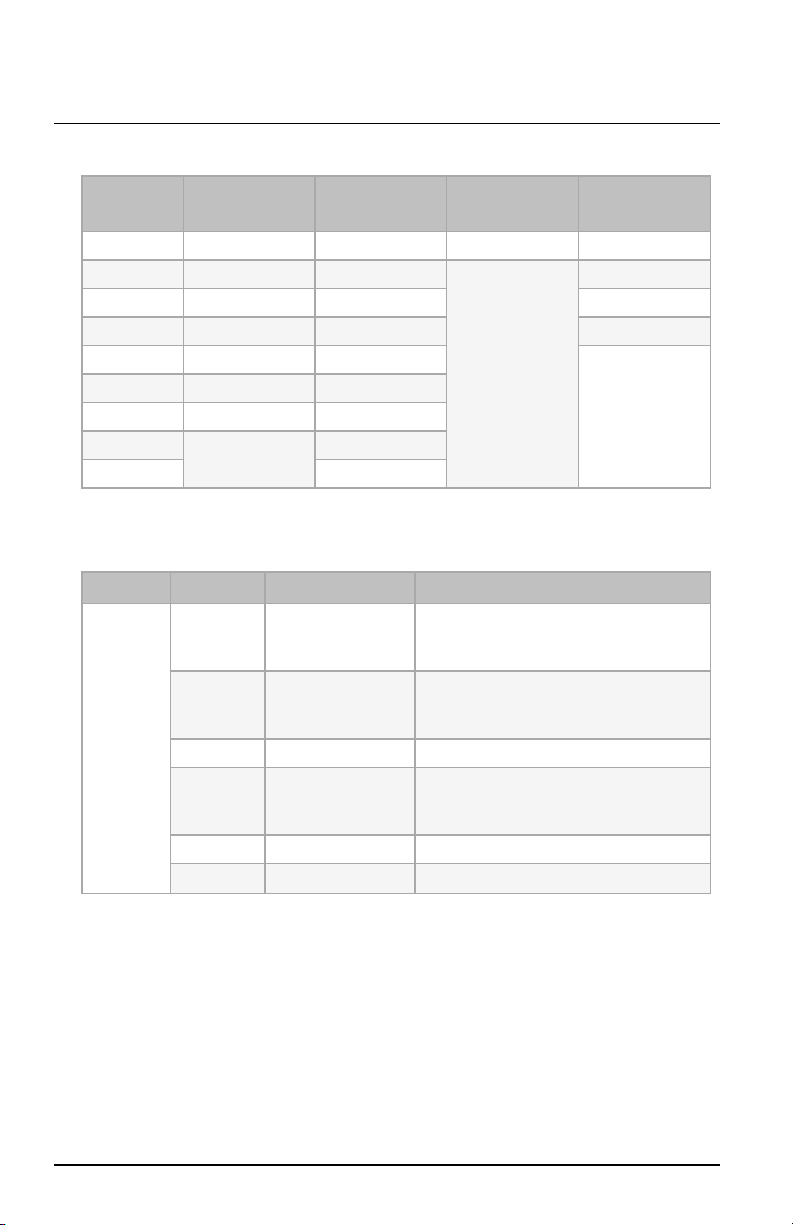
Display Setting Values Description
Uni Universe 001 – 999 Set the Universe value.
id SHoW ID 100 – 359
Set the value of the final three digits of the Show
ID (the prefix "24" is not displayed). For example,
for the SHoW ID24200, set the value to 200. This
value must match the SHoW ID value on the
Multiverse transmitting device.
PAS SHoW
Key 000 – 500
Set the SHoW Key value. This value must match
the SHoW Key value on the Multiverse
transmitting device.
Str Radio
Strength
Off
(oFF)
1 – 4
Set the value to the minimum level required for
successful communication between transmitters
and fixtures. Excess power output can cause
reflections and can degrade performance.
Off=Turns off power to the Multiverse radio.
Use this setting to disable wireless
communication on the fixture.
1=Low
2=Medium
3=High
4=Maximum
qAL Signal
Quality 1 – 100
Display of the signal quality. Values above 50%
are good signal quality, and above 80% are
excellent. This value can be helpful when
troubleshooting wireless performance.
SSi Signal
Strength -20 – -120
Display of RSSI(Received Signal
Strengthindicator) in dBm, ranging from -20
(strongest) to -120 (weakest). (Note that the
negative symbol does not display on the fixture.)
A display of "---" indicates that there's no
connection.
rtn Return Return to the rAd option.
Configure Fixtures Using the Set LightApp
Download the Set Light app to a smartphone with NFC
functionality, use the app to set fixture parameters, and
then tap the smartphone to the NFC tag on the fixture
to configure it wirelessly—even when the fixture is not
powered on. Or, after you configure the Multiverse
settings on the fixture, use the Set Light app to
configure one fixture or multiple fixtures wirelessly
from a smartphone or tablet.
Visit etcconnect.com/Apps or scan the code for more
information about the Set Light app.
ColorSource Fresnel V Page 9 of 16 ETC