manuals.online logo
Brands
  1. Home
  2. •
  3. Brands
  4. •
  5. Eyedro
  6. •
  7. Measuring Instrument
  8. •
  9. Eyedro EBEM1 User manual

Eyedro EBEM1 User manual

Other Eyedro Measuring Instrument manuals
Eyedro E5B-M-E3 User manual

Eyedro

Eyedro E5B-M-E3 User manual

Eyedro E5B-M-T2 User manual

Eyedro

Eyedro E5B-M-T2 User manual

Eyedro EYEDRO-HOME User manual

Eyedro

Eyedro EYEDRO-HOME User manual

Eyedro E5B-M-P2 User manual

Eyedro

Eyedro E5B-M-P2 User manual

Eyedro EHWEM1 User manual

Eyedro

Eyedro EHWEM1 User manual
Eyedro E5B-EW-E3 User manual

Eyedro

Eyedro E5B-EW-E3 User manual
Eyedro E5B-M-GWE3 User manual

Eyedro

Eyedro E5B-M-GWE3 User manual
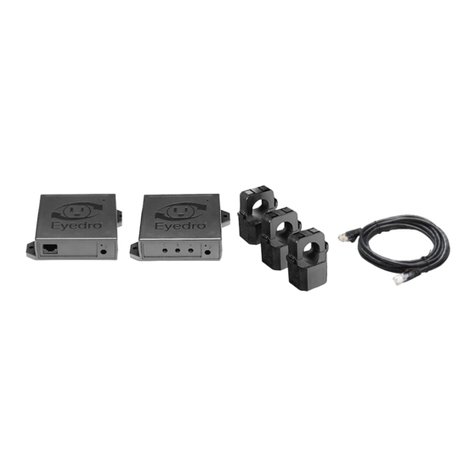
Eyedro E5B-M-GWE3 User manual

Eyedro

Eyedro E5B-M-GWE3 User manual
Eyedro EH Series User manual

Eyedro

Eyedro EH Series User manual

Popular Measuring Instrument manuals by other brands

Powerfix Profi 278296 Operation and safety notes

Powerfix Profi

Powerfix Profi 278296 Operation and safety notes

Test Equipment Depot GVT-427B user manual

Test Equipment Depot

Test Equipment Depot GVT-427B user manual

Fieldpiece ACH Operator's manual

Fieldpiece

Fieldpiece ACH Operator's manual

FLYSURFER VIRON3 user manual

FLYSURFER

FLYSURFER VIRON3 user manual

GMW TG uni 1 operating manual

GMW

GMW TG uni 1 operating manual

Downeaster Wind & Weather Medallion Series instruction manual

Downeaster

Downeaster Wind & Weather Medallion Series instruction manual

Hanna Instruments HI96725C instruction manual

Hanna Instruments

Hanna Instruments HI96725C instruction manual

Nokeval KMR260 quick guide

Nokeval

Nokeval KMR260 quick guide

HOKUYO AUTOMATIC UBG-05LN instruction manual

HOKUYO AUTOMATIC

HOKUYO AUTOMATIC UBG-05LN instruction manual

Fluke 96000 Series Operator's manual

Fluke

Fluke 96000 Series Operator's manual

Test Products International SP565 user manual

Test Products International

Test Products International SP565 user manual

General Sleep Zmachine Insight+ DT-200 Service manual

General Sleep

General Sleep Zmachine Insight+ DT-200 Service manual

Sensa Core Lacto Spark user manual

Sensa Core

Sensa Core Lacto Spark user manual

VOLTCRAFT UTS-1980 operating instructions

VOLTCRAFT

VOLTCRAFT UTS-1980 operating instructions

EBCHQ 94915 Operation manual

EBCHQ

EBCHQ 94915 Operation manual

Balluff BIP LD2-T017-01-EP-S4 Series user guide

Balluff

Balluff BIP LD2-T017-01-EP-S4 Series user guide

Pulsar IMP Lite Series instruction manual

Pulsar

Pulsar IMP Lite Series instruction manual

ETCR 6800 user manual

ETCR

ETCR 6800 user manual

manuals.online logo
manuals.online logoBrands
  • About & Mission
  • Contact us
  • Privacy Policy
  • Terms and Conditions

Copyright 2025 Manuals.Online. All Rights Reserved.

Eyedro
GREEN SOLUTIONS INC.
®
Quick Start Guide
Electricity Monitoring System (EBEM1)
Limited One Year Warranty
Eyedro Green Solutions Inc. warrants this
product for a period of one year from date
of purchase for all defects in material and
workmanship. Defective parts may be
repaired or replaced, at the discretion of the
manufacturer, during this period.
Full warranty policy details are available
at eyedro.com
Eyedro
GREEN SOLUTIONS INC.
®
Eyedro
GREEN SOLUTIONS INC.
®
Visit eyedro.com for any questions
or comments. We value your feedback.
Before Getting Started
This insert provides very high level installation
instructions. Complete installation instructions
and video can be found in the Product Manual
located at eyedro.com/support
Installation may require the cover of the main
electrical panel to be removed while some wires
are still electrified. Even when the main breaker
has been turned ‘OFF’ certain areas of the
panel may still be dangerous and carry the risk
of shock, burn, and electrocution. Installation
should be performed by a qualified electrician.
DO NOT attempt installation unless you know
where electrified areas within the panel are.
FOLD
3. Install Hardware1. Verify Package Contents
4. Create a MyEyedro User Account Template for mounting the
Eyedro Module (optional)
Cut out the below template and use it as a guide to
mark screw locations for a wall mounted module.
3.1 Install Current Sensor(s)
on the line1 conductor
of the circuit(s) to
be monitored.
1Line/Live/Hot conductor(s) only
3.3 Connect Sensor(s), Ethernet cable and
power adapter to the Eyedro module.
4.2 Add the device to your user account by entering the
serial number recorded earlier.
4.3 ENJOY! Login to MyEyedro as often as you like to
view your electricity consumption.
Copyright © 2016, Eyedro Green Solutions Inc.
4.1 GO ONLINE TO:
my.eyedro.com
to create your
online account
(or login if you
have an existing
account).
Ethernet Sensor(s)
Power
Adapter
A
B
C
D
Eyedro Module
Current Sensors (200A to 5000A max 600VAC)
Low-voltage Power Adapter
Ethernet Cable
1
3
1
10ft (3m)
QTY/LENGTH DESCRIPTION
A B C D
(1) (3) (1) (1)
2.36in (60mm)
A
B
C
4.4 For more details regarding the MyEyedro service, review
the MyEyedro User Guide located at eyedro.com/support.
2. Record Serial Number
Module SN: -
3.2 Securely mount the Eyedro modules,
using the template provided below (optional).