DDA-4320 & ZDA-4320RH Instruction Book Revision 7
www.irtelectronics.com P ge 10 of 16 4320-DDA_ib_Rev7.doc
Handshaking Operation:
For use with double width re r ssembly (ZDA-4320RH)
Inst ll two DDA-4320 units in dj cent slots in 3RU fr me. Use the ZDA-4320RH double width re r ssembly in
pl ce of the st nd rd re r ssemblies. As viewed from the front of the fr me, the left module is design ted s ‘A’
nd the right module is design ted s ‘B’.
Two BNC inputs re provided, A (SK6) nd B (SK5). Set module priority by pressing the front p nel ch nge request
button on your chosen M in feed ensuring correct LED lights on e ch unit – M in nd St ndby. The Ch nge-
Allow/Inhibit switch must be set to the Allow position for the Ch nge-Request button to work.
M in feed is now connected to switched outputs 1 (SK11), 2 (SK3) nd 6 (SK8) on the ZDA-4320RH re r connector
ssembly. Both M in nd St ndby feed output 5 out on their own BNC connectors (SK9 & SK1). Note th t these
two outputs re unswitched nd re therefore unsuit ble for m in progr m feeds. They re, however, suit ble for
monitoring the module’s perform nce.
A rel y byp ss is provided on the re r ssembly between the A & B Inputs nd Output 6 (SK8), the output
connector closest to the input connectors. Should both c rds be removed from the double width re r ssembly
mounted within the fr me, or if power f ilure occurs, the current M in input sign l will still p ss through to this
output. For situ tions requiring “critic l” p th, connect to Output 6 (SK8).
Alarm and External Control Connections:
Al rm nd extern l ch ngeover functions ppe r on two 5-pin Phoenix style screw connectors (PL1 nd PL6), e ch
controlling its relev nt module. PL1 corresponds to the ‘B’ module nd PL6 corresponds to the ‘A’ module.
Pin 1 T lly – connection to ground indic tes th t the corresponding module is
cting s the ‘M in’ p th.
2 Extern l ch ngeover request
11
– connecting to ground will m ke this module
‘M in’ in h ndsh ke mode.
3 Input Al rm
12
– n open circuit indic tes th t there is no input sign l present,
input sign l does not m tch the set sign l type, AIS detected in STM-1 d t , or
power to the module h s f iled.
4 Power F il
12
– n open circuit indic tes th t power to the module h s f iled.
5 Ground.
NOTE: 11 Front p nel toggle switch of module must be in the ‘Ch nge Allow’ position.
12 The non- l rm st te is connection to ground vi FET rel y.
Front Panel Indicators and Switches:
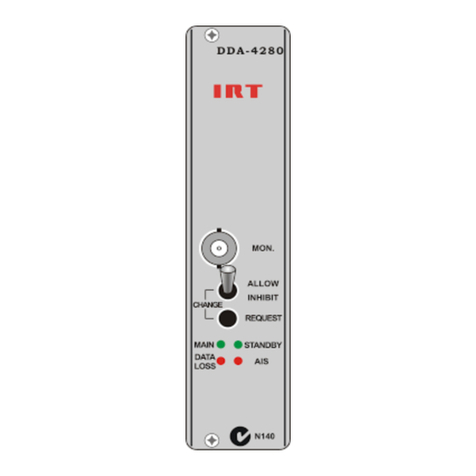
The st tus of the switched outputs is indic ted by the ‘MAIN’ nd ‘STANDBY’ front p nel LEDs (green).
When used s st nd- lone distribution mplifier the ‘STANDBY’ front p nel LED is not pplic ble.
Loss if sign l input or input sign l does not m tch the set sign l type is indic ted by the ‘DATA LOSS’ front p nel
LED (red). Not pplic ble to AIS.
Al rm Indic tion Sign l (AIS) detection is indic ted by the ‘AIS’ front p nel LED (red).
An input sign l presence is indic ted by either the “270Mb” front p nel LED (green) for 270Mb/s sign ls such s ASI
or SDI, or the “STM-1” front p nel LED (green) for 155Mb/s STM-1 sign ls (CMI encoded or NRZ) or AIS.
Two front p nel ch ngeover switches llow m nu l switching between M in nd St ndby modes when oper ting
the DDA-4320 s p ir with the ZDA-4320RH double width re r ssembly. To select module s M in, press the
Ch nge-Request pushbutton of this module. The Ch nge-Allow/Inhibit switch must be set to the Allow position for
the Ch nge-Request button to work.
The front p nel ch ngeover switches h ve no function when the DDA-4320 is used in st nd- lone situ tion.