manuals.online logo
Brands
  1. Home
  2. •
  3. Brands
  4. •
  5. Lake Shore
  6. •
  7. Temperature Controllers
  8. •
  9. Lake Shore DRC-91 C User manual

Lake Shore DRC-91 C User manual

Other Lake Shore Temperature Controllers manuals

Lake Shore 340 User manual

Lake Shore

Lake Shore 340 User manual

Lake Shore DRC-91CA User manual

Lake Shore

Lake Shore DRC-91CA User manual

Lake Shore 336 User manual

Lake Shore

Lake Shore 336 User manual

Lake Shore DRC-82C User manual

Lake Shore

Lake Shore DRC-82C User manual

Lake Shore 372 User manual

Lake Shore

Lake Shore 372 User manual

Lake Shore 805 User manual

Lake Shore

Lake Shore 805 User manual

Lake Shore 325 User manual

Lake Shore

Lake Shore 325 User manual

Lake Shore 331S User manual

Lake Shore

Lake Shore 331S User manual

Lake Shore 218S User manual

Lake Shore

Lake Shore 218S User manual

Lake Shore 520 User manual

Lake Shore

Lake Shore 520 User manual

Lake Shore 321-01 User manual

Lake Shore

Lake Shore 321-01 User manual

Lake Shore 350 User manual

Lake Shore

Lake Shore 350 User manual

Lake Shore 330 User manual

Lake Shore

Lake Shore 330 User manual

Lake Shore 335 User manual

Lake Shore

Lake Shore 335 User manual

Lake Shore DT-470-CU-HT User manual

Lake Shore

Lake Shore DT-470-CU-HT User manual

Lake Shore 332 User manual

Lake Shore

Lake Shore 332 User manual

Lake Shore 335 User manual

Lake Shore

Lake Shore 335 User manual

Popular Temperature Controllers manuals by other brands

Brookfield TC Series Operator's manual

Brookfield

Brookfield TC Series Operator's manual

Nibe HPAC 45 Installer manual

Nibe

Nibe HPAC 45 Installer manual

Auber TD100 instruction manual

Auber

Auber TD100 instruction manual

IntelliSense INTELLITEMP T-1000 installation instructions

IntelliSense

IntelliSense INTELLITEMP T-1000 installation instructions

Swegon LUNAd MB Instructions for use

Swegon

Swegon LUNAd MB Instructions for use

Lucky Reptile Thermo Control II Operation instructions

Lucky Reptile

Lucky Reptile Thermo Control II Operation instructions

SMC Networks Thermo-con INR-244-639 Operation manual

SMC Networks

SMC Networks Thermo-con INR-244-639 Operation manual

SENSORMETRIX Argon 100 manual

SENSORMETRIX

SENSORMETRIX Argon 100 manual

Fuji Electric PXE4 instruction manual

Fuji Electric

Fuji Electric PXE4 instruction manual

Yuyao gongyi XMT-808 series Operation manual

Yuyao gongyi

Yuyao gongyi XMT-808 series Operation manual

eltherm Ex-TC It Series operating instructions

eltherm

eltherm Ex-TC It Series operating instructions

Selec TC544C user guide

Selec

Selec TC544C user guide

P.W. KEY rt-208gt operating manual

P.W. KEY

P.W. KEY rt-208gt operating manual

Omron C200H-TV Series Operation manual

Omron

Omron C200H-TV Series Operation manual

BH Thermal BriskONE owner's manual

BH Thermal

BH Thermal BriskONE owner's manual

West Control Solutions KS 45 Operation Notes

West Control Solutions

West Control Solutions KS 45 Operation Notes

Opt Lasers TEC-8A-24V-PID-HC operating manual

Opt Lasers

Opt Lasers TEC-8A-24V-PID-HC operating manual

Vaillant VR 92/3 Operating and installation instructions

Vaillant

Vaillant VR 92/3 Operating and installation instructions

manuals.online logo
manuals.online logoBrands
  • About & Mission
  • Contact us
  • Privacy Policy
  • Terms and Conditions

Copyright 2025 Manuals.Online. All Rights Reserved.

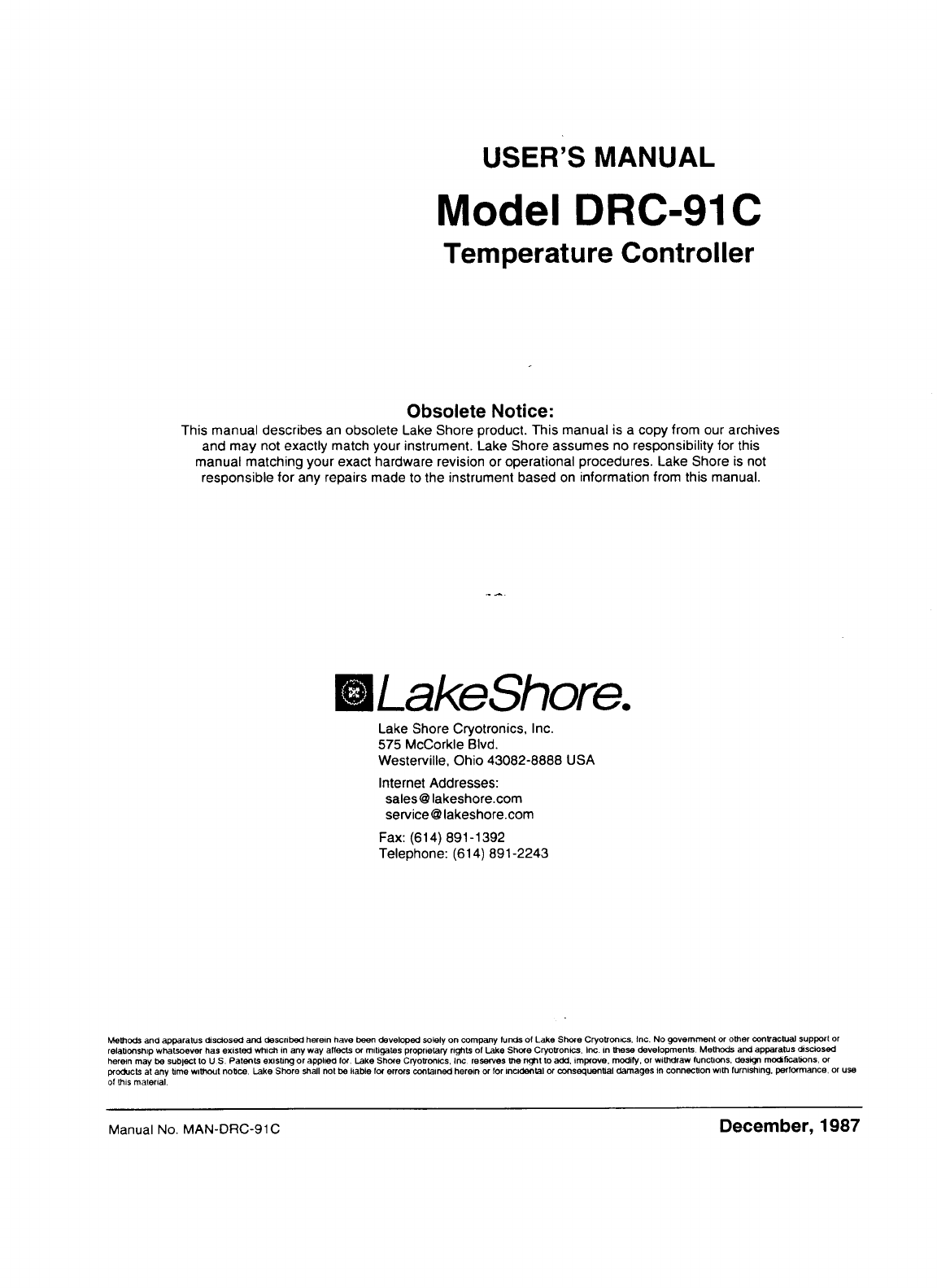
USER’S MANUAL
Model
DRC-91
C
Tem
per
at
u
re
Con
t
ro
I
ler
Obsolete Notice:
This manual describes an obsolete Lake Shore product This manual is a copy from our archives
and may not exactly match your instrument Lake Shore assumes no responsibility for this
manual matching your exact hardware revision or operational procedures. Lake Shore is not
responsible for any repairs made to the instrument based on information from this manual.
Lakeshore.
Lake Shore Cryotronics, Inc.
575
McCorkle Blvd.
Westerville, Ohio 43082-8888
USA
Internet Addresses.
sales@lakeshore com
service@lakeshore com
Fax (614) 891-1392
Telephone (614) 891-2243
Methods
andapparatusdisclosed
and
describedherein have been developed
solely
on
company
funds
of
Lake
Shore
Cryotronlcs
Inc
No
government
or
other
contractualsupport
Or
relationshipwhatsoeverhasexisted
which
in
any way affects
or
mitigatesproprietaryrights
of
Lake
Shore Cryotronlcs
Inc
in
these
developments
Methods
andapparatus
disclosed
hereinmay
be
subject
to
U
S
Patentsexisting
or
applied
lor
Lake
Shore
Cryotronics
Inc reserves
the
right
to
add
improve
modify
or
withdraw functions deslgn modificationsor
poducts
at any
time
withoutnotice
Lake
Shore
shall
not
be
liable
lor
errors containedherein
or
lor
incidental
or
consequential
damagesinconnectionwth furnishing performance
Or
use
of
this
material
Manual
No
MAN-DRC-91
C
December,
1987
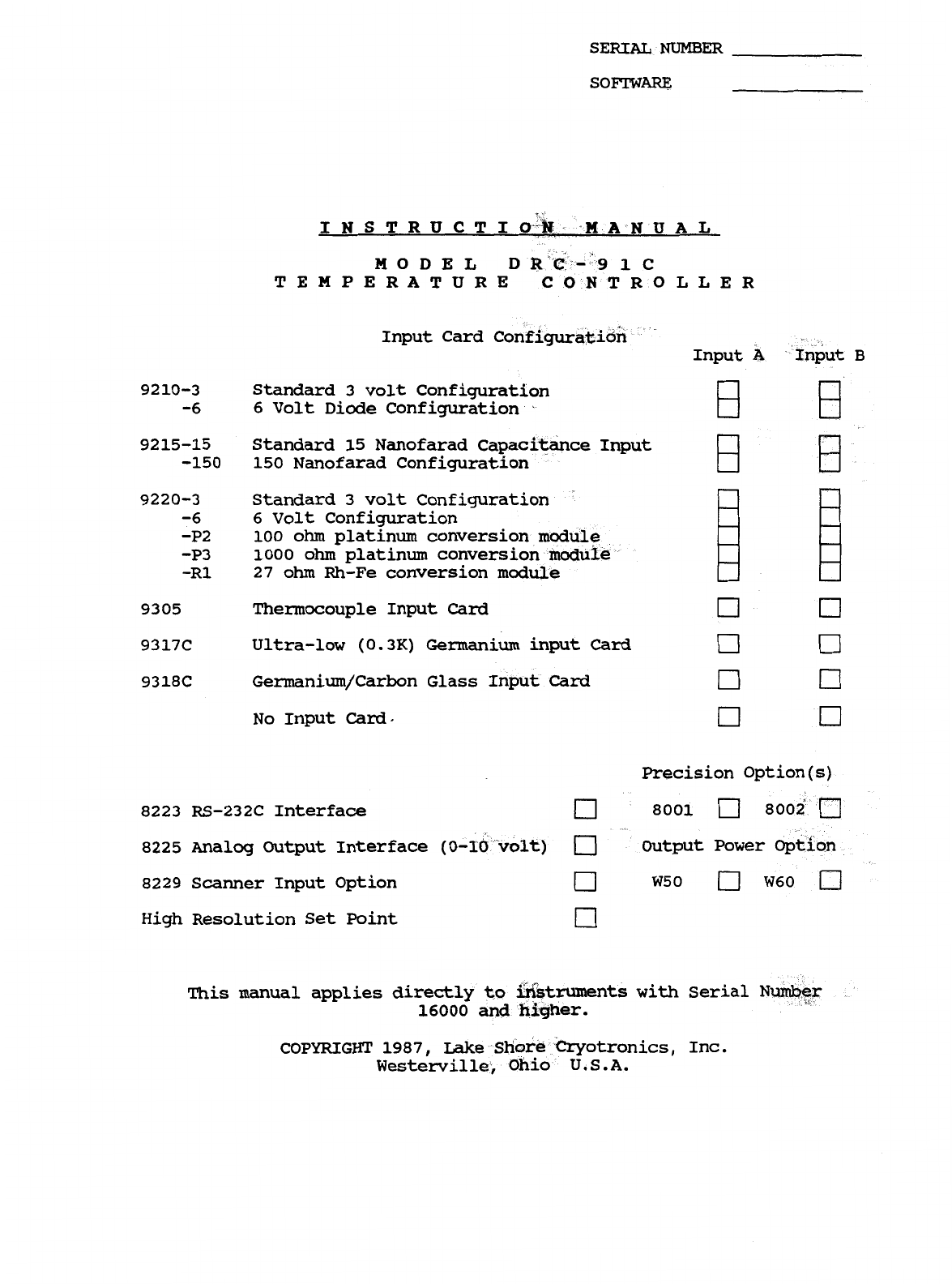
SERIAL
NUMBER
SOFTWARE
INSTRUCTIO
MANUA
L
MODEL
TEMPERATUR
Input Card
ut
B
92
10-3
Standard
3
volt Configuration
-6 6
Volt Diode Configuration
9215-15 Standard 15 Nanofarad Capac
-150 150 Nanofarad Configuration
9220-3 Standard
3
volt Configuration
-6 6
Volt
Configuration
-P2
-P3
-R1
27
ohm
Rh-Fe conversion module
100
ohm
platinum conversion modul
1000
ohm
platinum conversion modu
9305 Thermocouple Input
Card
9317C Ultra-low (0.3K) Germaniuminput
Card
9318C Germanium/Carbon Glass I
No
Input
Card
Precision Option(s)
8223 RS-232C Interface 8001 8002
8225 Analog Output Interface
(0-
Output
Power
8229 Scanner Input Option
W50
W60
High Resolution Set Point
This manual applies directly to
16000
and
nts
with Serial
N
COPYRIGHT 1987, Lake Shore Cryotronics, Inc.
Westerville,
Ohio
U.S.A.
WARRANTY
Lake Shore Cryotronics, Inc., the manufacturer, warrants this product
to the owner for a period of
12
months from the date of shipment.
During the warranty period, under authorized return of instruments or
component
parts
to
Lake Shore freight prepaid, the company will repair,
or at its option replace,
any
part
found to
be
defective in material or
workmanship without charge to the
Owner
for parts, service
labor
or
associated customary shipping cost. Replacement or repaired parts will
be
warranted for only the unexpired portion of the original warranty.
All products are thoroughly tested and calibrated to published
specifications prior to shipment. Calibration Certifications are
offered for six month periods only. Where such documentation must be
updated, a re-certification service
is
offered by
Lake
Shore
Cryotronics,Inc. at a reasonable cost.
LIMITATION
OF
WARRANTY
This warranty does not apply to defects resulting from improper or
inadequate maintenance, unauthorized modification or misuse, operation
outside of the environmental specifications for any product or part
or
buyer-supplied software or interfacing.
THIS
WARRANTY
IS IN LIEU
OF
ANY
OTHER
WARRANTIES, EXPRESSED
OR
IMPLIED,
INCLUDING MERCHANTABILITY
OR
FITNESS
FOR
A
PARTICULAR PURPOSE, WHICH
ARE
EXPRESSLY EXCLUDED.
THE
OWNER
AGREES
THAT
LAKE
SHORE’S
LIABILITY
WITH
RESPECT
TO
THIS
PRODUCT
SHALL
BE
SET
FORTH
IN
THIS
WARRANTY,
AND
INCIDENTAL
OR
CONSEQUENTIAL DAMAGES
ARE
EXPRESSLY EXCLUDED.
CERTIFICATION
Lake Shore Cryotronics, Inc. certifies that this product has been
inspected and tested
in
accordance with its published specifications
and that this product met its published specifications at the time of
shipment.
The accuracy and calibration of this product at the the of shipment
are traceable to the United States National Bureau of Standards.
Copyright
12/87
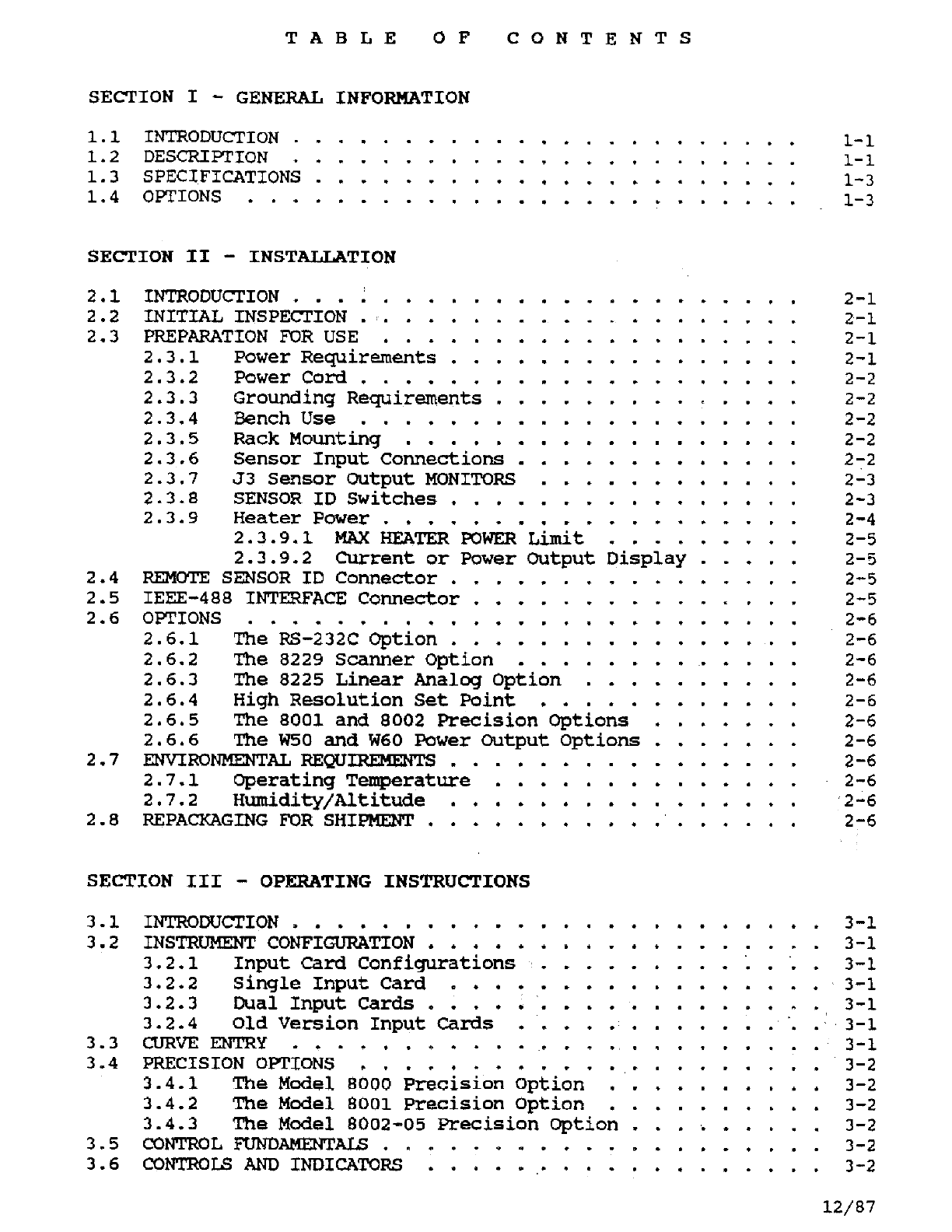
TABLE OF CONTENTS
SECTION
I
-
GENERAL INFORMATION
1.1
INTRODUCTION
.
1-1
1.2 DESCRIPTION
.
1-1
1.3 SPECIFICATIONS
1-3
1.4
OPTIONS
1-3
...
SECTION
II
-
INSTALLATION
2.1 INTRODUCTION
....
2-1
2.2 INITIAL INSPECTION
.
2-1
2.3 PREPARATION
FOR
USE
2-1
2.3.1
Power
Requirements 2-1
2.3.2
Power
Cord
....
2-2
2.3.3
Grounding
Requirements
.
2-2
2.3.4
Bench
Use
.......
2-2
2.3.5
Rack
Mounting
......
2-2
2.3.6
Sensor
Input
Connections
,
2-2
2.3.7
J3
Sensor
Output MONITORS
2-3
2.3.8
SENSOR
ID
Switches
...
2-3
2.3.9
Heater
Power
......
2-4
2.3.9.1
MAX
HEATER
POWER
Limit
....
2-5
2.3.9.2
Current or
Power
Output
Display 2-5
2.4
REMOTE
SENSOR
ID
Connector
.
2-5
2.5 IEEE-488
INTERFACE
Connector 2-5
2.6 OPTIONS
..........
2-6
2.6.1
The
RS-232C Option
.
2-6
2.6.2
The
8229
Scanner
Option
.
.
2-6
2.6.3
The
8225
Linear
Analog
Option
2-6
2.6.4 High Resolution
Set
Point .
2-6
2.6.5
The
8001
and
8002
Precision
Options
2-6
2.6.6
The
W50
and
W60
Power
Output
Options
2-6
2.7
ENVIRONMENTAL
REQUIREMENTS
.
2-6
2.7.1 Operating
Temperature
2-6
2.7.2 Humidity/Altitude
.
2-6
2.8
REPACKAGING
FOR
SHIPMENT
,
.
2-6
SECTION
III
-
OPERATING INSTRUCTIONS
3.1
INTRODUCTION.
.........
3-1
3.2
INSTRUMENT
CONFIGURATION
....
3-1
3.2.1
Input
Card
Configurations 3-1
3.2.2
Single
Input
Card
...
3-1
3.2.3
Dual
Input
Cards
....
3-1
3.2.4
Old
Version
Input
Cards
3-1
3.3
CURVE
ENTRY
..........
3-1
3.4
PRECISION OPTIONS
.......
3-2
3.4.1
The
Model
8000
Precision
Option
.
3-2
3.4.2
The
Model
8001
Precision
Option
.
3-2
3.4.3
The
Model
6002-05
Precision
Option 3-2
3.5
CONTROL
FUNDAMENTALS.
3-2
3.6
CONTROLS
AND
INDICATORS
3
-2
12/87
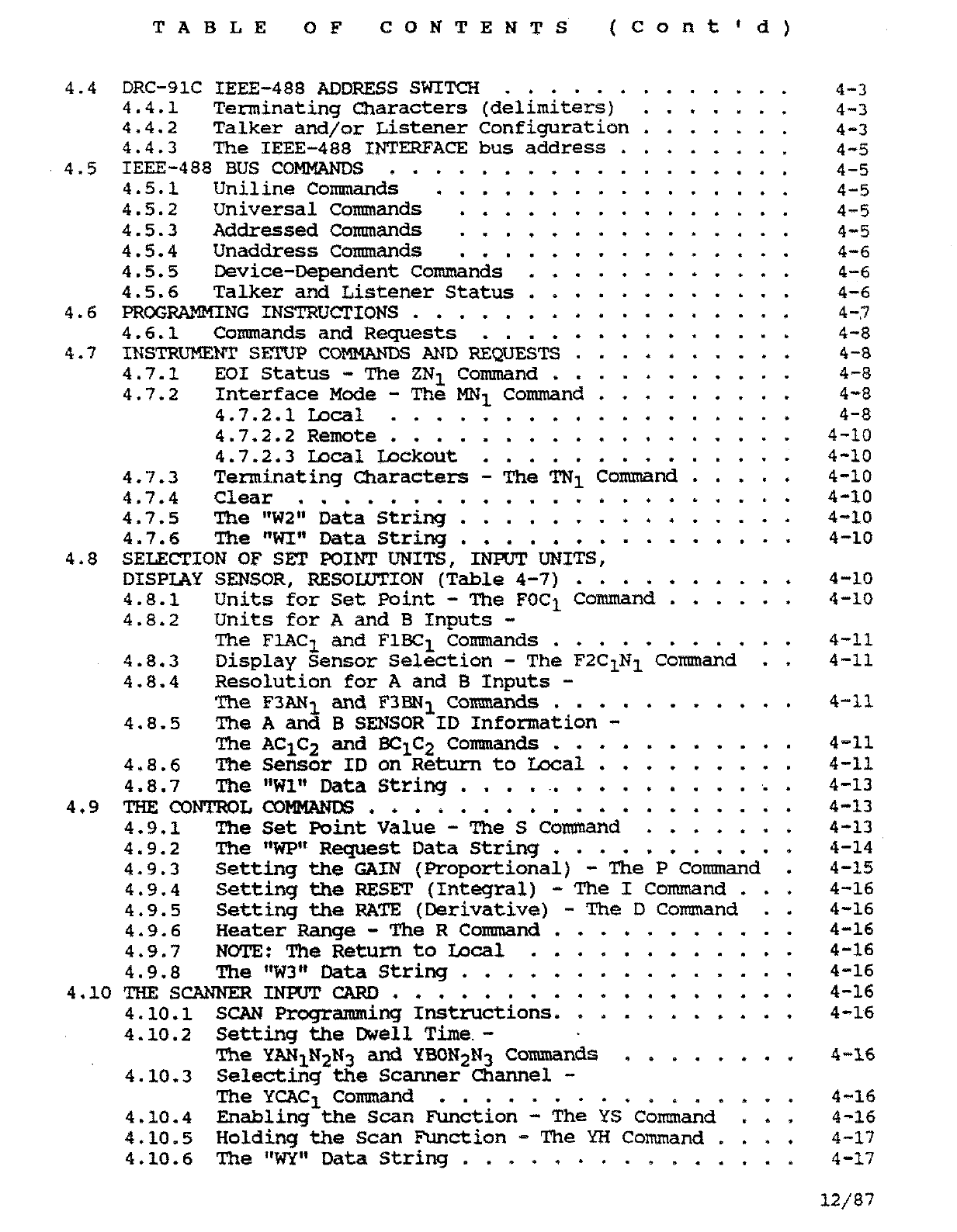
TABLE
OF
CONTENTS (Cont'd)
FRONT
PANEL
DESCRIPTION
3.7
POWERON..
........
3-2
3.7.1
POWER UP
Sequence
.
3-2
3.7.2
POWER-UP
Status
.
.
3-4
3.8
DISPLAY SENSOR
Block
....
3-4
3.8.1
DISPLAY SENSOR
Input
3-4
3.8.2 8229
Scanner
Conversion
option
.
3-4
3.8.3
SCAN
Function
.........
3-4
3.8.4
The
SCAN
Dwell
Time
......
3-4
3.8.5
DISPLAY
AND
DISPLAY SENSOR
Units
3-5
3.8.5.1
units
Select
.....
3-5
3.8.5.2
Sensor
Units
Mode
...
3-5
3.8.5.3
Voltage
Units
.....
3-5
3.8.5.4
Resistance
Units
...
3-5
3.8.5.5
Capacitance
Units
...
3-6
3.8.6
Display
Resolution
........
3-6
3.8.6.1
Temperature
Display
Resolution
Set
....
3-6
3.8.7
Filtering
the
Display
3-7
3.9
SENSOR
CURVES
......
3-7
3.9.1
Standard
Curves
.
3-7
3.9.2
The
Precision
Option
Table
3-7
3.10
SENSOR
CURVE
SELECTION
......
3-8
3.10.1
SENSOR
ID
Switch
4
Open
(0)
3-8
3.10.1.1
Display
of
Accessed
curve
.........
3-8
3.10.2
SENSOR
ID
Switch
4
Closed
(1)
-
No
REMOTE
SENSOR
ID
Present
........
3-9
3.10.3
SENSOR
ID
Switch
4
Closed
(1)
-
REMOTE
SENSOR
ID
Present
.........
3-9
3.10.4
Addition
of
8229
Scanner
Option
..........
3-10
3.10.5
Display
of
Accessed
Position
and
Assigned
Curve
.
.
3-10
3.10.6
Sensor
Curve
assignment
to
Sensor Position
.....
3-10
3.11
CONTROL
BLOCK
.
3-10
3.11.1
SET
POINT
3-10
3.11.2
GAIN
.
.
3-10
3.11.3
RATE
. .
3-10
3.11.4
RESET
.
3-11
3.11.5
HEATER
%
3-11
3.11.6
The
HEATER
POWER
RANGE
3-11
3.12
LOCAL/REMOTE
BLOCK
3-11
3.12.1
LOCAL
.
.
3-11
3.12.2
REMOTE
-
.
3-11
REAR
PANEL DESCRIPTION
3.13
REMOTE
SENSOR
ID
.
.
3-13
3.14
HEATER
CURRENT
LIMIT
3-13
SECTION
IV
-
REMOTE
OPERATION
4-1. IEEE-488
INTERFACE
.
.
.
.
.
-
*
.
-
-
.
4-1
4.2
GENERAL
IEEE
SPECTFICATIONS
AND
OPERATION
4-1
4.3
INTERFACE CAPABILITIES
.........
4-2
TABLE
OF
CONTENTS (COnt'd)
4.4
DRC-91C
IEEE-488
ADDRESS
SWITCH
......
4-3
4.4.1 Terminating Characters (delimiters) 4-3
4.4.2 Talker and/or Listener Configuratior 4-3
4.4.3
The
IEEE-488
INTERFACE
bus
address
.
4-5
4.5 IEEE-488
BUS
COMMANDS
.
.
4-5
4.5.1 Uniline Commands 4-5
4.5.2 Universal Commands 4-5
4.5.3 Addressed Commands
4-5
4.5.4 Unaddress Commands 4-6
4.5.5 Device-Dependent Commands
.....
4-6
4.5.6 Talker and Listener Status
.....
4-6
4.6
PROGRAMMING
INSTRUCTIONS
..........
4-7
4.6.1 Commands and Requests
.......
4-8
4.7
INSTRUMENT
SETUP
COMMANDS
AND
REQUESTS
...
4-8
4.7.1 EO1 Status
-
The ZN1 Command
....
4-8
4.7.2 Interface Mode
-
The
MN1
Command .
.
4-8
4.7.2.1
Local
...........
4-8
4.7.2.2 Remote
...........
4-10
4.7.2.3
Local
Lockout
.......
...
4-10
4.7.4 Clear
......................
4-10
4.7.5 The “W2” Data String
...............
4-10
4.7.3 Terminating Characters
-
The TN1 command
.....
4-10
4.7.6
The
“WI”
Data String
...............
4-10
4.8 SELECTION
OF
SET
POINT
UNITS,
INPUT
UNITS,
DISPLAY SENSOR, RESOLUTION (Table 4-7)
..........
4-10
4.8.1 Units
for
Set point
-
The FOC1 Command
......
4-10
4.8.2 Units for
A
and
B
Inputs
-
The
F1AC1
and
F1BC1 Commands
...........
4-11
4.8.3 Display Sensor Selection
-
The F2C1N1 Command
.
.
4-11
4.8.4 Resolution for
A
and
B
Inputs
-
The F3AN1 and
F3BN1
Comands
....
.
4-11
4.8.5 The
A
and
B
SENSOR
ID Information
-
4.8.6
The
Sensor
ID on Return to Local . .
.
4-11
4.8.7
The
“W1”
Data String
........
.
4-13
4.9
THE
CONTROL
COMMANDS
............
.
4-13
4.9.1
The
Set Point Value
-
The
S
Command
.
4-13
4.9.2
The
“WP”
Request
Data
string
...........
4-14
4.9.3 Setting
the
GAIN
(Proportional)
-
The
P
Command
.
4-15
4.9.4 Setting the RESET (Integral)
-
The
I
Command . .
,
4-16
4.9.5 Setting the
RATE
(Derivative)
-
The
D
Command . . 4-16
4.9.6 Heater Range
-
The R
Command
.
4-16
4.9.7 NOTE: The Return to
Local
. . 4-16
4.9.8 The “W3” Data String
.....
4-16
4.10
THE
SCANNER
INPUT
CARD
........
4-16
4.10.1
SCAN
Programming
Instructions. 4-16
The
AC1C2
and BC1C2 Commands
....
.
4-11
4.10.2 Setting the Dwell
Time
-
4.10.3 Selecting the Scanner channel
-
The
YCAC1
Command
................
4-16
4.10.4 Enabling
the
Scan
Function
-
The
YS
Command ... 4-16
4.10.5 Holding the
Scan
Function
-
The
YH
Command
.
.
.
.
4-17
4.10.6 The
“WY”
Data String
...............
4-17
12/87
The
YAN1N2N3
and
YBON2N3 Commands
........
4-16
TABLE
OF
CONTENTS
(Cont'd)
4.11
THE
SERVICE
REQUEST,
STATUS
REGISTER,
STATUS
REPORTS,
AND
THE
STATUS
REGISTER
MASK
...............
4-17
4.11.1
The
Service
Request
...............
4-18
4.11.2
The
Status
Register
and
Status
Reports
......
4-18
4.11.2.1
Status
Reports
0
and
1
-
Display
and
Control
Data
Ready
.....
4-18
The
Control Channel Limit
........
4-18
Display
Sensor
Channel
Change
......
4-19
4-19
4-19
4.11.2.2
Status
Report
2
-
4.11.2.3
Status
Report
3
-
4.11.2.4
Status
Report
5
-Overload
Error
Indicator
4.11.2.5
When
operating
without
the
Service
Request
4.11.3.1
Status
Register
Mask
Bits
0
and
1
-
Display
and
Control
Data
Ready Enables
.
4-20
4.11.3.2
Status
Register
Mask
Bit 2
-
The
Control Channel
Limit
Enable
....
4-20
4.11.3.3
Status
Register
Mask
Bit
3
-
Display
Sensor
Channel Change Enable
. .
4-20
4.11.3.4
Status
Register
Mask
Bit
5
-
4.11.3.5 Examples
for
setting
Mask
........
4-21
4.11.3.6
Status
Register
Mask
at
Power
up
....
4-21
4.11.4
The
“WQ”
Data
String
.
4-23
4.12 Command
Operations
......
4-23
4.12.1 Output
Data
Statemants
4-23
4.12.2
The
"WO"
Data
String
.
4-23
4.13.1
HP860
Keyboard
Interactive
Program
........
4-24
4.13.2
National
Instruments
IBM
Example
.........
4-25
4.13.3
National
Instruments
QUICK
BASIC
IBM
Example
...
4-25
4.13.4
HP86B
Bus
Comands
Program
............
4-26
4.14
SENSOR
CURVE
PROGRAMMING
INSTRUCTIONS
..........
4-27
4.14.1
The
XDT
Command
.
4-27
4.14.2
The
XDN1N2
Command 4-27
4.14.3
The
WA
Command
.
4-30
4.14.4
The
XCN1N2 Command 4-30
4.14.5
The
XEN1N2
Command
4-31
4.14.6
The
XKN1N2*
Command
4-31
4.14.7
The
XAC1C2=N1N2*
am
XBC1C2=N1N2* Commands
....
4-31
4.11.3
The
Status
Register
Mask
-
The
QC1C2 Command
...
4-19
Overload/Error
Indicator
Enable
.....
4-20
4.13
Sample
Programming
......
4-24
SECTION
V
-
MAINTENANCE
5.1
INTRODUCTION
...............
5-1
5.2
GENERALMAINTENANCE
...........
5-1
5.3
FUSE
REPLACEMENT
.............
5-
1
5.4
LINE
VOLTAGE
SELECTION
..........
5-1
5.5
PERFORMANCE VERIFICATION
.........
5-2
5.5.1
Performance
Verification
connector
5-2
5.5.2
Performance
Verification
procedure
5-2
5.6
CALIBRATION
...............
5-2
5.6.1
Input
Card
Calibration
......
5-2
5.6.2
Set
Point
Voltage
Calibration
.
.
5-2
12/87
TABLE
OF
CONTENTS
(Cont'd)
5.6.3
Calibration
of
GAIN,
RATE
and
RESET
.
.
.
. . .
.
5-3
5.6.4
Calibration
of
Power
Output
.
.
,
.
.
.
-
. . .
.
5-3
5.7
TROUBLESHOOTING
.
.
.
.
.
.
. .
.
.
.
.
.
.
.
-
.
.
.
.
.
.
5-4
SECTION
VI
-
ACCESSORIES,
INPUT
CARDS
AND
OPTIONS
APPENDIX
A
-
Standard
Curve
Data
APPENDIX
B
-
Sensor
Curve
Character
Information
APPENDIX
C
-
Error
Code
Summary
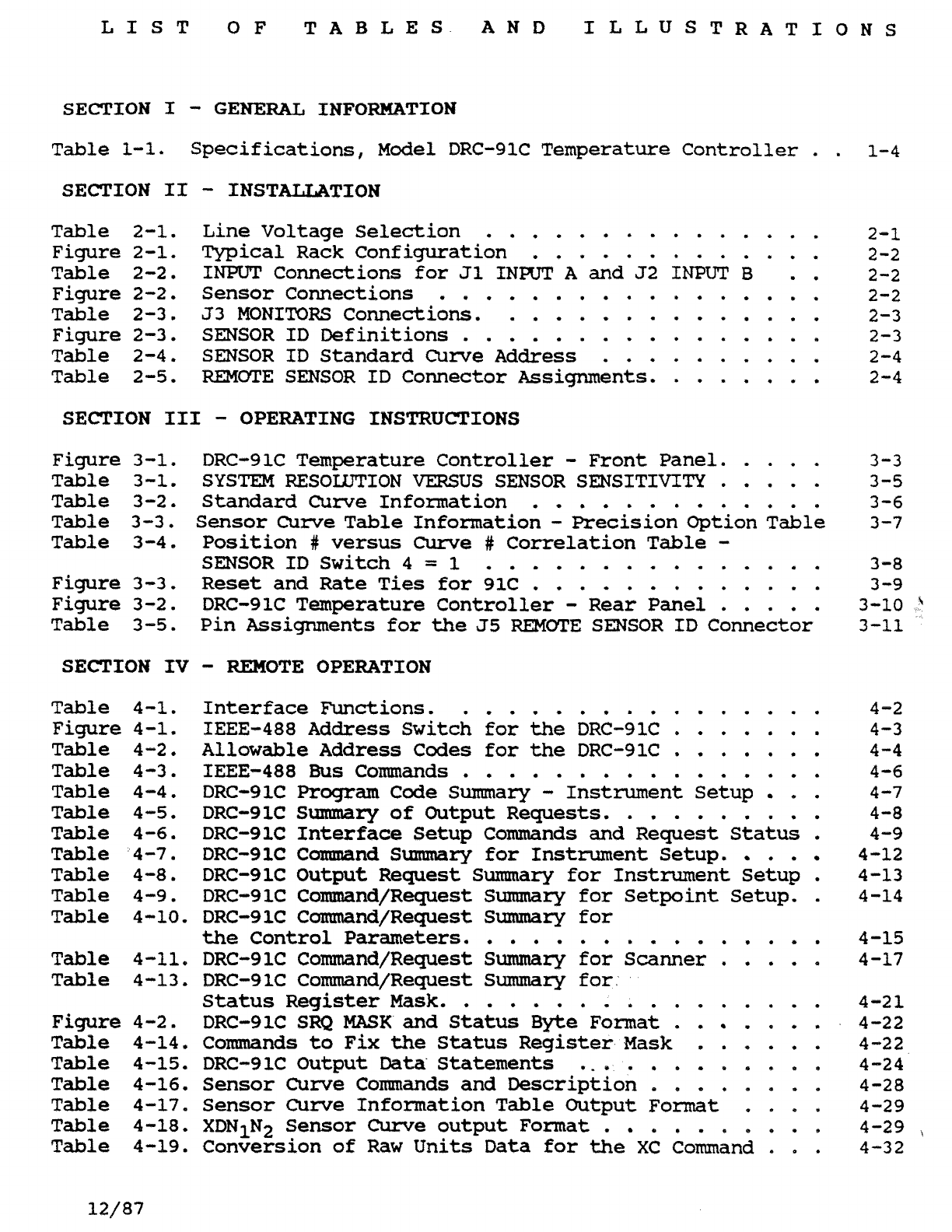
LIST
OF
TABLES AND ILLUSTRATIONS
SECTION
I
-
GENERAL INFORMATION
Table
1-1.
Specifications,
Model
DRC-91C Temperature
Controller
. .
1-4
SECTION
II
-
INST-TION
...............
Table 2-1.
Line
Voltage
Selection
2-1
Figure 2-1.
Typical
Rack Configuration
.............
2-2
Table
2-2,
INPUT
Connections
for
J1
INPUT
A
and
J2
INPUT
B
.
.
2-2
Figure
2-2.
Sensor
Connections
.................
2-2
Table
2-3.
J3
MONITORS
Connections.
..............
2-3
Figure
2-3. SENSOR
ID
Definitions
................
2-3
Table 2-4, SENSOR
ID
Standard
Curve
Address
..........
2-4
Table 2-5.
REEMOTE
SENSOR
ID
Connector
Assignments.
.......
2-4
SECTION
111
-
OPERATING
INSTRUCTIONS
Figure
3-1.
DRC-91C
Temperature
Controller
-
Front
Panel.
....
3-3
Table 3-1,
SYSTEM
RESOLUTION
VERSUS
SENSOR SENSITIVITY
.....
3-5
Table 3-2.
Standard
Curve
Information
.............
3-6
Table
3-3.
Sensor
Curve
Table
Information
-
Precision
Option
Table
3-7
Table
3-4-
Position
#
versus
Curve
#
Correlation
Table
-
Figure
3-3.
Reset
and
Rate
Ties
for
91C
.............
3
-9
Figure
3-2. DRC-91C
Temperature
Controller
-
Rear
Panel
.....
3-10
SENSOR
ID
Switch
4
=
1
...............
3-8
Table
3-5.
Pin
Assignments
for
the
55
REMOTE
SENSOR
ID
Connector
3-11
SECTION
IV
-
REMOTE OPERATION
Table 4-1.
Interface
Functions.
................
4-2
Figure
4-1. ZEEE-488
Address
Switch
for
the
DRC-91C
.
.
.
.
,
.
. 4-3
Table
4-2,
Allowable Address
Codes
for
the
DRC-9lC
.......
4-4
Table
4-3.
IEEE-488
BUS
Commands
................
4-6
Table 4-4. DRC-91C
Program
Code Summary
-
Instrument
Setup
.
.
4-7
Table 4-5. DRC-9lC
Summary
of
Output Requests.
.........
4-8
Table
4-6.
DRC-91C
Interface
Setup
Commands
and
Request
Status
.
4-9
Table
4-7.
DRC-91C Comand
Summary
for
Instrument
Setup.
.
. 4-12
Table 4-8. DRC-91C Output Request
Sumnary
for
Instrument
Setup
.
4-13
Table
4-9.
DRC-91C Command/Request
Summary
for
Setpoint
Setup.
.
4-14
Table 4-10, DRC-91C Command/Request
Summary
for
the
Control
Parameters.
...............
4-15
Table 4-13, DRC-91C Command/Request
Sumnary
for
Status
Register
Mask.
................
4-21
Figure
4-2. DRC-91C
SRQ
MASK
and
Status
Byte
Format
.
.
.
.
.
. 4-22
Table 4-14, Commands
to
Fix
the
Status
Register
Mask
......
4-22
Table 4-15. DRC-91C Output
Data
Statements
............
4-24
Table 4-16,
Sensor
Curve
Commands
and
Description
.
.
.
.
.
.
.
.
4-28
Table 4-17.
Sensor
Curve
Information
Table Output
Format
.
.)
..
4-29
Table 4-18.
XDN1N2
Sensor
Curve
output
Format
.
.
.
.
.
.
.
.
.
4-29
.
Table
4-19.
Conversion
of
Raw
Units
Data
for
the
XC
Command
.
.
. 4-32
Table 4-11, DRC-9lC Command/Request
Summary
for
Scanner
.....
4-17
12/87
Model
DRc-91c
Section
I
SECTION
I
GENERAL INFORMATION
1.1
INTRODUCTION
option selected, the DRC-91C
handles silicon (9210-3 or
9220-3)
The information contained in this or the patented Gallium-Aluminum-
operations manual pertains to the Arsenide
(9210-6
or
9220-6)
diodes,
installation, operation, remote platinum or rhodium-iron resistors
programming, options and acces- (9220 series), germanium or carbon
sories for the Lake Shore Cryotro- glass resistors (9317C, 9318c),
or
nics, Inc. Model DRC-91C Tempera- capacitance sensors (9215).
ture Controller. This manual also
contains troubleshooting and With or without the
8229
Scanner
calibration procedures, schematics, Card, the DRC-91C can
be
set to
component layouts and a complete scan automatically with an in-
parts list. dividual dwell time of
1
to
99
seconds per channel or stepped to
This section contains general any available input and held there.
information for the Lake Shore Setting the dwell time to zero
Cryotronics, Inc. DRC-91C Tempera- causes a particular channel to be
ture Controller. Included is an skipped. If all dwell times are
instrument description, specifica- zero, the instrument stays on the
tions, instrument identification, channel selected.
option and accessory information. The DRC-91C gives a direct reading
1.2
DESCRIPTION
in temperature when used with any
DT-470
Series Temperature Sensor.
The DRC-91C Temperature Controller All
MI-470
Sensors follow the same
is a microprocessor based instru- temperature response curve. Four
ment which provides true analog bands
of
tracking accuracy are
control. It
is
capable
of scanning available. Refer to DT-470
multiple sensor inputs
and
display-
ing temperature with up to
5
digits
of resolution
in
K,
°C
or
°F or Diode sensor voltages are digitized
sensor units (volts,
ohms
or to a resolution of 100 microvolts
nanofarads) to five digits. with full scale dependent on input
card configuration. Thetempera-
The DRC-91C
can
be
used with either ture display has a resolution
1
or
2
input cards. When
two
input capability of
0.01
kelvin above
100
cards are
used,
these cards can be kelvin and
0.001
kelvin below
100
different to allow
two
separate kelvin.
types of sensors to be used with
the controller. For greater precision individual
sensor calibrations can
be
accommo-
The dual sensor input with the dated with the
8001
Precision
optional 8229 Scanner Conversion Calibration Option which programs
Card
expand the input capability of the instrument with calibration
the DRC-91C to up to
6
input data for a specific Sensor. The
sensors.
Depending
on the input algorithm within the instrument
technical data for details.
COPYRIGHT
1/88
LSCI
1-1