manuals.online logo
Brands
  1. Home
  2. •
  3. Brands
  4. •
  5. LUMENWERX
  6. •
  7. Lighting Equipment
  8. •
  9. LUMENWERX RIM LINEAR User manual

LUMENWERX RIM LINEAR User manual

Other LUMENWERX Lighting Equipment manuals

LUMENWERX CUBITO User manual

LUMENWERX

LUMENWERX CUBITO User manual

LUMENWERX QUAD N-W FLUORESCENT User manual

LUMENWERX

LUMENWERX QUAD N-W FLUORESCENT User manual

LUMENWERX RIM VERSO ACOUSTIX User manual

LUMENWERX

LUMENWERX RIM VERSO ACOUSTIX User manual

LUMENWERX MIKRO User manual

LUMENWERX

LUMENWERX MIKRO User manual

LUMENWERX POP COLOR User manual

LUMENWERX

LUMENWERX POP COLOR User manual

Popular Lighting Equipment manuals by other brands

Life 39.9F70020C quick start guide

Life

Life 39.9F70020C quick start guide

EuroLite LED ML-20 user manual

EuroLite

EuroLite LED ML-20 user manual

LIGMAN OD-50141 installation manual

LIGMAN

LIGMAN OD-50141 installation manual

Home Accents Holiday 1002461144 instructions

Home Accents Holiday

Home Accents Holiday 1002461144 instructions

Experia IRiS Ripple Light instruction manual

Experia

Experia IRiS Ripple Light instruction manual

Erco Gecko Mounting instructions

Erco

Erco Gecko Mounting instructions

Inter-lux ZTA.100.Surface Installation and maintenance instructions

Inter-lux

Inter-lux ZTA.100.Surface Installation and maintenance instructions

Whelen Engineering Company TN Series installation guide

Whelen Engineering Company

Whelen Engineering Company TN Series installation guide

IKEA BJÖRKSPIREA manual

IKEA

IKEA BJÖRKSPIREA manual

Toolland PM 6640 instruction manual

Toolland

Toolland PM 6640 instruction manual

GTD GTD-LP200 user manual

GTD

GTD GTD-LP200 user manual

LIVARNO home 1105-W-UK manual

LIVARNO home

LIVARNO home 1105-W-UK manual

ProLights EclPar IPMFC user manual

ProLights

ProLights EclPar IPMFC user manual

Velvet EVO Series user manual

Velvet

Velvet EVO Series user manual

IDTOLIGHT GENT installation instructions

IDTOLIGHT

IDTOLIGHT GENT installation instructions

MAYTONI S35 installation manual

MAYTONI

MAYTONI S35 installation manual

MaxLite MLFP14DP4535 user manual

MaxLite

MaxLite MLFP14DP4535 user manual

SLV Elektronik 550621 instruction manual

SLV Elektronik

SLV Elektronik 550621 instruction manual

manuals.online logo
manuals.online logoBrands
  • About & Mission
  • Contact us
  • Privacy Policy
  • Terms and Conditions

Copyright 2025 Manuals.Online. All Rights Reserved.

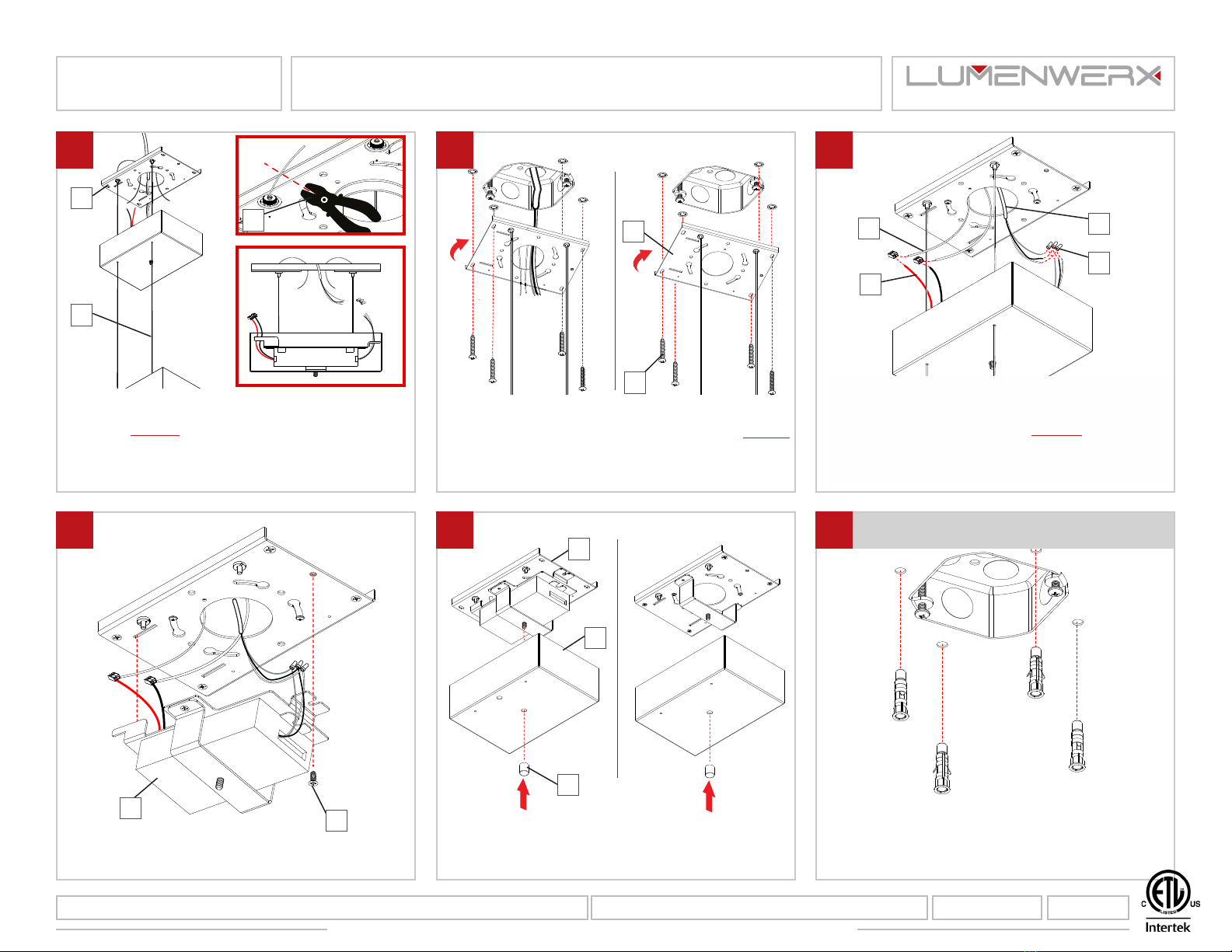
Use the canopy plate (C) as a model to mark 4 holes.
C
Loosen the decorative nut (A) on the canopy (B).
Separate the canopy (B) from the canopy plate (C).
B
C
A
NOTE: Wire dimming conductors as Class 1
Unscrew to remove the canopy driver (D) from the
canopy plate (C) in the order of the numbers.
Mount and turn the canopy plate (C) to place on the
junction box (E).
POWER SIDE NON POWER SIDE
Remove the canopy plate. Drill holes (Ø 1/4”)
following the marks. Install #8 screw anchors (F) .
POWER SIDE NON POWER SIDE
Pass all cables (H) through the canopy (B). Insert
them into the griplock (G). Adjust the cables (H) by
pushing the feeder tube.
B
H
G
D
C
CE
F
www.lumenwerx.com (T) 514-225-4304 (F) 514-931-4862 © All rights are reserved to LumenWerx ULC. RIM-PENDANT-REMOTE-DRIVER-POWER-OVER-CABLES-INST. October 7, 2019 Page: 1 / 3
LumenWerx ULC. reserves the right to change or modify product specifications without notification
4
2
1
5
3
6
PENDANT - CANOPY DRIVER BOX - POC
RIM LINEAR
IMPORTANT: Installation instructions are shown with RIM 4 and applies to all RIM LINEAR fixtures
WWW.LUMENWERX.COM
Fix canopy plate (C) with four screws (J). Notes:
Make sure to have a steady hold of the fixture. So,
it is never hanging loosely from POC if installation
is not complete.
J
POWER SIDE NON POWER SIDE
Make electrical connections between POC (Power
Over Cable) (K) and the remote driver feed (L). Then,
make connections between the driver and the main
power (M) with marettes (N). Notes: Connect the
negative (-) POC (black mark on the fixture) to the
black wire and the positive (+) POC (red mark on
the fixture) to the red wire.
C
Secure the canopy driver (D) with screw (O).
O
D
Put the canopy plate (B) and canopy (C) back in place
using the decorative nut (A).
POWER SIDE NON POWER SIDE
CONTINUOUS SYSTEM
For a continuous system, repeat steps 1 to 11 for all
mountings.
A
B
C
IK
L
M
N
Pull all wires (H) out through canopy plate (C)
and cut the excess cable with an aircraft cable
cutter(I). Notes: POC (Power Over Cable) should
have just enough length to make the connection
inside of J-box. Height adjustment of the fixture
must be done at this step.
DRIVER
H
C
www.lumenwerx.com (T) 514-225-4304 (F) 514-931-4862 © All rights are reserved to LumenWerx ULC. RIM-PENDANT-REMOTE-DRIVER-POWER OVER-CABLES-INST. October 7, 2019 Page: 2 / 3
LumenWerx ULC. reserves the right to change or modify product specifications without notification
7 8 9
10 11 12
PENDANT - CANOPY DRIVER BOX - POC
RIM LINEAR
WWW.LUMENWERX.COM

Slide first fixture (P) into second fixture (Q). Lock
them together using mallet (R).
P
Q
RS
Secure all fixtures with screws (S).
2
1
www.lumenwerx.com (T) 514-225-4304 (F) 514-931-4862 © All rights are reserved to LumenWerx ULC. RIM-PENDANT-REMOTE-DRIVER-POWER OVER-CABLES-INST. October 7, 2019 Page: 3 / 3
LumenWerx ULC. reserves the right to change or modify product specifications without notification
13 14
PENDANT - CANOPY DRIVER BOX - POC
RIM LINEAR
WWW.LUMENWERX.COM