manuals.online logo
Brands
  1. Home
  2. •
  3. Brands
  4. •
  5. OPTEX FA
  6. •
  7. Thermometer
  8. •
  9. OPTEX FA Thermo-Hunter PT-2LD Series User manual

OPTEX FA Thermo-Hunter PT-2LD Series User manual

This manual suits for next models

5

Other OPTEX FA Thermometer manuals

OPTEX FA CS-30TAC User manual

OPTEX FA

OPTEX FA CS-30TAC User manual

OPTEX FA SA-80T-4IO User manual

OPTEX FA

OPTEX FA SA-80T-4IO User manual

OPTEX FA Thermo-Hunter SA-80 Series User manual

OPTEX FA

OPTEX FA Thermo-Hunter SA-80 Series User manual

OPTEX FA Thermo-Hunter PT-S80 User manual

OPTEX FA

OPTEX FA Thermo-Hunter PT-S80 User manual

Popular Thermometer manuals by other brands

Benetech GM900 instruction manual

Benetech

Benetech GM900 instruction manual

Parton PTD-400 manual

Parton

Parton PTD-400 manual

GAME 15900 owner's manual

GAME

GAME 15900 owner's manual

scigiene FP-180 instruction manual

scigiene

scigiene FP-180 instruction manual

Ametek Land UNO U1 600/1600C-L user guide

Ametek Land

Ametek Land UNO U1 600/1600C-L user guide

Delton 981A instruction manual

Delton

Delton 981A instruction manual

Taylor 5286498 instruction manual

Taylor

Taylor 5286498 instruction manual

Baker MM2P instruction manual

Baker

Baker MM2P instruction manual

Chino IR-FA Series instructions

Chino

Chino IR-FA Series instructions

Vive DMD1010 user manual

Vive

Vive DMD1010 user manual

Tarmo 320281 manual

Tarmo

Tarmo 320281 manual

Citizen CTD 504 instruction manual

Citizen

Citizen CTD 504 instruction manual

TFA 14.1500 instruction manual

TFA

TFA 14.1500 instruction manual

Gotemp THB4002 user guide

Gotemp

Gotemp THB4002 user guide

GREISINGER G 1202 Quick reference guide

GREISINGER

GREISINGER G 1202 Quick reference guide

Amprobe TMD-53W user manual

Amprobe

Amprobe TMD-53W user manual

Trotec BP10 operating manual

Trotec

Trotec BP10 operating manual

Radiance instruments RT616 Series product manual

Radiance instruments

Radiance instruments RT616 Series product manual

manuals.online logo
manuals.online logoBrands
  • About & Mission
  • Contact us
  • Privacy Policy
  • Terms and Conditions

Copyright 2025 Manuals.Online. All Rights Reserved.

THERMO-HUNTER
PT-7LD
PrintedinJAPAN0898-72008/2
Portable Non-Contact Thermometer
Instruction Manual
OPTEX FA CO., LTD.
91 Chudoji-Awata-cho Shimogyo-ku Kyoto
600-8815 JAPAN
TEL: +81-75-325-1314 FAX: +81-75-325-2936
Ramco National - Optex FA Sensors
www.Optex-Ramco.com
Got Questions? 1-800-280-6933
Introduction
• Please make sure the model you purchased is the one you specified.
• Please read the manual thoroughly before using theTHERMO-HUNTER
PT-7LD for correct usage.
• After reading this manual, please retain it for future reference.
• OPTEX is not liable for any incidental or consequential damages or
losses including losses of data or chances of measurement, arising
from accident, misuse or abnormal conditions of operation or handling.
Thank you very much for purchasing OPTEX products. This device is a non-contact
thermometer to convert the infrared energy emitted from the surface of an object into
temperature. This thermometer measures the surface temperature of solid and liquid
without contacting them. The temperature of gas cannot be measured by this thermom-
eter.
Contents
Introduction ······································································································
Safe Usage ······································································································
Warnings & Cautions on Environment and Usage ······································
Specifications ··································································································
Name of Components ·····················································································
Operation ········································································································
Normal Measurement / Continuous Measurement ·····································
Field of View ·······························································································
Memory Function ························································································
Settings ···········································································································
Setting "High Limit Temperature for Alarm" ·················································
Setting "Low Limit Temperature for Alarm" ··················································
Setting "Emissivity Ratio (HOT / COLD mode)" ··········································
Setting "˚C / ˚F mode" ·················································································
"Record Erasing" ························································································
Troubleshooting ·······························································································
Maintenance / Battery ·····················································································
2
3
4
5
6
8
8
9
10
11
12
13
14
14
14
15
16
2
Ramco National - Optex FA Sensors
www.Optex-Ramco.com
Got Questions? 1-800-280-6933
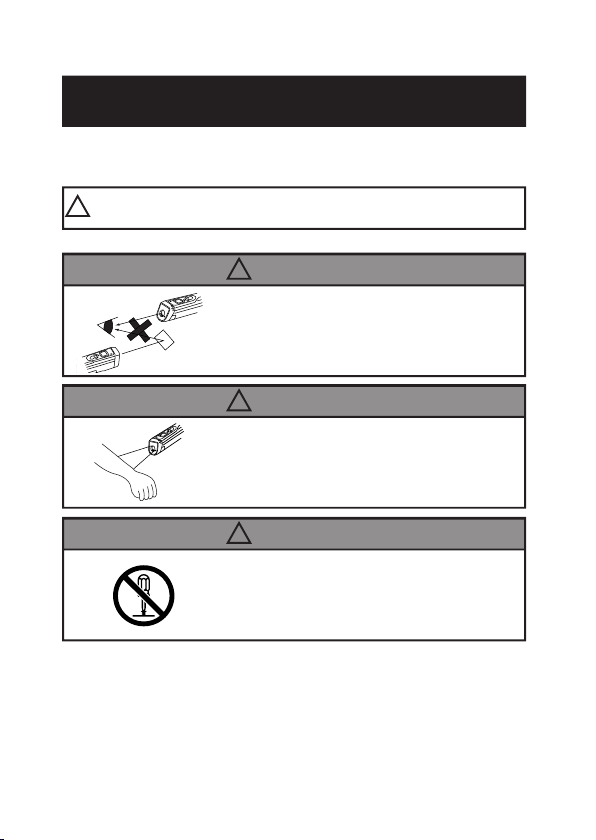
This product is not a clinical thermometer
and therefore, can not be used for medical
purposes.
Do not look into the laser beam, nor point it
directly at eyes.Even the reflection is
harmful.This laser may cause eye injury or
damage to your health.
Use of controls or adjustments or perfor-
mance of procedures other than those
specified herein may result in hazardous
radiation exposure.
Safe Usage
This instruction manual contains various warnings for your safety and proper usage to
avoid possible personal injury. Please be sure to heed the warnings and strictly follow
safety instructions.
!CAUTION:
This symbol signifies that improper usage may
result in injuries or damage.
! CAUTION
! CAUTION
! CAUTION
3
Ramco National - Optex FA Sensors
www.Optex-Ramco.com
Got Questions? 1-800-280-6933
Safe Usage
–– Warnings & Cautions on Environment and Usage
Environmental Warnings / Cautions –– Warning –– Caution
KEEP THE THERMOMETER
AWAY FROM DROPPING WATER
AND DO NOT USE IN WATER.
This thermometer has waterproof-
ing, but it cannot be operated in the
water. Water drops on the filter or
the area around it may cause incor-
rect measurement. Wipe up the fil-
ter and the area around it completely
before taking measurement.
KEEP THE THERMOMETER
AWAY FROM DIRECT SUNLIGHT,
DUST, HIGH TEMPERATURES
AND HIGH HUMIDITY DURING
USE AND STORAGE.
This may cause irreparable damage or
incorrect measurement.
e.g. Leaving the thermometer in a car
under a burning sun for long may result
in damage as it will get hot inside the car.
Usage Warnings / Cautions –– Warning –– Caution
4
GGGGGGGGG
DO NOT EXPOSE THE THER-
MOMETER TO SUDDEN TEM-
PERATURE CHANGES.
Sudden temperature changes may
cause incorrect measurement.
Leave the thermometer for a while
to let it reach stable temperature
before taking measurement.
AVOID MEASURING SHINY OB-
JECTS.
Shiny objects, of which emissivity value
is near 0, reflect surrounding tempera-
tures. As this thermometer's sensitiv-
ity to emissivity is fixed at 0.95 / 0.85,
the displayed temperature could differ
from the actual temperature of objects,
which has different emissivity value.
(See "Emissivity" on page 14)
DO NOT USE ANY BATTERY
OTHER THAN SPECIFIED.
This may cause irreparable dam-
age or incorrect measurement.
DO NOT TOUCH THE FILTER.
Do not touch the filter with some-
thing hard or things with sharp
points, which may damage the fil-
ter. Damaged filter causes incor-
rect measurement.
DO NOT LET THE THERMOM-
ETER TOUCH THE OBJECT THAT
IS BEING MEASURED.
The unit is a non-contact thermom-
eter. Touching or getting too close
to the objects with high tempera-
tures may cause irreparable dam-
age or incorrect measurement.
DO NOT OPERATE THE THER-
MOMETER NEAR LARGE ELEC-
TROMAGNETIC FIELDS.
Usage in such environments may
cause irreparable damage or incor-
rect measurement.
KEEP THE THERMOMETER
AWAY FROM CHARGED OB-
JECTS.
This may cause irreparable dam-
age or incorrect measurement.
DO NOT DROP THE THERMOM-
ETER OR APPLY VIOLENT
SHOCKS.
This product has shock resistant
structure to survive under normal
usage, but throwing or falling the
unit intentionally with force may
cause irreparable damage.

Ramco National - Optex FA Sensors
www.Optex-Ramco.com
Got Questions? 1-800-280-6933
Accessories : 9V layer-built alkaline dry battery (1 piece : Trial use only)
Quick Reference Card, Instruction Manual (this book)
Option : Black tape
* IP67 : It indicates a level of the protection structure of the product against water and dust under specified
conditions. This protection structure is in accordance with the standards of IEC (International
Electrotechnical Commission), JIS (Japanese Industrial Standards) and JEMA (The Japan Electrical
Manufacturers' Association).
※Specifications may change without prior notice.
Specifications
5
Model PT-7LD
Measurement range –30.0 to 200.0 ˚C
Display range –40.0 to 220.0 ˚C
Field of view
φ
25 / 300mm
Optics mirror / silicon filter
Sensing element Thermopile
Spectral response 8–14
µ
m
Response time 0.7 sec. / 90%
Accuracy (
ε
≒0.95)
–30.0 〜0˚C : 앧3.0˚C , 0.1 〜100.0˚C : 앧1.0˚C, 100.1 〜200.0˚C : 앧2.0˚C
Repeatability 앧1.0 ˚C of reading value
Display resolution 0.1˚C
Sighting method Non-coaxial laser marker (Class 2)
HOLD time 15 seconds
Continuous measurement mode ON / OFF Switchable
Memory 99-point memory
High / Low Limit Temp. for Alarm LED / Buzzer
ON / OFF Switchable
Emissivity(
ε
) Adjustment HOT(
ε
=0.95) / COLD(
ε
=0.85) Switchable
Temperature unit ˚C /˚F (Switchable)
Power supply 9V layer-built alkaline dry battery (1 piece)
Battery life 12 Hours (With max load)
Ambient temperature 0 to 50 ˚C
Ambient humidity 35% to 85%Rh (Without due condensation)
Storage temperature –10 to 60 ˚C
Protective structure * IP67
Material ABS (Antibacterial)
Dimension H x W x D = 160 x 44 x 42mm
Weight 200g (Incl. Battery)
Ramco National - Optex FA Sensors
www.Optex-Ramco.com
Got Questions? 1-800-280-6933
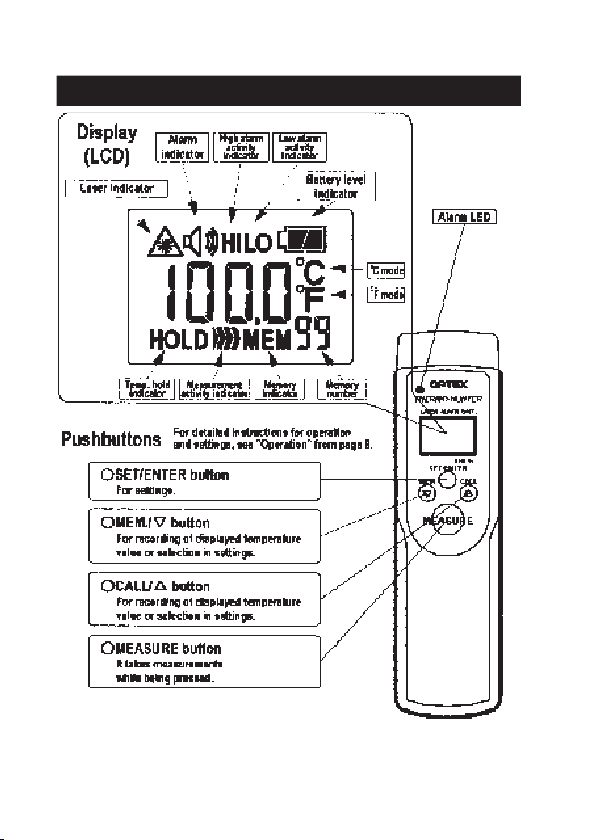
* There is no button to turn ON/OFF the power supply.
Pressing MEASURE button wakes up the thermometer.
The power supply turns off automatically after 15 seconds' absence of pressing any button.
Name of Components
6
Ramco National - Optex FA Sensors
www.Optex-Ramco.com
Got Questions? 1-800-280-6933
7
Ramco National - Optex FA Sensors
www.Optex-Ramco.com
Got Questions? 1-800-280-6933
Operation
¡¡
¡¡
¡Normal Measurement
[Starting Normal Measurement]
q
Press MEASURE button to turn on the power supply. A laser
beam is emitted and the measurement starts. (In the Normal Mea-
surement mode, the unit takes measurements while MEASURE
button is pressed.)
w
Point the laser beam at a measuring object and aim it at the
center of the area to be measured. For the distance from this
thermometer to the measuring object, refer to page 9.
e
In the Normal Measurement mode, the measurement indication
" " is shown on the LCD display and a laser indicator blinks.
[Quitting Normal Measurement / HOLD mode]
q
Release MEASURE button. Then, the laser beam turns off and
a value measured last is displayed for 15 seconds (HOLD mode).
The power supply turns off automatically after 15 seconds.
¡¡
¡¡
¡Continuous Measurement
[Starting Continuous Measurement]
q
Press and hold both of MEASURE button and SET/ENTER button simultaneously for two seconds or
more, then the Continuous Measurement mode switched on. (In the Continuous Measurement mode, the
thermometer keeps measuring temperatures without pressing MEASURE button.)
w
During the Continuous Measurement mode, LCD display shows
"".
[Quitting Continuous Measurement]
q
To quit the Continuous Measurement mode, press and hold SET/ENTER button for two seconds or
more. Then, it switches to HOLD mode. The power supply turns off automatically after 15 seconds
in the HOLD mode.
Set the battery supplied as an accessory and operate the unit according to the following procedure:
8
Ramco National - Optex FA Sensors
www.Optex-Ramco.com
Got Questions? 1-800-280-6933
For the non-contact thermometer (infrared thermometer), the field of view (spot size) is specified
depending on the distance from the thermometer to the measuring object as shown below. The
temperature value displayed is the average temperature within the spot size. To take an accurate
measurement, check the correlation between the size of object and the distance to it.
[Field of View]
* Remarks
ex.) The average temperature of surface of the circle 25 mm in diameter is measured at a distance of 300 mm
away from the measuring object.
* The laser beam points 13mm off to the left from the center of the field of view. The laser marker functions as a
sighting method and not a sensing element.
* It is possible to take temperatures with this thermometer at a distance of 1,000 mm or more away from the
measuring object, unless there is any obstacle. However, please note that the measuring field of view enlarges
in proportion to the measuring distance. This thermometer has an optical resolution of 15:1 [D(Distance to the
measuring object):S(Spot size)].
[For Correct Measurement]
The optical resolution values stated in "Field of View" are at minimum 90% energy. The size of measuring object
should be sufficiently larger than the field of view (spot size) shown in the above illustration.
Note. If any water drop is on the filter and/or the area around it, the thermometer measures temperature
of the water drop, which results in incorrect measurement. Wipe up the filter and the area around
it completely before taking measurement. (See "Maintenance" on page 16)
Field of View
9
OK NG
INCORRECT
The measuring object is smaller
than the field of view. The tem-
perature of background influ-
ences on the measuring value.
CORRECT
The measuring object is big-
ger than the field of view.
Ramco National - Optex FA Sensors
www.Optex-Ramco.com
Got Questions? 1-800-280-6933
Memory Function
[Recording / MEM. mode]
q
Press and hold MEM./쑴button for two seconds or more to record the tem-
perature value displayed at the time when you start pressing the button. Memory
function is available in Normal Measurement mode, Continuous Measurement
mode or HOLD mode (refer to page 8).
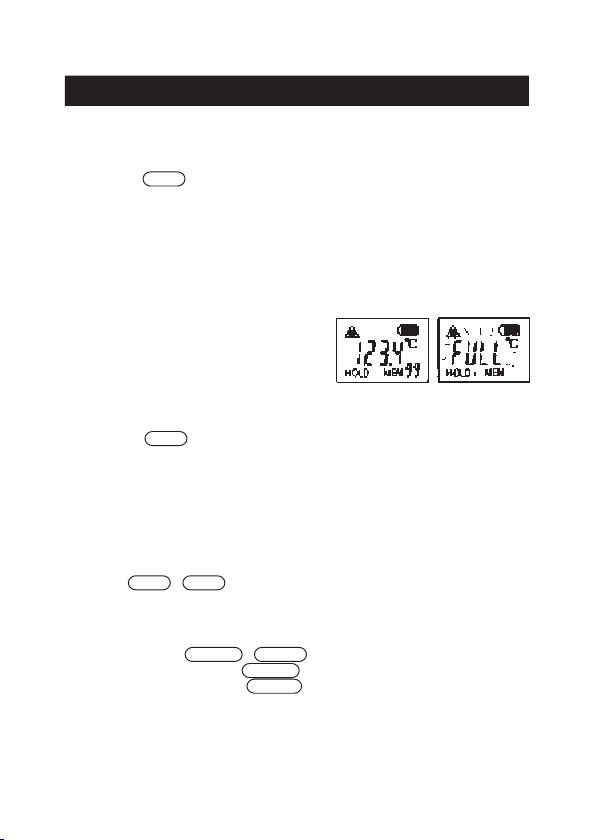
w
When the temperature data is recorded, "MEM" sign and the
memory number (01 to 99) on LCD display blink.
e
A maximum of 99 points of temperature data can be recorded
in the memory.
r
When you try to enter the memory over 100 points, the dis-
play shows "FULL".
[Recalling / CALL Mode]
q
Press and hold CALL/쑶button for two seconds or more in
HOLD Mode (refer to page 8), and "CALL" sign appears on the
LCD display. In CALL (recalling) mode, the last record of tem-
perature data and the corresponding memory number are shown
on the display.
w
By pressing MEM./쑴or CALL/쑶button, you can select the
memory number to show the stored temperature value corre-
sponding to the memory number.
e
To quit CALL mode, press SET/ENTER or MEASURE button.
You can enter HOLD mode by pressing SET/ENTER button, or
Normal Measurement mode by pressing MEASURE button.
* To erase all the stored records, see "Record Erasing" on page 14.
The non-contact thermometer PT-7LD can store 99-point temperature data in memory. Operate ac-
cording to the following procedure:
10
Ramco National - Optex FA Sensors
www.Optex-Ramco.com
Got Questions? 1-800-280-6933