manuals.online logo
Brands
  1. Home
  2. •
  3. Brands
  4. •
  5. Parrot
  6. •
  7. Automobile Accessories
  8. •
  9. Parrot CK3100 LCD User manual

Parrot CK3100 LCD User manual

Other manuals for CK3100 LCD

22

Other Parrot Automobile Accessories manuals
Parrot Minikit+ User manual

Parrot

Parrot Minikit+ User manual

Parrot MKi9200 RU User manual

Parrot

Parrot MKi9200 RU User manual

Parrot SK4000 User manual

Parrot

Parrot SK4000 User manual

Parrot Easydrive User manual

Parrot

Parrot Easydrive User manual
Parrot MINIKIT SLIM User manual

Parrot

Parrot MINIKIT SLIM User manual

Parrot Minikit+ User manual

Parrot

Parrot Minikit+ User manual

Parrot 3400 LS-GPS Manual

Parrot

Parrot 3400 LS-GPS Manual

Parrot MKi9200 RU User manual

Parrot

Parrot MKi9200 RU User manual

Parrot MKi9200 RU User manual

Parrot

Parrot MKi9200 RU User manual

Parrot CK3100 LCD User manual

Parrot

Parrot CK3100 LCD User manual
Parrot CK3300 Manual

Parrot

Parrot CK3300 Manual

Parrot CK3100 LCD User manual

Parrot

Parrot CK3100 LCD User manual

Parrot CK 3000 Evolution User manual

Parrot

Parrot CK 3000 Evolution User manual

Parrot 3200 LS-Color User manual

Parrot

Parrot 3200 LS-Color User manual
Parrot Minikit+ User manual

Parrot

Parrot Minikit+ User manual

Parrot CK3100 LCD User manual

Parrot

Parrot CK3100 LCD User manual

Parrot CK 3000 Evolution User manual

Parrot

Parrot CK 3000 Evolution User manual

Parrot Minikit+ Manual

Parrot

Parrot Minikit+ Manual

Parrot Minikit+ User manual

Parrot

Parrot Minikit+ User manual

Parrot MKi9200 RU User manual

Parrot

Parrot MKi9200 RU User manual
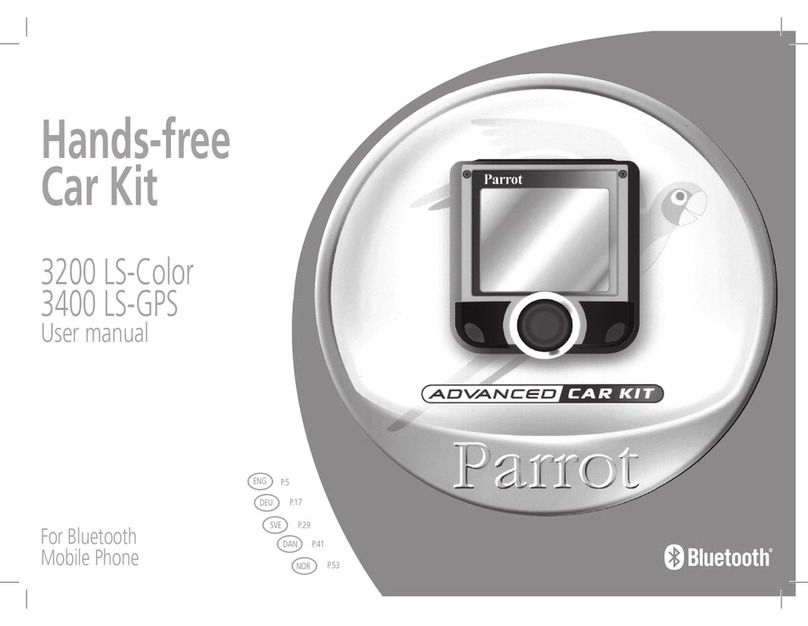
Parrot 3400 LS-GPS User manual

Parrot

Parrot 3400 LS-GPS User manual

Parrot MKi9100 User manual

Parrot

Parrot MKi9100 User manual

Parrot Eclipse BT-E500 User manual

Parrot

Parrot Eclipse BT-E500 User manual

Parrot EVOLUTION User manual

Parrot

Parrot EVOLUTION User manual

Popular Automobile Accessories manuals by other brands

Magneti Marelli AC161 Installation instruction

Magneti Marelli

Magneti Marelli AC161 Installation instruction

FDI uEZ GUI Start here

FDI

FDI uEZ GUI Start here

JCROffroad JT Install instructions

JCROffroad

JCROffroad JT Install instructions

Rostra VOXXElectronics 250-1930 owner's guide

Rostra

Rostra VOXXElectronics 250-1930 owner's guide

TOP VEHICLE TECH GR3FORD5 installation manual

TOP VEHICLE TECH

TOP VEHICLE TECH GR3FORD5 installation manual

Safe Fleet PRIME DESIGN AR-2000-BLK manual

Safe Fleet

Safe Fleet PRIME DESIGN AR-2000-BLK manual

Skoda Fabia Combi 5J Fitting instructions

Skoda

Skoda Fabia Combi 5J Fitting instructions

Camcar 40077 Al Mounting instructions

Camcar

Camcar 40077 Al Mounting instructions

Camcar 40089 AL Mounting instructions

Camcar

Camcar 40089 AL Mounting instructions

Impac Tradesman 2000 installation manual

Impac

Impac Tradesman 2000 installation manual

DVB OFFROAD BRSB-01 installation manual

DVB

DVB OFFROAD BRSB-01 installation manual

Safari Snorkel SS385HF installation guide

Safari Snorkel

Safari Snorkel SS385HF installation guide

ULTIMATE SPEED 279746 Assembly and Safety Advice

ULTIMATE SPEED

ULTIMATE SPEED 279746 Assembly and Safety Advice

SSV Works DF-F65 manual

SSV Works

SSV Works DF-F65 manual

ULTIMATE SPEED CARBON Assembly and Safety Advice

ULTIMATE SPEED

ULTIMATE SPEED CARBON Assembly and Safety Advice

Witter F174 Fitting instructions

Witter

Witter F174 Fitting instructions

WeatherTech No-Drill installation instructions

WeatherTech

WeatherTech No-Drill installation instructions

TAUBENREUTHER 1-336050 Installation instruction

TAUBENREUTHER

TAUBENREUTHER 1-336050 Installation instruction
manuals.online logo
manuals.online logoBrands
  • About & Mission
  • Contact us
  • Privacy Policy
  • Terms and Conditions

Copyright 2025 Manuals.Online. All Rights Reserved.

CLASS A
This document is a tool to assist with the installation of a Parrot product and is supplied purely for information. Any installation performed in
compliance with the instructions appearing in this document is done under the sole responsibility of the installer, who is entirely responsible
for the quality of the installation. All rights reserved © Copyright 2011 PARROT SA RCS PARIS 394 149 496. May not be reproduced without
the authorisation of Parrot SA. Pictures for information only.
CLASS-A (W169)
Installation manual:
Parrot MKi + Parrot
CK3100 Range
The brand name MERCEDES-BENZ CLASS-A and the MERCEDES logo are the property of MERCEDES.
This document is only valid for the vehicle model CLASS A® year 2004 to 2011, excluding all other models in the same range and excluding later
modifications made to the vehicle by the manufacturer.
The Parrot brand name and logos are the exclusive property of Parrot SA.
CLASS A
This document is a tool to assist with the installation of a Parrot product and is supplied purely for information. Any installation performed in
compliance with the instructions appearing in this document is done under the sole responsibility of the installer, who is entirely responsible
for the quality of the installation. All rights reserved © Copyright 2011 PARROT SA RCS PARIS 394 149 496. May not be reproduced without
the authorisation of Parrot SA. Pictures for information only.
Disassembly 30min
Mounting kit 30min
Refitting 30min
Testing 15min
Total 1h45min
NO +APC
YES* / NO ISO
YES (with the reserve
of steering wheel
coding)
UNIKA
FRONT SPEAKER TEL mode
ALL MUSIC mode
Fitting time (estimated) / Main features
Tools
-TORX screwdriver
- Cutting pliers
- Crimping pliers
- Multimeter or Test lamp
- Wire tie
- Electrical tape
- Round male terminal
- Jumper
- Semi-rigid guide
Plastic trim removal tools
FACOM / BOJO
MERCEDES factory tool:
140 589 02 33 00
CLASS A
This document is a tool to assist with the installation of a Parrot product and is supplied purely for information. Any installation performed in
compliance with the instructions appearing in this document is done under the sole responsibility of the installer, who is entirely responsible
for the quality of the installation. All rights reserved © Copyright 2011 PARROT SA RCS PARIS 394 149 496. May not be reproduced without
the authorisation of Parrot SA. Pictures for information only.
To get the most out of your hands-free kit, we recommend that you update your software
regularly. The procedure for doing this can be found at
http://www.parrot.com/usa/support/downloads
Updating
Accessories required
"Please contact your wholesaler to purchase
accessories. List of wholesalers available at
www.certified.parrot.com." »
Kram ref. Dealer ref.
CK range 86111 PC000033AA
MKi range 84099 PC000033AA
Photos for illustration purposes
CK range MKi range
ATTENTION: for vehicles equipped with the AUDIO 5 radio, the connection is by ISO. For
vehicles equipped with the AUDIO 20 or AUDIO 50 radio, the connection is by FAKRA and
requires an adaptor
Comments - Remarks
CLASS A
This document is a tool to assist with the installation of a Parrot product and is supplied purely for information. Any installation performed in
compliance with the instructions appearing in this document is done under the sole responsibility of the installer, who is entirely responsible
for the quality of the installation. All rights reserved © Copyright 2011 PARROT SA RCS PARIS 394 149 496. May not be reproduced without
the authorisation of Parrot SA. Pictures for information only.
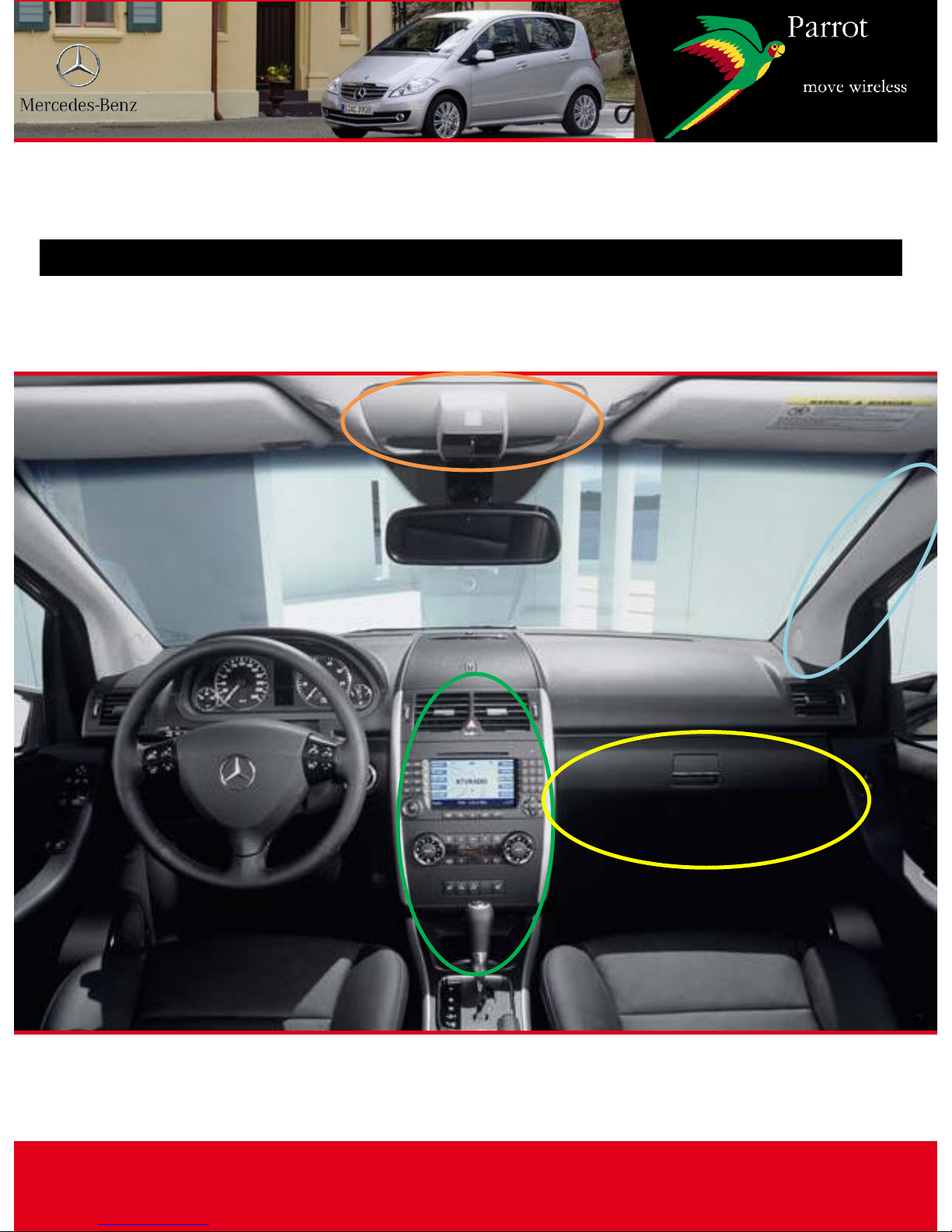
Disassembly
CLASS A
This document is a tool to assist with the installation of a Parrot product and is supplied purely for information. Any installation performed in
compliance with the instructions appearing in this document is done under the sole responsibility of the installer, who is entirely responsible
for the quality of the installation. All rights reserved © Copyright 2011 PARROT SA RCS PARIS 394 149 496. May not be reproduced without
the authorisation of Parrot SA. Pictures for information only.
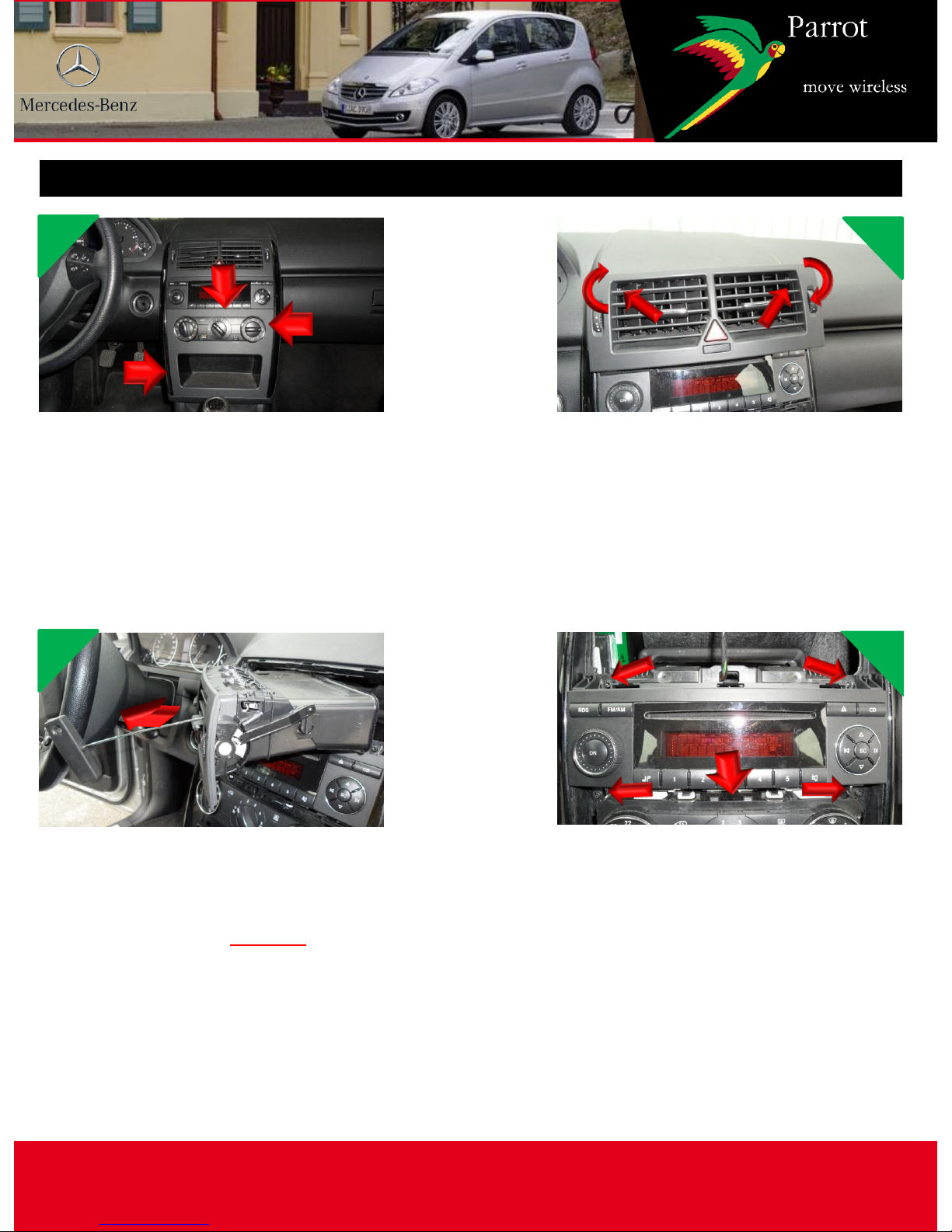
Disassembly 1 / 2
Using the plastic trim tools,
unclip the air conditioner cover
(pull hard as the clips are very
strong), first at the top A, then at
the centre B and finally at the
top C
Insert the two MERCEDES
extraction hooks into the central
air vent in D and E and make a
quarter turn
Then pull upwards to unclip the
vents which you place on the
dashboard without
disconnecting them
Unscrew screws 1, 2, 3 and 4
around the radio, then unclip the
blanking plate F above the air
conditioner and remove the
radio disconnecting the
connector and antenna cables
1
3
2
4
A
B
C
E D
1 2
3 4
F
CLASS A
This document is a tool to assist with the installation of a Parrot product and is supplied purely for information. Any installation performed in
compliance with the instructions appearing in this document is done under the sole responsibility of the installer, who is entirely responsible
for the quality of the installation. All rights reserved © Copyright 2011 PARROT SA RCS PARIS 394 149 496. May not be reproduced without
the authorisation of Parrot SA. Pictures for information only.
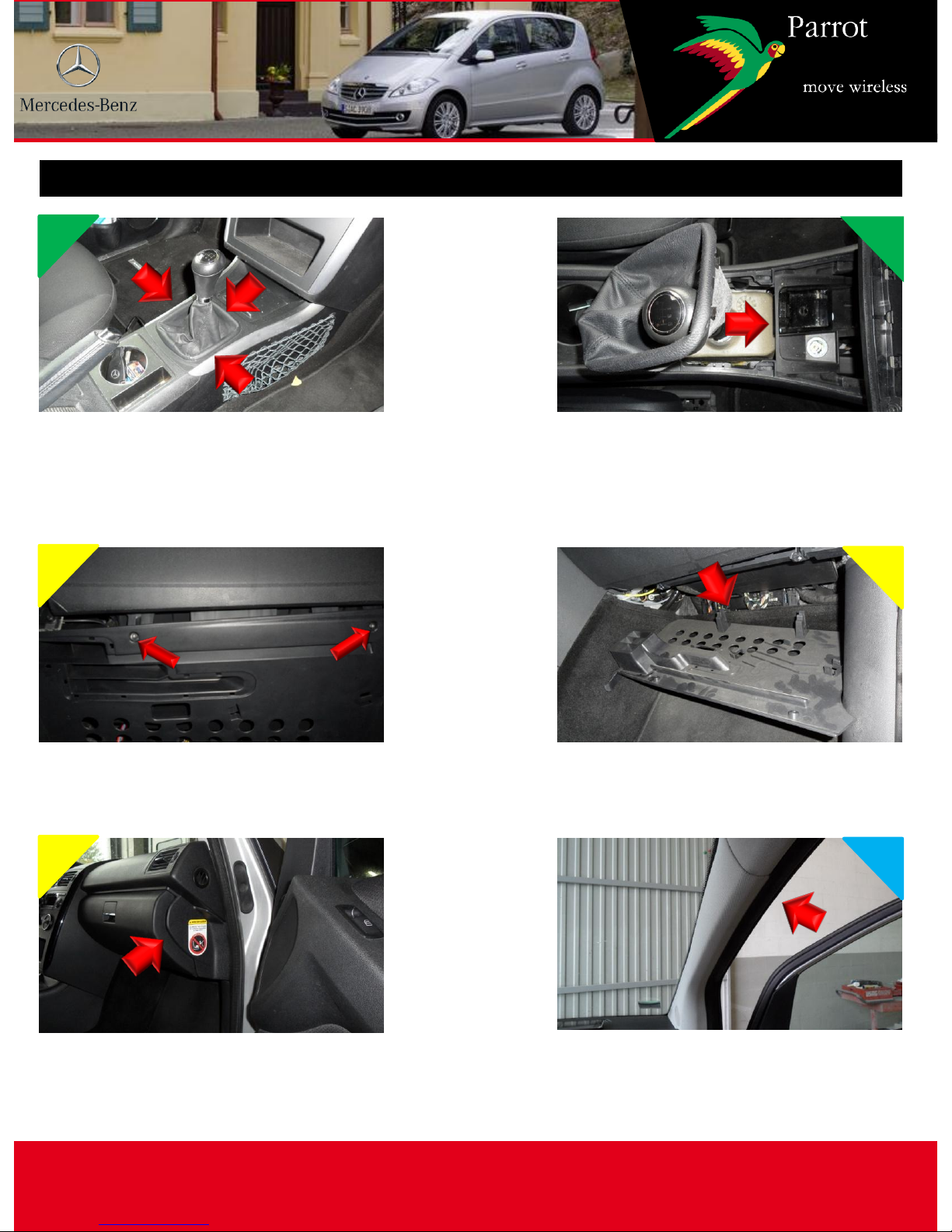
Disassembly 2 / 2
5 6
Using the plastic trim tools,
unclip the gear lever cover and
remove the bellows
Using the plastic trim tools,
unclip the ashtray and cigarette
lighter assembly, then place it to
the side without disconnecting
Unscrew screws 5 and 6 under
the glove box
Unfasten and half open the cover
7 8
9 10
Using the plastic trim tools,
unclip the passenger side of the
dashboard
Remove the passenger door seal
5 6
CLASS A
This document is a tool to assist with the installation of a Parrot product and is supplied purely for information. Any installation performed in
compliance with the instructions appearing in this document is done under the sole responsibility of the installer, who is entirely responsible
for the quality of the installation. All rights reserved © Copyright 2011 PARROT SA RCS PARIS 394 149 496. May not be reproduced without
the authorisation of Parrot SA. Pictures for information only.
Finding an ACC wire
Using a guide, pass an electric wire
from the cigarette lighter to the
underneath of air conditioning
control housing. Make a pigtail
connection (or use the jumper) to
the BLACK/GREEN wire
Attach the electric wire and
insulate with electrical tape (with
the Multimeter, check that the
+12V is properly controlled by the
key)
1 2
9
10
Connect the wire to +APC with a
round male terminal on the blue
wire the 84099 adapter (for the
Mki range) before the fuse
holder or invert the fuses on the
kit factory connector. Cut and
connect to the red wire between
the fuse holder and the ISO
connector (also valid for the
PC000033AA)
3
CLASS A
This document is a tool to assist with the installation of a Parrot product and is supplied purely for information. Any installation performed in
compliance with the instructions appearing in this document is done under the sole responsibility of the installer, who is entirely responsible
for the quality of the installation. All rights reserved © Copyright 2011 PARROT SA RCS PARIS 394 149 496. May not be reproduced without
the authorisation of Parrot SA. Pictures for information only.
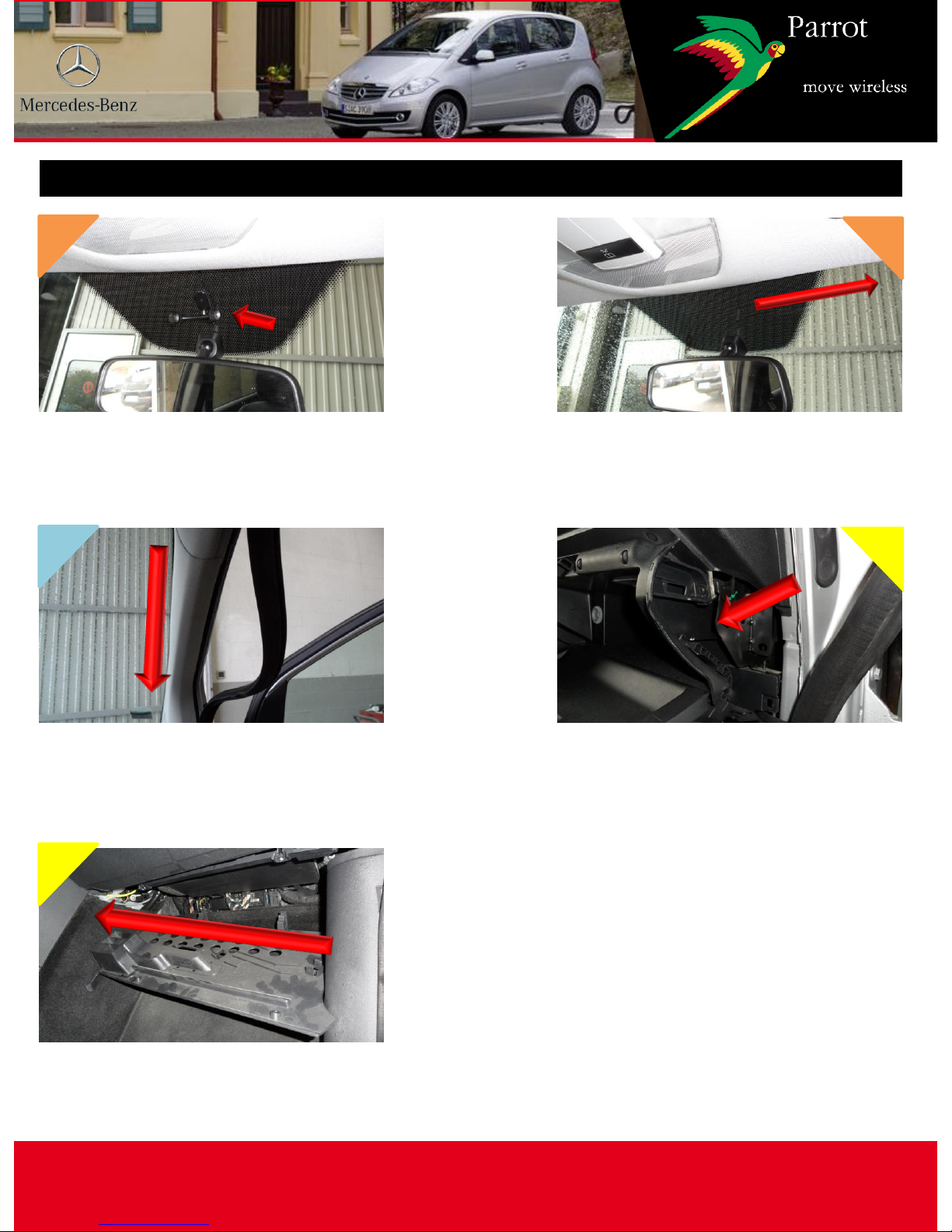
Microphone passage
Glue the bracket (supplied) to the grey
part of the windscreen, after having
thoroughly degreased the surface
Using the plastic trim tools, run the
cable along the windscreen
Slide the cable along the
passenger door pillar while
replacing the door seal
Pass the cable through the
passenger side of the dashboard
1
3
2
4
5
Pass the cable under the glove
box towards the radio housing
CLASS A
This document is a tool to assist with the installation of a Parrot product and is supplied purely for information. Any installation performed in
compliance with the instructions appearing in this document is done under the sole responsibility of the installer, who is entirely responsible
for the quality of the installation. All rights reserved © Copyright 2011 PARROT SA RCS PARIS 394 149 496. May not be reproduced without
the authorisation of Parrot SA. Pictures for information only.
Feeding the accessory cable
Using a guide, feed the cable in
the bottom of the glove
compartment through to the air
conditioning control unit housing
Place the cable being careful to
leave enough length
1 2
CLASS A
This document is a tool to assist with the installation of a Parrot product and is supplied purely for information. Any installation performed in
compliance with the instructions appearing in this document is done under the sole responsibility of the installer, who is entirely responsible
for the quality of the installation. All rights reserved © Copyright 2011 PARROT SA RCS PARIS 394 149 496. May not be reproduced without
the authorisation of Parrot SA. Pictures for information only.
Fitting the hands-free system 1 / 3
Connect the factory connector, invert the fuses
i.e. the RED and ORANGE wires, then cut the
RED wire between the fuse holder and the ISO
connector and connect the +APC wire above
1
For vehicles equipped with AUDIO 20 or 50: use the adapter 86111/PC000033AA
and the factory connector for CK (same mounting as AUDIO 5) or
84099/PC000033AA for MKI (for the PC000033AA add the factory connector and the
same mounting as the AUDIO 5)
For the adapter 84099, remove the terminals
from the blue wire before the fuse holder, then
mount a round female terminal on the +APC
wire and connect it to the blue wire
2