
manuals.online logo
Brands
  1. Home
  2. •
  3. Brands
  4. •
  5. PureEdge Lighting
  6. •
  7. Lighting Equipment
  8. •
  9. PureEdge Lighting TruTrack TR24-EP1-1RE WH Series User manual

PureEdge Lighting TruTrack TR24-EP1-1RE WH Series User manual

Other PureEdge Lighting Lighting Equipment manuals
PureEdge Lighting TruLine 1.6A User manual
PureEdge Lighting

PureEdge Lighting TruLine 1.6A User manual

PureEdge Lighting TruTrack TR24-LP1-1RE WH Series User manual

PureEdge Lighting

PureEdge Lighting TruTrack TR24-LP1-1RE WH Series User manual

PureEdge Lighting GLD_-_-C Series User manual
PureEdge Lighting

PureEdge Lighting GLD_-_-C Series User manual

PureEdge Lighting ZSD-2S Series User manual
PureEdge Lighting

PureEdge Lighting ZSD-2S Series User manual

PureEdge Lighting Piston User manual

PureEdge Lighting

PureEdge Lighting Piston User manual
PureEdge Lighting Nova NCM Series User manual
PureEdge Lighting

PureEdge Lighting Nova NCM Series User manual

PureEdge Lighting SS5C Commercial User manual

PureEdge Lighting

PureEdge Lighting SS5C Commercial User manual

PureEdge Lighting Fast Jack Power Round & Square 4" FJP-4... User manual

PureEdge Lighting

PureEdge Lighting Fast Jack Power Round & Square 4" FJP-4... User manual
PureEdge Lighting TruTrack TR24-CP1-1RE WH Series User manual
PureEdge Lighting

PureEdge Lighting TruTrack TR24-CP1-1RE WH Series User manual

PureEdge Lighting PLSTRM Series User manual
PureEdge Lighting

PureEdge Lighting PLSTRM Series User manual

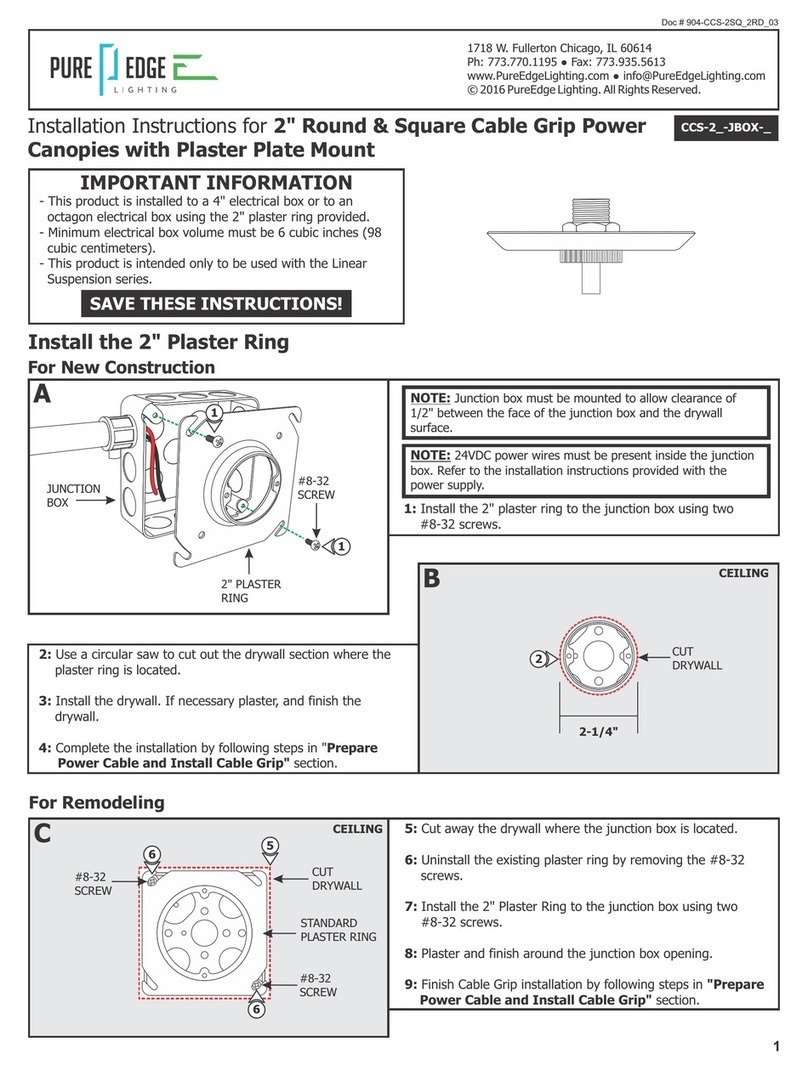
PureEdge Lighting CCS-2-JBOX Series User manual

PureEdge Lighting

PureEdge Lighting CCS-2-JBOX Series User manual

Popular Lighting Equipment manuals by other brands

Life 39.9F70020C quick start guide

Life

Life 39.9F70020C quick start guide

EuroLite LED ML-20 user manual

EuroLite

EuroLite LED ML-20 user manual

LIGMAN OD-50141 installation manual

LIGMAN

LIGMAN OD-50141 installation manual

Home Accents Holiday 1002461144 instructions

Home Accents Holiday

Home Accents Holiday 1002461144 instructions

Experia IRiS Ripple Light instruction manual

Experia

Experia IRiS Ripple Light instruction manual

Erco Gecko Mounting instructions

Erco

Erco Gecko Mounting instructions

Inter-lux ZTA.100.Surface Installation and maintenance instructions

Inter-lux

Inter-lux ZTA.100.Surface Installation and maintenance instructions

Whelen Engineering Company TN Series installation guide

Whelen Engineering Company

Whelen Engineering Company TN Series installation guide

IKEA BJÖRKSPIREA manual

IKEA

IKEA BJÖRKSPIREA manual

Toolland PM 6640 instruction manual

Toolland

Toolland PM 6640 instruction manual

GTD GTD-LP200 user manual

GTD

GTD GTD-LP200 user manual

LIVARNO home 1105-W-UK manual

LIVARNO home

LIVARNO home 1105-W-UK manual

ProLights EclPar IPMFC user manual

ProLights

ProLights EclPar IPMFC user manual

Velvet EVO Series user manual

Velvet

Velvet EVO Series user manual

IDTOLIGHT GENT installation instructions

IDTOLIGHT

IDTOLIGHT GENT installation instructions

MAYTONI S35 installation manual

MAYTONI

MAYTONI S35 installation manual

MaxLite MLFP14DP4535 user manual

MaxLite

MaxLite MLFP14DP4535 user manual

SLV Elektronik 550621 instruction manual

SLV Elektronik

SLV Elektronik 550621 instruction manual

manuals.online logo
manuals.online logoBrands
  • About & Mission
  • Contact us
  • Privacy Policy
  • Terms and Conditions

Copyright 2025 Manuals.Online. All Rights Reserved.

SAVE THESE INSTRUCTIONS!
- This product is for indoor locations only.
- This instructions shows a typical installation.
- Before beginning any electrical work, ensure that the
power to the electrical box is off.
IMPORTANT INFORMATION
1718 W. Fullerton Chicago, IL 60614
Ph: 773.770.1195 ● Fax: 773.935.5613
www.PureEdgeLighting.com ● [email protected]
© 2016 PureEdge Lighting. All Rights Reserved.
Doc # 904-TR24-EP1-1RE_05
Installation Instructions for TruTrack End Power Feed with 1"
Rectangle Junction Box
TR24-EP1-1RE-_-_-WH
Section One: Install the Junction Box
1
1: Mount each adjustable mounting bar to one side of the junction box and secure them with the mounting brackets and
Phillips screws provided.
A
B
ADJUSTABLE
MOUNTING BAR
#8 SCREWS
ADJUSTABLE
MOUNTING BAR
CONDUIT
3
2
MOUNTING
BRACKET
PHILLIPS SCREW
JUNCTION BOX
1
PHILLIPS SCREW
1
MOUNTING
BRACKET
ADJUSTABLE
MOUNTING BAR
JUNCTION BOX
HORIZONTAL ORIENTATION VERTICAL ORIENTATION
NOTE: Only use 0-10V and Uni power supplies with this
product. See the wiring diagram provided with the power supply
instructions.
2: Place the adjustable mounting bar tabs against the ceiling
joists. Secure the adjustable bars to the joists with the #8
screws.
3: Install conduit (if required by local electrical code) and run
the low voltage wires coming from the remote power supply
to the junction box.
NOTE: Adjustable mounting bars mount to studs that are
spaced 14.5" to 25" apart.
INSTALLATION
DIRECTION
INSTALLATION
DIRECTION
2END
POWER
FEED
TRACK
STRAIGHT
CONDUCTIVE
3
M3 SET
SCREW
D
4: Secure the End Power Feed to the junction box with the #4-40 screw using a 1/16" Allen wrench.
5: Secure the track to the ceiling using drywall screws.
E
DRYWALL
SCREW
4
5
DRYWALL
Section Two: Install 1RE End Power Feed
2
C
CUT
TRACK WITH COVER
INSTALLATION LENGTH
INSTALLATION
DIRECTION
1: Cut a section of drywall to expose the junction box area.
2: Mark and cut out the area where the installation will be
located using the junction box opening as a guide. Install
the drywall aligning it with the junction box.
NOTE: Refer to the TruTrack Recessed Channel instructions to
measure and cut the track and cover before continuing.
1
END FEED
POWER TRACK
SET
SCREW
STRAIGHT CONNECTOR
3: Align and slide a track over the straight connector on the
End Power Feed. Tighten the set screws using an Allen
wrench and the slotted screw on the straight connector
using a flat-head screw driver.
POWER FEED
ADAPTER
7
F 6: Strip 3/8" off of the Power Feed Adapter wires and the
low voltage power supply wires.
7: Pull up the levers of one lever nut and insert the low voltage
+24VDC power supply wire and the red wire of the Power
Feed Adapter into the connector. Push the lever down to
connect and lock into place.
8: Pull up the levers of the other lever nut and insert the low
voltage -24VDC power supply wire and the black wire of the
Power Feed Adapter into the connector. Push the lever down
to connect and lock into place.
9: Lightly tug on the wires to ensure they are secured in place.
10: Place the lever nut connections inside the junction box.
11: Place the Power Feed Adapter inside the End Power Feed
and tighten the slotted screw with a flat-head screw driver
to secure in place.
NOTE: Refer to the TruTrack Recessed Channel instructions to
plaster and complete the installation.
LEVER
NUT
3/8"
6
8
7
LEVER
3













