
Quantum Turbo SC Slim Compact User manual

TURBO SC
Slim Compact
Operating Instructions
Quantum Instruments
Designed and manufactured in the USA
TSC INSTRUC trans 8/8/06 8:28 PM Page 1

TSC INSTRUC trans 8/8/06 8:28 PM Page 2
Turbo SC (Turbo Slim Compact) uses the latest technology Nickel Metal
Hydride (NiMH) battery. The battery provides high power for quick flash
recycling, great capacity, no memory, and long life. Quantum’s NiMH bat-
tery is smaller and weighs less than other high power batteries!
1. INTRODUCTION
For best results, charge your Turbo SC the night before each use. The
nature of Nickel Metal Hydride batteries is that they loose a portion of
charge every day. Charging the night before or right before use insures
maximum capacity for your job.
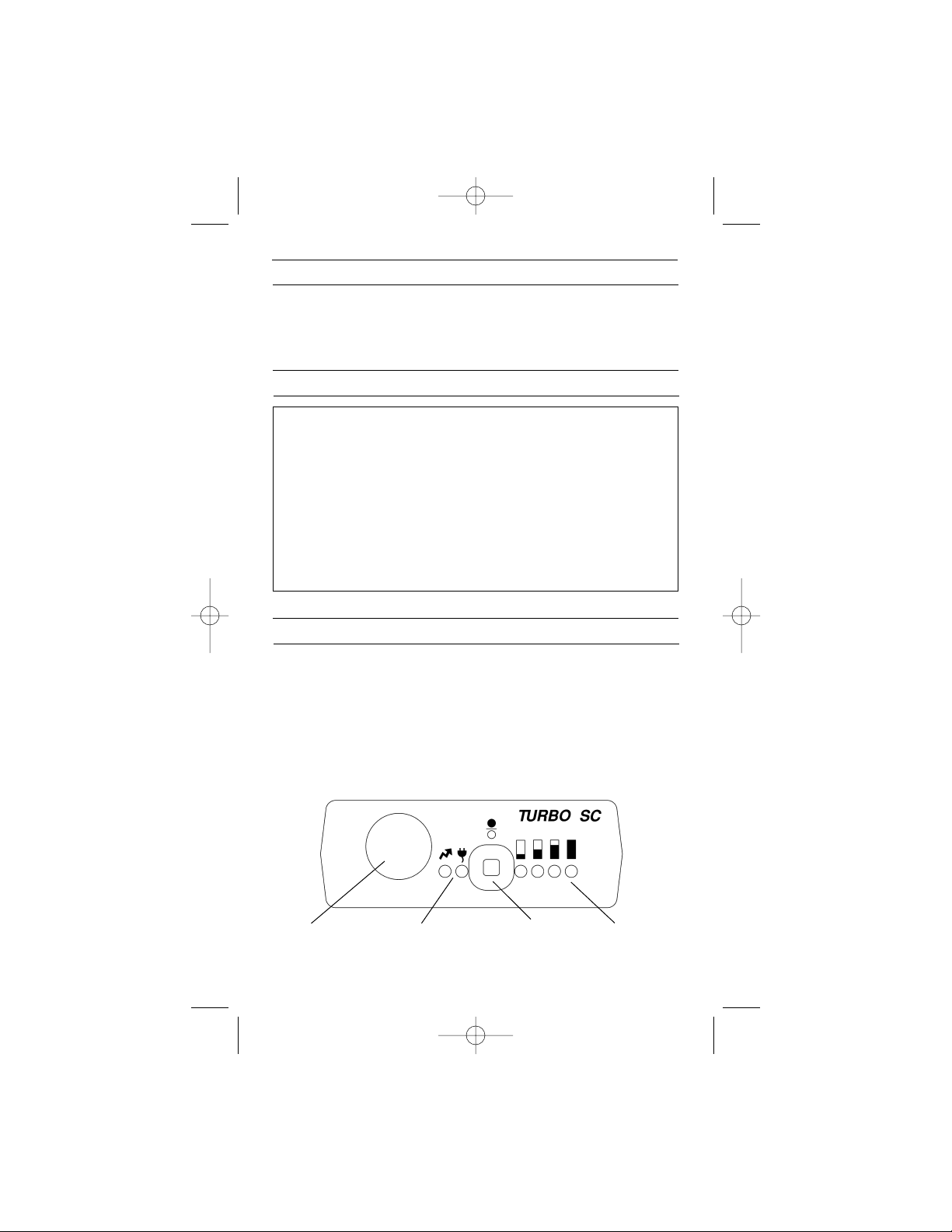
The “fuel gauge” is a computer calculated monitor of remaining battery
power and the amount of charge during recharging. When powering flash-
es, the green indicators go out as battery power is used up. With only one
green indicator lit less than 25% capacity remains.
3. QUICK GUIDE
•Do not disassemble the Turbo SC. High voltage!
•Return defective equipment only to Quantum dealers,
distributors, or directly to Quantum.
•Never put metal objects near either socket. Keep children away.
•Turn Turbo SC, camera and flash off before connecting or
disconnecting cables.
•Turbo SC is powerful! Do not exceed flash’s maximum
consecutive full-power flashes (see flash instructions, or
else 36 flashes). Then rest flash until it cools.
Note: no limit for Qflash.
2. WARNINGS AND CAUTIONS
1
FLASH
POWER ON/OFF FUEL GAUGEPOWER/RECHARGE
TSC INSTRUC trans 8/8/06 8:28 PM Page 3
2
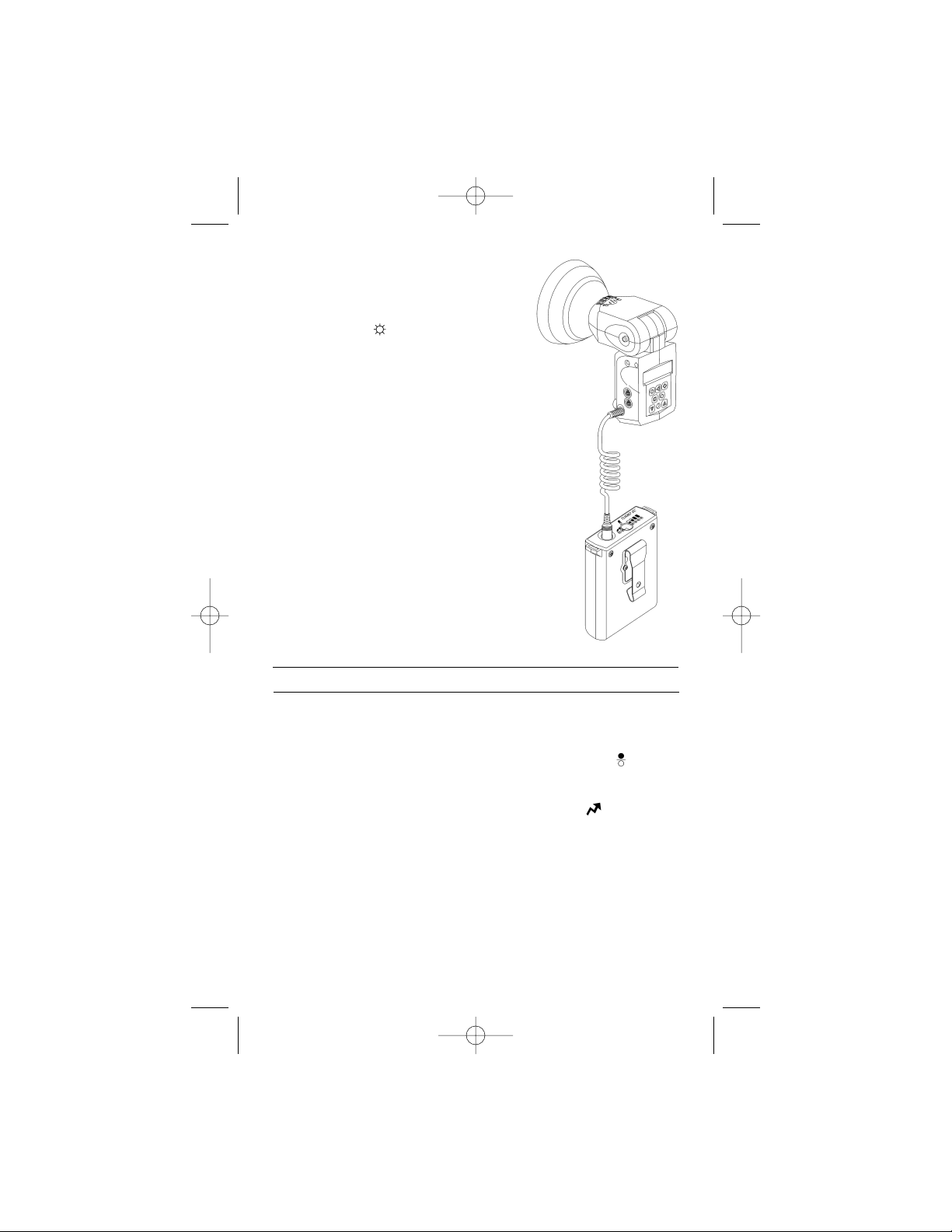
For trouble free operation, always turn Turbo SC, camera and flash off before
connecting or disconnecting Flash Cables. See Section 9 for selecting a
Flash Cable or accessory.
To turn Turbo SC on press and hold the panel button marked [ ] until the
green ”fuel gauge” lights come on. To turn off, press and hold the button
until the lights go out.
One yellow LED panel indicator is marked with the flash [ ] symbol. This
indicator lights steadily when connected to a flash. Please see Sections 6
and 7 for LED indications of the status of your Turbo SC and/or any
problems that it may have detected.
4. OPERATION
When the green [ ] 25% indicator blinks,
power to external equipment is shut off.
Turbo SC must be recharged.
During charging, each green indicator will
blink and eventually stay on as charge is
returned to the battery. When all green indi-
cators are lit steadily, charging is complete.
See Section 5 for more charging details.
Turbo SC is not compatible with SD and CD
Camera Cables. Quantum Qflash models
come with their own power cord, which
plugs into the socket of Turbo SC.
TSC INSTRUC trans 8/8/06 8:28 PM Page 4
3
Recharge at room tempera-
ture. Charge the night before,
or charge just before use to be
assured of obtaining 100%
charge.
Turbo SC is supplied with a universal charger
that works with AC mains power from 100 to 240
VAC. Your Turbo SC is supplied with one of the
following charger models: TCRUS (USA, Canada,
Japan); TCRE (euro countries); TCRUK (United
Kingdom); TCRA (Australia, New Zealand). Plug
adapters may be used to allow charging from
any 100-240 VAC power outlet. Avoltage con-
verter should not be used.
Be sure the AC mains socket is an uninter-
ruptible line (not switched). It is important not
to interrupt the charging so that the computerized fuel gauge remains
accurate. If the charge cycle is interrupted, the fuel gauge may read incor-
rectly during use, but will correct itself on the next cycle.
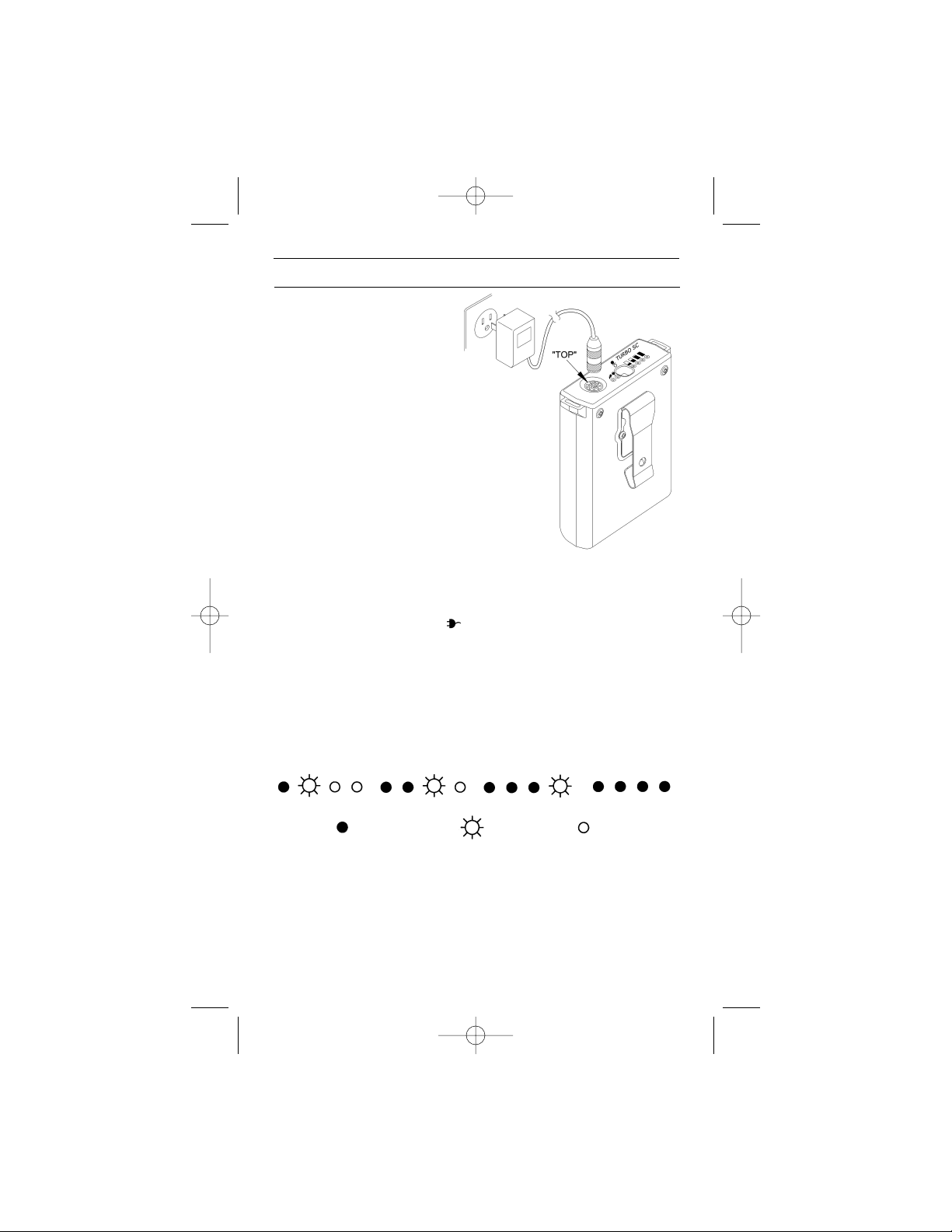
The yellow charge indicator [ ] lights when the charger is properly
connected. A full charge takes about 2 hours. Do not use any other type
of charger and risk damage to the Turbo SC!
When the charger is first connected the green fuel gauge LED’s turn on
and off during a brief self check. When the self-check finishes, charging
begins and the fuel gauge indicates charge progress. The fuel gauge indi-
cates charging progress as shown in the diagram.
5. RECHARGING
25% charged 50% charged 75% charged 100% charged
= steady light = off
= blinking
TSC INSTRUC trans 8/8/06 8:28 PM Page 5

4
Ayellow flash indicator [ ] shows the status of flash power.
Asteady light means the output is supplying flash or camera
power.
ABlinking indicator shows when high voltage has shut down.
Off indicates no power for that output.
6. FLASH INDICATORS
Symptom
AFlash Cable is connected
but the output indicator is
not lit.
AFlash Cable is connected
to a flash and the output
light blinks for 30 seconds.
The fuel gauge’s 25%
green light blinks for a few
minutes, and then all lights
go out and there is no power
to the equipment connected.
7. ERROR CONDITIONS and TROUBLESHOOTING
Solution
The cable could be broken, shorted, or
it may be the wrong cable.
Turbo SC has detected that no flash is
connected. This could be caused by
an intermittent or broken cable, or a
cable that is not fully engaged in the
socket.
This is the low battery indication.
Recharge. Check that the charger is
connected to a live mains outlet that
cannot be switched off.
Turbo SC may be clipped onto a belt with its
attached belt clip.
The Turbo SC also can be worn over a shoulder
using the shoulder strap. For comfort, the belt clip
may be removed from Turbo SC, as shown in the
diagram.
Loosen the screws a few turns and remove the
belt clip. Do not remove the screws completely!
Re-tighten the screws with moderate pressure.
8. WEARING TURBO SC
TSC INSTRUC trans 8/8/06 8:28 PM Page 6

5
“C” type Flash Cables for flash power - extend to 6’ (2m):
All Flash Cables power flashes with Turbo, Turbo Z, Turbo 2x2, Turbo C
and Turbo SC.
CA Armatar LR200HD, LR300HD, M200, M300
CH Honeywell 710, 780, 780S, 782, 810, 890, 890S,
892, 892S
CK Nikon SB11, 24, 25, 26, 27, 28-US
CKE Nikon SB28 (EURO), SB28D, SB28DX,
SB800, SB80DX
Contax TLA 360
CL3 Minolta 360PX
CL4 Minolta 4000AF
CL5 Minolta 5200I, 5400HS, 5400Xi, 5600HS(D)
CM1 Metz 45CT-1, 5
CM4 Metz 45CL1,3,4, 45CT3,4; Hasselblad 4504
CM5+ Metz 50MZ-5, 54MZ-3 54MZ-4, 70MZ4, 70MZ5
CN3 Vivitar 3900, National PE381SG, Pentax AF500FTZ
CO3 Olympus T32, T45
CS4 Sunpak 120J AUTO PRO TTL, 30DX, 30SR, 36DX,
36FD, 383, 4000AF, 411S, 422D, 433AF,
433D, 444D, AP52, AUTO DX 12R,
AUTO DX 8R, PZ4000AF, PZ5000AF
CS5 Sunpak 411, 4205G, 455, 511, 522, 544, 555, 611,
AUTOZOOM 3600, AUTOZOOM 5000,
G4500DX
CS6 Sunpak 622, 622 PRO
CV Vivitar 283, 285HV, 3700, 4600, 5200, 5600,
600 Series 1
Armatar 100, 200, 300
CZ Canon 430EZ, 480G, 540EZ, 550EX, 580EX,
MR-14EX, MT-24EX
Cables and accessories are updated continuously. Please consult our
website www.qtm.com, your dealer, or Quantum directly for the latest
availability.
9. FLASH CABLES & ACCESSORIES
TSC INSTRUC trans 8/8/06 8:28 PM Page 7

6
Short “CC” type Flash Cable – for mounting Turbo SC to bracket.
These short Flash Cables are designed for Turbo SC, or for other Turbo
models if they are mounted close to the flash.
CCK Nikon SB11, 24, 25, 26, 27, 28-US
CCKE Nikon SB28 Euro, 28D, 28DX, 80DX, SB800
Contax TLA360
CCM4 Metz 45CL1,3,4, 45CT3,4; Hasselblad 4504
CCM5+ Metz 50MZ-5, 54MZ-3,4, 70MZ-4,5
CCS4 Sunpak 120J AUTO PRO TTL, 30DX, 30SR,
36DX, 36FD, 383, 4000AF, 411S, 422D,
433AF, 433D, 444D, AP52, AUTO DX 12R,
AUTO DX 8R, PZ4000AF, PZ5000AF
CCS5 Sunpak 411, 4205G, 455, 511, 522, 544, 555, 611,
AUTOZOOM 3600, AUTOZOOM 5000,
G4500DX
CCV Vivitar US versions 283, 285HV, 3700, 4600,
5200, 5600, 600 Series 1
Armatar 100, 200, 300
CCZ Canon 430EZ, 480G, 540EZ, 550EX, 580EX,
MR-14EX, MT-24EX
Additional chargers for fast charging:
TCRUS USA, Canada, Japan
TCRE Euro countries
TCRUK UK
TCRA Australia, New Zealand
CL3 Minolta 360PX
Miscellaneous Accessories:
QT48 Dual connector for powering two flashes
QT49 10’ (3m) extension for flash cables
QBC Mounting Clamp for light stand / tripod mount
QMC Multi clip
ES1 for Viv 285HV;Metz 45CL1,3,4 & 45CT 3,4;Hasselblad 4504
ES2 for Canon 430EZ, 540EZ, Nikon SB24, SB25
TSC INSTRUC trans 8/8/06 8:28 PM Page 8

Having any trouble in using your Quantum product? We are here to help.
Mail, call, fax, or email our Service Department:
Service Department
Quantum Instruments Inc.
10 Commerce Drive, Hauppauge, NY 11788
Tel: 631 656 7400 Fax: 631 656 7410
www.qtm.com
Troubleshooting tips are available at www.qtm.com, Support, Customer
Support, FAQ. If you suspect a malfunction or require adjustment, return
the unit to us with an accurate description of the problem. Please be sure
your problem is not caused by improper operating procedure or malfunc-
tions in your other equipment. Send all equipment carefully packaged and
insured to our address above.
An estimate of repair cost on out-of-warranty merchandise may be for-
warded if you desire. This will require that we contact you for approval
before proceeding and will delay return of your equipment. For fastest
repair time, you may pre-approve repairs up to a limit of $85 with your
credit card. We will bill you only for actual costs up to that limit. If repair
costs exceed your pre-approval, we will contact you.
Paying by check will delay the repair until the check clears (up to 15 days).
Payment by money order is acceptable.
Normal repair time is 10-15 days. For expedited service, contact our
Service Department.
Summary:
•Ship via UPS, Parcel Post, or other carrier, insured.
•Give a clear, detailed description of the problem.
•Give your mailing address and daytime phone number, fax #,
and/or email.
•For warranty repairs include a copy of the receipt.
In addition, for out-of-warranty repairs with pre-approval:
•Provide your Visa, MasterCharge, or American Express card # and
expiration date.
•Give us authority to charge repair costs up to $85.00.
•Provide your billing address.
Note: Please do not e-mail your credit card information
9. CUSTOMER SERVICE
LIMITED WARRANTY
Quantum products have a 1 year limited warranty. Please refer to the
Limited Warranty card for complete details, conditions, and terms.
7
TSC INSTRUC trans 8/8/06 8:28 PM Page 9

8
La Turbo SC (Turbo Slim Compact) utilise la batterie de dernière généra-
tion au nickel-métal-hydrure (NiMH). Cette batterie fournit une grande
puissance permettant ainsi un recyclage rapide du flash, une grande
autonomie, aucun effet mémoire et une longue durée de vie. La batterie
NiMH de Quantum est plus compact et légère que les autres batteries de
forte puissance !
1. INTRODUCTION
Pour de meilleurs résultats, rechargez votre Turbo SC la nuit précédant
chaque utilisation. La nature même des batteries au nickel-métal-hydrure
est qu’elles perdent chaque jour une partie de leur charge. Recharger la
batterie la nuit précédant ou juste avant son utilisation vous assure une
capacité maximale pour vos travaux.
La « jauge de puissance » est un système de calcul assisté par ordinateur
de l’autonomie restante de la batterie et de la charge en cours de
recharge. Lorsque les éclairs partent, les indicateurs verts s’éteignent au
fur et à mesure de la diminution de la charge de la batterie. Lorsqu’il ne
reste qu’un seul indicateur vert allumé, cela signifie que la charge restante
est de moins de 25% de la capacité totale.
3. GUIDE RAPIDE D’UTILISATION
• Ne pas démonter la Turbo SC. Haute tension !
•Ne retournez le matériel défectueux qu’aux revendeurs et
qu’aux distributeurs agréés par Quantum, ou directement
chez Quantum.
• N’approchez aucun objet métallique à proximité des prises.
Eloignez les enfants de l’appareil.
• Eteignez la Turbo SC, l’appareil photo et le flash avant de
brancher ou de débrancher des câbles.
• La Turbo SC est puissant ! N’excédez pas le nombre
maximal d’éclairs consécutifs à pleine puissance (Reportez
vous aux instructions d’utilisation du flash, sinon ne
dépassez pas 36 éclairs). Ensuite, laissez le flash refroidir.
Remarque : il n’existe aucune limite de séquence d’éclairs
pour le Qflash.
2. PRÉCAUTIONS
TSC INSTRUC trans 8/8/06 8:28 PM Page 10
Table of contents
Languages:
Other Quantum Batteries Pack manuals
Popular Batteries Pack manuals by other brands





IOGear
IOGear GBP24V Series user manual
Inventus Power
Inventus Power PROTRXion S-12V100-TRX-HD user manual
Clas Ohlson
Clas Ohlson PW-290A quick start guide
EINHELL
EINHELL MULTI-Ah Power X-Change Plus Original operating instructions

Samsung
Samsung EB-U3300 quick start guide

ECTIVE
ECTIVE LC Series instruction manual