manuals.online logo
Brands
  1. Home
  2. •
  3. Brands
  4. •
  5. RATH MICROTECH
  6. •
  7. Emergency Phone
  8. •
  9. RATH MICROTECH SMARTPHONE IV Installation manual

RATH MICROTECH SMARTPHONE IV Installation manual

Other RATH MICROTECH Emergency Phone manuals

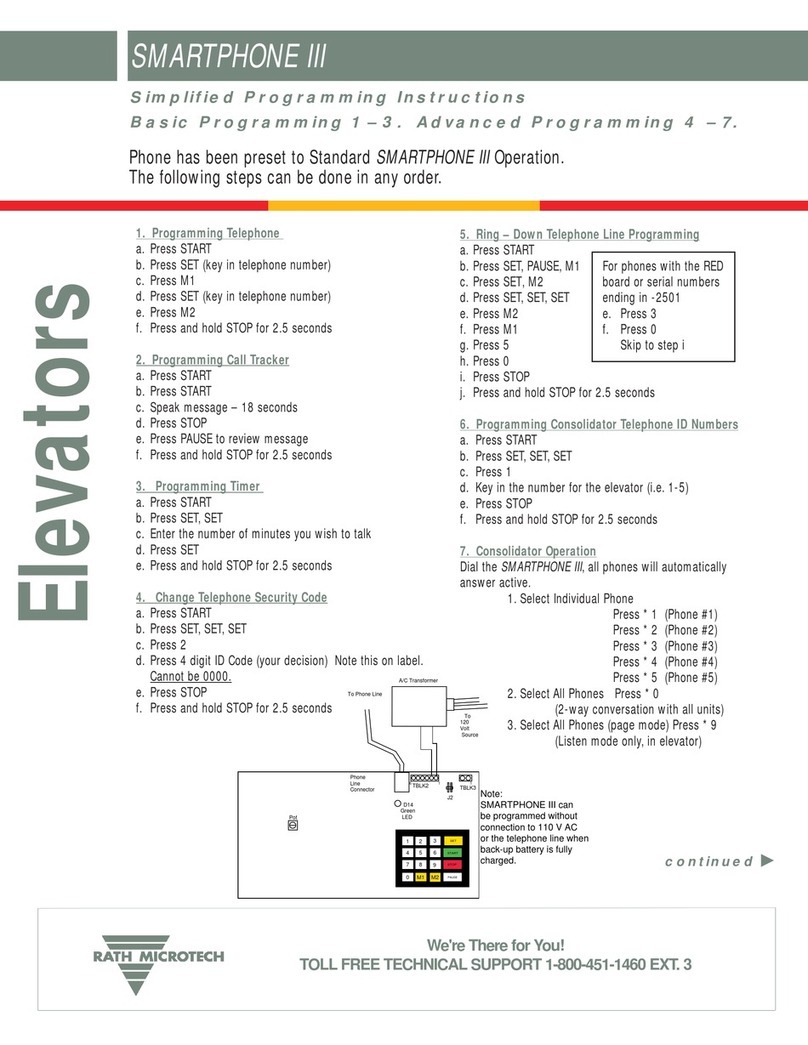
RATH MICROTECH SMARTPHONE III Installation manual

RATH MICROTECH

RATH MICROTECH SMARTPHONE III Installation manual

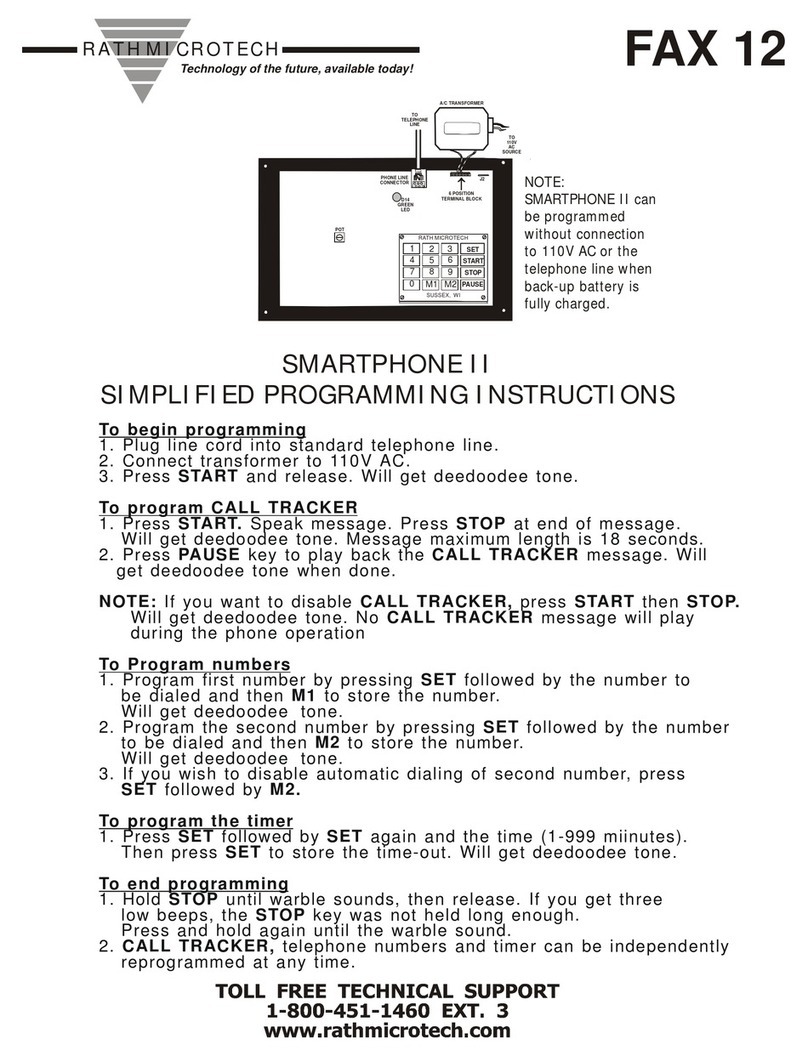
RATH MICROTECH SMARTPHONE II Installation manual

RATH MICROTECH

RATH MICROTECH SMARTPHONE II Installation manual

Popular Emergency Phone manuals by other brands

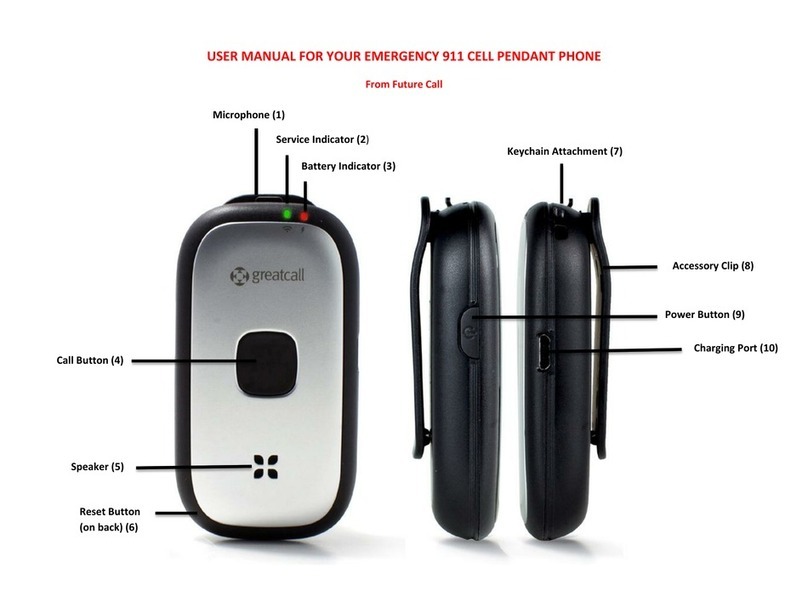
Future Call LLC. Emergency 911 user manual

Future Call LLC.

Future Call LLC. Emergency 911 user manual

LogicMark GUARDIAN ALERT 911 User's quick start guide

LogicMark

LogicMark GUARDIAN ALERT 911 User's quick start guide

LogicMark 37911 User's Quick Install Guide

LogicMark

LogicMark 37911 User's Quick Install Guide

Rath 2100-TLL Landline 12v Tower Installation & operation manual

Rath

Rath 2100-TLL Landline 12v Tower Installation & operation manual

DEXAPLAN BA 611 operating instructions

DEXAPLAN

DEXAPLAN BA 611 operating instructions

GAI-Tronics PHP400 Installation and user guide

GAI-Tronics

GAI-Tronics PHP400 Installation and user guide

switel POWERTEL TF 51 operating instructions

switel

switel POWERTEL TF 51 operating instructions

CareTech Gina user guide

CareTech

CareTech Gina user guide

Safeline SL1 manual

Safeline

Safeline SL1 manual

Smartlink OEM WIRELESS DIALLER user manual

Smartlink

Smartlink OEM WIRELESS DIALLER user manual

Merak MMk-656 instruction manual

Merak

Merak MMk-656 instruction manual

Talkaphone ETP-MT/R Series installation instructions

Talkaphone

Talkaphone ETP-MT/R Series installation instructions

indePendant DA1432 Get started

indePendant

indePendant DA1432 Get started

ANEP BOX-C manual

ANEP

ANEP BOX-C manual

Linear PERS-2400A Installation and operation instructions

Linear

Linear PERS-2400A Installation and operation instructions

Safeline MX3+ manual

Safeline

Safeline MX3+ manual

ADT WSB GEN1.0 user guide

ADT

ADT WSB GEN1.0 user guide

TeleAlarm TA72 user manual

TeleAlarm

TeleAlarm TA72 user manual

manuals.online logo
manuals.online logoBrands
  • About & Mission
  • Contact us
  • Privacy Policy
  • Terms and Conditions

Copyright 2025 Manuals.Online. All Rights Reserved.

Elevators
Note:
SMARTPHONE IV can
be programmed without
connection to 110 V AC
or the telephone line when
back-up battery is fully
charged.
Pot
D14
Green
LED
23
6
9
0PAUSE
8
7
54
1
M1 M2
STOP
START
SET
Phone
Line
Connector
To Phone Line
J2
A/C Transformer
61 1
TBLK2 TBLK3
To
120
Volt
Source
Phone has been preset to Standard SMARTPHONE IV Operation.
The following steps can be done in any order.
Simplified Programming Instructions
1. Programming Telephone
a. Press START
b. Press SET (key in telephone number)
c. Press M1
d. Press SET (key in telephone number)
e. Press M2
f. Press and hold STOP for 2.5 seconds
2. Programming Call Tracker
a. Press START
b. Press START
c. Speak message – 18 seconds
d. Press STOP
e. Press PAUSE to review message
f. Press and hold STOP for 2.5 seconds
3. Programming Timer
a. Press START
b. Press SET, SET
c. Enter the number of minutes you wish to talk
d. Press SET
e. Press and hold STOP for 2.5 seconds
4. Change Telephone Security Code
a. Press START
b. Press SET, SET, SET
c. Press 2
d. Press 4 digit ID Code (your decision) Note this on label.
Cannot be 0000.
e. Press STOP
f. Press and hold STOP for 2.5 seconds
5. Ring – Down Telephone Line Programming
a. Press START
b. Press SET, PAUSE, M1
c. Press SET, M2
d. Press SET, SET, SET
e. Press 3
f. Press 0
g. Press STOP
h. Press and hold STOP for 2.5 seconds
6. Programming Consolidator Telephone ID Numbers
a. Press START
b. Press SET, SET, SET
c. Press 1
d. Key in the number for the elevator (i.e. 1-5)
e. Press STOP
f. Press and hold STOP for 2.5 seconds
7. Consolidator Operation
Dial the SMARTPHONE IV,all phones will automatically
answer active.
1. Select Individual Phone
Press * 1 (Phone 1) Press # 1 (Phone 6)
Press * 2 (Phone 2) Press # 2 (Phone 7)
Press * 3 (Phone 3) Press # 3 (Phone 8)
Press * 4 (Phone 4) Press # 4 (Phone 9)
Press * 5 (Phone 5) Press # 5 (Phone 10)
2. Select All Phones Press * 0
(2-way conversation with all units)
3. Select All Phones (page mode) Press * 9
(Listen mode only, in elevator)
Basic Programming 1 – 3. Advanced Programming 4 – 7.
SMARTPHONE IV
continued 
We're There for You!
TOLL FREE TECHNICAL SUPPORT 1-800-451-1460 EXT. 3

Elevators
TABLE A
1# (ENTER PHONE NUMBER M1, ✱for pauses) # Deedoodee
1 ✱Phone number M1 is played back in beeps Deedoodee
2# (Enter phone number M2, for pauses) # Deedoodee
2 ✱Phone number M2 is played back in beeps Deedoodee
3# (Enter timeout minutes, last three digits) # Deedoodee
Factory set at 15 minutes
3 ✱Timeout minutes played back in beeps Deedoodee
4# Record Message # to stop Deedoodee
4 ✱Message is played back Deedoodee
9 ✱ #Will terminate call
Step 1 Remote Programming Sequence
REMOTE PROGRAMMING
1. SMARTPHONE IV Standard Remote Programming
a. Call number of phone or phones.
b. After you get the simulated ring, press the # key twice. Will hear long deedoodeedoo tone.
c. Key in the security code (4 digits). Will hear deedoodeedoo tone. Wrong security code will terminate the call.
dPress 9*0. Will hear tone. All phones will be ready to program. See Table A for programming menu.
e. Press 9*# to end programming
2. SMARTPHONE IV Consolidator Mode Remote Programming
a. Call number of phone or phones.
b. After you get the simulated ring, press the # key twice. Will hear long deedoodeedoo tone.
c. Key in the security code (4 digits). Will hear deedoodeedoo tone. Wrong security code will terminate the call.
d. Changing a single phone or all in group:
A) Single Phone
1. After security code, press 9*1. Will hear deedoodee tone. This will make phone with ID 1
ready to program.
2. See Table A for programming menu.
3. Press 9*2. Will hear deedoodee tone. You are now ready to program phone with ID 2.
See Table A.
4. Continue this until you have programmed all in the group.
5. Press 9*# to end the programming.
B) Changing All Phones In A Group
1. After security code, press 9*0. This will make all phones ready to program.
2. See Table A for programming menu.
3. Press 9*# to end the programming.
We're There for You!
TOLL FREE TECHNICAL SUPPORT 1-800-451-1460 EXT. 3