Bmlm
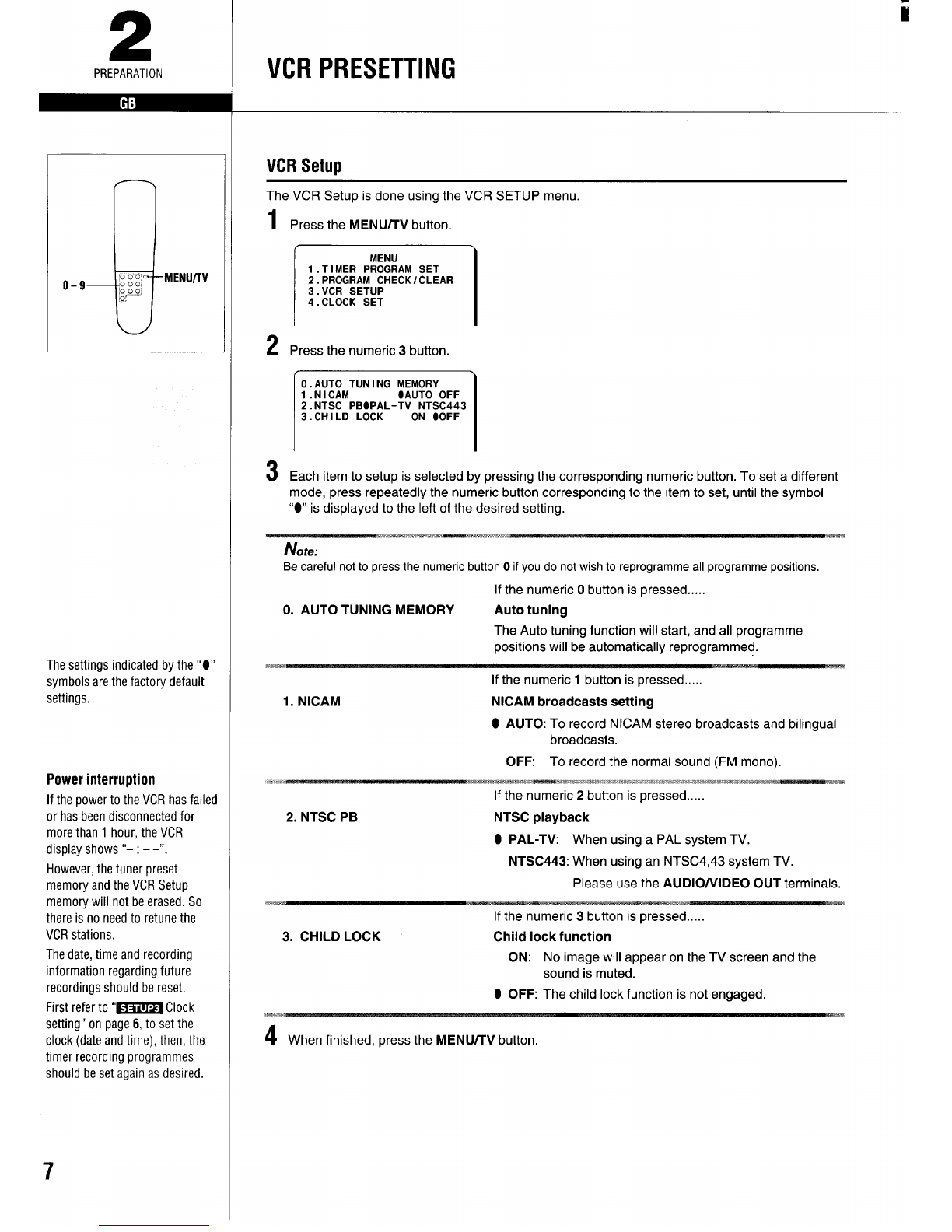
Clock setting
ExamP/e: Date,.. 9December, 1996
Time... 16:15
1Press the MENUTW button.
2Set the date and time using the numeric
buttons (O-9).
Enter in sequence, 0912961615.
\
CLOCK SET
09.12.96 16:15
[+/-] +Tl ME sHIFT
[CLEARI +TO CORRECT
[OKI +ENTER
If you entered awrong number, press the
CLEAR button to delete it, then enter the
correct number.
For time shifting adjustment, simply press the
(+ or -) button.
3When finished, press the OK button.
●Seconds will start counting from “00 as the
OK button is pressed.
●The normal TV broadcast screen will return.
Additional tuning adjustments
Sorting the TV stations
ExamP/e: To change TV1 from programme
position “4 to programme position “1”,
.
q
1Press the PRESET button.
2Using the (+ or-) button select the desired
TV station (e.g. TV1).
TV1
3Using the numeric buttons (O–9), enter the
target programme position number (e.g.
“01”).
4Press the OK button.
Repeat steps 2to 4to change another TV
station programme position number.
5When finished, press the PRESET button,
Fine tuning
If the tuning is not optimum, it can be
improved by manual fine tuning.
1Press the PRESET button.
2Press the FF or REW button to obtain the
best possible picture and sound.
3Press the OK button.
4When finished, press the PRESET button.
Skip function
If only programme position numbers 1to 30
have been preset, set the skip function for
programme position numbers 31 to 88, so that
only the preset TV stations will appear when
pressing the (+ or -) button.
1Press the PRESET button.
2Using the numeric buttons or the (+ or -)
button, select the programme position
number to skip.
3Press the CLEAR button.
●The “S” indicator will light,
To cancel the skip function, press the
CLEAR button again to erase the “S” indicator.
4Press the OK button.
Repeat steps 2to 4for every programme
position number to skip.
5When finished, press the PRESET button.
Manual tuning
This tuning mode can be used to modify the
settings entered by the Auto tuning function,
or to manually preset the TV stations to
particular programme position numbers.
1Press the PRESET button.
2Using the (+ or –) button, select the desired
programme position number.
3Press the PLAY button.
If the search stops on a broadcast other
than the one desired, press the PLAY
button again until the broadcast from the
desired TV station appears on the TV
screen.
4Press the OK button when the desired TV
station appears on the TV screen.
Repeat steps 2to 4to preset another TV
station to another programme position number.
5When finished, press the PRESET button.
2
PREPARATION
i
REW
E
FF
PLAY
MENLf/TV
Doo
o-9 :::, CLEAR
‘“’~~ PRESET
Tuning or presetting the
VCRchannels
This is very important for
correct G-Codeoperation.
Ideallyfor simpler operation,
channelsshould be presetas
follows:
Television Programme
station positionnumber
TV11
TV22
TV33
‘or additional channelsin your
]reait is overto you to selectthe
nest logicalchannelposition to
]Iacethem.
kSky
I’elevision 4
tCanterbury
rv 5
‘Action TV 6
‘Whenyou usethe G-Code
function to programme a
recordingfrom acertainchannel
for the first time, it will askyou
theprogramme position number
thatchannelwas presetto, That
settingwill be memorizedand
automaticallysetthe nexttime
thesamechannelis selected.