manuals.online logo
Brands
  1. Home
  2. •
  3. Brands
  4. •
  5. Sony
  6. •
  7. Projector
  8. •
  9. Sony VPLHS3 - Cineza Digital Home Entertainment LCD Front... Quick start guide

Sony VPLHS3 - Cineza Digital Home Entertainment LCD Front... Quick start guide

Other manuals for VPLHS3 - Cineza Digital Home Entertainment LCD Front...

4

Other Sony Projector manuals

Sony VPL-FH31 User manual

Sony

Sony VPL-FH31 User manual

Sony VPL-BW7 User manual

Sony

Sony VPL-BW7 User manual

Sony VPL-SX535 User manual

Sony

Sony VPL-SX535 User manual

Sony VPL-SW235 Service manual

Sony

Sony VPL-SW235 Service manual

Sony VPL-CS5 User manual

Sony

Sony VPL-CS5 User manual

Sony VPL-VW1100ES Service manual

Sony

Sony VPL-VW1100ES Service manual

Sony VPL-FHZ85 User manual

Sony

Sony VPL-FHZ85 User manual

Sony RVP-411DS User manual

Sony

Sony RVP-411DS User manual

Sony 4-125-572-12 (1) User manual

Sony

Sony 4-125-572-12 (1) User manual

Sony VPH-D50Q User manual

Sony

Sony VPH-D50Q User manual

Sony VPL-CX20 User manual

Sony

Sony VPL-CX20 User manual

Sony VPLSW525 User manual

Sony

Sony VPLSW525 User manual

Sony VPL-FE100U User manual

Sony

Sony VPL-FE100U User manual

Sony VPL-CS5A User manual

Sony

Sony VPL-CS5A User manual

Sony VPL-CX75 User manual

Sony

Sony VPL-CX75 User manual

Sony VPL-PX1 User manual

Sony

Sony VPL-PX1 User manual

Sony CPJ-A300 Operating Instructions / Mode... User manual

Sony

Sony CPJ-A300 Operating Instructions / Mode... User manual

Sony VPL-VW11HT - Lcd Video Projector User manual

Sony

Sony VPL-VW11HT - Lcd Video Projector User manual

Sony VPLCX275 Service manual

Sony

Sony VPLCX275 Service manual

Sony VPL-FHZ700L User manual

Sony

Sony VPL-FHZ700L User manual

Sony VPL-PWZ10 Service manual

Sony

Sony VPL-PWZ10 Service manual

Sony VPL-CW275 User manual

Sony

Sony VPL-CW275 User manual

Sony VPL-FH500L User manual

Sony

Sony VPL-FH500L User manual

Sony VPL-CX70 User manual

Sony

Sony VPL-CX70 User manual

Popular Projector manuals by other brands

Eiki LC-X985 Specification sheet

Eiki

Eiki LC-X985 Specification sheet

InFocus LitePro 610 quick start

InFocus

InFocus LitePro 610 quick start

Epson EH-TW5900 datasheet

Epson

Epson EH-TW5900 datasheet

FOREVER MLP-100 manual

FOREVER

FOREVER MLP-100 manual

Toshiba TDP-MT8U Specifications

Toshiba

Toshiba TDP-MT8U Specifications

Mitsubishi XD500U specification

Mitsubishi

Mitsubishi XD500U specification

Kodak Ektapro 3020 Illustrated parts list

Kodak

Kodak Ektapro 3020 Illustrated parts list

Toshiba TDP-EW25U Specifications

Toshiba

Toshiba TDP-EW25U Specifications

Barco iQ PRO G500 supplementary guide

Barco

Barco iQ PRO G500 supplementary guide

NEC Showcase Series HT1100 user manual

NEC

NEC Showcase Series HT1100 user manual

Philips LC1341 user guide

Philips

Philips LC1341 user guide

Epson PowerLite 1266 user guide

Epson

Epson PowerLite 1266 user guide

MAGINON DLP 1400S user manual

MAGINON

MAGINON DLP 1400S user manual

Toshiba TLP-380 owner's manual

Toshiba

Toshiba TLP-380 owner's manual

Philips PicoPix PPX2480/EU user manual

Philips

Philips PicoPix PPX2480/EU user manual

Hitachi CP-X605 Series Specifications

Hitachi

Hitachi CP-X605 Series Specifications

Optoma TW1692 user manual

Optoma

Optoma TW1692 user manual

Kodak EKTAPRO instruction manual

Kodak

Kodak EKTAPRO instruction manual

manuals.online logo
manuals.online logoBrands
  • About & Mission
  • Contact us
  • Privacy Policy
  • Terms and Conditions

Copyright 2025 Manuals.Online. All Rights Reserved.

4-093-193-02 (1)Sony Corporation © 2002 Printed in Japan
日本語
プロジェクターご使用時の発熱に関するご注意
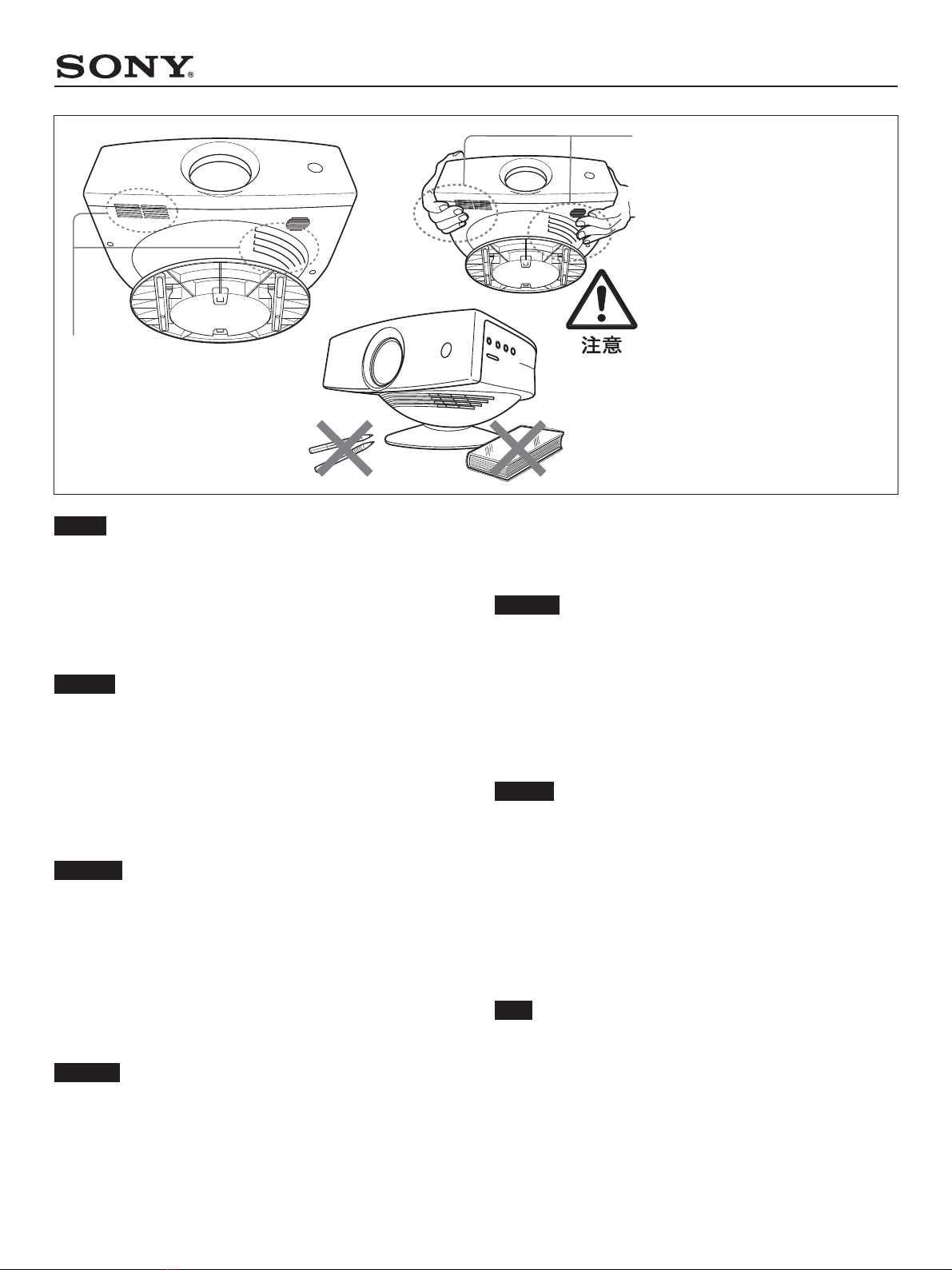
•排気口の近くに、熱に弱いものを置かないでください。排気口か
らの熱風で、変型したり、変質する可能性があります。
•電源をOFFにした後は、しばらくの 間、排気口付近の温度が高く
なっています。運搬の際は、ご注意ください。
English
Note on generation of heat when using the
projector
• Do not place objects easily affected by heat near the ventilation holes.
Such objects may be adversely affected by the hot air from the
ventilation holes.
•The temperature near the ventilation holes remains high for a while
after the projector is turned off. When you carry the projector, be
careful not to touch the areas near the ventilation holes.
Français
Remarque sur le dégagement calorifique
lors de l'utilisation du projecteur
• Ne placez pas d'objets ne supportant pas la chaleur près des orifices de
ventilation. Ces objets pourraient être endommagés par l'air chaud
provenant des orifices de ventilation.
• La température près des orifices de ventilation reste élevée pendant un
certain temps après la mise hors tension du projecteur. Lors du
transport du projecteur, veillez à ne pas toucher les zones situées près
des orifices de ventilation.
Deutsch
Hinweis zurWärmeentwicklung beim
Projektorbetrieb
•Lassen Sie wärmeempfindliche Gegenstände nicht in der Nähe der
Lüftungsöffnungen liegen. Solche Gegenstände könnten durch die
heiße Luft, die über die Lüftungsöffnungen abgegeben wird, beschädigt
werden.
•Auch nach dem Ausschalten des Projektors bleibt die Temperatur um
die Lüftungsöffnungen herum eine Zeit lang hoch. Wenn Sie den
Projektor tragen, achten Sie deshalb darauf, den Bereich um die
Lüftungsöffnungen nicht zu berühren.
Español
Nota sobre la generación de calor al utilizar
el proyector
• No coloque objetos sensibles al calor cerca de los orificios de
ventilación, ya que pueden resultar dañados por el aire caliente.
• Tras apagar el proyector, la temperatura de los orificios de ventilación
permanecerá alta durante un tiempo. Cuando transporte el proyector,
tenga cuidado de no tocar las zonas cercanas a los orificios de
ventilación.
Italiano
Nota sulla generazione di calore durante
l'uso del proiettore
•Non collocare in prossimità dei fori di ventilazione oggetti che
potrebbero risultare danneggiati a causa del calore. Tali oggetti
potrebbero risultare danneggiati dall'aria calda proveniente dai fori di
ventilazione.
•La temperatura in prossimità dei fori di ventilazione rimane elevata per
alcuni minuti dopo che il proiettore è stato spento. Durante il trasporto
del proiettore, prestare attenzione a non toccare le aree in prossimità
dei fori di ventilazione.
中文
注意使用投影仪时会产生热量
•请勿在通风孔附近放置易于受热之影响的物品。该类物品可能
因通风孔发出的热气而损坏。
•投影仪关闭后的一段时间内,通风孔四周仍保持高温。搬运投
影仪时,小心不要触摸通风孔四周。

排気口
Ventilation holes
Orifices de ventilation
Orificios de ventilación
Lüftungsöffnungen
Fori di ventilazione
通风孔
排気口付近の温度が高くなっています。

注意してください。
Be careful not to touch the areas near
the ventilation holes.
Veuillez à ne pas toucher les zones
situées près des orifices de
ventilation.
Achten Sie darauf, den Bereich um
die Lüftungsöffnungen nicht zu
berühren.
No toque las zonas cercanas a los
orificios de ventilación.
Prestare attenzione a non toccare le
aree in prossimità dei fori di
ventilazione.
小心不要触摸通风孔四周。