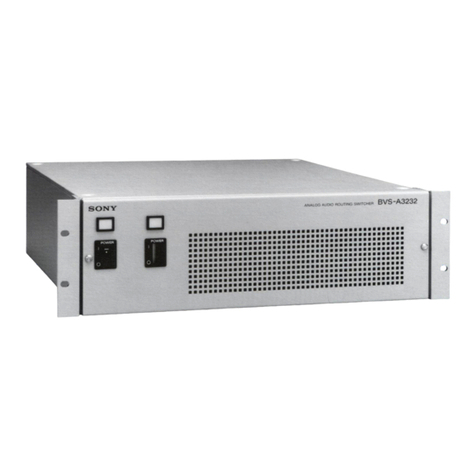
Sony BVS-A3232 User manual

BACKUP POWER SUPPLY FOR BVS-A3232
BKDS-PA3291
BACKUP CONTROL BOARD
BKDS-RS1690
ANALOG AUDIO ROUTING SWITCHER
BVS-A3232
MAINTENANCE MANUAL
1st Edition (Revised 1)
Serial No. 10001 and Higher (BVS-A3232)
Serial No. 10001 and Higher (BKDS-PA3291)
Serial No. 10001 and Higher (BKDS-RS1690)

!WARNING
This manual is intended for qualified service personnel only.
To reduce the risk of electric shock, fire or injury, do not perform any servicing other than that
contained in the operating instructions unless you are qualified to do so. Refer all servicing to
qualified service personnel.
!WARNUNG
Die Anleitung ist nur für qualifiziertes Fachpersonal bestimmt.
Alle Wartungsarbeiten dürfen nur von qualifiziertem Fachpersonal ausgeführt werden. Um die
Gefahr eines elektrischen Schlages, Feuergefahr und Verletzungen zu vermeiden, sind bei
Wartungsarbeiten strikt die Angaben in der Anleitung zu befolgen. Andere als die angegeben
Wartungsarbeiten dürfen nur von Personen ausgeführt werden, die eine spezielle Befähigung
dazu besitzen.
!AVERTISSEMENT
Ce manual est destiné uniquement aux personnes compétentes en charge de l’entretien. Afin
de réduire les risques de décharge électrique, d’incendie ou de blessure n’effectuer que les
réparations indiquées dans le mode d’emploi à moins d’être qualifié pour en effectuer d’autres.
Pour toute réparation faire appel à une personne compétente uniquement.
For the customers in the U.S.A.
Attention-when the product is installed in Rack:
1. Prevention against overloading of branch circuit
When this product is installed in a rack and is
supplied power from an outlet on the rack, please
make sure that the rack does not overload the supply
circuit.
2. Providing protective earth
When this product is installed in a rack and is
supplied power from an outlet on the rack, please
confirm that the outlet is provided with a suitable
protective earth connection.
3. Internal air ambient temperature of the rack
When this product is installed in a rack, please make
sure that the internal air ambient temperature of the
rack is within the specified limit of this product.
4. Prevention against achieving hazardous
condition due to uneven mechanical loading
When this product is installed in a rack, please make
sure that the rack does not achieve hazardous
condition due to uneven mechanical loading.
For the customers in the U.S.A. and Canada
RECYCLING NICKEL-CADMIUM
BATTERIES
NICKEL-CADMIUM BATTERY.
MUST BE DISPOSED OF PROPERLY.
Nickel-Cadmium batteries are recyclable.
You can help preserve our environment
by returning your unwanted batteries to
your nearest Sony Service Center or
Factory Service Center for collection,
recycling or proper disposal.
Note: In some areas the disposal of
nickel-cadmium batteries in household or
business trash may be prohibited.
For the Sony Service Center nearest you call 1-800-
222-SONY (United States only)
For the Factory Service Center nearest you call 416-
499-SONY (Canada only)

1(E)

BVS-A3232
Table of Contents
Manual Structure
Purpose of this manual .............................................................................................. 5
Contents ..................................................................................................................... 5
Related manuals ......................................................................................................... 6
1. Installation
1-1. Installation Procedure .................................................................................. 1-1
1-2. Supplied Accessories .................................................................................. 1-1
1-2-1. How to Make XLR Connector Cable ......................................... 1-2
1-3. Operating Environment ............................................................................... 1-3
1-4. Power Supply .............................................................................................. 1-3
1-4-1. Power Supply Specifications ...................................................... 1-3
1-4-2. Recommended Power Cord ........................................................ 1-3
1-5. Installation Space ........................................................................................ 1-4
1-6. Installation of the Backup Power Supply Unit (BKDS-PA3291) ............... 1-5
1-7. Installation of the Backup CPU Board
(BKDS-RS1690; CPU-94 Board) ............................................................... 1-6
1-7-1. Installation Procedure ................................................................. 1-6
1-7-2. Initial Setting of the Backup CPU-94 Board .............................. 1-7
1-8. Rack Mounting ............................................................................................ 1-8
1-9. Connectors................................................................................................... 1-9
1-10. Signal Inputs and Outputs ........................................................................... 1-9
1-11. System Connection .................................................................................... 1-11
1-12. Settings of Switches and Controls/LED Functions on Board ................... 1-12
1-12-1. CPU-94 Board (BVS-A3232, BKDS-RS1690) ....................... 1-12
1-12-2. HN-237 Board .......................................................................... 1-16
1-12-3. HN-238 Board .......................................................................... 1-16
1-12-4. OPM-24 Board ......................................................................... 1-17
1-13. Optional Accessories ................................................................................. 1-17
2. Service Overview
2-1. Removal of Cabinet..................................................................................... 2-1
2-2. Main Parts Locations................................................................................... 2-1
2-3. Printed Circuit Board Function ................................................................... 2-2
2-3-1. BVS-A3232 ................................................................................ 2-2
2-3-2. BKDS-PA3291 (Option) ............................................................ 2-2
2-3-3. BKDS-RS1690 (Option) ............................................................ 2-2
2-4. Switching Regulator Replacement .............................................................. 2-2
2-5. Backup Battery Replacement ...................................................................... 2-4

2(E) BVS-A3232
2-6. DC Fan Motor Replacement ....................................................................... 2-4
2-7. Connector Panel Replacement .................................................................... 2-5
2-8. MB-721 Board Replacement ....................................................................... 2-6
2-9. Cleaning ...................................................................................................... 2-7
2-10. Use of Extension Board EX-351 ................................................................. 2-7
2-11. Notes on Repair Parts .................................................................................. 2-8
2-12. ISR (Interactive Status Reporting) System ................................................. 2-9
2-12-1. Connection of Equipment .......................................................... 2-9
2-12-2. Mode Selection of REMOTE 3 Connector .............................. 2-11
3. Maintenance Mode
3-1. Mode Type .................................................................................................. 3-1
3-2. Normal Mode .............................................................................................. 3-2
3-3. Table Initialization Mode ............................................................................ 3-2
3-4. Test Mode .................................................................................................... 3-3
3-4-1. LED Test .................................................................................... 3-3
3-4-2. DIP Switch and Rotary Switch Test ........................................... 3-5
3-4-3. Crosspoint Test B ....................................................................... 3-5
3-4-4. S-BUS (REMOTE 1) Test ......................................................... 3-6
3-4-5. RS-232C (REMOTE 3) Test ...................................................... 3-7
3-4-6. RS-422A (REMOTE 2) Test ...................................................... 3-7
3-4-7. Buzzer Test ................................................................................. 3-8
3-5. Error Indications .......................................................................................... 3-8
4. Electrical Alignment
4-1. Power Supply Voltage Adjustment ............................................................. 4-1
4-1-1. +5 V Adjustment ........................................................................ 4-2
4-1-2. –15 V Adjustment ...................................................................... 4-3
4-2. CPU-94 Board ............................................................................................. 4-4
4-2-1. Crosspoint Phase Adjustment .................................................... 4-5
4-2-2. Buzzer Volume Adjustment ....................................................... 4-5
4-3. MX-82 Board .............................................................................................. 4-6
4-3-1. Adjustment Points List ............................................................... 4-6
4-3-2. Audio Level Adjustment ............................................................ 4-7
5. Spare Parts
5-1. Exploded Views .......................................................................................... 5-1
5-2. Electrical Parts List ..................................................................................... 5-8

3(E)
BVS-A3232
6. Semiconductor Pin Assignments
7. Block Diagrams
OVERALL .................................................................................................. 7-1
CPU-94 ........................................................................................................ 7-2
MX-82 ......................................................................................................... 7-3
8. Board Layouts and Locations of Components
CPU-94 ........................................................................................................ 8-2
MX-82 ......................................................................................................... 8-4
IPM-80 ........................................................................................................ 8-5
OPM-24 ....................................................................................................... 8-5
CN-1388 ...................................................................................................... 8-6
CNB-10 ....................................................................................................... 8-6
HN-237 ........................................................................................................ 8-8
HN-238 ...................................................................................................... 8-10
MB-721 ..................................................................................................... 8-12
DP-251 ...................................................................................................... 8-14
FL-235 ....................................................................................................... 8-14
PS-453 ....................................................................................................... 8-14
9. Schematic Diagrams
CN-1388 ...................................................................................................... 9-2
CNB-10 ....................................................................................................... 9-3
DUS-971 ..................................................................................................... 9-3
CPU-94 ........................................................................................................ 9-4
HN-237 ...................................................................................................... 9-10
HN-238 ...................................................................................................... 9-11
MB-721 ..................................................................................................... 9-12
MX-82 ....................................................................................................... 9-15
IPM-80 ...................................................................................................... 9-23
OPM-24 ..................................................................................................... 9-23
DP-251 ...................................................................................................... 9-25
FL-235 ....................................................................................................... 9-25
PS-453 ....................................................................................................... 9-25
FRAME ..................................................................................................... 9-26


5 (E)
BVS-A3232
Manual Structure
Purpose of this manual
This manual is the maintenance manual of following models.
Analog Audio Routing Switcher BVS-A3232
Backup Power Supply for BVS-A3232 BKDS-PA3291
Backup Control Board BKDS-RS1690
This manual is intended for use by trained system and service engineers, and
describes the information for maintenance and detailed service.
n
The functions and specifications of BKDS-PA3291 and BVS-A3232’s power supply
unit are equal. Therefore, BKDS-PA3291 and BVS-A3232’s power supply unit are
described in this manual as ‘’Power Supply Unit”.
Contents
This manual is organized by following sections.
Section 1 Installation
This section explains the installation environment, the power specifications, the
power cord of recommendation and the installation of the optional board/unit, etc.
Section 2 Service Information
This section explains the location of main parts, the removal of panels, how to
replace the parts, the cleaning procedure of the air filter, how to use the extension
boards, and ISR (Interactive Status Reporting).
Section 3 Maintenance Mode
This section explains the test mode and error indications.
Section 4 Electrical Alignment
This section explains the adjustment after replacing the power supply unit and part.
Section 5 Spare Parts
This section describes the spare parts.
Section 6 Semiconductor Pin Assignments
This section describes the pin assignments of semiconductors.
Section 7 Block Diagrams
This section describes the block diagrams of overall, CPU-94 board and MX-82
board.
Section 8 Board Layouts and Locations of Components
This section describes the board layouts and locations of components.
Section 9 Schematic Diagrams
This section describes the schematic diagrams of the boards.

6 (E) BVS-A3232
Related manuals
The following manuals are prepared for BVS-A3232 and BKDS-PA3291/RS1690.
• Operation Manual (Supplied with BVS-A3232)
This manual describes the notes on operating, the locations and functions of parts
and controls, and the specifications of BVS-A3232.
• Installation Manual (Supplied with BVS-A3232)
This manual contains the information on setting up the software when installing
BVS-A3232.

1-1(E)
BVS-A3232
Section 1
Installation
1-1. Installation Procedure
The installation procedure of BVS-A3232 is shown in the following flowchart.
Refer to each item in this manual for details.
1-2. Supplied Accessories
Connector Cover Set 32 sets
(including cable retainer, sticker, and sticker clear cover)
Connector Plug 32 pcs
75 ΩTerminator (BNC Type) 3 pcs
BNC Connector (T Type Bridge) 1 pc
Screws for Connector 2 pcs
Operation Manual 1 pc
Maintenance Manual 1 pc
Installation Manual for Software 1 pc
Start
Determining the Location
of Installation
Installation of the Optional Unit
and Board
Rack Mounting
Connection
Switch Settings on the Board
End
1-3. Operating Environment
1-4. Power Supply
1-5. Installation Space
1-6. Installation of the Backup Power Supply Unit (BKDS-PA3291)
1-7. Installation of the Backup CPU Board (BKDS-RS1690; CPU-94 Board)
1-8. Rack Mounting
1-9. Connectors
1-10. Signal Inputs and Outputs
1-11. System Connection
1-12. Settings of Switches and Controls/LED Functions on Board
1-2-1. How to Make XLR Connector Cable

1-2(E) BVS-A3232
1-2-1. How to Make XLR Connector Cable
The connector plugs and the connector covers are supplied with the BVS-A3232.
When connecting an XLR connector cable to the audio signal input/output
connector, it is necessary to make the cable with the supplied plug.
Make the XLR connector cable following the procedure described below.
Supplied Accessories
Connector plug (MC 6-pin type) 32 pcs
Connector cover set 32 sets
Parts to be Prepared
XLR connector 64 pcs
Two conductor shielded wire 64 pcs
A supplied connector plug requires two XLR connectors and two wires.
Procedure
1. Connect an XLR connector to one end of the two conductor shielded wire.
2. Strip off about 6.5 mm of insulation at the other end of the wire.
3. Insert the stripped core wires to the corresponding inlets of the supplied connec-
tor plug. Secure the wires using the plug screws. (H: HOT, C: COLD, G: GND)
Tightening torque: 0.29 N.m (3 kgf.cm)
1-2. Supplied Accessories
6.5 mm
Two conductor shielded wire Plug
Odd channel Even channel
H C G H C G
Other manuals for BVS-A3232
1
This manual suits for next models
2
Table of contents
Other Sony Switch manuals

Sony
Sony DFS-900M User manual

Sony
Sony DVS-7300 User manual

Sony
Sony ESBK-7052 User manual

Sony
Sony MVS-6000 User manual

Sony
Sony DMX-SW1 - Bravia Input Link User manual

Sony
Sony XVS-9000-C User manual

Sony
Sony MCS-8M User manual

Sony
Sony MVS-8400 User manual

Sony
Sony MVS-3000A User guide

Sony
Sony DVS-7200 User manual

Sony
Sony DFS-500 User manual

Sony
Sony DVS-9000 User manual

Sony
Sony XVS Series User manual

Sony
Sony MVS-8000 User manual

Sony
Sony DVS-7150 User manual

Sony
Sony BZPS-8001 User manual

Sony
Sony MVS-8000X System User manual

Sony
Sony PCGA-PRFX1 User manual

Sony
Sony HDS-7150 User manual

Sony
Sony DFS-900M User manual