Sleep Apnea Therapy Software User Manual Page 3
Installation procedure
Follow these steps to install the Sleep Apnea Therapy software.
Note: You must have administration privileges to install this software. For questions
regarding administration privileges refer to an IT professional.
1. Log in to the computer on which the
software will be installed. Close all
other open programs before
installation.
Insert the Sleep Apnea Therapy
software CD into your computer disk
drive. If you do not have the software
installation CD the software can be
downloaded from
www.mytranscend.com/resources.
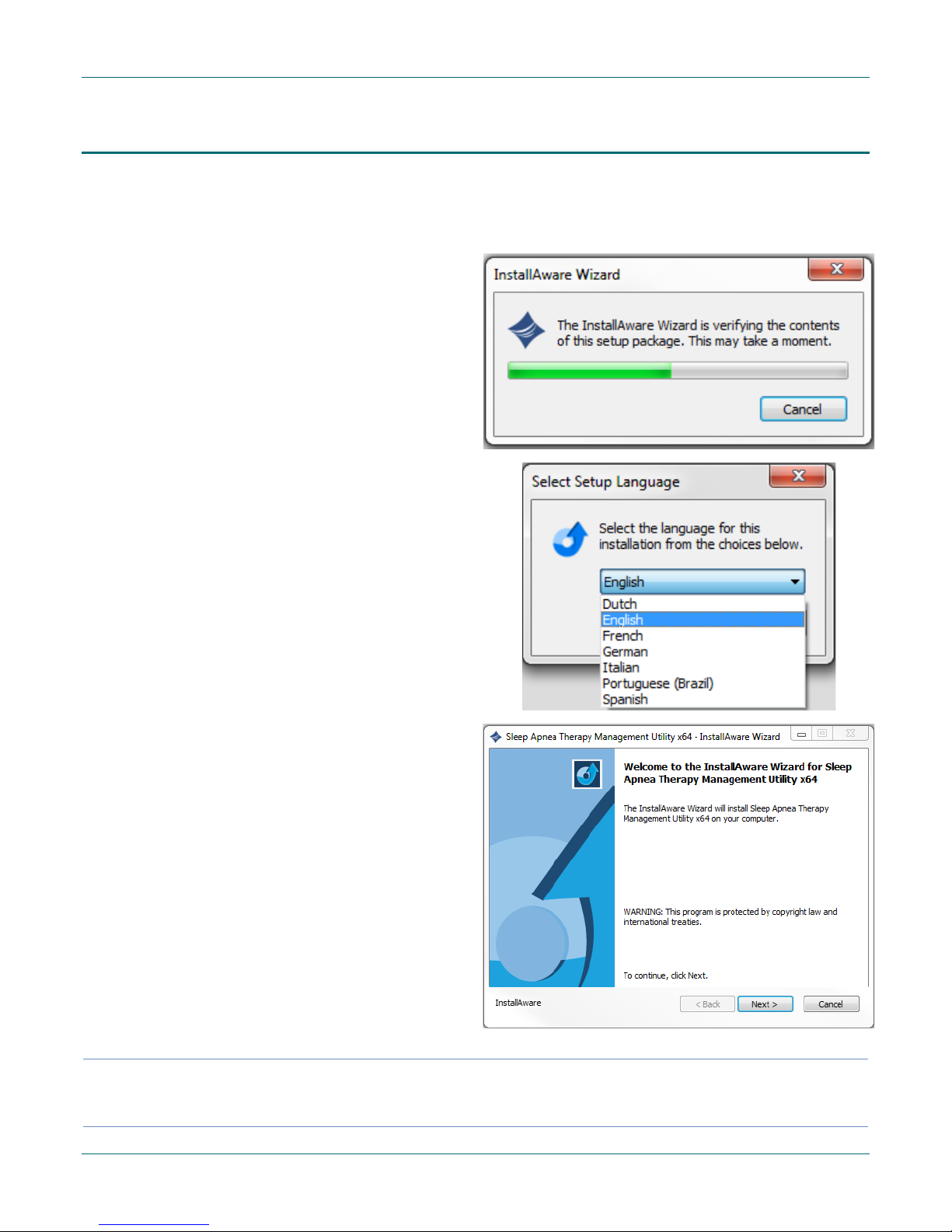
3. The install wizard will verify the setup
package.
Note:If you are updating existing
Transcend software you will be
instructed to uninstall your current
version of software before installing
an updated version.
Select Next> to proceed.
4. Select your language from the menu
and click OK.
5. A dialog box similar to the one shown
will appear notifying the user that the
installation setup is ready to begin.
6. Click Next> to begin the installation.
Note Software and Transcend user manual updates can be download at
http://www.mytranscend.com/resources