66251800 - V1.2 - 09/04/19
- 3 -
Art. 4903 - Installation Instructions
4000 Series ENG
Art. 4903 Codelock Module for the GSMPRO
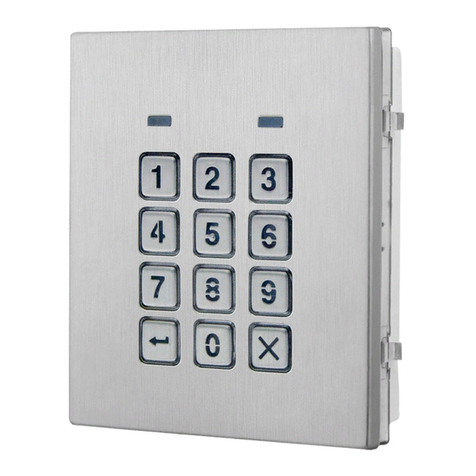
The two modes that can be programmed change the functionality of the jumper JPL. The table below indicates the programming
mode, the position of the jumper and the operation of the backlit buttons.
Jumper Position Back light Operation
Mode 1
A
(default)
Back light on low brightness in standby. Full brightness when any buttons are pressed.
B
Back light OFF in standby. Full brightness when any buttons are pressed.
Mode 2
A or B
or
Back light on full brightness all of the time.
JPL removed in
either Mode
No back light, the back light is completely disabled.
PROGRAMMING MODE 1 DEFAULT MODE, JPL = A
Follow the steps below to set the codelock to mode 1:
1. Disconnect the power from the Art.4903 codelock;
2. Short out terminals -and SW2, see Fig.6, page 2;
3. Press and hold down button 1and keep it pressed down
while the power is switched back ON;
4. When power is restored to the codelock wait for the module
to emit a single beep and the red status LED (Fig.1, ) to
ash once;
5. Listen for the conrmation tone and wait for the red status
LED (Fig.1, ) to ash once again;
6. Release button 1 and remove the short between terminals
-and SW2, see Fig.7, page 2;
7. Set the jumper JPL to the desired position.
PROGRAMMING MODE 2
Follow the steps below to set the codelock to mode 2:
1. Disconnect the power from the Art.4903 codelock;
2. Short out terminals -and SW2, see Fig.6, page 2;
3. Press and hold down button 2and keep it pressed down
while the power is switched back ON;
4. When power is restored to the codelock wait for the module
to emit a double beep and the red status LED (Fig.1, ) to
ash once;
5. Listen for the conrmation tone and wait for the red status
LED (Fig.1, ) to ash once again;
6. Release button 2 and remove the short between terminals
-and SW2, see Fig.7, page 2;
7. Set the jumper JPL to the desired position.
BACK LIGHT AND BUTTON OPERATION
If the back light programming mode is set to mode 1 (with jumper JPL in either the A or B position) when a button is pressed on the
keypad the back light will switch to full brightness for approximately 10 seconds.
After this time the back light will either switch OFF or switch back to low brightness (depending on the jumper position) unless
another button has been pressed within the 10 second period in which case the back light will stay on full brightness for a further
10 seconds.
The exception to this is if the back light programming mode is set to mode 2, i.e. the back light will be on full brightness all of the
time or if the jumper is removed the back light will be disabled.
SETTING UP THE UNIT ID OF THE KEYPAD ID 1 8
The unit ID is required when connecting the Art.4903 codelock to a GSM PRO module via the RS485 bus terminals when additional
access codes and parameters for these codes (timebands, access levels etc.) are required (also refer to the notes: programming
when integrated with the GSM PRO on page 5). Follow the steps below to setup the unit ID of the codelock:
1. Disconnect the power from the Art.4903 keypad, then short out terminals -and SW2, see Fig.6;
2. Press and hold down the 0 button, keeping it pressed while the power is switched back ON;
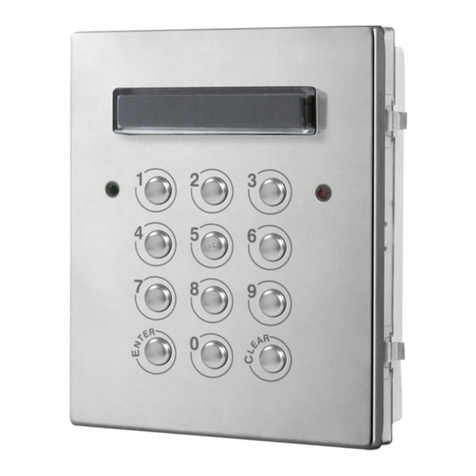
3. When power is restored to the keypad rst the backlit key buttons will illuminate (Fig.1, ). Wait for the keypad to emit a
low level tone then wait for the red status LED (Fig.1, ) to switch ON;
4. Release the 0 button then enter the unit ID required for the Art.4903 (1 - 8) using the keypad (Fig.1, ). The red status LED
will switch OFF and the keypad will play a short melody. Observe the red status LED (Fig.1, ) as this will ash as many times
as the unit ID being set (e.g. if the unit ID is set to ID.8 the red status LED will ash 8 times);
5. After the red status LED stops ashing remove the short between terminals -and SW2, see Fig.7, the unit ID has been set.