DE5468IP 1
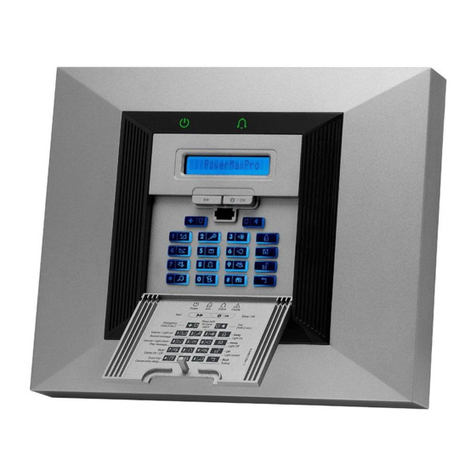
POWERMAX
POWERMAXPOWERMAX
POWERMAX PRO
PROPRO
PRO
Fully Supervised Wireless Alarm Control System
Installer Guide
TABLE OF CONTENTS
TABLE OF CONTENTSTABLE OF CONTENTS
TABLE OF CONTENTS
1. INTRODUCTION...........................................................3
2. SPECIFICATIONS ........................................................3
2.1 General Data...........................................................3
2.2 RF Section ..............................................................4
2.3 Electrical Data.........................................................4
2.4 Communication.......................................................4
2.5 Physical Properties.................................................4
3. INSTALLATION .............................................................4
3.1 Unpacking the Equipment........................................4
3.2 Supplying Power to the Unit.....................................4
3.3 System Planning and Programming.........................4
3.4 Mounting .................................................................4
3.5 Wiring.......................................................................4
3.6 Backup Battery Insertion..........................................6
3.7 X-10 Interface Module Connection................................6
3.8 Optional GSM Module Mounting....................................6
3.9 Additional Optional Module Mounting.......................6
3.10 Power Cable Connection .......................................7
3.11 Installing an Optional X-10 Siren............................9
3.12 Connecting PowerMax Pro to a Computer.............9
3.13 Connecting PowerMax Pro to GSM Modem..........9
4. PROGRAMMING ........................................................10
4.1 INTRODUCTION........................................................10
4.1.1 General Guidance...............................................10
4.1.2 Entering an Invalid Installer Code.......................10
4.1.3 Installer's Menu...................................................10
4.1.4 Setting a New Installer Code...............................10
4.1.5 Setting a New Installer Code in PowerMax Pro
that has 2 Installer Codes...................................10
4.2 ENROLLING WIRELESS DEVICES AND KEYFOBs11
4.2.1 General Guidance...............................................11
4.2.2 Enrolling Type.....................................................12
4.2.3 Enroll / Delete Wireless Devices.........................12
4.2.4 Enroll / Delete Keyfob Transmitters ....................12
4.2.5 Enroll / Delete Wireless Commander..................12
4.2.6 Enroll / Delete 2-Way Keypad.............................12
4.2.7 Enroll / Delete Wireless Siren.............................12
4.2.8 Enroll / Delete Proximity Tags.............................13
4.3 DEFINING ZONE TYPES, NAMES & CHIME ZONES12
4.4 DEFINING CONTROL PANEL PARAMETERS ........13
4.4.1 Preliminary Guidance..........................................13
4.4.2 Entry Delays 1&2 ................................................13
4.4.3 Exit Delay............................................................13
4.4.4 Bell Time.............................................................13
4.4.5 Abort Time...........................................................13
4.4.6 Alarm Cancel ......................................................13
4.4.7 Quick Arm ...........................................................14
4.4.8 Bypass ................................................................15
4.4.9 Exit Mode............................................................15
4.4.10 Piezo Beeps......................................................15
4.4.11 Trouble Beeps.................................................. 15
4.4.12 Panic Alarm......................................................15
4.4.13 Swinger Stop....................................................15
4.4.14 Cross Zoning....................................................15
4.4.15 Supervision.......................................................15
4.4.16 NOT READY.....................................................15
4.4.17 AUX Button A...................................................15
4.4.18 AUX Button B 2-W-KF......................................15
4.4.19 Jam Detect.......................................................15
4.4.20 Latchkey...........................................................15
4.4.21 “Not Active”.......................................................16
4.4.22 Back Light.........................................................16
4.4.23 Duress..............................................................16
4.4.24 Piezo Siren.......................................................16
4.4.25 Reset Options...................................................16
4.4.26 Tamper Option..................................................16
4.4.27 Siren on Line.................................................... 16
4.4.28 Memory Prompt................................................16
4.4.29 Disarm Option .................................................. 16
4.4.30 Bell/Rep. Option............................................... 16
4.4.31 Low-Bat ACK....................................................16
4.4.32 Screen Saver.................................................... 16
4.4.33 Confirm Alarm ..................................................16
4.4.34 AC Fail Rep...................................................... 16
4.4.36 User Permission...............................................16
4.5 DEFINING COMMUNICATION PARAMETERS....... 18
4.5.1 Autotest Time.....................................................18
4.5.2 Autotest Cycle.................................................... 18
4.5.3 Area Code ..........................................................18
4.5.4 Out Access Code ............................................... 18
4.5.5 First Central Station Telephone..........................18
4.5.6 First Account No.................................................18
4.5.7 Second Central Station Telephone ....................18
4.5.8 Second Account No............................................18
4.5.9 Report Format ....................................................18
4.5.10 4/2 Pulse Rate.................................................. 18
4.5.11 Reporting to Central Stations...........................18
4.5.12 Report CNF Alarm............................................ 18
4.5.13 Send 2WV Code .............................................. 18
4.5.14 Two-Way Voice Central Stations .....................18
4.5.15 Ring Back Time................................................ 19
4.5.16 Dialing Attempts............................................... 19
4.5.17 Set Private Telephone No................................19
4.5.18 Two-Way Voice - Private Phones ....................19
4.5.19 Private Telephone Dialing Attempts.................19
4.5.20 Reporting to Private Telephones......................19
4.5.21 Telephone Acknowledge..................................19
4.5.22 Pager Telephone Number................................19
4.5.23 Pager’s PIN No.................................................19
4.5.24 Reporting to a Pager........................................ 19