manuals.online logo
Brands
  1. Home
  2. •
  3. Brands
  4. •
  5. Wali
  6. •
  7. TV Mount
  8. •
  9. Wali FTM-3 User manual

Wali FTM-3 User manual

Other Wali TV Mount manuals

Wali MF002S User manual

Wali

Wali MF002S User manual

Wali GSDM001S User manual

Wali

Wali GSDM001S User manual

Wali M004 User manual

Wali

Wali M004 User manual

Wali TVDVD-03 User manual

Wali

Wali TVDVD-03 User manual

Wali GSDM002S User manual

Wali

Wali GSDM002S User manual

Wali SBR203 User manual

Wali

Wali SBR203 User manual

Wali WL-FTM-1 User manual

Wali

Wali WL-FTM-1 User manual

Wali CM2665XL User manual

Wali

Wali CM2665XL User manual

Wali MA4602 User manual

Wali

Wali MA4602 User manual

Popular TV Mount manuals by other brands

Krüger & Matz KM1300 owner's manual

Krüger & Matz

Krüger & Matz KM1300 owner's manual

Barkan E220 manual

Barkan

Barkan E220 manual

Bauhn ACTVB-1120 installation guide

Bauhn

Bauhn ACTVB-1120 installation guide

Vantage Point Products CB01 instructions

Vantage Point Products

Vantage Point Products CB01 instructions

Ergotron Neo Flex Cantilever UHD user guide

Ergotron

Ergotron Neo Flex Cantilever UHD user guide

ECG LD 174203 instruction manual

ECG

ECG LD 174203 instruction manual

StarTech.com FPCEILBTB user manual

StarTech.com

StarTech.com FPCEILBTB user manual

VonHaus 05/038 instruction manual

VonHaus

VonHaus 05/038 instruction manual

Techlink ECHO TV manual

Techlink

Techlink ECHO TV manual

Sandstrom SSTVMC12X instruction manual

Sandstrom

Sandstrom SSTVMC12X instruction manual

Kanto RCAD590 user manual

Kanto

Kanto RCAD590 user manual

Forging Mount HY9440 instruction manual

Forging Mount

Forging Mount HY9440 instruction manual

ICW SCACC18 installation instructions

ICW

ICW SCACC18 installation instructions

LG WM-L640V owner's manual

LG

LG WM-L640V owner's manual

Gembird WM-65ST-01 user manual

Gembird

Gembird WM-65ST-01 user manual

ERARD FiTUP XXL 035320 quick start guide

ERARD

ERARD FiTUP XXL 035320 quick start guide

PEERLESS PLCK-1 Installation and assembly

PEERLESS

PEERLESS PLCK-1 Installation and assembly

GEM GEM GP001 instructions

GEM

GEM GEM GP001 instructions

manuals.online logo
manuals.online logoBrands
  • About & Mission
  • Contact us
  • Privacy Policy
  • Terms and Conditions

Copyright 2025 Manuals.Online. All Rights Reserved.

FTM - 3
LED/LCD TV Mount
Hook X2 Panel extensions X2
(4)∅8Washer-C
(4)Plastic Anchor-A(4)Self-tapping screw-B
(4)Longer spacer-A(4)M8*30 screw-B(4)M8*15 screw-C(4)M6*30 screw-D(4)M6*15 screw-E (4)M5*30 screw-F
(4)M5*12 screw-G(4)M4*30 screw-H(4)M4*12 screw-I(4)
∅6 Washer-J (4)shorter spacer-K
Screw Package 1

Screw Package 2
Accessories
Bracket X1 Panel X1
Display Size: 37”
600
400
Pre-installation preparation
Check the VESA holes pattern on the back of the TV
600MM
400MM
B、C、D、E、F、G、H、I
A、K
J
-70” Maximum Load:132lbs A s s em b l e t h e Ho o k an d TV
Screw Package 2
Screw
Package 2
Screw Package 2
Bubble Level (x1) Nylon cable tie (x6)
You may need others help to
lift the TV on the bracket.
Installation in the wooden wall
Installation in the concrete wall
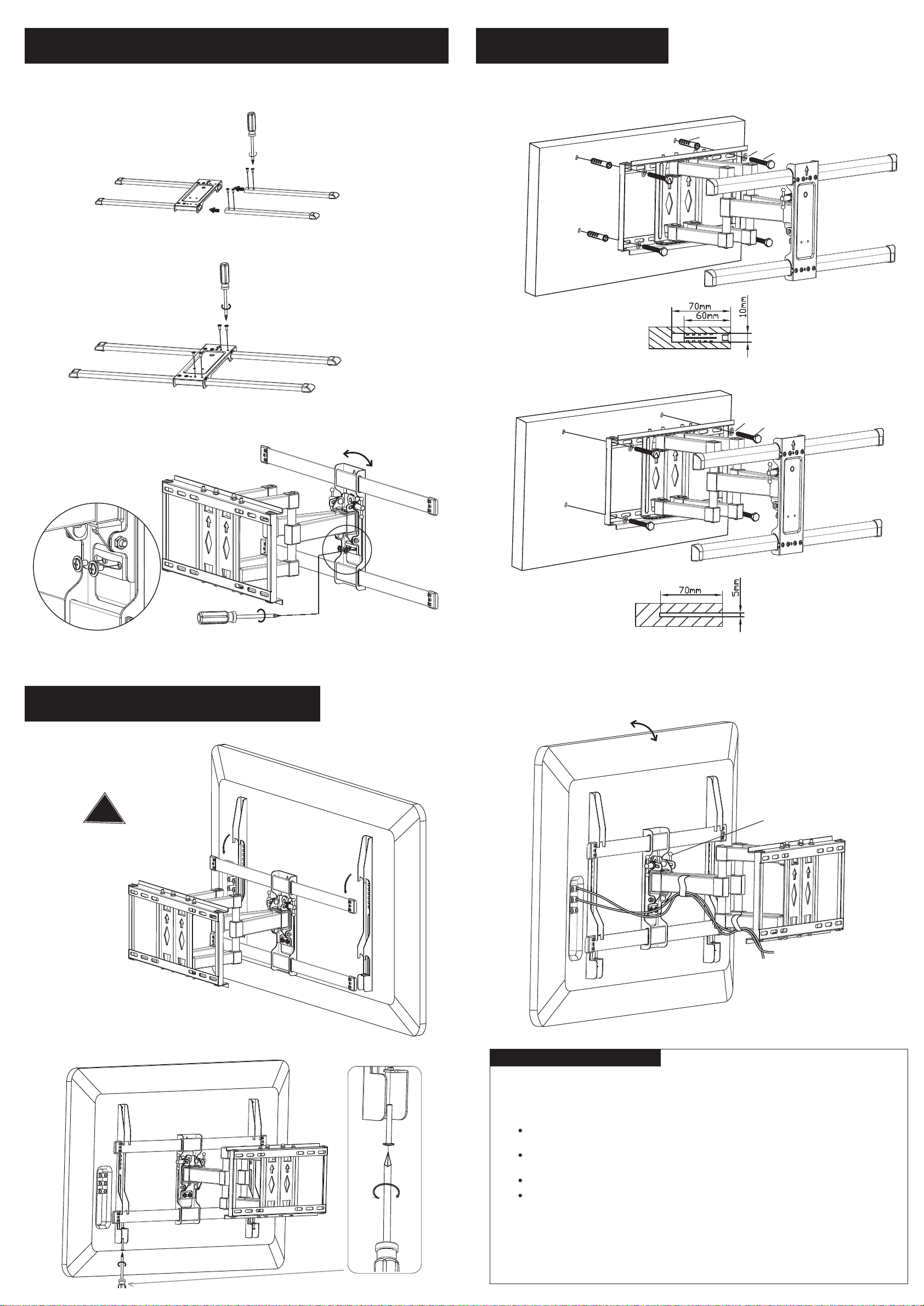
Assemble the Panel and Panel extensions
1:Remove the pre-installed screws on the 2 Panel
extensions, and insert into the Panel as the picture shows.
2:Fix the panel and panel extension
by the screw removed in step 1,
shown as the picture.
Pre-installation
preparation
3:Hang the panel on the bracket and
fixed by the pre-installed screws and washers.
Install the Bracket
Install the hook and Panel
1:Place the hook on
the panel with the TV
2:Fix the screw under the hook with screwdriver
3:Arrange the cable management with extra tie
IMPORTANT SAFETY INFORMATION:
WARNING: Install and operate this device with care. Please read this instruction before beginning
the installation, and carefully follow all instructions contained herein. Use proper safety equipment
during installation. We hereby disclaims any and all liability for injury or damage arising from incorrect
assembly, incorrect mounting, or incorrect use of this product.
Please call a qualified installation contractor for help if you don't understand these directions or
about the safety of the installation.have any doubts
If the product or accessory is damaged or missing, do not assemble or install. If you need to replace
anything else, contact us via Email:[email protected].parts or
This product is suitable for 37-70'' LCD, plasma screen. The load-bearing of it is 132lbs/60kg
Do not use this product of any purpose or in any configuration not explicitly specified in this
instruction.
[Maintenance Instruction]
Please check the screws once every two months whether they are fixed or not.
Can adjust the angle
ACB
CB
!Rotate this nut to adjust
front and rear
Screw Package 1

Screw Package 1