manuals.online logo
Brands
  1. Home
  2. •
  3. Brands
  4. •
  5. Waycon
  6. •
  7. Accessories
  8. •
  9. Waycon MAB-A User manual

Waycon MAB-A User manual

This manual suits for next models

3

Other Waycon Accessories manuals

Waycon LAS Series User manual

Waycon

Waycon LAS Series User manual

Waycon MSB Series User manual

Waycon

Waycon MSB Series User manual

Waycon MH60 Series User manual

Waycon

Waycon MH60 Series User manual

Waycon LAM Series User manual

Waycon

Waycon LAM Series User manual

Waycon UFP Series User manual

Waycon

Waycon UFP Series User manual

Waycon LLD-RS232 User manual

Waycon

Waycon LLD-RS232 User manual

Waycon LZW2 Series User manual

Waycon

Waycon LZW2 Series User manual

Waycon MAP Series User manual

Waycon

Waycon MAP Series User manual

Waycon SX Series Operating and maintenance instructions

Waycon

Waycon SX Series Operating and maintenance instructions

Waycon SX50 Series User manual

Waycon

Waycon SX50 Series User manual

Waycon UFP Series User manual

Waycon

Waycon UFP Series User manual

Waycon EZ 105 Series User manual

Waycon

Waycon EZ 105 Series User manual

Waycon SX300 Series User manual

Waycon

Waycon SX300 Series User manual

Waycon UFA2 Series User manual

Waycon

Waycon UFA2 Series User manual

Waycon UFA-CP Series User manual

Waycon

Waycon UFA-CP Series User manual

Waycon SX300 Series User manual

Waycon

Waycon SX300 Series User manual

Waycon LX Series User manual

Waycon

Waycon LX Series User manual

Waycon LVDT Series User manual

Waycon

Waycon LVDT Series User manual

Popular Accessories manuals by other brands

Quincy lab 140AE-1 operating manual

Quincy lab

Quincy lab 140AE-1 operating manual

HomePro ZIR000 user manual

HomePro

HomePro ZIR000 user manual

DOL 20SCR Technical user guide

DOL

DOL 20SCR Technical user guide

RAB Smart Task installation manual

RAB

RAB Smart Task installation manual

Kemppi KMS 300 quick guide

Kemppi

Kemppi KMS 300 quick guide

Stearns 57,500 Series Installation and service instructions

Stearns

Stearns 57,500 Series Installation and service instructions

iGuzzini TWILIGHT COPENAGHEN manual

iGuzzini

iGuzzini TWILIGHT COPENAGHEN manual

Adelaide Annexe & Canvas Avan Deluxe installation guide

Adelaide Annexe & Canvas

Adelaide Annexe & Canvas Avan Deluxe installation guide

OHAUS 5000 instruction manual

OHAUS

OHAUS 5000 instruction manual

HOME8 WLS1300 quick start guide

HOME8

HOME8 WLS1300 quick start guide

MAXBOTIX MaxSonar quick start guide

MAXBOTIX

MAXBOTIX MaxSonar quick start guide

ioSmart iSmart56 Installation and user guide

ioSmart

ioSmart iSmart56 Installation and user guide

Focusrite Scarlett 18i8 user guide

Focusrite

Focusrite Scarlett 18i8 user guide

Velleman ED38105 user manual

Velleman

Velleman ED38105 user manual

JumpSport SkyBounce user manual

JumpSport

JumpSport SkyBounce user manual

Prima-Temp PRIYA Instructions for use

Prima-Temp

Prima-Temp PRIYA Instructions for use

Tefcold BC85I-BC85I W user manual

Tefcold

Tefcold BC85I-BC85I W user manual

Vaisala WMS302 user guide

Vaisala

Vaisala WMS302 user guide

manuals.online logo
manuals.online logoBrands
  • About & Mission
  • Contact us
  • Privacy Policy
  • Terms and Conditions

Copyright 2025 Manuals.Online. All Rights Reserved.

INSTALLATION GUIDE
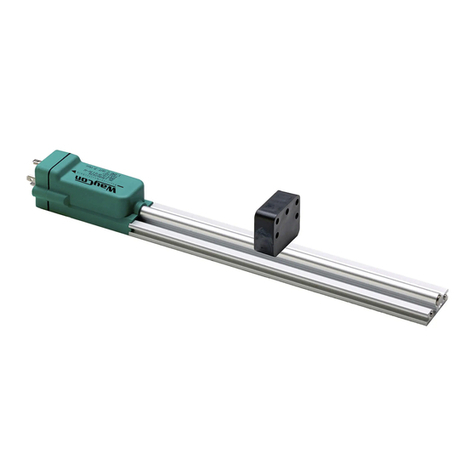
Magnetostrictive Sensor Series MAB
For more information please see the data sheet at
www.waycon.biz/products/magnetostrictive-transducers/
FIRST STEPS
WayCon Positionsmesstechnik GmbH would like to thank you for the trust you have placed in
us and our products. This manual will make you familiar with the installation and operation of our
magnetostrictive sensors. Please read this manual carefully before initial operation!
Unpacking and checking:
Carefully lift the device out of the box by grabbing the housing. After unpacking the device, check
it for any visible damage as a result of rough handling during the shipment. Check the delivery for
completeness.
If necessary consult the transportation company, or contact WayCon directly for further assistance.
GENERAL NOTES
The transducer must be installed away from sources of magnetic elds, both static and dynamic. The
connection cable must be wired separately from power cables and/or solenoid controls, drives, or
remote switches. The line used for power supply must be dedicated to the transducers or must be
drawn directly from the power terminals and as near as possible. When choosing a cursor for the MAB
prole, remember that the transducer’s cursor is a magnet. Therefore, if there are iron lings or small
magnetic metal fragments in proximity of the transducer, avoid the use of sliding cursors, as there
would be a risk of material accumulation on the cursor, creating problems for sliding. Use a oating
cursor instead.
MAGNETIC CURSORS
Magnetic Cursors (please order separately)
Cursors for
MAB-A / MAB-S
Cursors
for MAB-C Description
PCUR210 PCUR045 standard version;
guided sliding, axial joint, low
PCUR211 PCUR046 guided sliding, axial joint, high
PCUR212 PCUR047 guided sliding, angled joint
PCUR202 PCUR068 unguided oating 1)
1) The adjustment has to be done 2...7 mm above the MAB-prole. Allowed lateral deviation ±2 mm. Installation only
on a support made of non-magnetic material.
PCUR210
PCUR045
PCUR211
PCUR046
PCUR212
PCUR047
PCUR212
PCUR068

MOUNTING THE SENSOR
Brackets (please order separately)
1 set includes 2 brackets. We recommend to use 1 set for each 250...300
mm of the measurement range.
Code: PKIT091
Material: steel Distance between mounting holes: 50 mm
Overall length: 63.5 mm Mounting screws: M5
Sliding magnetic cursor
Floating magnetic cursor
A[mm] measurement range + 154
During installation, please observe the magnetically inactive range before and after the measurement
range. The inactive range is 96 mm on the connector side and 58 mm on the front side.
ELECTRICAL CONNECTION
The transducer case must be grounded with the cable sheathing on the control system side only.
MAB-A: analog output
Supply: 24 VDC, ±20 %
Function Pin
Output magnetic cursor 1 1
GND output magnetic cursor 1, 2, speed 2
Inverse output:
Output magnetic cursor 2, speed 3
Supply GND 4
Supply + 5
Connection cable analog output
Cable with mating connector M12, female, 5 pins, IP67
K5PXM-S-M12 X m, straight connector, shielded
K5PXM-SW-M12 X m, angular connector, shielded
Pin 12345
Cable colour BN WH BU BK GY
Pin
2
Pin 1
Pin
3
Pin 4
P
in 5
MAB-C: digital output CANopen
Supply: 24 VDC, ±20 %
Baud rate: 500 kBaud
Interface : CANopen DS-301 V4.01
Device prole: DS-406 V2.0
CANopen Data Protocol
SOF Arbitration Control Data Field CRC ACK EOF Interframe Space
1 11 1 6 0...8 Bytes 15 1 1 1 7 ≥ 3 Bits
Type Cursors PD01 (Standard) PD02 (Standard)
A 1 Position 4 Byte integer
Speed 2 Byte integer
Cams, 1 Byte integer
Absence of data
B 2 Position 4 Byte integer
Speed 2 Byte integer
Cams, 1 Byte integer
Position 4 Byte integer
Speed 2 Byte integer
Cams, 1 Byte integer
Function Pin
n. c. 1
Supply + 2
Supply GND 3
CAN H 4
CAN L 5
ELECTRICAL CONNECTION
MAB-S: digital output SSI
Supply: 10...32 VDC Function Pin
Data - 1
Data + 2
Clock + 3
Clock - 4
Supply + 5
Supply GND 6
DECLARATION OF EUCONFORMITY
WayCon Positionsmesstechnik GmbH
Mehlbeerenstrasse 4
82024 Taufkirchen / Germany
This is to certify that the products
Classication Magnetostrictive Sensors
Series MAB
fulll the current request of the following EU-directives:
EMV-directive 2004/108/EG (until April 19th 2016)
2014/30/EU (from April 20th 2016)
applied harmonized standards:
EN 61000-6-2:2005, EN 61000-6-4:2007, EN 61326-1:2006
The declaration of conformity loses its validity if the product is misused or modied without proper
authorisation.
Taufkirchen, 24.02.2016 Andreas Täger
CEO