Chapter3Operation
3.1 POWER ON AND AUTO ZERO-SETTING
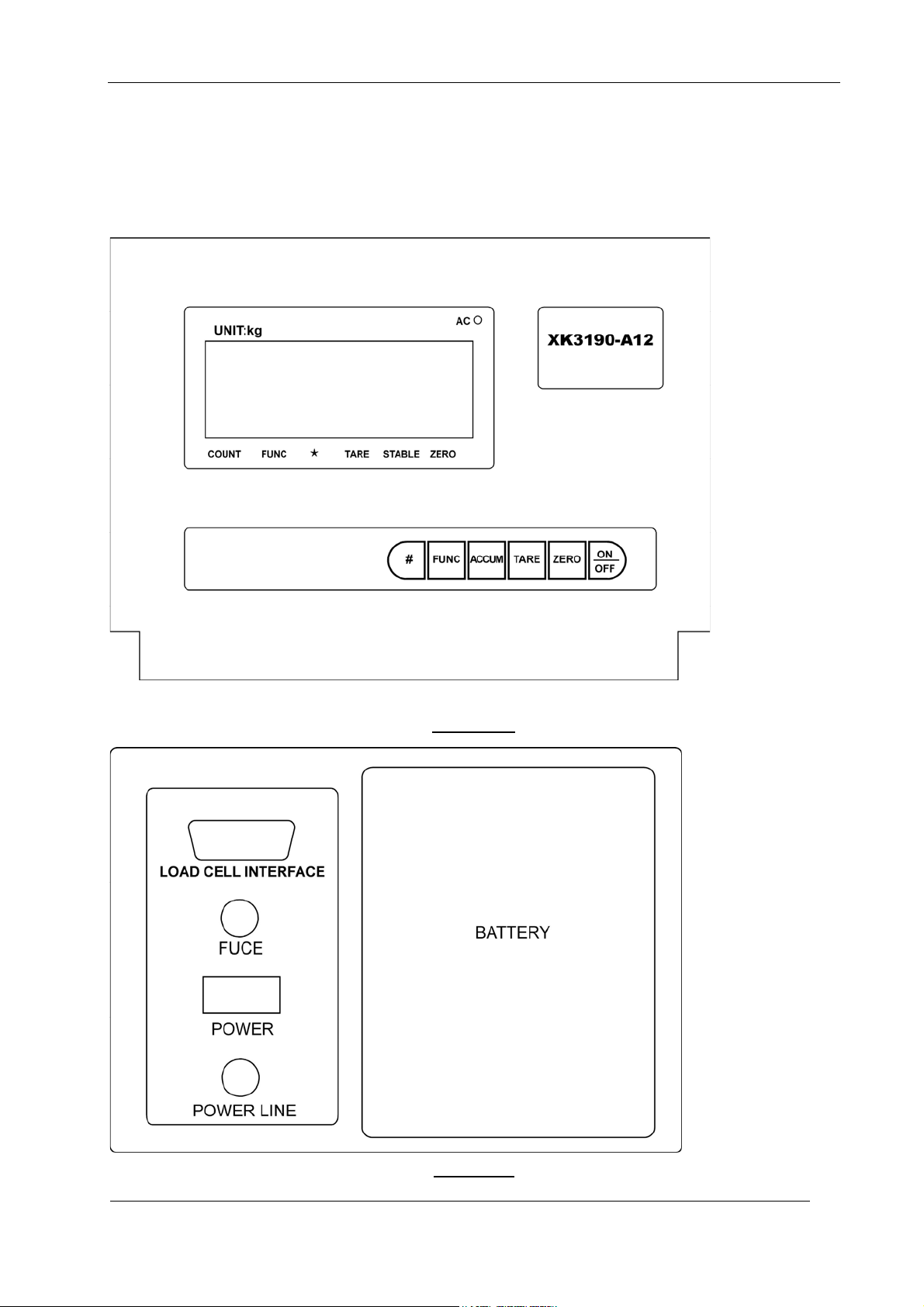
3.1.1 The indicator will perform “999999-000000” to self-checking when turning on. Then it will enter
weighing mode.
3.1.2 When power on, if loading weight on the scale deviates from the zero point, but still within zero
set range, the indicator will set zero automatically; if out of range, it is necessary to adjust the
zero point or recalibrate or reset.
3.2 MANUAL ZERO SETTING (AUTOMATICALLY)
3.2.1 In weighing mode, when there is some error when unloaded, press [Zero] to make the indicator to be
zero.
3.2.2 If the displayed value deviates from zero point, but still within zero-range, pressing [Zero] key is
available. Otherwise, [Zero] key is invalid. (In this status, please recalibrate or reset zero
parameters)
3.2.3 Only when stable annunciator is on, zero operation can be available。
3.3 TARE FUNCTION
When Indicator at weighing status, and displaying positive weight stable, press [ Tare ] key, indicator
will deduct the displayed weight value as tare weight. Then indicator displays net weight as “0 ”, and
Tare sign annunciator is on.
3.4 ACCUMULATING FUNCTION
In weighing mode, when the displayed value is positive and stable as well, press [Accum] key to
accumulate the present weight and display the accumulated weight, the accumulate annunciator will
be on. Press this key again, it will back to weighing mode and the accumulate annunciator will be off.
The next accumulating operation must be performed after the weight return to be zero. When the
accumulated weight displayed, press [Func] key to clean the accumulated weight in Memory and
press [Accum] to return weighing mode. If the accumulated weight needs to be checked, please keep
the load of platform to be zero, then press [Accum] to display the accumulated weight.
3.5 COUNTING FUNCTION
In weighing mode, press [Func] to enter the counting state, it will display “count”, and press [Accum]
it will display “C00000”, then press [Tare] to move the digit corresponding with the small triangle, the
number corresponding with the small triangle will be increased one by one each time after pressing
[Zero] key; and it will enter counting function after the sample number inputted and [Accum] pressed.
“0” will be displayed and the counting annunciator will be on. Press [Func] key to return weighing mode.
After entering counting mode, “count” will be displayed, press [Accum] twice times to enter counting
mode directly, indicator will display according to the result of the sampling last time. (In this process, if
the ERR4 appears, it means sampling failed, the indicator will keep the result from the last sampling)
A12-51007V1.0 - 5 -