manuals.online logo
Brands
  1. Home
  2. •
  3. Brands
  4. •
  5. YSI
  6. •
  7. Measuring Instrument
  8. •
  9. YSI 550A User manual

YSI 550A User manual

Other manuals for 550A

1

Other YSI Measuring Instrument manuals

YSI Professional Plus Use and care manual

YSI

YSI Professional Plus Use and care manual

YSI 1500 Sport User manual

YSI

YSI 1500 Sport User manual

YSI MultiDO 5400 User manual

YSI

YSI MultiDO 5400 User manual

YSI 85 User manual

YSI

YSI 85 User manual

YSI ProDSS Use and care manual

YSI

YSI ProDSS Use and care manual

YSI PRO20 User manual

YSI

YSI PRO20 User manual

YSI Professional Plus User manual

YSI

YSI Professional Plus User manual

YSI 3100 User manual

YSI

YSI 3100 User manual

YSI 2700D User manual

YSI

YSI 2700D User manual

YSI Pro30 User manual

YSI

YSI Pro30 User manual

YSI MultiLab 4010-1W User manual

YSI

YSI MultiLab 4010-1W User manual

YSI Pro2030 User manual

YSI

YSI Pro2030 User manual

YSI 3200 User manual

YSI

YSI 3200 User manual

YSI MultiLab 4010P-1W User manual

YSI

YSI MultiLab 4010P-1W User manual

YSI 900 User manual

YSI

YSI 900 User manual

YSI EcoSense pH1000A User manual

YSI

YSI EcoSense pH1000A User manual

YSI EXO User manual

YSI

YSI EXO User manual

YSI EcoSense DO200 User manual

YSI

YSI EcoSense DO200 User manual

YSI 550A User manual

YSI

YSI 550A User manual

YSI 550 DO User manual

YSI

YSI 550 DO User manual

YSI ProDIGITAL User manual

YSI

YSI ProDIGITAL User manual

YSI 2900 series User manual

YSI

YSI 2900 series User manual

YSI YSI 556 MPS Manual instruction

YSI

YSI YSI 556 MPS Manual instruction

YSI Pro10 User manual

YSI

YSI Pro10 User manual

Popular Measuring Instrument manuals by other brands

Powerfix Profi 278296 Operation and safety notes

Powerfix Profi

Powerfix Profi 278296 Operation and safety notes

Test Equipment Depot GVT-427B user manual

Test Equipment Depot

Test Equipment Depot GVT-427B user manual

Fieldpiece ACH Operator's manual

Fieldpiece

Fieldpiece ACH Operator's manual

FLYSURFER VIRON3 user manual

FLYSURFER

FLYSURFER VIRON3 user manual

GMW TG uni 1 operating manual

GMW

GMW TG uni 1 operating manual

Downeaster Wind & Weather Medallion Series instruction manual

Downeaster

Downeaster Wind & Weather Medallion Series instruction manual

Hanna Instruments HI96725C instruction manual

Hanna Instruments

Hanna Instruments HI96725C instruction manual

Nokeval KMR260 quick guide

Nokeval

Nokeval KMR260 quick guide

HOKUYO AUTOMATIC UBG-05LN instruction manual

HOKUYO AUTOMATIC

HOKUYO AUTOMATIC UBG-05LN instruction manual

Fluke 96000 Series Operator's manual

Fluke

Fluke 96000 Series Operator's manual

Test Products International SP565 user manual

Test Products International

Test Products International SP565 user manual

General Sleep Zmachine Insight+ DT-200 Service manual

General Sleep

General Sleep Zmachine Insight+ DT-200 Service manual

Sensa Core Lacto Spark user manual

Sensa Core

Sensa Core Lacto Spark user manual

VOLTCRAFT UTS-1980 operating instructions

VOLTCRAFT

VOLTCRAFT UTS-1980 operating instructions

EBCHQ 94915 Operation manual

EBCHQ

EBCHQ 94915 Operation manual

Balluff BIP LD2-T017-01-EP-S4 Series user guide

Balluff

Balluff BIP LD2-T017-01-EP-S4 Series user guide

Pulsar IMP Lite Series instruction manual

Pulsar

Pulsar IMP Lite Series instruction manual

ETCR 6800 user manual

ETCR

ETCR 6800 user manual

manuals.online logo
manuals.online logoBrands
  • About & Mission
  • Contact us
  • Privacy Policy
  • Terms and Conditions

Copyright 2025 Manuals.Online. All Rights Reserved.

8
Water Action Volunteers –Level 2 Manual Updated January 2016
YSI Model 550a Dissolved Oxygen (DO) Meter
The YSI 550a Dissolved Oxygen (DO) meter needs to be calibrated before being used in the field
each and every time you monitor. Once calibrated, the meter must be left on until you/your
team is done with monitoring activities for the day at all monitoring locations.
In order to avoid damaging the meter, do not let sponge inside the probe chamber dry.
Maintaining a damp environment in the chamber will help to ensure that your meter has high
quality performance throughout the field season. Keep sponge moist by re-wetting it, at least
bi-weekly, if not more frequently. If the sensor membrane becomes damaged, you will need to
replace it (contact the WAV coordinator for assistance) and then wait at least 1 hour before
calibrating and using the meter to monitor at your stream site.
Get to know your YSI 550A DO meter
I
I
In
n
ns
s
st
t
tr
r
ru
u
um
m
me
e
en
n
nt
t
t
d
d
di
i
is
s
sp
p
pl
l
la
a
ay
y
y: displays temperature in either °C or °F
and dissolved oxygen in either mg/L (milligrams per liter) or %
air saturation.
Power button: powers the unit on or off.
Backlight button: turns the display backlight on or off. The
light will turn off automatically after two minutes of non-use.
Mode button: allows the user to select between % and mg/L
during calibration process. When monitoring, pushing ‘Mode’
switches the instrument display between DO %, DO mg/L, and
salinity calibration.
Arrow keys: increases or decreases the value during
calibrations.
: enter button
Probe: use to monitor water temp and dissolved oxygen content. Clean
the probe with DI water after each monitoring event and store in the
calibration chamber when not in use.
Maintaining your YSI 550A DO meter
Verify that the sensor membrane is in good condition by removing the sensor from the storage
chamber and check that the sponge is damp, if there are holes or tears in the membrane, and
for air bubbles beneath the membrane. If air bubbles or damage to the membrane is evident,
replace the membrane housing and solution. Ensure that membrane housing has been filled
with KCl solution for at least 1 hour before calibration and first use. Training videos for how to
calibrate the YSI 550A meter and monitor with it are available on the WAV website
(http://watermonitoring.uwex.edu/wav/monitoring/video.html). Please contact your local
coordinator or the WAV coordinator if you have any questions!
9
Water Action Volunteers –Level 2 Manual Updated January 2016
YSI 550a DO Meter Calibration Procedure
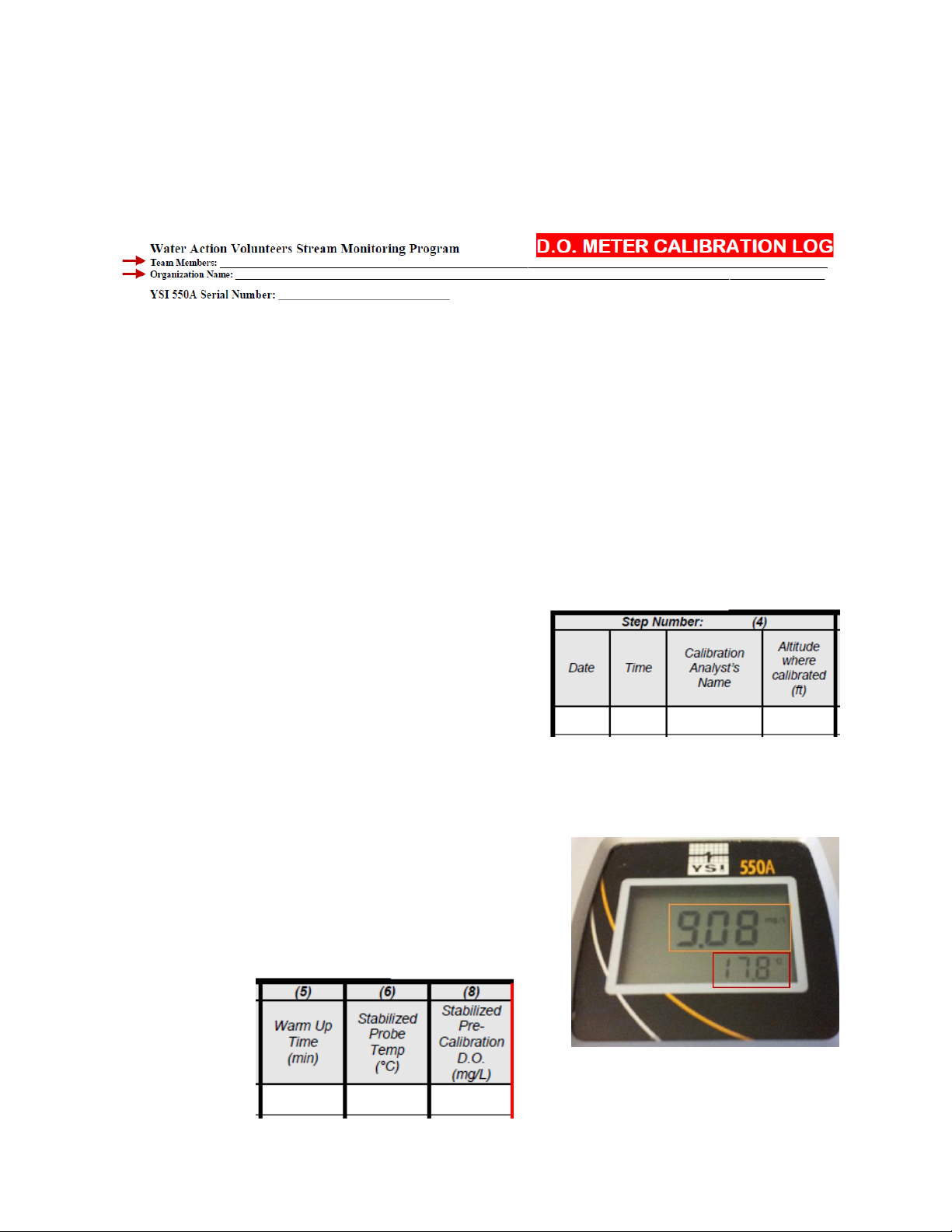
*Before calibrating your meter at the beginning of the field season, please fill out the top
portion of the calibration log with the following information:
Your name as well as that of any other team members
Your organization name
The serial number for your meter (located on the back of the meter)
**The numbers along the top of the calibration log correspond to the steps in the protocol.
1. Turn on the meter and allow at least 15 minutes of warm up time before calibration.
Be sure to note the time that you turned on the meter as this information will be
important during the calibration process.
2. Verify that the sensor membrane is in good condition by removing the sensor from the
calibration/storage chamber and doing the following:
Check that the sponge is damp (rewet if necessary).
Shake or blow off excess water on the sensor.
Check for holes or tears in the membrane.
Check for air bubbles beneath the membrane.
3. Reinsert the sensor into the calibration/storage chamber at the back of the meter.
4. On the calibration log, record the date, time,
name of analyst (who is calibrating the meter),
and the altitude (in feet) at which the
calibration is taking place.
You can find your local altitude by using
a Wisconsin Atlas and Gazeteer or a
USGS topographic map.
i. Elevations may appear in meters, but you can convert meters to feet by
multiplying the meter value by 3.28.
5. Record the number of minutes of warm up time on the DO calibration log.
6. Record the stabilized probe temperature (°C) on
the DO calibration log (red box).
7. Record the stabilized pre-calibration D.O. (mg/L) on
the DO calibration log (orange box).
Press the MODE button to change from %
saturation to mg/L.
10
Water Action Volunteers –Level 2 Manual Updated January 2016
8. Press and release both the UP ARROW and DOWN ARROW keys
at the same time to enter the calibration menu.
The meter will say CAL on the screen in large letters and
CAL in small letters in the lower left corner. This will stay
on the screen until the calibration process is done.
9. Press ENTER on the meter to show a value for altitude (x100) in feet.
For example, enter a ‘9’
here indicates 900 ft and a
‘12’indicates 1200 ft.
10. Adjust the altitude with the up and
down arrow buttons for the
elevation where the calibration is
taking place and press ENTER.
The % saturation value is now showing on the meter display.
11. Allow the % saturation value (red box) to stabilize on the screen
This may take a minute or two to happen
12. Press ENTER (orange box).
The salinity of the water samples is now on the screen.
13. Press ENTER again to accept 0 (the salinity of fresh water).
The calibrated % saturation value is now on the screen
(red box) and the small CAL is no longer visible in the
lower left corner.
14. Press the MODE key (orange box) to switch to mg/L. (This key is
used to toggle between mg/L and % saturation.)
11
Water Action Volunteers –Level 2 Manual Updated January 2016
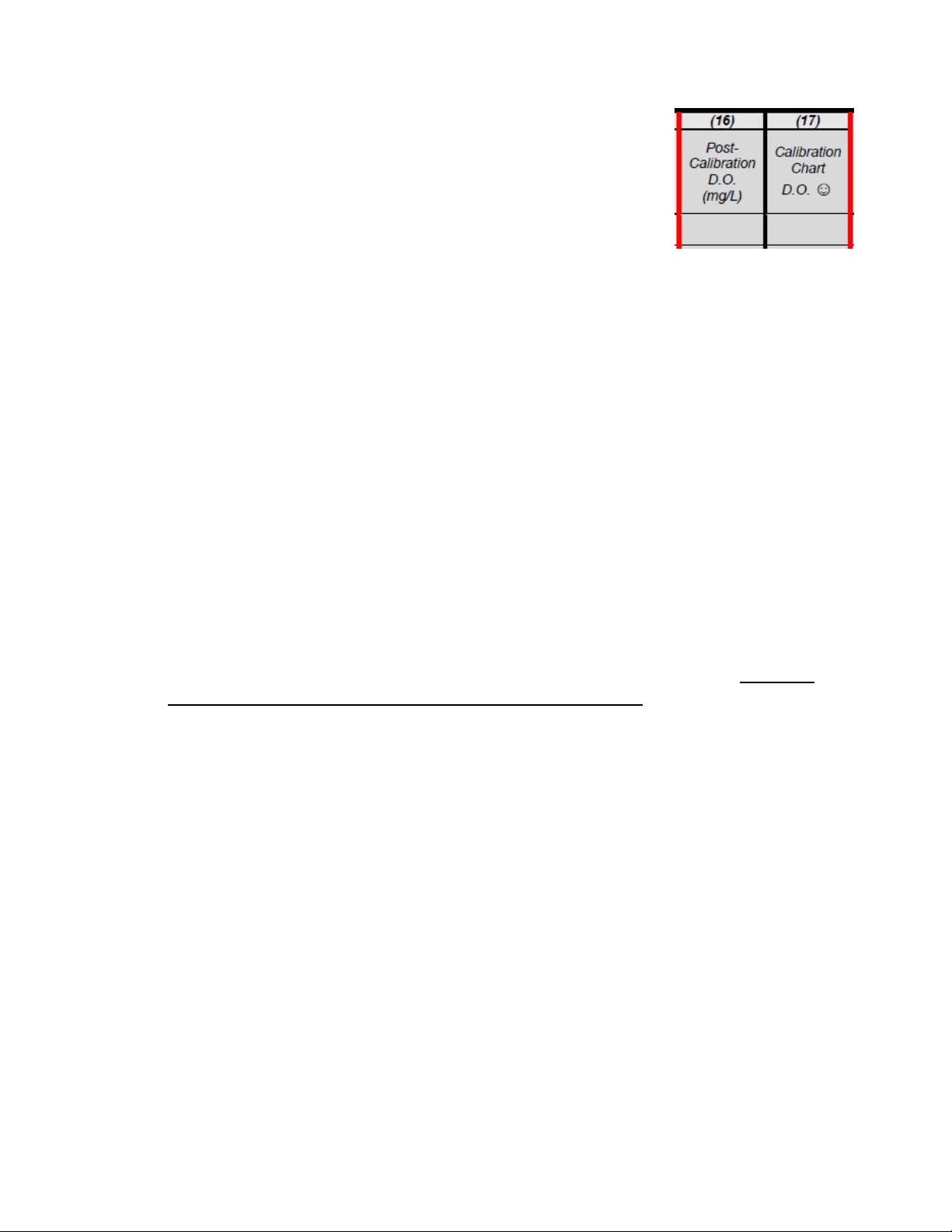
15. Record the post-calibration D.O. (mg/L) on the calibration log.
16. Look up the calibration chart D.O. value (mg/L) from the table
(available on the next two pages of this manual and as a
laminated sheet in the monitoring kit).
To read the table, find the probe temperature (y-axis)
and the altitude (x-axis) and record the corresponding
D.O. (mg/L) value as the calibration chart D.O. on the
calibration log.
If the difference between the post-calibration D.O. and the calibration chart D.O.
is greater than 0.3 (mg/L), re-calibrate the meter before using in the field.
17. Record any comments about the calibration process in the Comments field on the log.
18. Conduct a post-calibration drift test to verify accuracy of your calibration
If unsuccessful, check on the condition of the probe tip and contact the WAV
coordinator for further instructions.
**Post Calibration Drift
This quality control step must be performed to insure the collection of accurate data. After
calibration, check the meter for drift. This is a check as to how well the meter is holding the
calibration. Leave the meter where you calibrated it (this step is important to insure a stabilized
temperature) and walk away for 5 minutes. Upon returning, the DO percent saturation value
should be within a couple of percent of the calibrated percent saturation value you recorded. If
it has drifted more than a couple of percent, you must remove the cap membrane to check the
condition of the probe. If necessary, refurbish the probe tip according to your instrument’s
manual, and change the solution and membrane (contact the WAV coordinator for further
instructions. Once the refurbishment process is completed, wait one hour before repeating the
calibration procedures listed above (Steps 1-18).
19. After completing a successful calibration and post-calibration drift test, the DO meter
should be left on until the last reading of the day is completed.
20. Once monitoring is complete, moisten the sponge in the calibration chamber and turn
the meter off before storing it in the monitoring kit until the next field event.
Note: If you notice your meter is not calibrating properly, please check for bubbles or tears in
the membrane and replace if necessary. If replacing the membrane does not work, try cleaning
the probe by following instructions in the instrument’s manual (located in the pocket of your
meter case) or contact the WAV coordinator for further instructions or to inquire about a
replacement new meter.

Dissovled Oxygen Saturation (mg/L) Based on Elevation or Ambient Barometric Pressure (Station Pressure)
Elv: 2000 1900 1800 1700 1600 1500 1400 1300 1200 1100 1000 900 800 700 600 500 400 300 200 100 0* -200
Press: 706.5 709.1 711.8 714.5 717.1 719.8 722.5 725.1 727.8 730.5 733.1 735.8 738.5 741.1 743.8 746.5 749.1 751.8 754.5 757.1 760 765.1
032.0 13.6 13.6 13.7 13.7 13.8 13.8 13.9 14.0 14.0 14.1 14.1 14.2 14.2 14.3 14.3 14.4 14.4 14.5 14.5 14.6 14.62 14.7
133.8 13.2 13.3 13.3 13.4 13.4 13.5 13.5 13.6 13.6 13.7 13.7 13.8 13.8 13.9 13.9 14.0 14.0 14.1 14.1 14.2 14.22 14.3
235.6 12.9 12.9 13.0 13.0 13.0 13.1 13.1 13.2 13.2 13.3 13.3 13.4 13.4 13.5 13.5 13.6 13.6 13.7 13.7 13.8 13.83 13.9
337.4 12.5 12.6 12.6 12.7 12.7 12.7 12.8 12.8 12.9 12.9 13.0 13.0 13.1 13.1 13.2 13.2 13.3 13.3 13.4 13.4 13.46 13.6
439.2 12.2 12.2 12.3 12.3 12.4 12.4 12.5 12.5 12.6 12.6 12.6 12.7 12.7 12.8 12.8 12.9 12.9 13.0 13.0 13.4 13.11 13.2
541.0 11.9 11.9 12.0 12.0 12.0 12.1 12.1 12.2 12.2 12.3 12.3 12.4 12.4 12.5 12.5 12.5 12.6 12.6 12.7 12.7 12.77 12.9
642.8 11.6 11.6 11.7 11.7 11.7 11.8 11.8 11.9 11.9 12.0 12.0 12.1 12.1 12.1 12.2 12.2 12.3 12.3 12.4 12.4 12.45 12.5
744.6 11.3 11.3 11.4 11.4 11.5 11.5 11.5 11.6 11.6 11.7 11.7 11.8 11.8 11.8 11.9 11.9 12.0 12.0 12.1 12.1 12.14 12.2
846.4 11.0 11.0 11.1 11.1 11.2 11.2 11.3 11.3 11.3 11.4 11.4 11.5 11.5 11.5 11.6 11.6 11.7 11.7 11.8 11.8 11.84 11.9
948.2 10.7 10.8 10.8 10.9 10.9 10.9 11.0 11.0 11.1 11.1 11.2 11.2 11.2 11.3 11.3 11.4 11.4 11.4 11.5 11.5 11.56 11.6
10 50.0 10.5 10.5 10.6 10.6 10.7 10.7 10.7 10.8 10.8 10.8 10.9 10.9 11.0 11.0 11.0 11.1 11.1 11.2 11.2 11.2 11.29 11.4
11 51.8 10.3 10.3 10.3 10.4 10.4 10.4 10.5 10.5 10.6 10.6 10.6 10.7 10.7 10.8 10.8 10.8 10.9 10.9 10.9 11.0 11.03 11.1
12 53.6 10.0 10.1 10.1 10.1 10.2 10.2 10.2 10.3 10.3 10.4 10.4 10.4 10.5 10.5 10.5 10.6 10.6 10.7 10.7 10.7 10.78 10.8
13 55.4 9.8 9.8 9.9 9.9 9.9 10.0 10.0 10.1 10.1 10.1 10.2 10.2 10.2 10.3 10.3 10.3 10.4 10.4 10.5 10.5 10.54 10.6
14 57.2 6.6 9.6 9.7 9.7 9.7 9.8 9.8 9.8 9.9 9.9 9.9 10 10.0 10.0 10.1 10.1 10.2 10.2 10.2 10.3 10.31 10.4
15 59.0 9.4 9.4 9.4 9.5 9.5 9.6 9.6 9.6 9.7 9.7 9.7 9.8 9.8 9.8 9.9 9.9 9.9 10.0 10.0 10.0 10.08 10.2
16 60.8 9.2 9.2 9.2 9.3 9.3 9.3 9.4 9.4 9.5 9.5 9.5 9.6 9.6 9.6 9.7 9.7 9.7 9.8 9.8 9.8 9.87 9.9
17 62.6 9.0 9.0 9.1 9.1 9.1 9.2 9.2 9.2 9.3 9.3 9.3 9.4 9.4 9.4 9.5 9.5 9.5 9.6 9.6 9.6 9.66 9.7
18 64.4 8.8 8.8 8.9 8.9 8.9 9.0 9.0 9.0 9.1 9.1 9.1 9.2 9.2 9.2 9.3 9.3 9.3 9.4 9.4 9.4 9.47 9.5
19 66.2 8.6 8.7 8.7 8.7 8.8 8.8 8.8 8.9 8.9 8.9 8.9 9.0 9.0 9.0 9.1 9.1 9.1 9.2 9.2 9.2 9.28 9.3
20 68.0 8.5 8.5 8.5 8.5 8.6 8.6 8.6 8.7 8.7 8.7 8.8 8.8 8.8 8.9 8.9 8.9 9.0 9.0 9.0 9.1 9.09 9.2
Temp
Elevation Feet Above Sea Level/Equivalent Un-Corrected1 Barometric Pressure mm Hg
C
F
Dissovled Oxygen Saturation (mg/L) Based on Elevation or Ambient Barometric Pressure (Station Pressure)
Elv: 2000 1900 1800 1700 1600 1500 1400 1300 1200 1100 1000 900 800 700 600 500 400 300 200 100 0* -200
Press: 706.5 709.1 711.8 714.5 717.1 719.8 722.5 725.1 727.8 730.5 733.1 735.8 738.5 741.1 743.8 746.5 749.1 751.8 754.5 757.1 760 765.1
20 68.0 8.5 8.5 8.5 8.5 8.6 8.6 8.6 8.7 8.7 8.7 8.8 8.8 8.8 8.9 8.9 8.9 9.0 9.0 9.0 9.1 9.09 9.2
21 69.8 8.3 8.3 8.3 8.4 8.4 8.4 8.5 8.5 8.5 8.6 8.6 8.6 8.7 8.7 8.7 8.8 8.8 8.8 8.8 8.9 8.91 9.0
22 71.6 8.1 8.2 8.2 8.2 8.2 8.3 8.3 8.3 8.4 8.4 8.4 8.5 8.5 8.5 8.6 8.6 8.6 8.6 8.7 8.7 8.74 8.8
23 73.4 8.0 8.0 8.0 8.1 8.1 8.1 8.2 8.2 8.2 8.2 8.3 8.3 8.3 8.4 8.4 8.4 8.5 8.5 8.5 8.5 8.58 8.6
24 75.2 7.8 7.9 7.9 7.9 7.9 8.0 8.0 8.0 8.1 8.1 8.1 8.1 8.2 8.2 8.2 8.3 8.3 8.3 8.4 8.4 8.42 8.5
25 77.0 7.7 7.7 7.7 7.8 7.8 7.8 7.9 7.9 7.9 7.9 8.0 8.0 8.0 8.1 8.1 8.1 8.1 8.2 8.2 8.2 8.26 8.3
26 78.8 7.5 7.6 7.6 7.6 7.7 7.7 7.7 7.7 7.8 7.8 7.8 7.9 7.9 7.9 7.9 8.0 8.0 8.0 8.1 8.1 8.11 8.2
27 80.6 7.4 7.4 7.5 7.5 7.5 7.5 7.6 7.6 7.6 7.7 7.7 7.7 7.7 7.8 7.8 7.8 7.9 7.9 7.9 7.9 7.97 8.0
28 82.4 7.3 7.3 7.3 7.4 7.4 7.4 7.4 7.5 7.5 7.5 7.6 7.6 7.6 7.6 7.7 7.7 7.7 7.7 7.8 7.8 7.83 7.9
29 84.2 7.1 7.2 7.2 7.2 7.3 7.3 7.3 7.3 7.4 7.4 7.4 7.4 7.5 7.5 7.5 7.6 7.6 7.6 7.6 7.7 7.69 7.7
30 86.0 7.0 7.1 7.1 7.1 7.1 7.2 7.2 7.2 7.2 7.3 7.3 7.3 7.3 7.4 7.4 7.4 7.5 7.5 7.5 7.5 7.56 7.6
31 87.8 6.9 6.9 7.0 7.0 7.0 7.0 7.1 7.1 7.1 7.1 7.2 7.2 7.2 7.2 7.3 7.3 7.3 7.3 7.4 7.4 7.43 7.5
32 89.6 6.8 6.8 6.8 6.9 6.9 6.9 6.9 7.0 7.0 7.0 7.0 7.1 7.1 7.1 7.1 7.2 7.2 7.2 7.3 7.3 7.30 7.4
33 91.4 6.7 6.7 6.7 6.8 6.8 6.8 6.8 6.9 6.9 6.9 6.9 7.0 7.0 7.0 7.0 7.1 7.1 7.1 7.1 7.2 7.18 7.2
34 93.2 6.6 6.6 6.6 6.6 6.7 6.7 6.7 6.7 6.8 6.8 6.8 6.8 6.9 6.9 6.9 6.9 7.0 7.0 7.0 7.0 7.06 7.1
35 95.0 6.5 6.5 6.5 6.5 6.6 6.6 6.6 6.6 6.7 6.7 6.7 6.7 6.8 6.8 6.8 6.8 6.8 6.9 6.9 6.9 6.95 7.0
Source: J. Sullivan, WDNR-LaCrosse, March 2006
1Dissolved oxygen saturation values based on elevation due not account for TRUE station pressure. For more accurate dissolved oxygen saturation values use un-corrected pressure measurements.
Uncorrected barometric pressure values = National Weather Service Barometric Pressure in mm Hg x (Equivalent elevation pressure/760)
C
F
Temp
Elevation Feet Above Sea Level/Equivalent Un-Corrected1 Barometric Pressure mm Hg
*Dissolved oxygen saturation at 760 mm Hg derived from the tables of Benson & Kuause (1980), from C.M. Mortimer 1981. The oxygen content of air-saturated fresh waters over ranges of temperature
and atmospheric pressure of limnological interest. Mitt. Int. Ver. Limnol. No. 22. Stuttgart, Germany.
14
Water Action Volunteers –Level 2 Manual Updated January 2016
YSI 550a DO Meter Monitoring Procedure
Before going out to your stream site to monitor dissolved oxygen (or any parameter), please
remember to fill out the top portion of the monitoring datasheet with your name (s), the
station name, and the station ID #, as well as the date and time of the monitoring event.
It is also important that you indicate what type of equipment was used to monitor for dissolved
oxygen. In this case, you will circle the YSI 550A Meter option on your datasheet.
To measure dissolved oxygen (DO) in the stream:
1. With the DO meter in hand, enter the stream downstream from your monitoring
location (as to not disturb the bottom sediment as you move towards the site).
a. You can also monitor dissolved oxygen from a bridge overpass as to not disturb
the bottom sediment.
2. Remove the probe from its chamber and insert it into the water to be measured.
a. Continuously stir or move the probe through the water (especially when
monitoring in very still water) while taking the measurement.
3. Allow the temperature and dissolved oxygen readings to stabilize.
a. This should take anywhere from 2 to 5 minutes.
4. Observe and record the water temp and the DO values on the monitoring datasheet.
5. Press the MODE button to change the instrument display.
6. Observe and record the % saturation value on the monitoring datasheet.
7. Rinse the probe with distilled water after each use, and return it to the storage
chamber.
8. Before storing the meter in the carrying case, moisten the probe sponge by soaking with
distilled water.
9. Press the green button on the meter to turn if off at the conclusion of the day’s
monitoring effort.
15
Water Action Volunteers –Level 2 Manual Updated January 2016
Oakton Acorn pH 5 and 5+ Meter
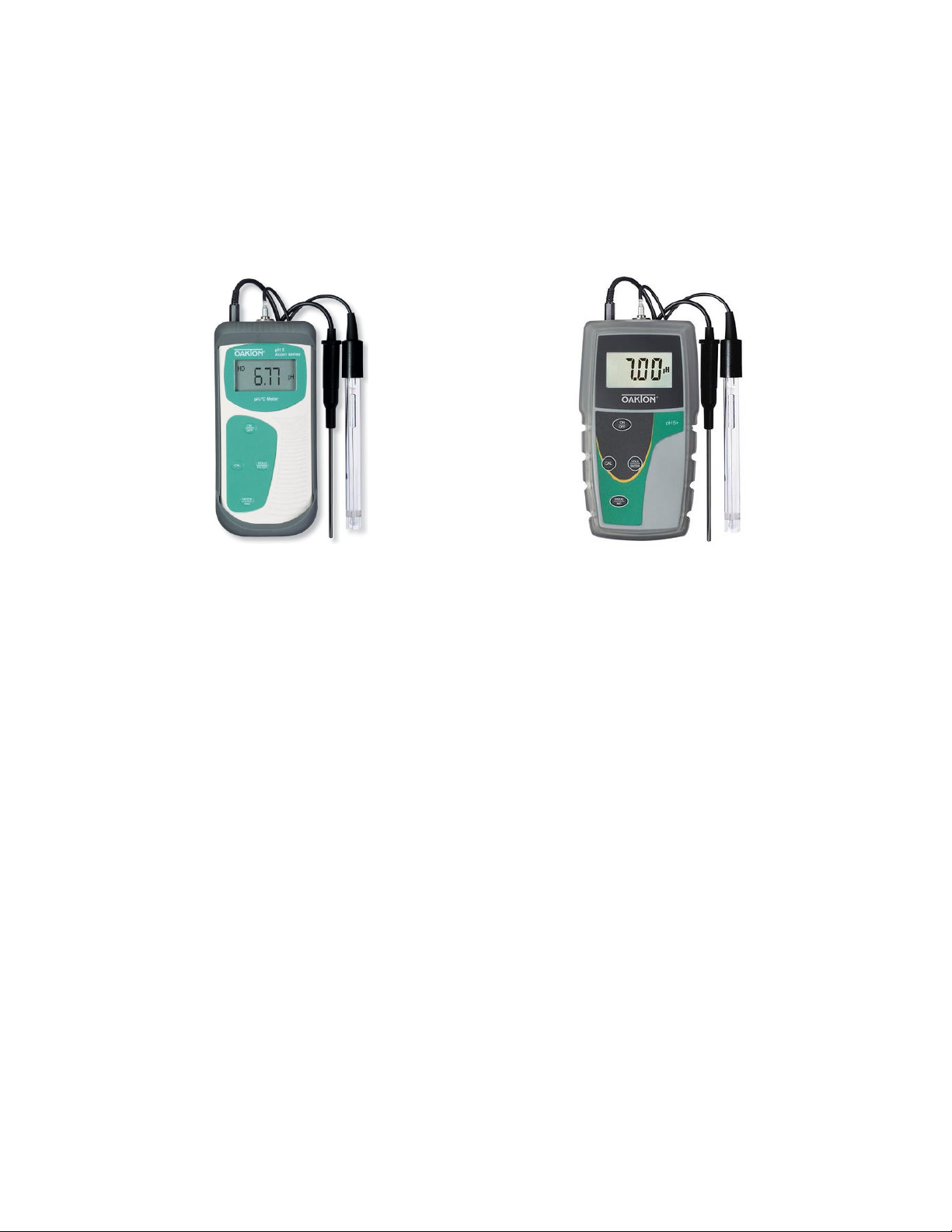
WAV volunteers currently use one of three different pH meters:
1. pH 5 (original software and original outside casing)
2. pH 5 (updated software, but original outside casing)
3. pH 5+ (updated software and updated outside casing)
pH 5 meter
pH 5+ meter
Which pH meter do I have?
Before calibrating your pH meter, you will first need to ascertain which meter version you are
using. This information is important to know because the calibration protocol is varies slightly
between the different software versions.
The only way to tell if you have meter version #1 or #2 is by going through the calibration
process and seeing what happens between the calibration with the pH 7 buffer solution
calibration and the calibration with the pH 10 buffer solution. The original software tells the
meter to exit calibration mode and return to measurement mode upon completion of the first
calibration point. This means that you will complete two ‘one point’ calibrations as you have to
re-enter calibration mode in order to complete the pH 10 calibration. The software update on
the newer meters keeps the meter in calibration mode throughout the calibration process (the
values on the screen will continue to blink). This means that you will complete a ‘two point’
calibration when calibrating the meter.
For all meters used by WAV volunteers…
Both the Oakton Acorn pH 5 and the 5+ meters need to be calibrated before being used in the
field each and every time you monitor throughout the field season. Once calibrated, the pH
meter can be turned on and off between monitoring events if you monitor at multiple locations
in one day (unlike the DO meter).
When calibrating your meter, please use both the pH 7 and pH 10 buffer solutions (NIST)
provided in order to calibrate the meter. Do not reuse the buffer solutions following the
calibration as contaminants in the solution can impact the accuracy of the calibration and the
field measurements.
16
Water Action Volunteers –Level 2 Manual Updated January 2016
In order to avoid damaging the meter, be sure to keep the pH electrode (specifically the bulb at
the end of the probe) wet when not in use. Store the electrode in the electrode soaker bottle
and keep it filled with electrode storage solution. Refresher storage solution can be found in
your monitoring kit. Contact the WAV coordinator if you need more solution.
If you notice your meter is not calibrating properly, try cleaning the probe by following the
instructions in the instrument’s manual (located in the pocket of your meter case) or contact
the WAV coordinator for directions.
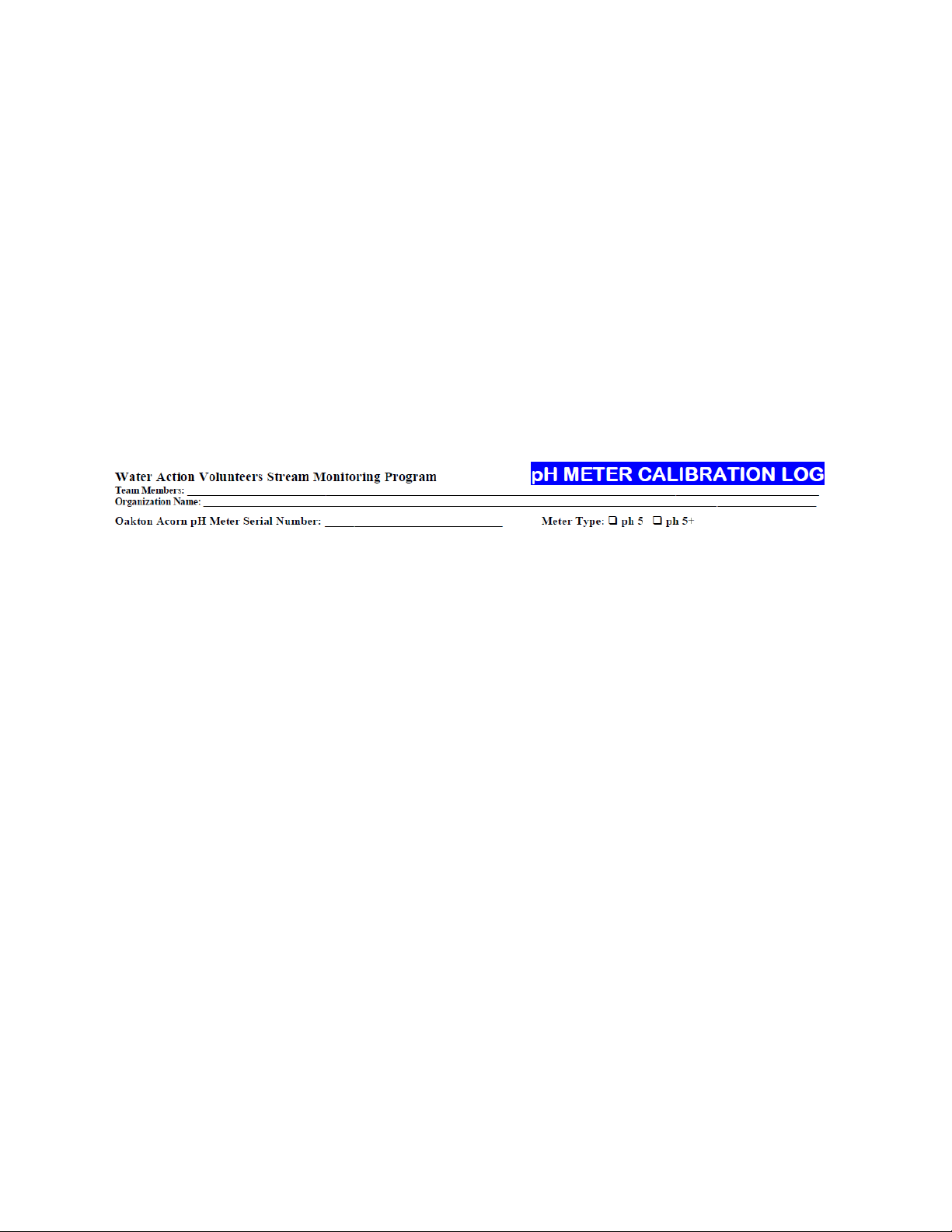
*Before calibrating your meter at the beginning of the field season, please fill out the top
portion of the calibration log with the following information:
Your name, as well as that of any other team members
The name of your organization
The serial number for your meter (located on the back of the meter)
The type of meter that you are using
oThis can be recorded after the first calibration is completed
17
Water Action Volunteers –Level 2 Manual Updated January 2016
Cal. procedure - pH 5 meter with original software and original outside casing
This calibration process will be completed by conducting two one-point calibrations. This means
that the meter will complete a single point calibration and then exit calibration mode each
time. You will have to restart the calibration process when using the pH 10 buffer solution by
pressing the CAL button.
1. Connect pH and temperature probes to meter.
a. Ensure that the pH probe connecter snaps into place.
2. Turn the meter on by pushing the On/Off button on the face of the meter.

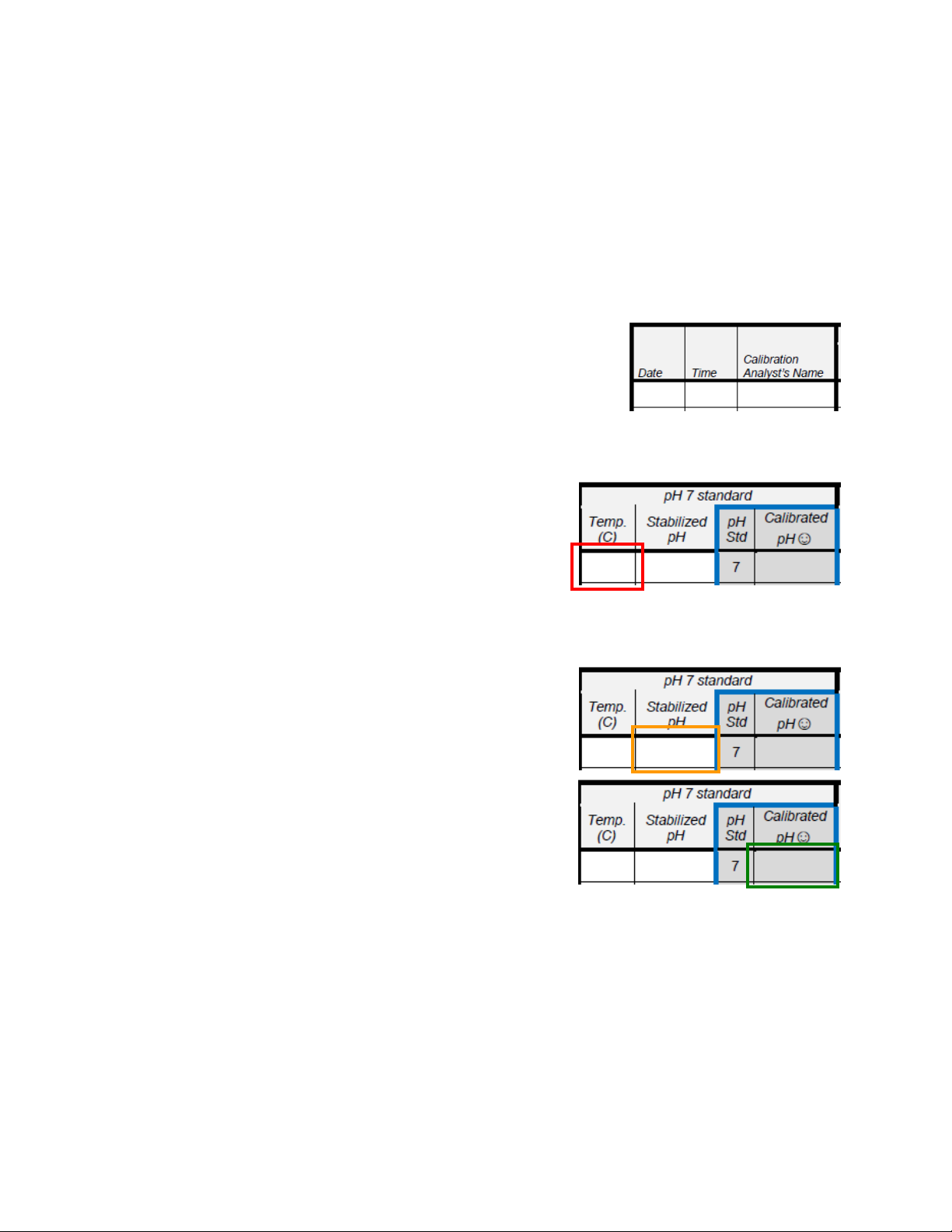
3. Record the date, time, and the name of analyst
performing the calibration on the calibration log.
4. Remove the pH electrode from the electrode soaker
bottle.
5. Rinse the pH electrode with distilled water and shake the excess water off of the
electrode.
6. Click the MODE button to find the temperature
reading and record value on the calibration log.
7. Click the MODE button again to return to the pH screen on the meter.
8. Press the CAL button on the meter in order to start the calibration process (blinking).

9. Place the electrode and temperature sensors into the pH buffer solution and submerge
the glass bulb completely in the solution.
10. Wait for the reading to stabilize and record the
Stabilized pH value on the calibration log.
11. Press the ENTER key once and record the Calibrated
pH value (the meter is now out the calibration
mode and in measuring mode).
12. Check that the Calibrated pH value is within 0.2 of the pH buffer standard (7 or 10).
a. If the value is more than 0.2 higher or lower than its pH buffer value (compare
values in the grey columns, outlined in blue), recalibrate the meter (new line).
b. Record the new results on the next line of the pH meter calibration log.
13. Remove the electrode from the buffer solution (refill if necessary), rinse with distilled
water and shake off the excess water from the electrode.
14. To finish the calibration, repeat steps 6 through 12 for the pH 10 buffer solution.
15. Replace the pH probe in the electrode soaker bottle (refill if necessary), turn the meter
off, and head out to the field to complete your monitoring activities.