A3-AG/N3-AG User Manual
4
©2017 DJI All Rights Reserved.
1. IMU1 Port
Communicates with the IMU Pro module.
2. CAN1 Port
Dedicated DJI CAN-Bus port.
Communicates with the A3 GPS-Compass
Pro or other DJI devices (e.g. Agriculture
Management Unit (AMU) or Real Time
Kinematic (RTK) GPS system).
3. Orientation Arrow
The FC module should be mounted with
the arrow pointing in the specied direction
(Orientation can be set in the DJI Assistant 2).
4. Status Indicator
Indicates the status of the ight controller
and triple modular redundancy system.
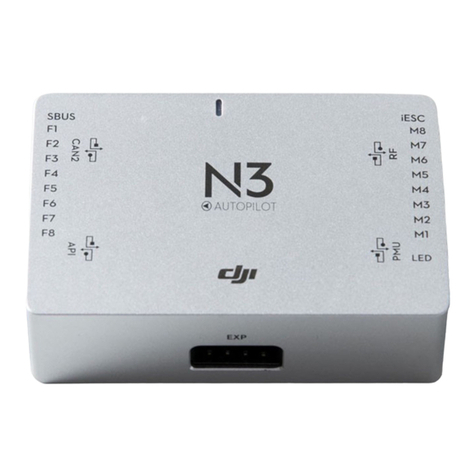
5. RF Port
Communicates with the DJI Datalink 3 Air
System.
6. iESC Port
Communicates with the DJI Smart ESC
using the Smart ESC Communication Cable.
7. M1-M8 Pins
Connects to the corresponding ESC
PWM port for each motor.
8. LED Port
Communicates with the LED module.
9. IMU2 Port
Communicates with the IMU Pro module.
10. PMU Port
Derives power from the PMU.
11. CAN2
Reserved port.
12. API Port
Reserved port.
13. F5-F8 Pins
Multifunction PWM I / O ports.
14. F1-F4 Pins
Multifunction PWM output ports.
15. S-Bus Port
Communicates with a DJI DR16 or
S-Bus receiver.
GPS-Compass Pro Module
The GPS-Compass Pro module has a built-in GPS and compass. The compass is used for
geomagnetic eld measurements. Compass calibration is required before use. DO NOT use or
store the compass in environments with ferromagnetic materials.
Note that the GPS-Compass Pro module in the Upgrade Kit is the same as the one in the A3-AG
package.
1. Status Indicator
Indicates the status of the GPS-Compass Pro
module and triple modular redundancy system.
2. Orientation Arrow
The GPS-Compass Pro module should be
mounted with the arrow pointing to the aircraft’s
nose.
3. Extended CAN1 Port
Dedicated DJI CAN-Bus port. Communicates with DJI devices (e.g. Agriculture Management
Unit (AMU) or Real Time Kinematic (RTK) GPS system).
1
2
3