manuals.online logo
Brands
  1. Home
  2. •
  3. Brands
  4. •
  5. DT Research
  6. •
  7. Tablet
  8. •
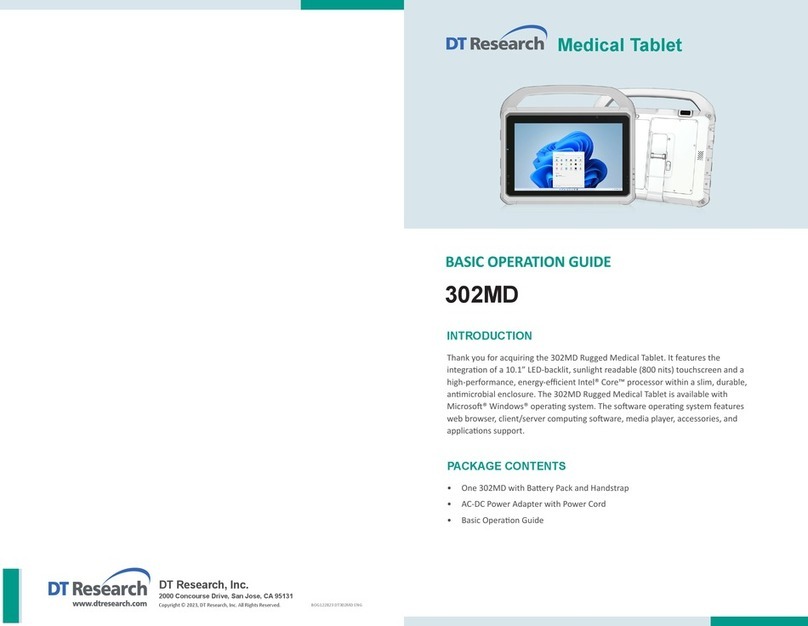
  9. DT Research 302MD Assembly instructions

DT Research 302MD Assembly instructions

Other DT Research Tablet manuals

DT Research DT311T Assembly instructions

DT Research

DT Research DT311T Assembly instructions

DT Research DT301YR Assembly instructions

DT Research

DT Research DT301YR Assembly instructions

DT Research DT313C Assembly instructions

DT Research

DT Research DT313C Assembly instructions

DT Research DT311C Assembly instructions

DT Research

DT Research DT311C Assembly instructions

DT Research DT301T-TR Assembly instructions

DT Research

DT Research DT301T-TR Assembly instructions

DT Research DT391UF User manual

DT Research

DT Research DT391UF User manual

DT Research DT313Y Assembly instructions

DT Research

DT Research DT313Y Assembly instructions

DT Research DT395GS Assembly instructions

DT Research

DT Research DT395GS Assembly instructions

DT Research DT390 Assembly instructions

DT Research

DT Research DT390 Assembly instructions

DT Research 504T User manual

DT Research

DT Research 504T User manual

DT Research DT362GL Assembly instructions

DT Research

DT Research DT362GL Assembly instructions

DT Research DT313SC-MD Assembly instructions

DT Research

DT Research DT313SC-MD Assembly instructions

DT Research DT365 Assembly instructions

DT Research

DT Research DT365 Assembly instructions

DT Research DT302RP Assembly instructions

DT Research

DT Research DT302RP Assembly instructions

DT Research DT312 Assembly instructions

DT Research

DT Research DT312 Assembly instructions

DT Research DT301XC Assembly instructions

DT Research

DT Research DT301XC Assembly instructions

DT Research DT313H Assembly instructions

DT Research

DT Research DT313H Assembly instructions

DT Research 316T/MD Assembly instructions

DT Research

DT Research 316T/MD Assembly instructions

DT Research DT370CR Assembly instructions

DT Research

DT Research DT370CR Assembly instructions

DT Research DT370CR Assembly instructions

DT Research

DT Research DT370CR Assembly instructions

DT Research WebDT 375 User manual

DT Research

DT Research WebDT 375 User manual

DT Research DT365 Assembly instructions

DT Research

DT Research DT365 Assembly instructions

DT Research DT301Y Assembly instructions

DT Research

DT Research DT301Y Assembly instructions

DT Research 340Q Assembly instructions

DT Research

DT Research 340Q Assembly instructions

Popular Tablet manuals by other brands

Fujitsu Stylistic ST5021D Specifications

Fujitsu

Fujitsu Stylistic ST5021D Specifications

Samsung Galaxy Tab S2 user manual

Samsung

Samsung Galaxy Tab S2 user manual

Venstar 4050 user manual

Venstar

Venstar 4050 user manual

TabLines TWE Mounting instructions

TabLines

TabLines TWE Mounting instructions

Fujitsu LifeBook T902 user guide

Fujitsu

Fujitsu LifeBook T902 user guide

Coby Kyros MID1042 Series quick start guide

Coby

Coby Kyros MID1042 Series quick start guide

Porto S908ET quick guide

Porto

Porto S908ET quick guide

Samsung Galaxy Tab A user manual

Samsung

Samsung Galaxy Tab A user manual

Laser MID-1060 Quick operation guide

Laser

Laser MID-1060 Quick operation guide

MUNBYN IRT09J Easy setup guide

MUNBYN

MUNBYN IRT09J Easy setup guide

Motorola MC3090R - Win CE 5.0 Professional 520 MHz quick start guide

Motorola

Motorola MC3090R - Win CE 5.0 Professional 520 MHz quick start guide

Dell Latitude ST Setup and features information

Dell

Dell Latitude ST Setup and features information

Samsung Galaxy Tab S2 user manual

Samsung

Samsung Galaxy Tab S2 user manual

Samsung GT-P8510 user manual

Samsung

Samsung GT-P8510 user manual

Venturer WT9L11 quick start guide

Venturer

Venturer WT9L11 quick start guide

EDUGEAR UnoBook user guide

EDUGEAR

EDUGEAR UnoBook user guide

Zeki TBDB763B user guide

Zeki

Zeki TBDB763B user guide

TwinMOS TwinTAB-T102D1 user guide

TwinMOS

TwinMOS TwinTAB-T102D1 user guide

manuals.online logo
manuals.online logoBrands
  • About & Mission
  • Contact us
  • Privacy Policy
  • Terms and Conditions

Copyright 2025 Manuals.Online. All Rights Reserved.

Product End-of-Life Disassembly Instructions
Product Name / Model: Rugged Medical Tablet / 302MD
Purpose: The document is intended for use by end-of-life recyclers or treatment facilities. It provides the basic instructions
for the disassembly of DT Research products to remove components and materials requiring selective treatment, as
defined by EU Directive 2012/19/EU of the European Parliament and of the Council of 4 July 2012 on waste electrical and
electronic equipment (WEEE).
1.0 Items Requiring Selective Treatment
1.1 Items listed below are classified as requiring selective treatment.
1.2 Enter the quantity of items contained within the product which require selective treatment in the right column, as
applicable.
Item Description Notes Quantity of
items included
in product
Printed Circuit Boards Assemblies (PCBA)
With a surface greater than 10 sq cm
1
Mass storage device Permanently soldered to PCBA 0
Batteries All types including standard alkaline and
lithium coin or button style batteries
2
Mercury-containing components For example, mercury in lamps, display
backlights, scanner lamps, switches,
batteries
0
LCD Display a surface greater than 100 sq cm includes
background illuminated displays with gas
discharge lamps
1
Cathode Ray Tubes (CRT)
0
Capacitors / condensers (Containing PCB/PCT) 0
Electrolytic Capacitors / Condensers measuring
greater than 2.5 cm in diameter or height 0
External electrical cables and cords 1
Gas Discharge Lamps
0
Plastics containing Brominated Flame Retardants
weighing > 25 grams (not including PCBs or PCAs
already listed as a separate item above)
0
Components and parts containing toner and ink,
including liquids, semi-liquids (gel/paste) and
toner
Include the cartridges, print heads,
tubes, vent chambers, and service
stations.
0
Components and waste containing asbestos 0
Components, parts and materials containing
refractory ceramic fibers 0
Components, parts and materials containing
radioactive substances 0
2.0
Tools Required
List the type and size of the tools that would typically be used to disassemble the product to a point where components
and materials requiring selective treatment can be removed.
Tool Description
Tool Size (if applicable)
Description #1 SCREW DRIVER(Plum flower head)
Description #2 HAIR DRYER
Description #3 KNIFE BLADE
3.0 Product Disassembly Process
3.1 List the basic steps that should typically be followed to remove components and
materials requiring selective
treatment:
1. Dismantle the handle, corners, I/O doors and back cover.
2. Dismantle buttons cover and side frame
3. Dismantle bottom cover, top cover and buckles
4. Remove battery pack
5. Dismantle back-up battery
6. Dismantle rear enclosure
7. Dismantle mother board
8. Dismantle I/O board
9. Dismantle the LCD display
3.2 Optional Graphic. Model 302MD is same as model DT302RP excluded enclosure color so that the disassembly
process is same. Please refer to “DT302RP Product End-of-Life Disassembly Instructions”