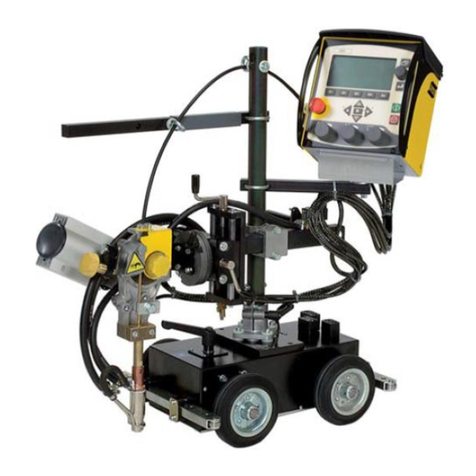
ESAB A2 Multitrac User manual

Instruction manual
0460 949 274 GB 20151222 Valid for: from program version 4.10A
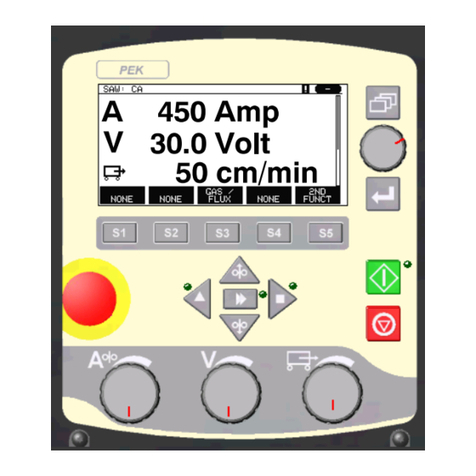
A2, A6 PEK Control Panel

TABLE OF CONTENTS
0460 949 274 © ESAB AB 2015
1 INTRODUCTION................................................................................................... 5
1.1 Control panel ........................................................................................................ 5
1.1.1 Keys and knobs.................................................................................................. 6
1.2 First step ............................................................................................................... 7
1.2.1 Choice of language ............................................................................................ 7
1.2.2 Unit of measurements ........................................................................................ 9
1.3 Display ................................................................................................................ 10
1.3.1 Symbols in the display ..................................................................................... 11
1.4 General information about settings ................................................................. 11
1.4.1 Setting of numerical values .............................................................................. 11
1.4.2 Setting with given alternatives.......................................................................... 11
1.5 QUIT and ENTER ................................................................................................ 12
2 MENUS ............................................................................................................... 13
2.1 Main Menu........................................................................................................... 13
2.1.1 Configuration menu.......................................................................................... 14
2.1.2 Tools menu....................................................................................................... 14
2.1.3 Weld data setting menu ................................................................................... 15
2.1.4 Measurements menu ....................................................................................... 16
2.1.5 Weld data memory menu ................................................................................. 17
2.1.6 Fast mode menu .............................................................................................. 18
3 SUBMERGED ARC WELDING .......................................................................... 19
3.1 Settings for submerged arc welding ................................................................19
4 GAS METAL ARC WELDING............................................................................. 21
4.1 Settings for Gas Metal Arc Welding .................................................................21
5 GOUGING ........................................................................................................... 23
5.1 Settings for gouging ..........................................................................................23
6 FUNCTION EXPLANATIONS ............................................................................. 25
6.1 CA, constant amperage ..................................................................................... 25
6.2 CW, constant wire feed......................................................................................25
6.3 CC, constant current.......................................................................................... 25
6.4 Wire / electrode dimension ...............................................................................25
6.5 Arc voltage.......................................................................................................... 25
6.6 Wire feed speed.................................................................................................. 25
6.7 Cold wire feed speed (ICE)................................................................................25
6.8 Cold wire start delay (ICE).................................................................................25
6.9 Travel speed ....................................................................................................... 26

6.10 Welding direction ............................................................................................... 26
6.11 AC frequency...................................................................................................... 26
6.12 AC balance.......................................................................................................... 26

TABLE OF CONTENTS
0460 949 274 © ESAB AB 2015
6.13 AC offset ............................................................................................................. 26
6.14 Flux pre-flow (SAW) ...........................................................................................26
6.15 Gas pre-flow (GMAW) ........................................................................................26
6.16 Air pre-flow (Gouging) .......................................................................................26
6.17 Start type............................................................................................................. 26
6.18 Wire creep start .................................................................................................. 27
6.19 Start phases........................................................................................................ 27
6.20 Max Open Circuit Voltage (OCV).......................................................................27
6.21 Flux post-flow (SAW) .........................................................................................27
6.22 Gas post-flow (GMAW) ......................................................................................27
6.23 Air post-flow (Gouging) .....................................................................................27
6.24 Crater filling ........................................................................................................ 28
6.25 Burnback time .................................................................................................... 28
6.26 Stop phases........................................................................................................ 28

6.27 Dynamic regulation............................................................................................ 28
6.28 Control parameters ............................................................................................28
6.29 Setting limits....................................................................................................... 29
6.30 Measure limits .................................................................................................... 29
7 MEMORY MANAGEMENT ................................................................................. 30
7.1 Control panel working method ......................................................................... 30
7.2 Store .................................................................................................................... 31
7.3 Recall................................................................................................................... 32
7.4 Delete .................................................................................................................. 33
7.5 Copy .................................................................................................................... 34
7.6 Name ................................................................................................................... 36
7.7 Edit ...................................................................................................................... 37
8 CONFIGURATION MENU................................................................................... 39
8.1 Code lock ............................................................................................................ 39
8.1.1 Lock code status .............................................................................................. 39
8.1.2 Specify/edit lock code ...................................................................................... 40
8.2 General configuration........................................................................................ 40
8.2.1 Fast mode soft keys ......................................................................................... 41
8.2.2 Quality data log to file....................................................................................... 42
8.2.3 Soft key configuration....................................................................................... 42
8.2.4 Auto save mode ............................................................................................... 44
8.3 Machine configuration....................................................................................... 44
8.3.1 Product code .................................................................................................... 44
8.3.2 Wire feed axis .................................................................................................. 45
8.3.3 Cold wire axis (ICE) ......................................................................................... 45

TABLE OF CONTENTS
0460 949 274 © ESAB AB 2015
8.3.4 Travel axis ........................................................................................................ 46
8.3.5 Outer axis......................................................................................................... 46
8.3.6 Tandem for LAF and TAF power sources......................................................... 47
8.3.7 Tandem for Aristo 1000 power source .............................................................50
8.3.8 Parallel power sources (applies only to Aristo 1000 power sources)...............51
8.3.9 Ice wire feed..................................................................................................... 52
8.3.10 Polarity (applies only to Aristo 1000 power source) ......................................... 53
8.3.11 Node id settings (applies only to Aristo 1000 power source) ...........................54
8.3.12 System information (applies only to Aristo 1000 power source) ......................54
8.4 Cable lengths (applies only to LAF and TAF power sources) .......................54
8.5 Maintenance ....................................................................................................... 55
8.6 Measure–values filter factor..............................................................................55
9 TOOLS ................................................................................................................ 56
9.1 Event handling ................................................................................................... 56
9.1.1 Event log .......................................................................................................... 56
9.1.2 Active errors ..................................................................................................... 57
9.1.3 Unit IDs ............................................................................................................ 57
9.1.4 Description of fault management codes...........................................................58
9.2 Export/Import...................................................................................................... 59
9.3 File manager ....................................................................................................... 60
9.3.1 Delete a file/folder ............................................................................................ 61
9.3.2 Rename a file/folder ......................................................................................... 61
9.3.3 Create new folder............................................................................................. 62
9.3.4 Copy and paste files......................................................................................... 62
9.4 Setting limit editor.............................................................................................. 63
9.5 Measure limits editor ......................................................................................... 63
9.6 Production statistics.......................................................................................... 65
9.7 Quality functions................................................................................................ 65
9.7.1 Store quality data ............................................................................................. 66
9.8 Calendar.............................................................................................................. 67
9.9 User accounts .................................................................................................... 67
9.10 Unit information ................................................................................................. 69
MENU STRUCTURE..................................................................................................70
WIRE DIMENSION.....................................................................................................75
ORDERING NUMBERS.............................................................................................76
Rights reserved to alter specifications without notice.

1 INTRODUCTION
0460 949 274 -5- © ESAB AB 2015
1 INTRODUCTION
To benefit as much as possible from your welding equipment, we recommend that you read
this instruction manual.
For general information about operation, see the instruction manual for the control unit,
automatic welding machine, column and boom or power source.
The text presented in the display is available in the following languages: English, Swedish,
Finnish, Norwegian, Danish, German, French, Italian, Dutch, Spanish, Portuguese,
Hungarian, Polish, American, Czech, Chinese and Russian.
1.1 Control panel
1. Menu
2. Knob for moving cursor (positioning
knob)
3. ENTER
4. Green indicating lamp, illuminates
when the function is active
5. Welding start
6. Welding stop
7. Knob for setting the travel speed in
the measurements menu, in other
menus to increase or decrease the
set values (setting knob)
8. Manual travel motion
9. Manual wire feed downwards
10. Knob for setting the arc voltage in the measurement menu, in other menus to increase
or decrease the set values (setting knob)
11. Fast motion
12. Manual travel motion
13. Knob for setting the welding current / wire feed speed in the measurements menu, in
other menus to increase or decrease the set values (settings knob)
14. Emergency stop
15. Manual wire feed upwards

1 INTRODUCTION
0460 949 274 -6- © ESAB AB 2015
16. Soft keys
17. Display
1.1.1 Keys and knobs
Menu
The Menu key always takes you back to the main menu in the relevant process:
ENTER
Use the ENTER key to confirm a selection.
Soft keys
The five keys (S1 - S5) under the display have different functions. They are called ”soft” keys,
i.e. they can have different functions depending on which menu you are in. The current
function for these keys can be seen from the text in the bottom row of the display. When the
function is active, this is indicated by the field with the text box turning white.
Wire feed upwards
Key for reversing the wire without arc voltage, when replacing wire bobbin for example. The
wire is fed as long as the button is depressed.
Wire feed downwards
Key for feeding wire without arc voltage. The wire is fed as long as the button is depressed.
Travel motion
Key for travel motion in the direction of welding where the symbol is indicated on the weld
equipment. To stop travel motion press , or .
The LED illuminates during travel motion.

1 INTRODUCTION
0460 949 274 -7- © ESAB AB 2015
Travel motion
Key for travel motion in the direction of welding where the symbol is indicated on the weld
equipment. To stop travel motion press , or .
The LED illuminates during travel motion.
Welding start
Key for welding start.
Welding stop
Key for welding stop for all travel motions and all motors.
Positioning knob
The uppermost right-hand knob is called the positioning knob in the instruction manual and is
used to position the cursor.
Settings knob
The three knobs under the panel are called settings knobs in the instruction manual and are
used to change the set values in the panel.
1.2 First step
1.2.1 Choice of language
This menu appears when the machine is first started:
The control panel is set to English on delivery. To select your language, proceed as follows:
Press Menu to access the main menu.

1 INTRODUCTION
0460 949 274 -8- © ESAB AB 2015
Position the cursor on the CONFIGURATION row, using the positioning knob.
Press ENTER to confirm the selection.
Position the cursor on the LANGUAGE row. Press ENTER to bring up a list of the languages
that are available in the control panel.
Position the cursor on the row for your language and press ENTER.

1 INTRODUCTION
0460 949 274 -9- © ESAB AB 2015
1.2.2 Unit of measurements
The control panel is set to metric measurement on delivery. To select another mesurement,
proceed as follows:
Press Menu to access the main menu.
Position the cursor on the CONFIGURATION row, using the positioning knob.
Press ENTER to confirm the selection.
Position the cursor on the GENERAL CONFIGURATION row.
Press ENTER to confirm the selection.

1 INTRODUCTION
0460 949 274 - 10 - © ESAB AB 2015
Position the cursor on the UNIT OF LENGTH row. Press ENTER to bring up a list of the
mesurements that are available in the control panel.
Position the cursor on the row for correct
mesurement and press ENTER.
1.3 Display
Cursor
The control panel's cursor is presented as a black field around the text, with the selected text
turning white. The cursor is displayed in the instruction manual with bold text
Text boxes
At the bottom of the display are five boxes containing text that describes the current function
of the five soft keys below the display.
Other manuals for A2 Multitrac
2
This manual suits for next models
1
Table of contents
Other ESAB Control Panel manuals

ESAB
ESAB A2 PEK User manual

ESAB
ESAB 0558001913 Operating instructions

ESAB
ESAB Origo TA23 User manual

ESAB
ESAB Caddy TA33 User manual

ESAB
ESAB Origo MA23 User manual

ESAB
ESAB Aristo U82 User manual

ESAB
ESAB Caddy TA34 AC/DC User manual

ESAB
ESAB T6 User manual

ESAB
ESAB Origo MA24 User manual

ESAB
ESAB A2 PEK User manual