
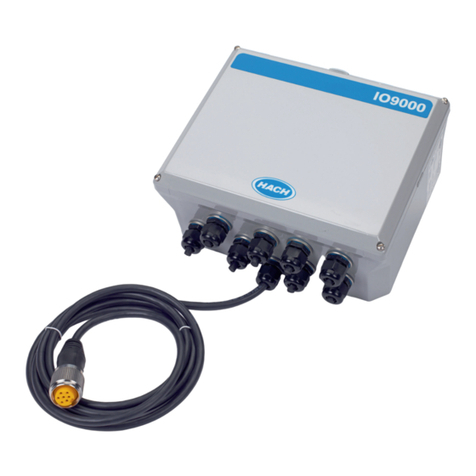
Hach IO9000 User manual

DOC276.97.80496
IO9000
02/2015, Edition 2
User Instructions
Instructions d'utilisation
Instrucciones para el usuario
Instruções do Usuário
用户说明
取扱説明書

English..............................................................................................................................3
Français......................................................................................................................... 19
Español.......................................................................................................................... 37
Português...................................................................................................................... 54
中文................................................................................................................................. 72
日本語............................................................................................................................. 88
2

Table of contents
Specifications on page 3 Calibration on page 17
General information on page 4 Maintenance on page 18
Installation on page 6 Replacement parts on page 18
Configuration on page 15
Specifications
Specifications are subject to change without notice.
Specification Details
Dimensions (L x W X D) 247 x 300 x 130 mm (9.71 x 11.82 x 5.12 in.)
Enclosure IP66, NEMA 4X
Weight 2.5 kg (5.5 lb)
Pollution degree/installation
category
2, II
Protection class II
Operating temperature –40 to 50 °C (–40 to 122 °F)
Storage temperature –40 to 80 °C (–40 to 176 °F)
Storage/operating humidity 100% non-condensing
Cable Auxiliary cable, 2.74 m (9 ft)
Cable strain reliefs Eight
Power requirements 12 to 15 VDC, 1 A supplied by AS950 controller
Analog outputs IO9001: None; IO9004: Three
0/4–20 mA current loop; external loop power (18 VDC maximum) or internal loop
power (14 VDC minimum, 18 VDC maximum); loop burden—3.6 V maximum at
25 mA
Wire size: 24 to 16 AWG solid or stranded copper. The analog outputs are
individually galvanically isolated1.
Analog inputs IO9001: None; IO9004: Two
Current input mode: 0/4–20 mA; 18 VDC maximum; 108 Ω and 0.4 V maximum
loop burden
Voltage pulse input mode: Input resistance—11 kΩ typical; pulse high level—4 V
minimum to 15 V maximum; pulse low level—0 V minimum to 2 V maximum;
hysteresis—0.5 V typical; pulse width (high or low state)—50 ms minimum
Wire size: 24 to 16 AWG solid or stranded copper. The analog inputs are
individually galvanically isolated1.
Digital outputs IO9001: None; IO9004: Four
Low-voltage (±30 VDC or 20 VAC-rms at 0.15 A maximum) contact closure
relays; optional pull-up to externally-supplied logic level (0 to 30 VDC)
Wire size: 24 to 16 AWG solid or stranded copper. The digital outputs are
galvanically isolated as a group. If a switch is not referenced to the COM pin, the
switch is individually galvanically isolated1.
1Galvanic isolation is used to decrease the effects of ground loop interference. Galvanic isolation
does not supply safety isolation.
English 3

Specification Details
Digital inputs IO9001: None; IO9004: Four
0 to 25 VDC (120 kΩ input resistance); 1.5 V default internal threshold. An
optional external voltage applied to Vth input supplies a threshold voltage of
0.5*Vth.
Wire size: 24 to 16 AWG solid or stranded copper. The digital inputs are
galvanically isolated as a group1.
Relays IO9001: One; IO9004: Four
Form C; 20 to 230 VAC and 0.006 to 0.5 A
Wire size: 20 to 14 AWG solid or stranded copper
Certifications CE, UL/CSA standards (cETLus)
Warranty USA: 1 year, EU: 2 years
General information
In no event will the manufacturer be liable for direct, indirect, special, incidental or consequential
damages resulting from any defect or omission in this manual. The manufacturer reserves the right to
make changes in this manual and the products it describes at any time, without notice or obligation.
Revised editions are found on the manufacturer’s website.
Safety information
N O T I C E
The manufacturer is not responsible for any damages due to misapplication or misuse of this product including,
without limitation, direct, incidental and consequential damages, and disclaims such damages to the full extent
permitted under applicable law. The user is solely responsible to identify critical application risks and install
appropriate mechanisms to protect processes during a possible equipment malfunction.
Please read this entire manual before unpacking, setting up or operating this equipment. Pay
attention to all danger and caution statements. Failure to do so could result in serious injury to the
operator or damage to the equipment.
Make sure that the protection provided by this equipment is not impaired. Do not use or install this
equipment in any manner other than that specified in this manual.
Use of hazard information
D A N G E R
Indicates a potentially or imminently hazardous situation which, if not avoided, will result in death or serious injury.
WARNING
Indicates a potentially or imminently hazardous situation which, if not avoided, could result in death or serious
injury.
CAUTION
Indicates a potentially hazardous situation that may result in minor or moderate injury.
N O T I C E
Indicates a situation which, if not avoided, may cause damage to the instrument. Information that requires special
emphasis.
Precautionary labels
Read all labels and tags attached to the instrument. Personal injury or damage to the instrument
could occur if not observed. A symbol on the instrument is referenced in the manual with a
precautionary statement.
4 English
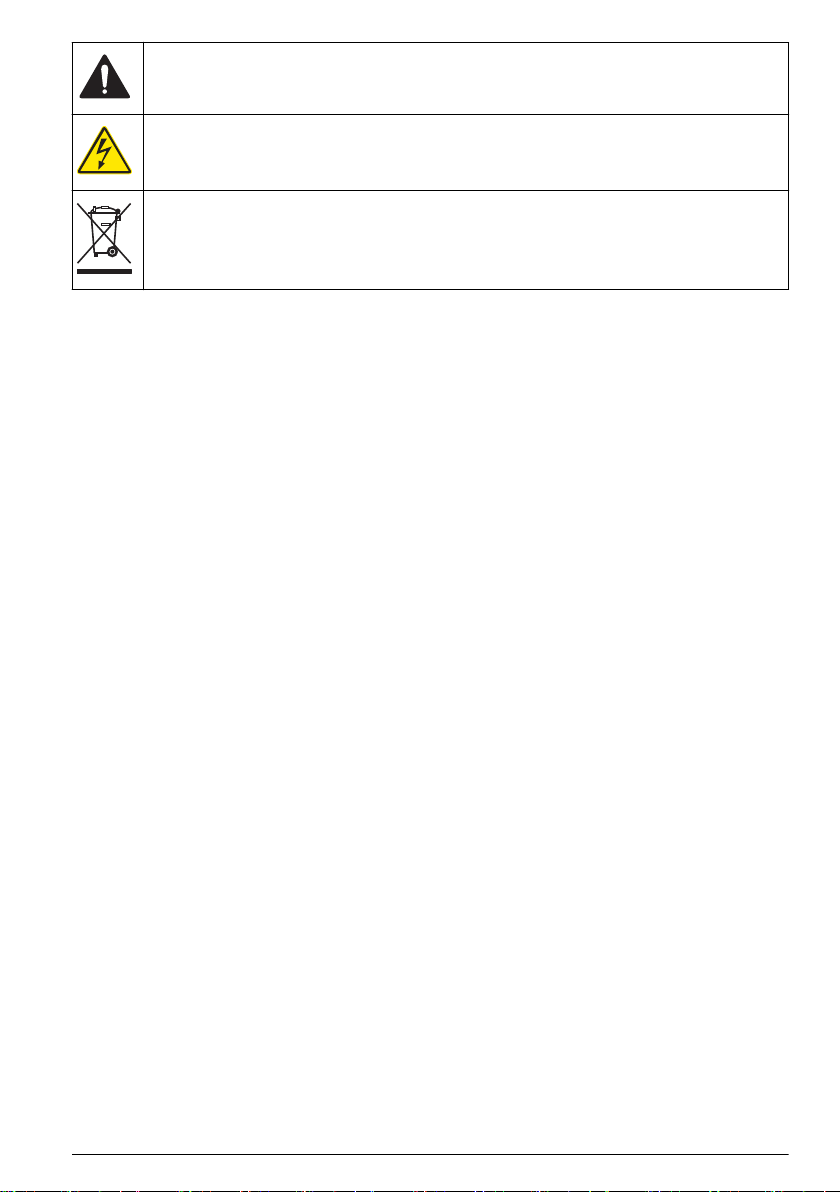
This is the safety alert symbol. Obey all safety messages that follow this symbol to avoid potential
injury. If on the instrument, refer to the instruction manual for operation or safety information.
This symbol indicates that a risk of electrical shock and/or electrocution exists.
Electrical equipment marked with this symbol may not be disposed of in European domestic or public
disposal systems. Return old or end-of-life equipment to the manufacturer for disposal at no charge to
the user.
Certification
Canadian Radio Interference-Causing Equipment Regulation, IECS-003, Class A:
Supporting test records reside with the manufacturer.
This Class A digital apparatus meets all requirements of the Canadian Interference-Causing
Equipment Regulations.
Cet appareil numérique de classe A répond à toutes les exigences de la réglementation canadienne
sur les équipements provoquant des interférences.
FCC Part 15, Class "A" Limits
Supporting test records reside with the manufacturer. The device complies with Part 15 of the FCC
Rules. Operation is subject to the following conditions:
1. The equipment may not cause harmful interference.
2. The equipment must accept any interference received, including interference that may cause
undesired operation.
Changes or modifications to this equipment not expressly approved by the party responsible for
compliance could void the user's authority to operate the equipment. This equipment has been tested
and found to comply with the limits for a Class A digital device, pursuant to Part 15 of the FCC rules.
These limits are designed to provide reasonable protection against harmful interference when the
equipment is operated in a commercial environment. This equipment generates, uses and can
radiate radio frequency energy and, if not installed and used in accordance with the instruction
manual, may cause harmful interference to radio communications. Operation of this equipment in a
residential area is likely to cause harmful interference, in which case the user will be required to
correct the interference at their expense. The following techniques can be used to reduce
interference problems:
1. Disconnect the equipment from its power source to verify that it is or is not the source of the
interference.
2. If the equipment is connected to the same outlet as the device experiencing interference, connect
the equipment to a different outlet.
3. Move the equipment away from the device receiving the interference.
4. Reposition the receiving antenna for the device receiving the interference.
5. Try combinations of the above.
Product overview
The I/O module connects to an AS950 sampler to supply the sampler with relay, analog input, analog
output, digital input and digital output terminals.
Product components
Make sure that all components have been received. Refer to Figure 1. If any items are missing or
damaged, contact the manufacturer or a sales representative immediately.
English 5

Figure 1 Product components
1 IO9000 module 3 Self-drilling screws
2 Mounting brackets 4 Screws for mounting brackets
Installation
This instrument is rated for an altitude of 2000 m (6562 ft) maximum. Although the use of this
equipment above the 2000 m altitude does not show any substantial safety concern, the
manufacturer recommends that users with concerns contact technical support.
Install the brackets
Install the brackets as shown in the illustrated steps that follow.
Mount the instrument
N O T I C E
Damage to internal components can occur if a screw goes into the side of the refrigerated sampler more than
12.5 mm (0.5 in.). Use the screws supplied to prevent damage to the refrigerated sampler.
Attach the I/O module to a flat, vertical surface that lets the user easily disconnect the I/O module
from the AS950 controller. Make sure that the I/O module is sufficiently near the sampler to connect
the I/O module cable to the AUX I/O port. Refer to Figure 2 to attach the I/O module to a wall.
Refer to Figure 3 to attach the I/O module to the sampler.
6 English

Figure 2 Wall mounting
English 7

Figure 3 Mounting locations on the sampler
8 English

Electrical installation
D A N G E R
Electrocution hazard. Always remove power to the instrument before making electrical connections.
D A N G E R
Electrocution hazard. Use only fittings that have the specified environmental enclosure rating. Obey the
requirements in the Specifications section.
WARNING
Electrical shock hazard. Externally connected equipment must have an applicable country safety
standard assessment.
N O T I C E
Make sure that the equipment is connected to the instrument in accordance with local, regional and national
requirements.
• Use cables with a diameter of 4.3 to 11.4 mm (0.17 to 0.45 in.) so that the cable strain reliefs hold
the cables when tightened.
• Do not put more than one cable in a cable strain relief.
• To connect conduit to a terminal, replace an installed cable strain relief with a conduit fitting. To
connect conduit to the I/O module, replace the applicable cable strain relief with a sealing conduit
to bond the conduit to the bonding plate of the I/O module. For a reliable, low impedance ground
connection, an independent ground wire with equivalent gauge can be pulled and attached at the
ground lug terminal on the bonding plate.
• Close all unused cable strain reliefs with rods, cables or the supplied sealing cords to keep out
moisture.
• For relay connections, it is necessary to use a 20 A circuit breaker (at maximum). Relay
connections must have a local disconnection device. The disconnection device must clearly
identify that this device is the disconnection device. Make sure that the device is in a location
where there is sufficient clearance around it to make connections and to do maintenance tasks.
English 9

Table of contents
Languages:
Other Hach Control Unit manuals




Popular Control Unit manuals by other brands

Festo
Festo Compact Performance CP-FB6-E Brief description

Elo TouchSystems
Elo TouchSystems DMS-SA19P-EXTME Quick installation guide

JS Automation
JS Automation MPC3034A user manual

JAUDT
JAUDT SW GII 6406 Series Translation of the original operating instructions

Spektrum
Spektrum Air Module System manual

BOC Edwards
BOC Edwards Q Series instruction manual

KHADAS
KHADAS BT Magic quick start

Etherma
Etherma eNEXHO-IL Assembly and operating instructions

PMFoundations
PMFoundations Attenuverter Assembly guide

GEA
GEA VARIVENT Operating instruction

Walther Systemtechnik
Walther Systemtechnik VMS-05 Assembly instructions

Altronix
Altronix LINQ8PD Installation and programming manual





