manuals.online logo
Brands
  1. Home
  2. •
  3. Brands
  4. •
  5. Henny Penny
  6. •
  7. Fryer
  8. •
  9. Henny Penny 691 Operating instructions

Henny Penny 691 Operating instructions

Other Henny Penny Fryer manuals

Henny Penny LOV LVG-102 User manual

Henny Penny

Henny Penny LOV LVG-102 User manual

Henny Penny OFE-391 User manual

Henny Penny

Henny Penny OFE-391 User manual

Henny Penny OFE- 290 Instruction Manual

Henny Penny

Henny Penny OFE- 290 Instruction Manual

Henny Penny PFE-500 User manual

Henny Penny

Henny Penny PFE-500 User manual

Henny Penny 500 User manual

Henny Penny

Henny Penny 500 User manual

Henny Penny LVE-102 User manual

Henny Penny

Henny Penny LVE-102 User manual

Henny Penny Evolution Elite EEG-163 User manual

Henny Penny

Henny Penny Evolution Elite EEG-163 User manual

Henny Penny PFE-561 User manual

Henny Penny

Henny Penny PFE-561 User manual

Henny Penny 590 Guide

Henny Penny

Henny Penny 590 Guide

Henny Penny LVG-102 User manual

Henny Penny

Henny Penny LVG-102 User manual

Henny Penny OFE-341 User manual

Henny Penny

Henny Penny OFE-341 User manual

Henny Penny PFE-590 Reference manual

Henny Penny

Henny Penny PFE-590 Reference manual

Henny Penny OFG-391 User manual

Henny Penny

Henny Penny OFG-391 User manual

Henny Penny Evolution Elite EEE-154 User manual

Henny Penny

Henny Penny Evolution Elite EEE-154 User manual

Henny Penny EVOLUTION ELITE EEG-141 User manual

Henny Penny

Henny Penny EVOLUTION ELITE EEG-141 User manual

Henny Penny OFE-341 Operating instructions

Henny Penny

Henny Penny OFE-341 Operating instructions

Henny Penny 342 Guide

Henny Penny

Henny Penny 342 Guide

Henny Penny OEA-322 User manual

Henny Penny

Henny Penny OEA-322 User manual

Henny Penny 520 User manual

Henny Penny

Henny Penny 520 User manual

Henny Penny LVE 30 Series User manual

Henny Penny

Henny Penny LVE 30 Series User manual

Henny Penny PFE-591 User manual

Henny Penny

Henny Penny PFE-591 User manual

Henny Penny OFE-321 User manual

Henny Penny

Henny Penny OFE-321 User manual

Henny Penny 8000 Computron User manual

Henny Penny

Henny Penny 8000 Computron User manual

Henny Penny Velocity Series User manual

Henny Penny

Henny Penny Velocity Series User manual

Popular Fryer manuals by other brands

Innsky 55SA1US user manual

Innsky

Innsky 55SA1US user manual

Falcon G350/11 Installation and servicing instructions

Falcon

Falcon G350/11 Installation and servicing instructions

GoWISE USA GW22612 instruction manual

GoWISE USA

GoWISE USA GW22612 instruction manual

Wolf IF15/S Specification sheet

Wolf

Wolf IF15/S Specification sheet

Electrolux Thermetic 9CHG583284 Operating and safety instructions

Electrolux

Electrolux Thermetic 9CHG583284 Operating and safety instructions

Gourmia GAF799 user manual

Gourmia

Gourmia GAF799 user manual

DeLonghi D677UX Instructions for use

DeLonghi

DeLonghi D677UX Instructions for use

SEVERIN DEEP FRYER - Dimensions

SEVERIN

SEVERIN DEEP FRYER - Dimensions

Toastmaster TMFG18-NAT Installation and operation instructions

Toastmaster

Toastmaster TMFG18-NAT Installation and operation instructions

Domo DO465FR Instruction booklet

Domo

Domo DO465FR Instruction booklet

Farberware FBW FT 43721 B manual

Farberware

Farberware FBW FT 43721 B manual

GERMANICA GEAF5L3LD instruction manual

GERMANICA

GERMANICA GEAF5L3LD instruction manual

Philips HD9211 user manual

Philips

Philips HD9211 user manual

Linea 2000 Domo DO536FR Instruction booklet

Linea 2000

Linea 2000 Domo DO536FR Instruction booklet

Lakeland 31796 Instruction booklet

Lakeland

Lakeland 31796 Instruction booklet

Dash Tasti-Crisp DFAF755 user manual

Dash

Dash Tasti-Crisp DFAF755 user manual

Fagor F-200 Instructions for use

Fagor

Fagor F-200 Instructions for use

Keating Of Chicago 18 BB GAS Specification sheet

Keating Of Chicago

Keating Of Chicago 18 BB GAS Specification sheet

manuals.online logo
manuals.online logoBrands
  • About & Mission
  • Contact us
  • Privacy Policy
  • Terms and Conditions

Copyright 2025 Manuals.Online. All Rights Reserved.

Model 691
Power switch ON but fryer
completely inoperative
Pressure not exhausting at
end of cook cycle
Operating pressure too high
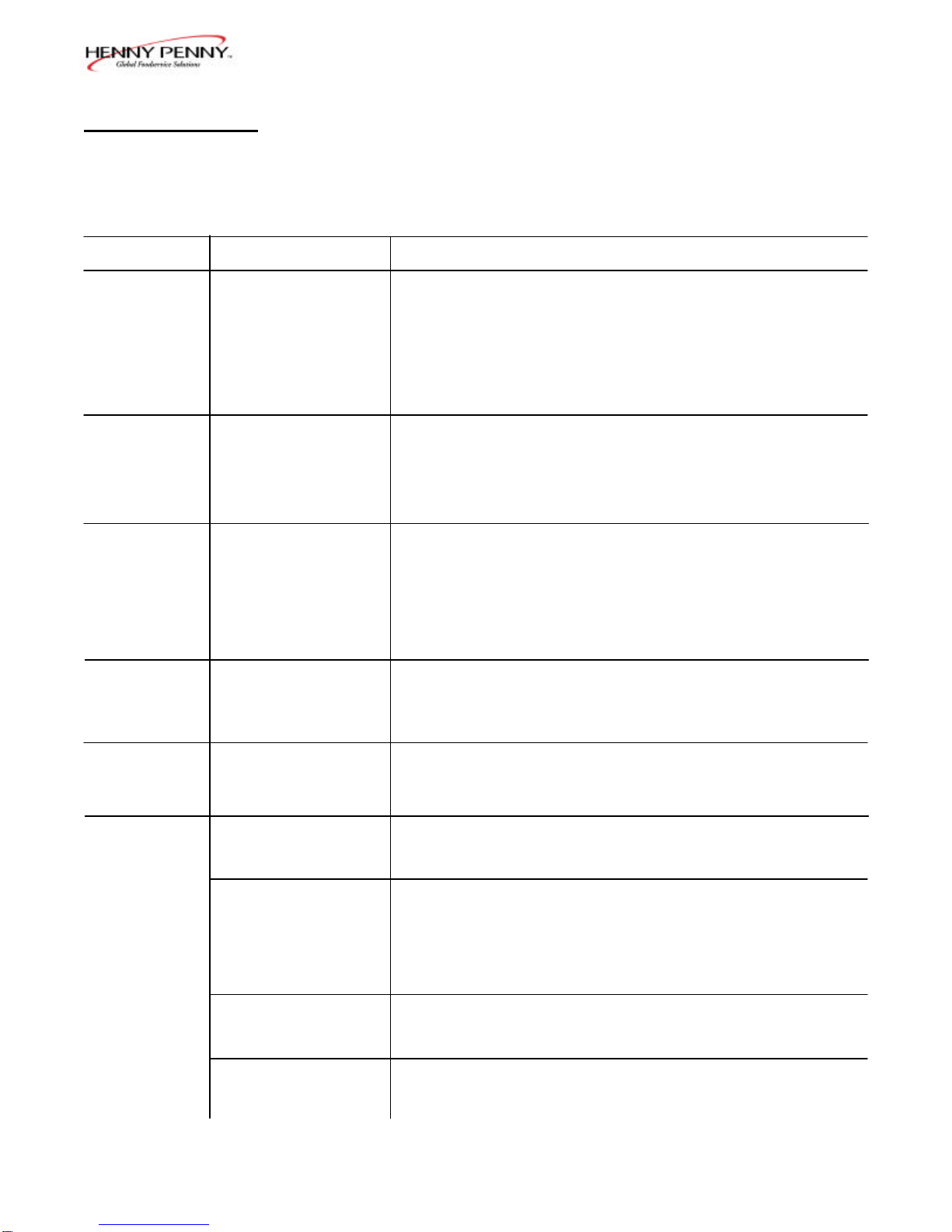
4-1. TROUBLESHOOTING GUIDE
Problem Cause Correction
•Open circuit
•Solenoid or exhaust line clogged
•Deadweight assembly clogged
•Plug fryer in
•Check breaker or fuse at wall
•Turn OFF and allow fryer to cool to
release the pressure in frypot; have
all lines, solenoid, and exhaust tank
cleaned
•Turn OFF and allow fryer to cool to
release the pressure in frypot; clean
deadweight per Section 3-15
DO NOT OPERATE UNIT IF PRESSURE GAUGE SHOWS HIGH-PRESSURE CONDITIONS.
SEVERE INJURIES AND BURNS WILL RESULT. PLACE THE POWER/PUMPSWITCH IN
THE OFF POSITION IMMEDIATELY. RELEASE THE PRESSURE BYALLOWINGUNIT
TO COOL. THE PRESSURE THEN DROPS. DO NOT RESUME USE OF UNIT UNTIL CAUSE
OF HIGH PRESSURE HAS BEEN FOUND AND CORRECTED.
Pressure does not build
Shortening not heating
Foaming or boiling over
Shortening not draining
Filter motor won’t run
•Not enough product in frypot
•Metal shipping spacer not
removed from deadweight
•Pressure not programmed
•Lid gasket leaking
•Gas valve knob turned to the
OFF position
•Drain valve open
•High temperature limit tripped
•See Boil-Over label on fryer
and information in this manual
•Drain valve clogged
•Motor overheated
•Place full capacity product in frypot
when using fresh shortening
•Remove shipping spacer; see
Section 2-2
•Check programming
•Reverse or replace lid gasket
•Make sure gas control valve knob is
turned to the ON position
•Close drain valve
•Reset high temperature limit
•Follow Boil-Over procedures
•Push cleaning rod through open
drain valve
•Reset motor
More detailed troubleshooting information is available in the Technical Manual, available at www.hennypenny.com,
or 1-800-417-8405 or 1-937-456-8405.
803 4-1
SECTION 4. TROUBLESHOOTING
Model 691
4-2. ERROR CODES In the event of a control system failure, the digital display will show
an error message which are coded: “E-4”, “E-5”, “E-6”, “E-10”,
“E-15”, “E-20A-D”, “E-41”, “E-46”, “E-47”, “E-48”, “E-70B”,
and “E-92”. A constant tone is heard when an error code is
displayed; and to silence this tone, press any of the product buttons.
DISPLAYCAUSE PANEL BOARD CORRECTION
“E-4” Control board Turn switch to OFF position, then turn switch back to ON;
overheating if display still shows “E-4”, the board is getting too hot; check
for signs of overheating behind the control panel; once panel
cools down, the controls should return to normal; if “E-4”
persists, replace the control
“E-5” Shortening Turn switch to OFF position, then back to ON; if display
overheating shows “E-5”, the heating circuits and temperature probe should
be checked; once the unit cools down, the controls should
return to normal; if “E-5” persists, replace the control
“E-6A” Temperature Turn switch to OFF position, then turn switch back to ON;
probe open if display shows “E-6”, have the temperature probe checked
“E-6B” Temperature Turn switch to OFF position, then turn switch back to ON;
probe shorted if display shows “E-6”, have the temperature probe checked
“E-10” High limit Reset the high limit by manually pushing up on the red reset
button; if the high limit does not reset, the high limit must be
replaced; call Henny Penny’s Service Department
“E-15” Drain switch Close the drain using the drain valve handle; if display still
shows “E-15”, call Henny Penny’s Service Department
“E-20A” Air pressure switch Press the timer button to try the ignition process again; and if
failure (stuck closed) “E-20A” persists, call Henny Penny’s Service Department
“E-20B” Draft fan or Press the Timer button to try the ignition process again; and if
air pressure “E-20B” persists, call Henny Penny’s Service Department
switch failure
(stuck open)
“E-20C” Ignition module Press the Timer button to try the ignition process again; and if
failure “E-20C” persists, call Henny Penny’s Service Department
“E-20D” Modules working Press the Timer button to try the ignition process again; and if
but no ignition “E-20D” persists, call Henny Penny’s Service Department
4-2 803

Model 691
803 4-3

4-2. ERROR CODES (Continued)
DISPLAYCAUSE PANEL BOARD CORRECTION
“E-41” Programming Turn switch to OFF position, then back to ON; if display
failure shows “E-41”, the control should be re-initialized (see Pro-
gramming section); if the error code persists, replace the
control panel
“E-46” Eeprom memory Turn switch to OFF position, then back to ON; if display
write error shows “E-46”, the control should be re-initialized (see Pro
gramming section); if the error code persists, replace the
control panel
“E-47” A-to-D failure Turn switch to OFF position, then back to ON; if display
(Analog converter shows “E-47”, the control should be re-initialized (see Pro-
chip) gramming section); if the error code persists, replace the
control panel
“E-48” Input system Turn switch to OFF position, then back to ON; if display
error (CPU can’t shows “E-48”, the control should be re-initialized (see Pro-
read buttons graming section); if the error code persists, replace the control
digital inputs) panel
“E-70B” Faulty power Have power switch checked, along with its wiring; have
switch, or switch Input/Output board replaced if necessary
wiring; faulty
I/O board
“E-92” 24-VAC fuse Have components, in 24-volt circuit (I.E., hi limit, drain switch)
on I/O board open checked for shorts
Model 691
4-4 803
THIS
PAGE
INTENTIONALLY
LEFT
BLANK.