manuals.online logo
Brands
  1. Home
  2. •
  3. Brands
  4. •
  5. Kramer
  6. •
  7. Batteries Charger
  8. •
  9. Kramer W-2UC User manual

Kramer W-2UC User manual

This manual suits for next models

1

Other Kramer Batteries Charger manuals

Kramer W-2UC User manual

Kramer

Kramer W-2UC User manual

Kramer KWC-1 User manual

Kramer

Kramer KWC-1 User manual

Kramer TS-2UC/U Quick start guide

Kramer

Kramer TS-2UC/U Quick start guide

Kramer TBUS-204 User manual

Kramer

Kramer TBUS-204 User manual

Kramer W-2UCA User manual

Kramer

Kramer W-2UCA User manual

Kramer KWC-1 User manual

Kramer

Kramer KWC-1 User manual

Popular Batteries Charger manuals by other brands

EVBox BusinessLine manual

EVBox

EVBox BusinessLine manual

Goobay 71808 user manual

Goobay

Goobay 71808 user manual

Kogan KACRDQIS4XA user manual

Kogan

Kogan KACRDQIS4XA user manual

Sealey WCB3 quick start guide

Sealey

Sealey WCB3 quick start guide

Vanner SP00143/181 owner's manual

Vanner

Vanner SP00143/181 owner's manual

KeyOuest KO037515 quick start guide

KeyOuest

KeyOuest KO037515 quick start guide

Enplus Silk Series user manual

Enplus

Enplus Silk Series user manual

Intermec SF51 user guide

Intermec

Intermec SF51 user guide

Colorovo PowerBox 6800 user guide

Colorovo

Colorovo PowerBox 6800 user guide

Smartech WBC-250 Operator's manual

Smartech

Smartech WBC-250 Operator's manual

PIXO C-USB instruction manual

PIXO

PIXO C-USB instruction manual

Gunson G4104 quick start guide

Gunson

Gunson G4104 quick start guide

Dometic NDS SCE320 Short Operating Manual

Dometic

Dometic NDS SCE320 Short Operating Manual

ABB HT572708 Operation manual

ABB

ABB HT572708 Operation manual

EVOline Square80 manual

EVOline

EVOline Square80 manual

Redarc SBC24025 Operating instructions and owner's manual

Redarc

Redarc SBC24025 Operating instructions and owner's manual

Absaar HV04 manual

Absaar

Absaar HV04 manual

DazeTechnology Cover Dazebox Home installation manual

DazeTechnology

DazeTechnology Cover Dazebox Home installation manual

manuals.online logo
manuals.online logoBrands
  • About & Mission
  • Contact us
  • Privacy Policy
  • Terms and Conditions

Copyright 2025 Manuals.Online. All Rights Reserved.

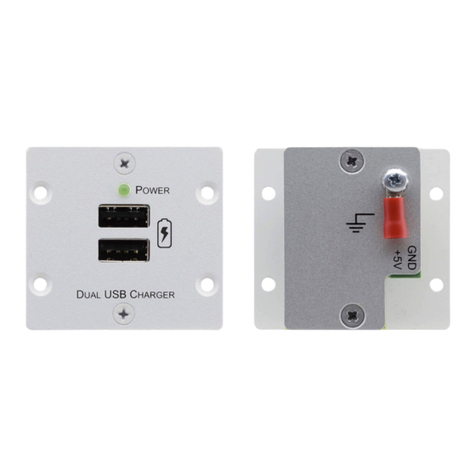
The Kramer Dual USB Charger
Congratulations on purchasing your Kramer dual USB charger with two USB connectors for charging
devices (such as iOS and Android devices) that is available as: W-2UC, a dual insert and as
WP-2UC, a Decora® style one gang insert.
Defining the Dual USB Charger
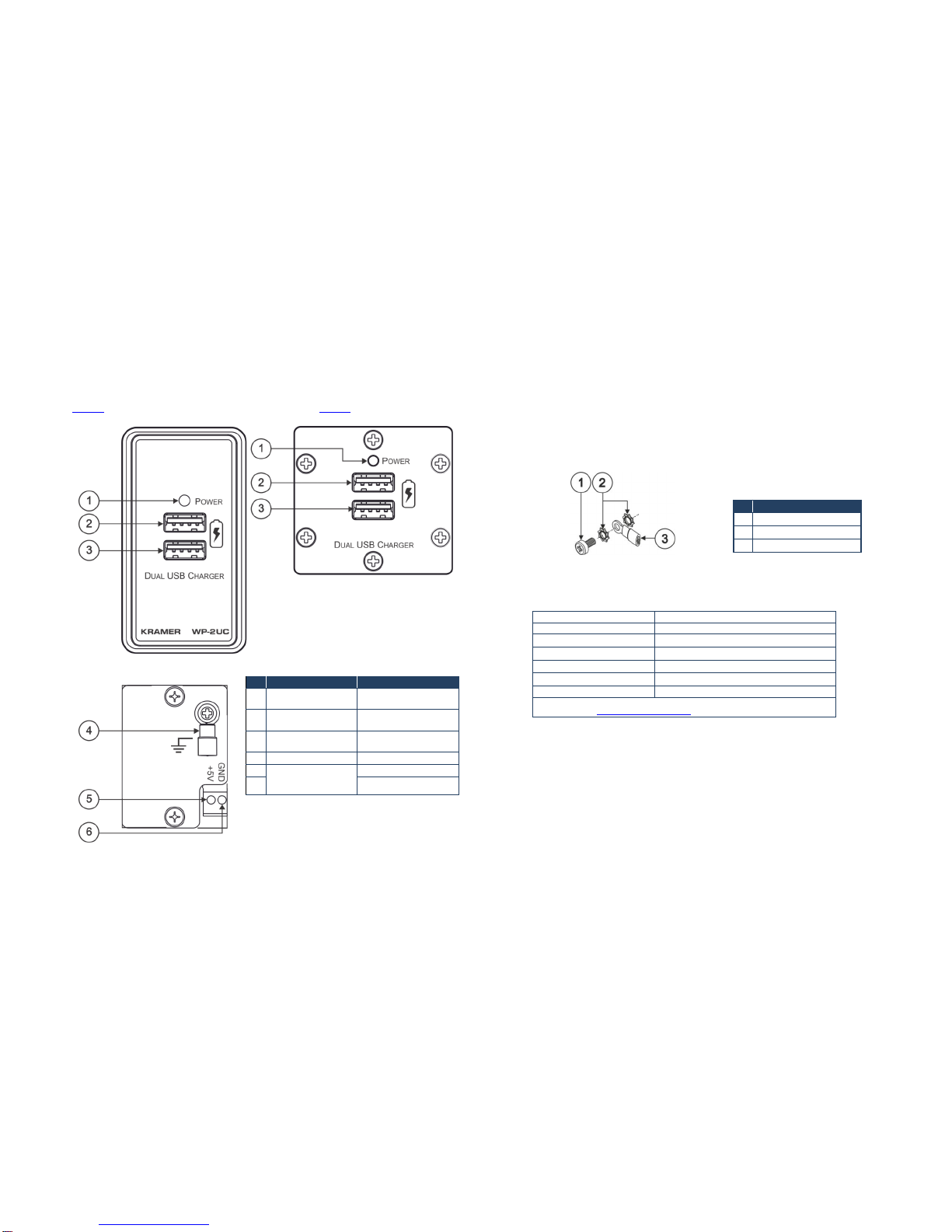
Figure 1 defines the front panels of the W-2UC and WP-2UC and Figure 2 defines their rear panel.
Figure 1: WP-2UC and W-2UC Front Panels
Figure 2: WP-2UC and W-2UC Rear Panel
#
Feature
Function
1
Power LED
Lights when the unit
receives power
2
Top USB Connector
Connect to a device for
charging
3
Lower USB Connector
Connect to a device for
charging
4
Grounding Screw
Connect to grounding wire
5
Power Supply 2-pin
Terminal Block
Connector
Connect +5V to +5V
6
Connect GND to GND
Mounting the W-2UC
To mount a Kramer insert or connector module:
1. Place the Kramer insert over the opening.
2. Insert the four screws (two on each side) to fix the Kramer insert in place, and tighten them.
Mounting the WP-2UC
The WP-2UC Decora® style one gang insert can be fitted into a Decora® style faceplate.
Grounding the Dual USB Charger
The grounding screw is used to earth the chassis of the unit to the ground of the building to help
prevent static electricity from impacting on the performance of the unit.
Figure 3: Grounding Connection Components
#
Component Description
1
M3X6 screw
2
1/8" Toothed Lock Washer
3
M3 Ring Tongue Terminal
Technical Specifications
PORTS:
2 USB connectors
POWER CONSUMPTION:
5V DC, 4A
OPERATINGTEMPERATURE:
0° to +40°C (32° to 104°F)
STORAGE TEMPERATURE:
-40° to +70°C (-40° to 158°F)
HUMIDITY:
10% to 90%, RHL non-condensing
INCLUDED ACCESSORIES:
Power supply
WEIGHT:
0.14kg(0.31lbs) approx.
Specifications are subject to change without notice
GotoourWebsiteathttp://www.kramerelectronics.com

KRAM ER ELECT RONIC S LTD.
Installation
Instructions
MODELS:
W-2UC Dual Insert
Dual USB Charger
WP-2UC Wall Plate Device
Dual USB Charger
For the latest information on our products and a list of Kramer
distributors, visit our Web site where updates to these
installation instructions may be found.
We welcome your questions, comments, and feedback.
Web site: www.kramerelectronics.com

E-mail: [email protected]
P/N: 2900-300359 Rev 2
P/N:
2900-300359
Rev:
2
!
SAFETY WARNING
Disconnect the unit from the power
supply before opening and servicing