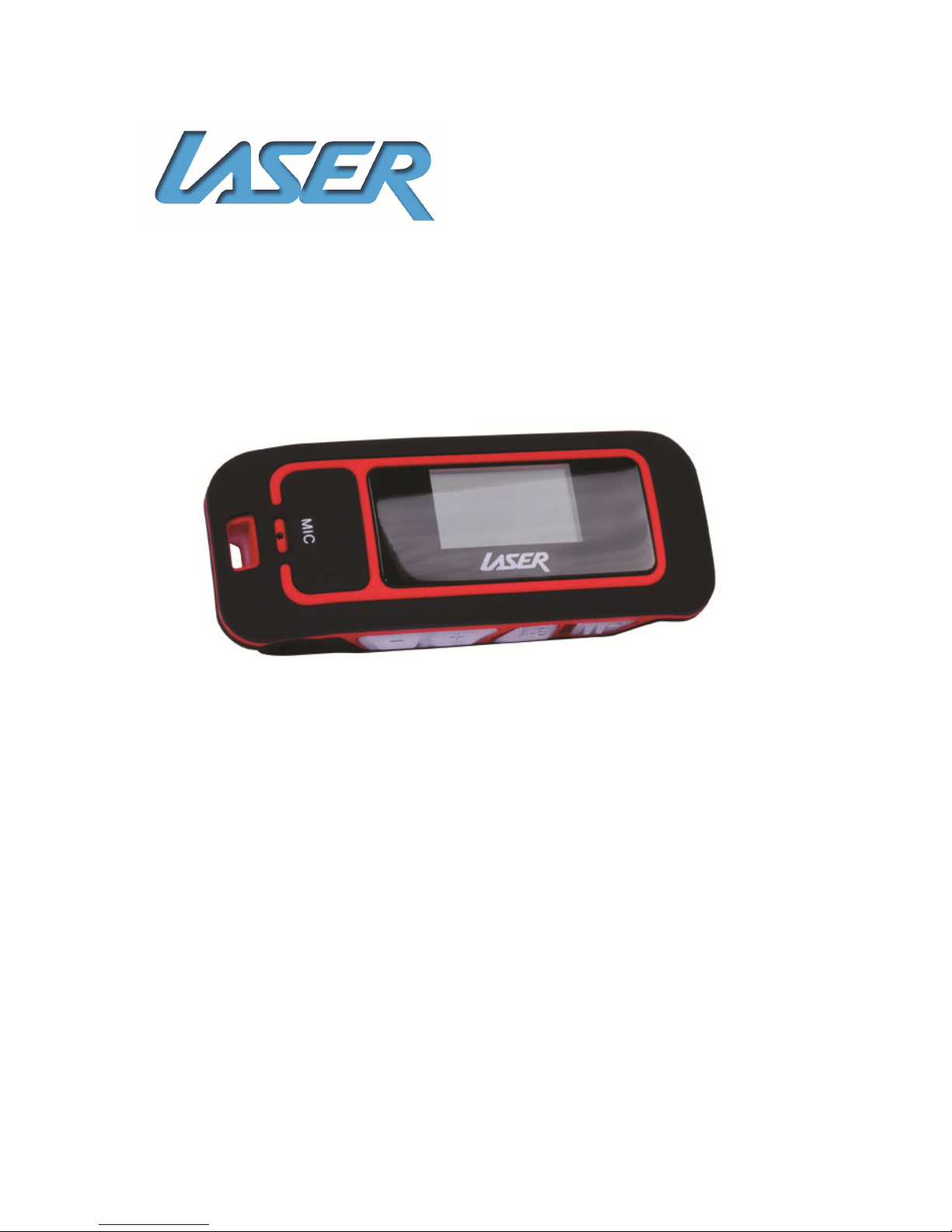
Laser K10 User manual

K10 MP3 PLAYER
User Manual

MP3-K10
USER MANUAL
1
IMPORTANT SAFETY INSTRUCTIONS AND PRECAUTIONS
• Read instruction carefully before usin this product
• Observe all warnin s and cautions when usin this product.
• Retain all manuals and documentation for future referral.
• Only use this product in a manner described in this manual.
• Do not use this device in extremely hot, cold, humid, dusty or sandy environments.
• Do not use this device in electrical storms or other conditions if the likely hood of
li htnin is possible.
• Do not attempt to clean this product usin liquid cleaners or aerosol cleaners. Use
only a damp soft cloth to clean the surface of this device.
• Extreme Care should be taken when usin this product near any body of water such
swimmin pools, kitchen sinks, baths and alike.
• This device is not waterproof. Do not use this device in the open if there is a hi h
level of moisture in the air.
• Only place the device on a stable surface and ensure that cables attached to the
device can not cause the device to fall.
• There are no serviceable parts in this device. Attempts to open this device by
unauthorised personnel may cause further dama e and void the warranty.
• Ima es of product and accessories are indicative only and may vary sli htly from
actual product.
• We reserve the ri ht to make chan es to this document and the product without
notification

MP3-K10
USER MANUAL
2
Table of Contents
IMPORTANT SAFETY INSTRUCTIONS AND PRECAUTIONS ........................................................ 1
KNOWING YOUR K10 MP3 PLAYER ........................................................................................... 4
WHAT’S IN THE BOX .................................................................................................................. 5
Gettin Started .......................................................................................................................... 5
TRANSFERRING MUSIC .............................................................................................................. 5
Connectin the player ........................................................................................................... 5
Transferrin Audio Files ........................................................................................................ 6
USING THE PLAYER .................................................................................................................... 6
Turnin the Player ON and OFF ............................................................................................. 6
Lockin the Player ................................................................................................................. 6
MAIN MENU .............................................................................................................................. 7
Music Mode ........................................................................................................................... 7
Selectin Files & Folders ........................................................................................................ 8
Local Folder ....................................................................................................................... 8
Delete File .......................................................................................................................... 8
Delete All ........................................................................................................................... 8
Exit ..................................................................................................................................... 8
Music Playback Settin s ........................................................................................................ 9
Repeat ............................................................................................................................... 9
Equaliser ............................................................................................................................ 9
Replay .............................................................................................................................. 10
Replay Times ................................................................................................................... 10
Replay Gap ...................................................................................................................... 10
Exit ................................................................................................................................... 10
Displayin Lyrics .................................................................................................................. 10
Record Mode ....................................................................................................................... 11
Record Settin s.................................................................................................................... 11
Local Folder ..................................................................................................................... 11
REC Type .......................................................................................................................... 12
Record Gain Set ............................................................................................................... 12
Exit ................................................................................................................................... 12
FM Radio ............................................................................................................................. 13
Manual search for a station ............................................................................................ 13


MP3-K10
USER MANUAL
3

FM Radio Sub Menu ............................................................................................................ 14
Save ................................................................................................................................. 14
Record ............................................................................................................................. 14
Delete .............................................................................................................................. 14
Delete All ......................................................................................................................... 14
Auto Search. .................................................................................................................... 14
Normal Band.................................................................................................................... 14
Exit ................................................................................................................................... 14
Text Reader ......................................................................................................................... 15
Text Reader Menu ............................................................................................................... 15
Local Folder ..................................................................................................................... 15
Play Set ............................................................................................................................ 15
Delete .............................................................................................................................. 15
Delete All ......................................................................................................................... 15
Phone Book ......................................................................................................................... 16
Settin s Mode ..................................................................................................................... 16
System Time .................................................................................................................... 16
Backli ht .......................................................................................................................... 16
Lan ua e ......................................................................................................................... 16
Power Off ........................................................................................................................ 17
Contrast ........................................................................................................................... 17
Memory info .................................................................................................................... 17
Firmware version ............................................................................................................. 17
Firmware Up rade .......................................................................................................... 17
Exit ................................................................................................................................... 18
TROUBLE SHOOTING ............................................................................................................... 18

MP3-K10
USER MANUAL
4
KNOWING YOUR K1 MP3 PLAYER
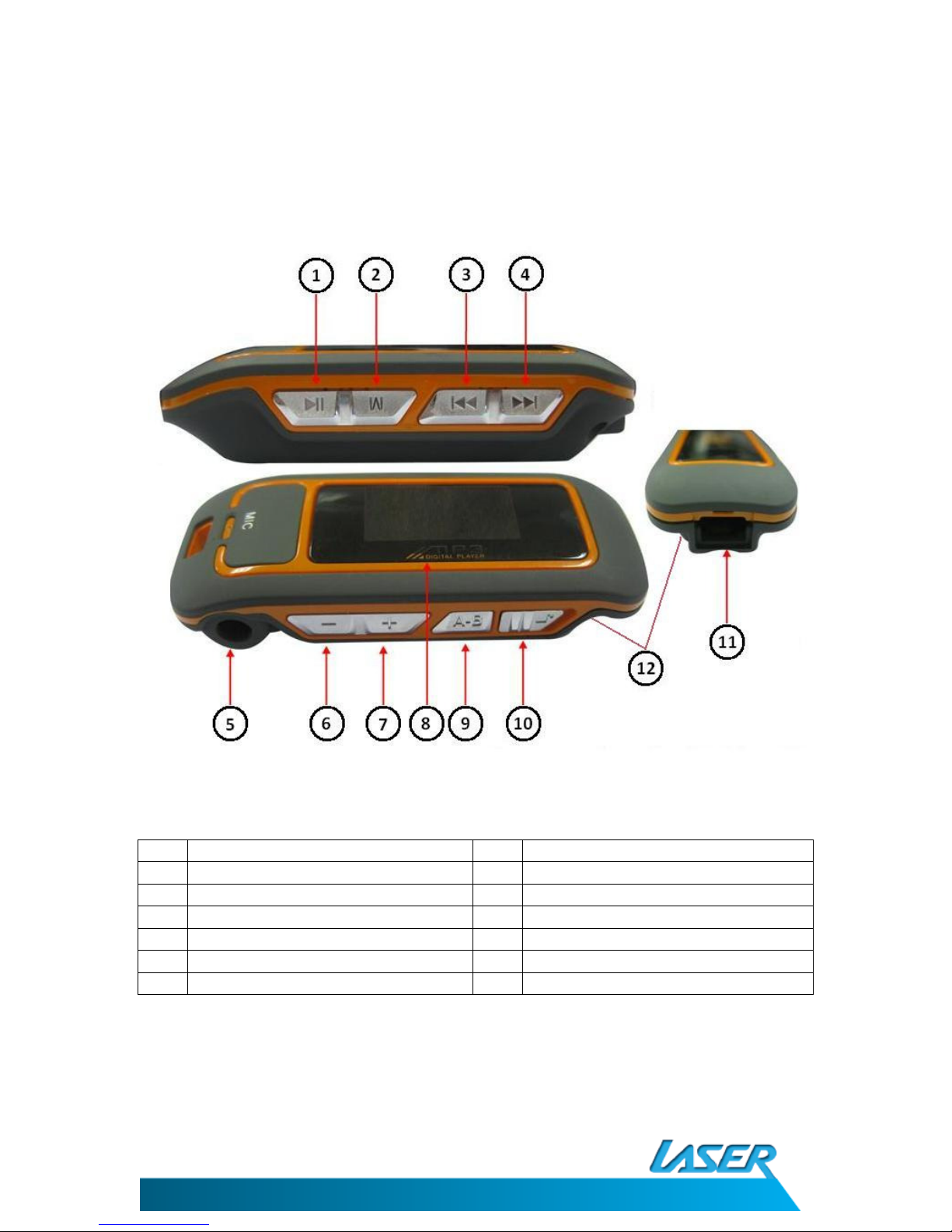
Item
Description Item
Description
1 Play/Pause ~ Power ON/OFF 7 Volume + (Increase)
2 Mode 8 LCD Screen
3 Previous 9 A-B Mode Button
4 Next 10 Lock/Unlock Switch
5 3.5mm Stereo Earphone Jack 11 USB Mini Cable connection
6 Volume – (Decrease) 12 AAA Battery Compartment
(Not Shown)

MP3-K10
USER MANUAL
5
WHAT’S IN THE BOX
1) K10 MP3 Player
2) Earphones
3) USB Cable
4) User Manual.
Getting Started
Prior to usin the K10 you will need to fit 1 AAA battery (Not supplied) in to the
compartment on the underside of the player. Please ensure that the battery terminals
match the markin s in the compartment. Fittin the battery incorrectly may dama e the
player.
While you are able to use rechar eable AAA size batteries in this player they cannot be
char ed in this player when connected to a PC or USB power sources.
Note: You are able to connect the player and transfer material to the player without
battery fitted as the player will be powered by the USB cable.
TRANSFERRING MUSIC
Connecting the player
Connect the USB –Mini end of the USB cable to the K10 MP3 player and the USB-A end to an
unused USB port on your computer.
The operatin system will load built in drivers and the player will be detected and loaded as
a USB Mass Stora e device and be displayed as a Drive in the (My) Computer Window.
The player will be assi ned the next available drive letter on your system.

MP3-K10
USER MANUAL
6
Transferring Audio Files
The K10 Player now acts like any other drive on your computer and files are simply copied
to and from the player as you would any other drive or folder on your computer.
For more information about transferrin files please refer to the Documentation for your
operatin system.
Please ensure that Audio files transferred to the player are in the MP3 or WMA format and
are free of any form of copy protection. The K10 MP3 player will not play any files that are
copy protected.
USING THE PLAYER
Turning the Player ON and OFF
To turn the player on Press and hold the Play/Pause button for approximately 3 seconds. To
turn the player off, press and hole the Play/Pause button for approximately 3 seconds.
When turned off, the player will still draw a small amount of power from the battery to
retain the settin s and memory. If the player is not to be used for an extended period
please remove the battery from the player before storin .
Locking the Player
You can prevent accidental operations by usin the Lock/Unlock switch.
In the unlock position you can use any of the buttons and data can be copied to and from
the player when connected to the computer.
In the Lock position the icon will be displayed for 2 seconds before returnin to
the previous screen. When the player is locked, it will not respond to any button presses.
The player can be locked in any feature and is useful if the player is kept in a snu area
durin playback to ensure the playback is not interrupted by accidental button presses.
When locked it is not possible to delete, add or move files on the player. You are only able
to copy files from the player to your PC.

MP3-K10
USER MANUAL
7
MAIN MENU
From the main menu you can access all features of the player.
Use the Previous/Next buttons to scroll throu h the menu until the required feature is
displayed. Press the Mode button to enter the feature.
Feature Description
Music Playback Music files stored on the player
Record Record Voice usin the built in microphone
Radio Listen to FM radio broadcast in your area
Text Display the contents of a TXT file on the player
Telephone Book Store telephone numbers
Settin s Chan e the system settin s
Tip: Press and holdin the Mode Button in any feature will return the player to the main
menu.
Music Mode
Use the Previous/Next button to cycle throu h the main menu until the Music Mode icon is
displayed and then press the Mode button.
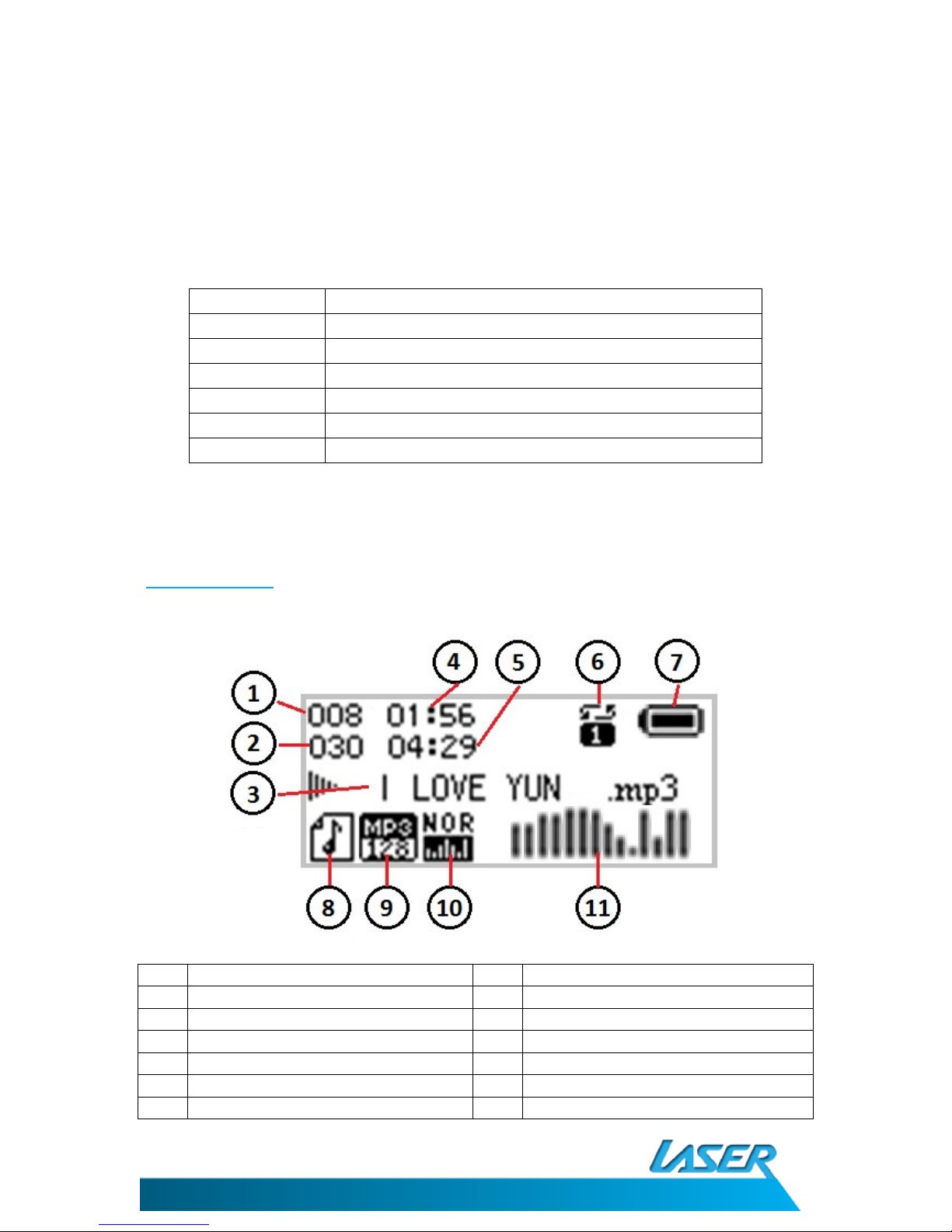
Item
Description Item
Description
1 Current track number 7 Battery Status
2 Total tracks in folder 8 Lyric file Available
3 Current file name 9 Type & bitrate of current file
4 Current time position 10 Current Equaliser settin
5 Total file len th 11 EQ display of current file
6 Playback type (Only shown in play)

MP3-K10
USER MANUAL
8
Press the Play/Pause button to play or pause the current track. Press the Previous/Next
button to o the next or previous file in the current folder.
Selecting Files & Folders
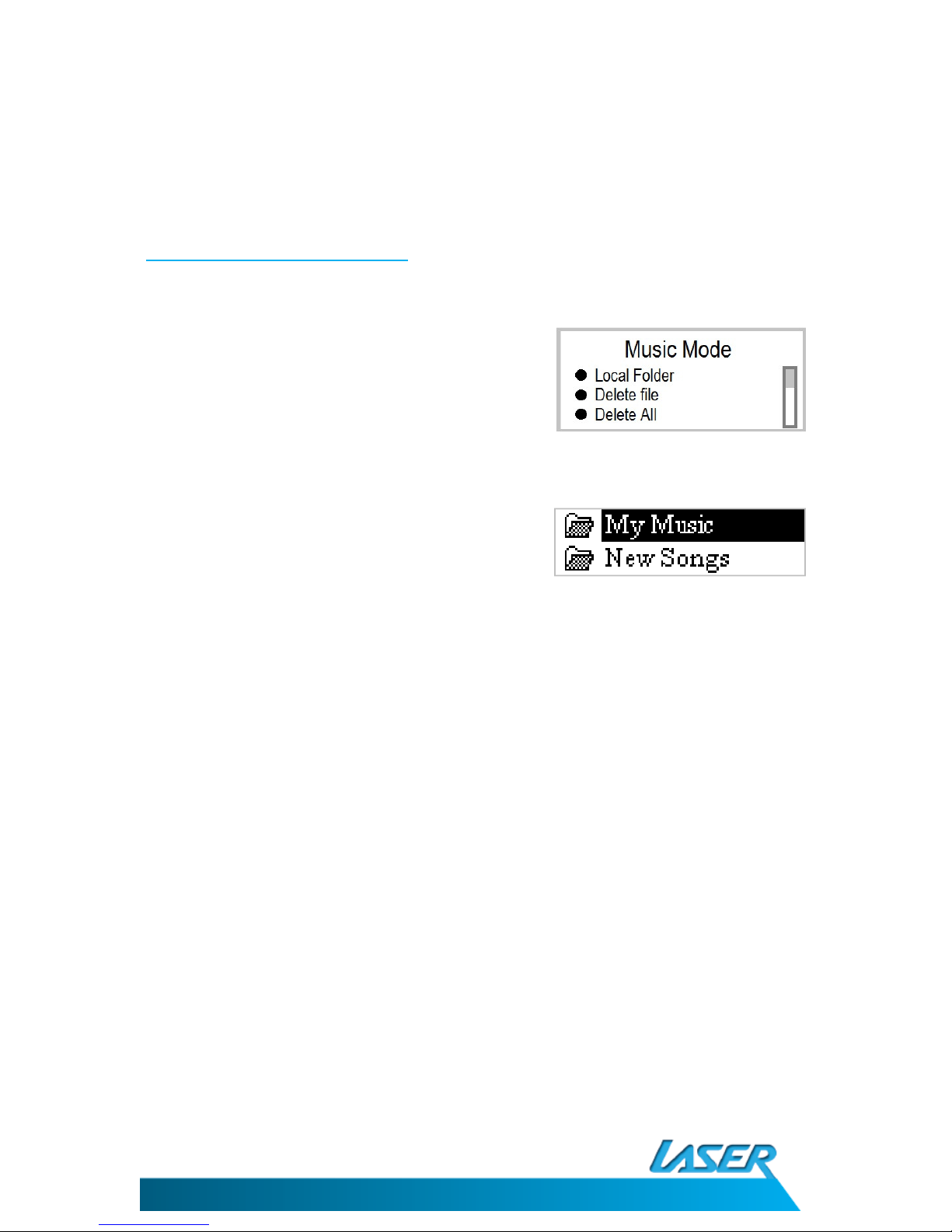
Press the Play/Pause button to pause the current track. Press the Mode Button to access the
folder menu.
Use the Previous/Next buttons to scroll throu h the
options and the press the Mode button to select the
options.
Local Folder
Use the Previous/Next buttons to scroll throu h the
available folders and tracks on the player.
Press the Mode button to select the folder. Browse
the folder and when the desired track is hi hli hted
press the Mode button to be in playback.
Delete File
This option will delete the current file. To delete use the Previous/Next buttons to chan e
the option to confirm the deletion.
Delete All
This option will delete all files in the current selected folder. To delete use the
Previous/Next buttons to chan e the option to confirm the deletion.
Warnin : Files deleted from the player cannot be recovered. We stron ly recommend that
file mana ement is completed by connectin the player to your computer.
Exit
Exits this menu and returns to the previous screen.

MP3-K10
USER MANUAL
9
Music Playback Settings
Press the Play/Pause button to play the current track. Press the Mode Button while the
track is playin to access the Playback Settin s Menu.
Use the Previous/Next buttons to scroll throu h the
options and the press the Mode button to select the
options.
Repeat
This settin chan es the way the music is played on you K10 MP3 Player. Use the
Previous/Next buttons to scroll throu h the options and the press the Mode button to
select the options.
ICON Option Description
Normal Plays each music file in sequence until last file in folder.
Repeat One Repeats sin le music file
Folder Plays all music files in folder
Repeat Folder Repeats all music files in folder
Repeat All Repeats all music files on player
Random Plays Music files in folder randomly
Intro Plays the 1
st
seconds of each in the folder in sequence.
Equaliser
This settin chan es the way the music is heard. Use the Previous/Next buttons to scroll
throu h the options and the press the Mode button to select the options.
Each selection will chan e the way the music is played. Please
select the style that represents the type of music you are
listenin to.
Note: Each selection may vary depending on style and type of
headphones used. Please try several to see which is best for your
combination of music/ear/headphones.
Natural
Rock
Pop
Classical
Soft
Jazz
DBB
Table of contents
Other Laser MP3 Player manuals

Laser
Laser T10 User manual

Laser
Laser MP3-L60 User manual

Laser
Laser MP3 Player User manual

Laser
Laser CL30 User manual

Laser
Laser Groove Mate V10 User manual

Laser
Laser MP3-A7 User manual

Laser
Laser MP4-T9-4GBK User manual

Laser
Laser MP4-L50 User manual

Laser
Laser MP3-C40 User manual

Laser
Laser MP3-A9-4GB User manual