manuals.online logo
Brands
  1. Home
  2. •
  3. Brands
  4. •
  5. LEGRAND
  6. •
  7. Accessories
  8. •
  9. LEGRAND HPM Serenity User manual

LEGRAND HPM Serenity User manual

This manual suits for next models

3

Other LEGRAND Accessories manuals

LEGRAND 896 30 User manual

LEGRAND

LEGRAND 896 30 User manual

LEGRAND HPM 630R01WE User manual

LEGRAND

LEGRAND HPM 630R01WE User manual

LEGRAND 6 946 90 User manual

LEGRAND

LEGRAND 6 946 90 User manual

LEGRAND Plexo 695 56 User manual

LEGRAND

LEGRAND Plexo 695 56 User manual

LEGRAND Dooxie 6 003 78 User manual

LEGRAND

LEGRAND Dooxie 6 003 78 User manual

LEGRAND PW-100-347 User manual

LEGRAND

LEGRAND PW-100-347 User manual

LEGRAND 572 250 User manual

LEGRAND

LEGRAND 572 250 User manual

LEGRAND Wattstopper FSP-321B User manual

LEGRAND

LEGRAND Wattstopper FSP-321B User manual

LEGRAND 6 547 40 User manual

LEGRAND

LEGRAND 6 547 40 User manual

LEGRAND 0 942 70 User manual

LEGRAND

LEGRAND 0 942 70 User manual

LEGRAND Wattstopper DT-355 User manual

LEGRAND

LEGRAND Wattstopper DT-355 User manual

LEGRAND WattstopperFS-205 User manual

LEGRAND

LEGRAND WattstopperFS-205 User manual

LEGRAND WattStopper DW-100-24-LA User manual

LEGRAND

LEGRAND WattStopper DW-100-24-LA User manual

LEGRAND 0 489 32 User manual

LEGRAND

LEGRAND 0 489 32 User manual

LEGRAND 0 883 37 User manual

LEGRAND

LEGRAND 0 883 37 User manual

LEGRAND Wattstopper FSP-212D User manual

LEGRAND

LEGRAND Wattstopper FSP-212D User manual

LEGRAND Wiremold TableSource User manual

LEGRAND

LEGRAND Wiremold TableSource User manual

LEGRAND HB340B-L1 User manual

LEGRAND

LEGRAND HB340B-L1 User manual

LEGRAND Excel Life EM803PIR User manual

LEGRAND

LEGRAND Excel Life EM803PIR User manual

LEGRAND Watt Stopper DT-305 User manual

LEGRAND

LEGRAND Watt Stopper DT-305 User manual

LEGRAND adorne ARPTR151 User manual

LEGRAND

LEGRAND adorne ARPTR151 User manual

LEGRAND Watt Stopper CI-355 User manual

LEGRAND

LEGRAND Watt Stopper CI-355 User manual

LEGRAND Wattstopper User manual

LEGRAND

LEGRAND Wattstopper User manual

LEGRAND 0 489 53 User manual

LEGRAND

LEGRAND 0 489 53 User manual

Popular Accessories manuals by other brands

Quincy lab 140AE-1 operating manual

Quincy lab

Quincy lab 140AE-1 operating manual

HomePro ZIR000 user manual

HomePro

HomePro ZIR000 user manual

DOL 20SCR Technical user guide

DOL

DOL 20SCR Technical user guide

RAB Smart Task installation manual

RAB

RAB Smart Task installation manual

Kemppi KMS 300 quick guide

Kemppi

Kemppi KMS 300 quick guide

Stearns 57,500 Series Installation and service instructions

Stearns

Stearns 57,500 Series Installation and service instructions

iGuzzini TWILIGHT COPENAGHEN manual

iGuzzini

iGuzzini TWILIGHT COPENAGHEN manual

Adelaide Annexe & Canvas Avan Deluxe installation guide

Adelaide Annexe & Canvas

Adelaide Annexe & Canvas Avan Deluxe installation guide

OHAUS 5000 instruction manual

OHAUS

OHAUS 5000 instruction manual

HOME8 WLS1300 quick start guide

HOME8

HOME8 WLS1300 quick start guide

MAXBOTIX MaxSonar quick start guide

MAXBOTIX

MAXBOTIX MaxSonar quick start guide

ioSmart iSmart56 Installation and user guide

ioSmart

ioSmart iSmart56 Installation and user guide

Focusrite Scarlett 18i8 user guide

Focusrite

Focusrite Scarlett 18i8 user guide

Velleman ED38105 user manual

Velleman

Velleman ED38105 user manual

JumpSport SkyBounce user manual

JumpSport

JumpSport SkyBounce user manual

Prima-Temp PRIYA Instructions for use

Prima-Temp

Prima-Temp PRIYA Instructions for use

Tefcold BC85I-BC85I W user manual

Tefcold

Tefcold BC85I-BC85I W user manual

Vaisala WMS302 user guide

Vaisala

Vaisala WMS302 user guide

manuals.online logo
manuals.online logoBrands
  • About & Mission
  • Contact us
  • Privacy Policy
  • Terms and Conditions

Copyright 2025 Manuals.Online. All Rights Reserved.

2
1
Features
Specificaton
Specificaton
Warranty
Legrand Australia warrants this product for a period of 3
years from the date of purchase.
These goods come with guarantees that cannot be excluded
under the Australian and New Zealand Consumer Laws. You
are entitled to a replacement or a refund for a major failure
and for compensation for any other reasonably foreseeable
loss or damage. You are also entitled to have the goods
repaired if the goods fail to be of acceptable quality and the
failure does not amount to a major failure.
See the Warranty card enclosed with this product for further
details.
Customer Service
For all Customer Service and Technical Support
please call Monday to Friday during business hours.
08/2019
Legrand Australia
1300 369 777
www.hpm.com.au
Legrand New Zealand
0800 476 009
www.hpm.co.nz
ABN: 31 000 102 661
Please read all instructions carefully before installation and use.
LE1101034AAA
■Radio operating range: 200 m free eld
■Receiver sound power: 80 dB @ 1m
■ Frequency band: 433.05 - 434.79 MHz
■RF power level: <10 mW
■Degree of protection: IP54 (Transmitter), IP20 (Receiver)
■Receiver installation: Wall mounted / Free standing
■Transmitter installation: Wall mounted / Adhesive / Free standing
Battery requirement:
■Battery for transmitter: 1 x 3 V battery (CR2032) included
■Battery for receiver: 3 x 1.5 V AA batteries (not included)
Do not use rechargeable batteries.
Box contents:
■1 x Bell press
■1 x Door bell receiver
■ USB type A Cable
■3 x Wall plugs and 3 x Screws
■1 x Double sided tape
■Battery operated / Wireless operation
■Range 200m in free eld
■30 melodies
■Name tag insert
■Slimline
■Easy to install - no wires or cables
■ No signal interference for neighbours
■ Can be used as a door bell or panic switch
7
8
Important Notes Before First Time Use
Product Notes
H
J
I
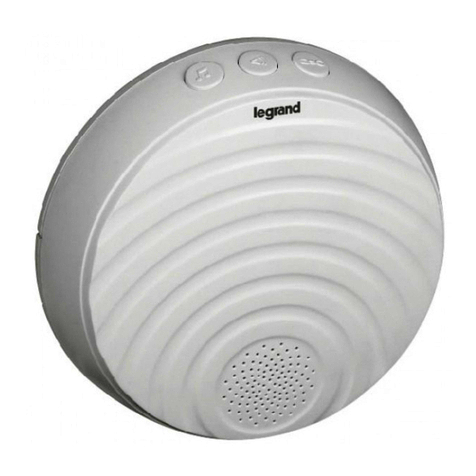
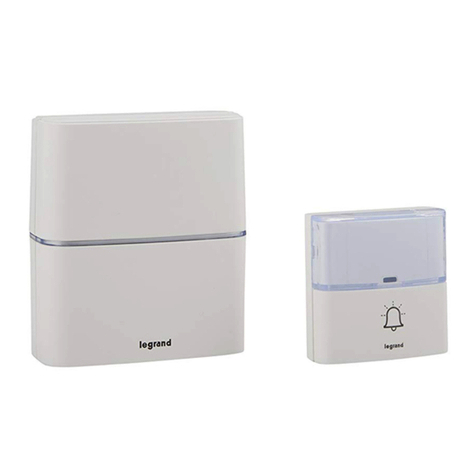
Wireless Door Bell - Serenity
Battery Operated
Cat. No. D643/WES, D643/ALS,D643/BPWES
Instruction Manual
A. Speaker
B. Melody selection (30 melodies available and MP3)
C. Volume control
D. Additional transmitter pairing
E. Light indicator setting
F. Micro USB socket
G. Indicator light (LED)
H. Name Plate
I. Light indicator
J. Weatherproof button
-20° C
+50° C
1. Suitable for indoor installation only. 2. Handle the door bell gently and carefully. Dropping it can damage
the circuit boards and can cause the door bell to work improperly. 3. Keep the door bell away from dust
and dirt, which can cause premature wear of parts. 4. Use only fresh batteries of the recommended size
and type. Always remove old or weak batteries. They can leak chemicals that can destroy electronic circuits.
5. Modifying or tampering with the door bell’s internal components can cause a malfunction and might
invalidate its warranty. 6. This product contains no serviceable parts and no attempt should be made to
repair this product. If the product is faulty it should be discarded. 7. The material in this product may vary in
colour from batch to batch. Colour matching from one batch to another cannot be guaranteed. 8. Legrand
reserves the right to modify the specications of this product at any time. 9. This product utilises intellectual
property in the form of registered designs, trademarks, and/or patents.Such intellectual property remains
the property of Legrand in all cases.
1. Do not use rechargeable batteries, do not mix old and new batteries or dierent types. Alkaline batteries
are recommended in the receiver for a longer operating life.
2. The operation and range of your wireless door bell depends on location, temperature and battery
condition.
3. Do not expose the unit to rain or immerse either unit in water.
4. Avoid locations where the bell press transmitter is exposed to direct summer sunlight.
5. Do not leave exhausted batteries in door bell receiver or bell press transmitter.
6. Clean only with a damp cloth and mild detergent. Do not use solvents.
6Door Bell operation
Press the button on the bell press transmitter.The door bell will sound and the indicator light on the unit
will ash.
Flashing Mode
Slow
Fast Someone rings
Alternate Low receiver battery
B
C
D
G
F
A
E

3
4
Before Installation
Installation
A. DOOR BELL RECEIVER
B. DOOR BELL TRANSMITTER
ADDITIONAL TRANSMITTER PAIRING
ADDIING MP3 MELODIES
1. Wall mount with screws
2. Free standing
Receiver
3. Free standing
2.With adhesive
USB type A cable
5Operating Instructions
BATTERY REPLACEMENT
Transmitter
x 3 x 1
x 3
Ding
Ding
> 5 s
Ding
Ding
Ding
1 x
or > 15 s
1. Install the software on a computer using usb cable supplied,from the internal memory of the door bell.
6. Set the duration of your melody by selecting
the beginning and the end and click ✂
2. Click on the icon to launch the software
7. The software asks you to confirm where to save
the new MP3 file: Receiver memory.
8. To set the MP3 melody, select it with the B button.
3.
4. Click + to import an MP3 melody in the selection window.
5. Select the melody and press play.( mandatory 1 time)
■ Test the location of both units to ensure satisfactory operation before permanently xing either unit in place.
■ Do not mount the bell press transmitter on metal or near a metal door frame, security door or in close proximity
to any metal outdoor furniture. The range of the unit may be substantially reduced.