manuals.online logo
Brands
  1. Home
  2. •
  3. Brands
  4. •
  5. Louvolite
  6. •
  7. Remote Control
  8. •
  9. Louvolite R1730 User manual

Louvolite R1730 User manual

Other Louvolite Remote Control manuals

Louvolite R1723 User manual

Louvolite

Louvolite R1723 User manual

Louvolite 1CH User manual

Louvolite

Louvolite 1CH User manual

Louvolite R1723 User manual

Louvolite

Louvolite R1723 User manual

Louvolite R1700 Manual instruction

Louvolite

Louvolite R1700 Manual instruction

Louvolite R1730 User manual

Louvolite

Louvolite R1730 User manual

Louvolite R1722 Manual instruction

Louvolite

Louvolite R1722 Manual instruction

Louvolite One Touch 5 User manual

Louvolite

Louvolite One Touch 5 User manual

Louvolite R1735 User manual

Louvolite

Louvolite R1735 User manual

Louvolite R1725 User manual

Louvolite

Louvolite R1725 User manual

Louvolite 1100 Series User manual

Louvolite

Louvolite 1100 Series User manual

Popular Remote Control manuals by other brands

Bircher Reglomat RC Duo 2 user guide

Bircher Reglomat

Bircher Reglomat RC Duo 2 user guide

Emerson RCBT100 owner's manual

Emerson

Emerson RCBT100 owner's manual

BILDA Element-6 user manual

BILDA

BILDA Element-6 user manual

Absima CR7P manual

Absima

Absima CR7P manual

Mitsubishi Electric PAR-32MAAG Instruction book

Mitsubishi Electric

Mitsubishi Electric PAR-32MAAG Instruction book

RCA RCRTBL08BE1 quick start guide

RCA

RCA RCRTBL08BE1 quick start guide

US Electronics NOVARI user guide

US Electronics

US Electronics NOVARI user guide

Panasonic EUR7622KB0 Operation guide

Panasonic

Panasonic EUR7622KB0 Operation guide

Bang & Olufsen Beo4 user manual

Bang & Olufsen

Bang & Olufsen Beo4 user manual

Marantz RC101 user guide

Marantz

Marantz RC101 user guide

FUTABA 9ZAP - PART2 manual

FUTABA

FUTABA 9ZAP - PART2 manual

HR Matic HR MULTI 3 quick start guide

HR Matic

HR Matic HR MULTI 3 quick start guide

Anritsu MP1777A Operation manual

Anritsu

Anritsu MP1777A Operation manual

Niles WVC100 Installation & operating guide

Niles

Niles WVC100 Installation & operating guide

Bang & Olufsen BEO6 Getting started

Bang & Olufsen

Bang & Olufsen BEO6 Getting started

GE 94901 instruction manual

GE

GE 94901 instruction manual

FUTABA R7108SB Full manual

FUTABA

FUTABA R7108SB Full manual

Invacare G91S user manual

Invacare

Invacare G91S user manual

manuals.online logo
manuals.online logoBrands
  • About & Mission
  • Contact us
  • Privacy Policy
  • Terms and Conditions

Copyright 2025 Manuals.Online. All Rights Reserved.

STEP 1 - PAIRING THE HANDSET WITH THE MOTOR
NOTE: During the setting procedure, the time between two operations must
not exceed 4 seconds as this will cause the setting up process to quit.
2 jogs = 1 movement, up AND down
• Switch on the power to the motor
• Remove the battery cover on the reverse of the remote. There are two setting buttons (P2) on either side of the battery,
press either one
• Select a channel from 1- 15 on the remote by pressing channel up or down (< or >)
• Press the button on the motor and the motor will jog up and down
• Press P2 twice then the up or down button once. The motor will jog twice each time
The motor and remote are now paired.
• R1740 - To change direction press and hold the button on the motor for 2 jogs
• R1725 - To change direction press and hold the button on the motor for 4 jogs
STEP 2 - SETTING THE LIMITS
Select the same channel and set the top limit.
• Press P2, then the up button followed by P2 again, the motor will jog twice and beep
• Press the up button and the blind will start to rise
• Press P2 and the blind will go into slow jog mode
• Press the stop button on the remote and the blind will stop
• Hold the stop button down until the motor jogs twice, this will set the top limit
• Press the down button and the blind will start to go down
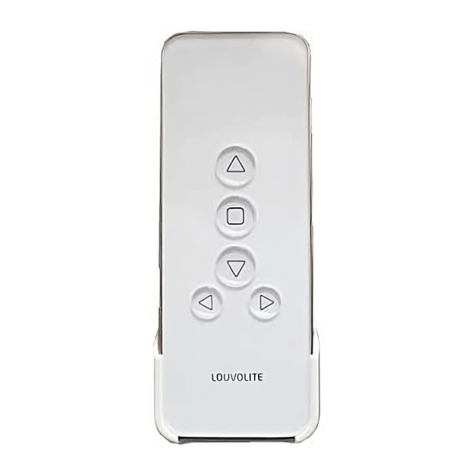
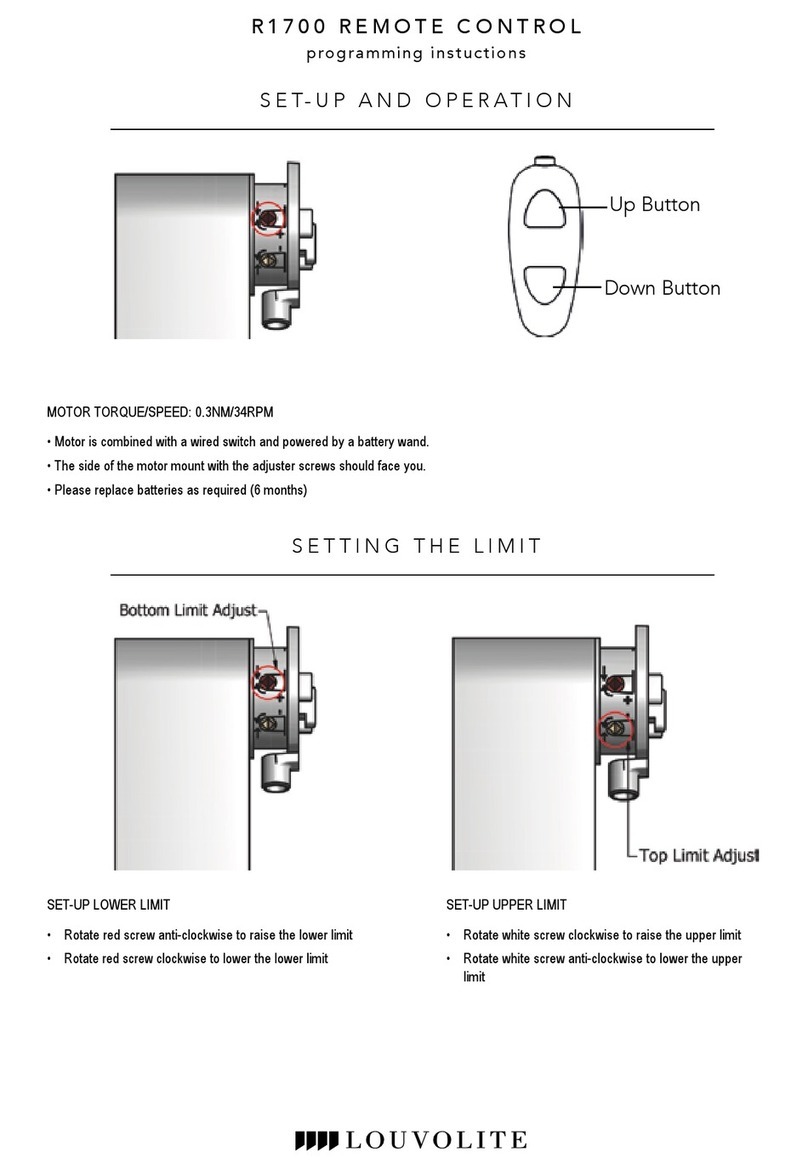
Down Button
Channel <
Stop Button
Up Button
LCD
Screen
Channel >
Setting Button
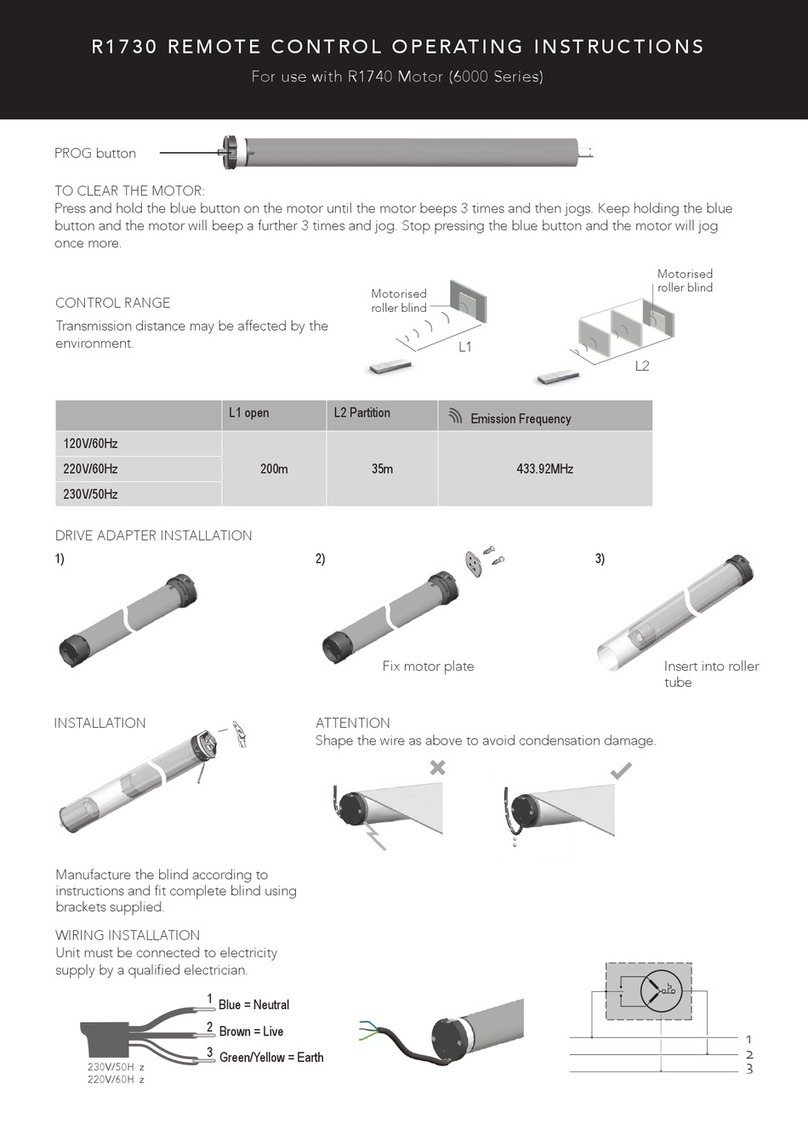
R1730 REMOTE CONTROL
for use with R1725 & R1740 motors
operating instructions
R1730 REMOTE CONTROL
• Press P2 and the blind will go into slow jog mode
• Press the stop button on the remote and the blind will stop
Press and hold the stop button down until the motor jogs twice, this will set the lower limit.
Setting is complete. For more blinds, select another channel on the remote and repeat from Step 2.
STEP 3 - SETTING A THIRD POSITION
• Press P2 followed by the stop button twice more, this will cause the motor to jog twice
• Move the blind using the up and down buttons on the remote to the desired position (press stop)
• To operate the third position, press and hold the stop button and the blind will move to its third position
• To delete the third position, press P2, followed by the stop button twice, the motor will jog twice
DELETING A LIMIT
• To delete a limit, press P2 followed by the down button then press P2 again, the motor will jog twice
DELETING A HANDSET
• To delete a handset, press P2 then the stop button followed by P2 again, the motor will jog twice
ADDING A HANDSET
• To add a handset, press P2 twice on the existing handset. Then press P2 on the new handset, the motor will jog twice
• R1725 - To perform a factory reset press and hold the button on the motor for 6 jogs
• R1740 - To perform a factory reset press and hold the button on the motor for 1 jog then turn off the power for 20 seconds
Notice:
Do not expose the unit to moisture or heat. When
you use the control unit, if emission distance is short
and less effective, please replace battery. Please
recycle batteries.
CAUTION
RISK OF EXPLOSION IF BATTERY IS REPLACED BY AN
INCORRECT TYPE. DISPOSE OF USED BATTERIES
ACCORDING TO THE INSTRUCTIONS.
Technical specication
Input voltage: 3V (CR2450) X 1
Transmitting frequency: 433MHz
Transmitting power: 10 milliwatt
Operating temperature: -100c to 500c
Transmission distance: 200 metres open ofce, 35 metres on two walls
Oct 2017