Product Description
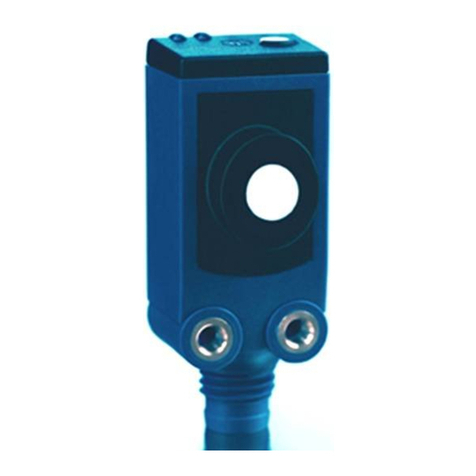
The sks sensor offers a non-contact
measurement of the distance to an
object which must be positioned
within the sensor’s detection zone.
The switching output is set in depen-
dence of the adjusted detect distance.
Via the push-button, the detect dis-
tance and operating mode can be
adjusted (Teach-in).
Two LEDs indicate operation and the
state of the switching output.
The output function is changeable
from NOC to NCC.
Use for intended purpose only
sks ultrasonic sensors are used for
non-contact detection of objects.
Safety Notes
Ԏ
Read the operation manual prior
to start-up.
ԎConnection, installation and ad-
justment works may only be car-
ried out by expert personnel.
Ԏ
No safety component in ac-
cordance with the EU Machine
Directive, use in the area of per-
sonal and machine protection
not permitted
Installation
Î
Mount the sensor at the place of
tting.
Maximum torque of attachment
screw: 0,5 Nm.
ÎConnect a connection cable to the
M8 device plug, see Fig.1.
sks-15/D, sks-15/E:
4
color
1 +UBbrown
3 –UBblue
4 D/E black
sks-15/CD, sks-15/CE:
1
2
3
4
color
1 +UBbrown
3 –UBblue
4 D/E black
2*)– white
*) do not connect
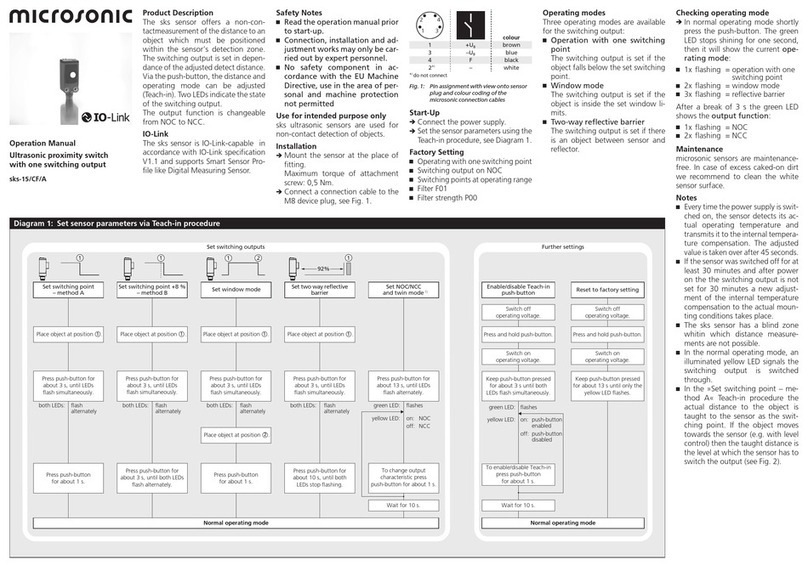
Fig.1: Pin assignment with view onto sensor
plug and colour coding of the
microsonic connection cables
Start-Up
ÎConnect the power supply.
Î
Set the sensor parameters using the
Teach-in procedure, see Diagram1.
Factory Setting
sks sensors are delivered with the fol-
lowing settings:
Ԏ
Operation with one switching point
Ԏ
Switching output on NOC
Ԏ
Switching point at operating range
Operating modes
Three operating modes are available
for the switching output:
Ԏ
Operation with one switching
point
The switching output is set if the
object falls below the set switching
point.
ԎWindow mode
The switching output is set if the
object is outside the set window li-
mits.
ԎTwo-way reective barrier
The switching output is set if there
is an object between sensor and
reector.
Checking operating mode
Î
In normal operating mode shortly
press the push-button. The green
LED stops shining for one second,
then it will show the current ope-
rating mode:
Ԏ1x ashing = operation with one
switching point
Ԏ2x ashing = window mode
Ԏ3x ashing =reective barrier
After a break of 3 s the green LED
shows the output function:
Ԏ1x ashing =NOC
Ԏ2x ashing =NCC
Maintenance
microsonic sensors are maintenance-
free. In case of excess caked-on dirt
we recommend to clean the white
sensor surface.
Notes
ԎThe sensors with internal tempera-
ture compensation (sks-15/CD and
sks-15/CE) determine their current
operating temperature each time
the operating voltage is switched
on and pass this value on to the in-
ternal temperature compensation.
After 45 seconds, the internal tem-
perature compensation adjusts to
its adjusted value.
Ԏ
sks-15/CD and sks-15/CE sensors
have internal temperature compen-
sation. Because the sensors heat up
on their own, the temperature com-
pensation reaches its optimum wor-
king point after approximatly 30
minutes of operation.The sensors
sks-15/D and sks-15/E have no tem-
perature compensation.
Ԏ
The sks sensor has a blind zone,
within which distance measure-
ments are not possible.
ԎIn the normal operating mode, an
illuminated yellow LED signals the
switching output is switched
through.
Diagram1: Set sensor parameters via Teach-in procedure
Press push-button for
about 3 s, until LEDs
flash simultaneously.
Press push-button for
about 3 s, until LEDs
flash simultaneously.
Press push-button for
about 3 s, until LEDs
flash simultaneously.
Press push-button for
about 13 s, until LEDs
flash alternately.
Press push-button
for about 1 s.
Press push-button
for about 1 s.
Press push-button
for about 10 s, until
LEDs stop flashing
Place object at position .
1Place object at position .
1Place object at position .
1
Place object at position .
2
Wait for 10 s.
To change output
characteristic press
push-button for about 1 s.
Normal operating mode
Set switching output
Set window mode Set NOC/NCCSet switching point Set two way reflective
barrier
both LEDs: flash
alternately both LEDs: flash
alternately both LEDs: flash
alternately green LED: flashes
yellow LED: on:
off: NCC
NOC
11 2
%85
1
Reset to factory setting
Wait for 10 s.
Normal operating mode
Further settings
Switch off
operating voltage.
Switch on
operating voltage.
Switch on
operating voltage.
Switch off
operating voltage.
Enable/disable Teach-in
push-button
To enable/disable Teach-in
press push-button
for about 1 s.
Press and hold push-button. Press and hold push-button.
Keep push-button pressed
for about 3 s until both
LEDs flash simultaneously.
Keep push-button pressed
for about 13 s until both
LEDs stop flashing.
flashesgreen LED:
on:
off:
push-button
enabled
push-button
disabled
yellow LED:
Operation Manual
Ultrasonic proximity switch
with one switching output
sks-15/D sks-15/E
sks-15/CD sks-15/CE