manuals.online logo
Brands
  1. Home
  2. •
  3. Brands
  4. •
  5. NanoVibronix
  6. •
  7. Medical Equipment
  8. •
  9. NanoVibronix PainShield FD-14A User manual

NanoVibronix PainShield FD-14A User manual

Other NanoVibronix Medical Equipment manuals

NanoVibronix UROSHIELD User manual

NanoVibronix

NanoVibronix UROSHIELD User manual

NanoVibronix UROSHIELD User manual

NanoVibronix

NanoVibronix UROSHIELD User manual

NanoVibronix PAINSHIELD MD User manual

NanoVibronix

NanoVibronix PAINSHIELD MD User manual

NanoVibronix URO SHIELD User manual

NanoVibronix

NanoVibronix URO SHIELD User manual

NanoVibronix UROSHIELD User manual

NanoVibronix

NanoVibronix UROSHIELD User manual

NanoVibronix PainShield User manual

NanoVibronix

NanoVibronix PainShield User manual

NanoVibronix PAINSHIELD MD User manual

NanoVibronix

NanoVibronix PAINSHIELD MD User manual

NanoVibronix PainShield User manual

NanoVibronix

NanoVibronix PainShield User manual

NanoVibronix Wound Shield User manual

NanoVibronix

NanoVibronix Wound Shield User manual

Popular Medical Equipment manuals by other brands

Itamar Medical WatchPAT Operation manual

Itamar Medical

Itamar Medical WatchPAT Operation manual

PROTEOR 1P650 KNEE Assembling and adjustment instructions

PROTEOR

PROTEOR 1P650 KNEE Assembling and adjustment instructions

Liberate Medical VentFree user manual

Liberate Medical

Liberate Medical VentFree user manual

Dicarre DA20 user guide

Dicarre

Dicarre DA20 user guide

Stryker Medical M Series Operation manual

Stryker Medical

Stryker Medical M Series Operation manual

Invacare ScanBed 750 user manual

Invacare

Invacare ScanBed 750 user manual

Getinge Arjohuntleigh Nimbus 3 Professional Instructions for use

Getinge

Getinge Arjohuntleigh Nimbus 3 Professional Instructions for use

Mettler Electronics Sonicator 730 Maintenance manual

Mettler Electronics

Mettler Electronics Sonicator 730 Maintenance manual

Pressalit Care R1100 Mounting instruction

Pressalit Care

Pressalit Care R1100 Mounting instruction

Denas MS DENAS-T operating manual

Denas MS

Denas MS DENAS-T operating manual

bort medical ActiveColor quick guide

bort medical

bort medical ActiveColor quick guide

AccuVein AV400 user manual

AccuVein

AccuVein AV400 user manual

agiliti NP Trio user manual

agiliti

agiliti NP Trio user manual

Rocket Medical Rocket Digital Oocyte Aspiration Pump Service manual

Rocket Medical

Rocket Medical Rocket Digital Oocyte Aspiration Pump Service manual

Monteris Medical Neuroblate Instructions for use

Monteris Medical

Monteris Medical Neuroblate Instructions for use

Otto Block 8E33 7 manual

Otto Block

Otto Block 8E33 7 manual

ADVANCED HOME CARE Helios Guide

ADVANCED HOME CARE

ADVANCED HOME CARE Helios Guide

NeuLog NUL-208 Guide

NeuLog

NeuLog NUL-208 Guide

manuals.online logo
manuals.online logoBrands
  • About & Mission
  • Contact us
  • Privacy Policy
  • Terms and Conditions

Copyright 2025 Manuals.Online. All Rights Reserved.

PainShield ®
Attention – this guide provides the basic principals of operation for the PainShield ®device. It is not intended to replace the complete
user manual. Please read the complete manual (PSUM003) before using the PainShield and make sure that you understand all
aspects of PainShield operation.
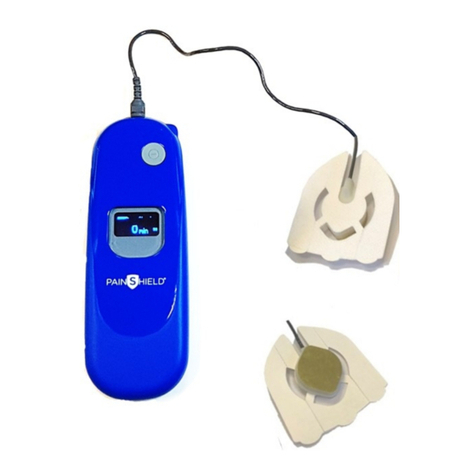
The PainShield MD is a microprocessor controlled therapeutic ultrasound device that produces low frequency , low intensity ultrasonic waves for the relief of
pain , muscle spasm and improve ment of localized blood circulation. The ultrasonic waves are generated by a unique transducer incorporated into a
treatment patch. There are two types of the patches: Reusable treatment patch – A and Reusable facial treatment patch – B . The t reatment patch should be
placed on the skin at the desired treatment area or adjacent to it .
For maximal effectiveness – ensure that the ultrasonic transducer is in full contact with the skin .
Pain Shield MD
model FD -14A specifications
Frequency range:
90 kHz ± 0.001 Hz
Output voltage:
12 V
Rechargeable battery:
Lithium -ion (full charging time ~ 6 h)
Dimensions:
113 mm (h) x 39.4 mm (w) x 12.6 mm (h)
Weight:
Driver ~ 70 g ; patch ~ 10 g
Acoustic power:
0.4 W
Contraindications

Do not use in patients with cancer and bone metastases

Do not apply over bone growth centers until bone growth is complete

Do not apply directly on the eye

Do not apply directly over ischemic tissues in individuals with vascular disease

Pregnant women should be treated only wit h physician consent.
Precautions

In children, it is preferable to avoid usage over the epiphyseal growth plate area.

Following a laminectomy when major tissue removal has occurred

Over anesthetic areas

When hemorrhagic diathesis is present
General warnin gs and precautions

Treating of children should be done under adult supervision.

Following treatment, some redness might occur in the treated area. The redness should resolve naturally within a few hours.

Do not place the treatment patch directly on open w ound.

The safety and effectiveness of PainShield has not been determined in patients who are being treated by, or who have received , other medical
devices including but not limited to pacemakers, electrical stimulators, radiofrequency generators, surgical meshes
or other surgical implants.
PSIFU009 Ver. 03
USA
– NanoVibronix Inc., 105 Maxess Road, Suite S124 Melville, NY 11747 , Tel: +631 -574 -4410
Europe
- NanoVibronix Ltd. 9 Derech Hashalom S t., Nesher 36603, Israel , Tel: +9 72 4 820 -0581
www.nanovibronix.com info@nanovibronix.com

Driver
FD -14A
Driver cable
Ultrasound transducer
incorporated into patch
Reusable treatment
patch - A
Contact snaps
Reusable facial treatment patch - B
PainShield®– Instruction for use
Removal and storage of the treatment patch
Reusable patch (A) – gently remove the patch from the skin. Moist the sticky area of the patch with water and put the protective liner back and store it
in its original package.
Reusable facial patch ( B) – gently remove the patch from the skin. Moist the sticky area of the patch with water and put the protective liner back and
store it in its original package.
Pain Shield driver screen s
1.
Ensure that the treatment area is
clean, dry and free of wounds or
ot her lesions.
Remove the protective liner from the
treatment patch.
2.
Place the ultrasonic transducer (the metal
part in the center of the treatment patch) over
the pain source or next to it and tighten the
patch to the skin.
3.
Following treatment patch
placement, connect it to the
PainShield device using the snaps at
the end of the connecting cable.
4.
Press the ON/OFF button at the upper
side of the device for about 2 seconds till you
hear a beeping sound to turn the device on
.
ON /OFF
Approvals and compliance with
standards
FDA 510 K cleared
IEC 60601 -1; IEC -60601 -2
Representative in USARegulatory
MedicSence
291 Hiliside Avenue
Somerset, MA 02726
Tel.: 1 -508 -479 -6116
Fax: 1 -508 -677 -1418
[email protected]
m
PainShield
Ver: 30.03
-- Off --
-3-
Device is turned O n
Battery discharged and
requires charging
Treatment screen indicates treatment phase.
Each cycle has an active period of 30 min. followed by an IDLE period of 30 min.
The PainShield is active for 6 .5 hours and then it shuts down automatically.
During treatment, a screen server is activated. For returning to normal screen, press shortly the ON/ OFF
button.
It is possible to turn the device off at any time by pressing the O N / O FF button and hold it during 2 seconds.
Treatment patch is
disconnected or damaged
Charging in progress
Device is turn ing O ff
C1 0. 4 W
29 min
C1 0 W
IDLE
Treatment cycle
number: C1 - C6
Time of treatment in
the cycle: 0 -30 min
Output power
Battery level
indicator
number: C1 - C6
IDLE mode
screen