ASSEMB LY I NSTRUCTIONS
PARTS
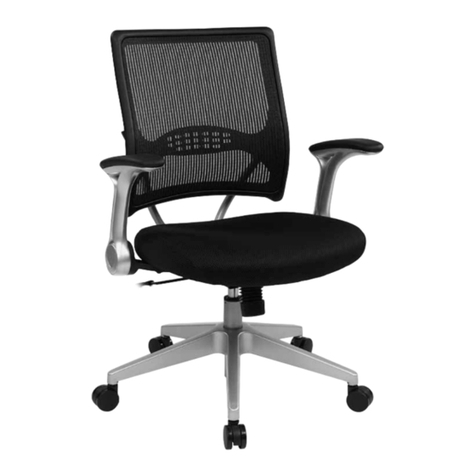
Congratulations on the purchase of your new Signature Series chair!
INSTRUCTIONS
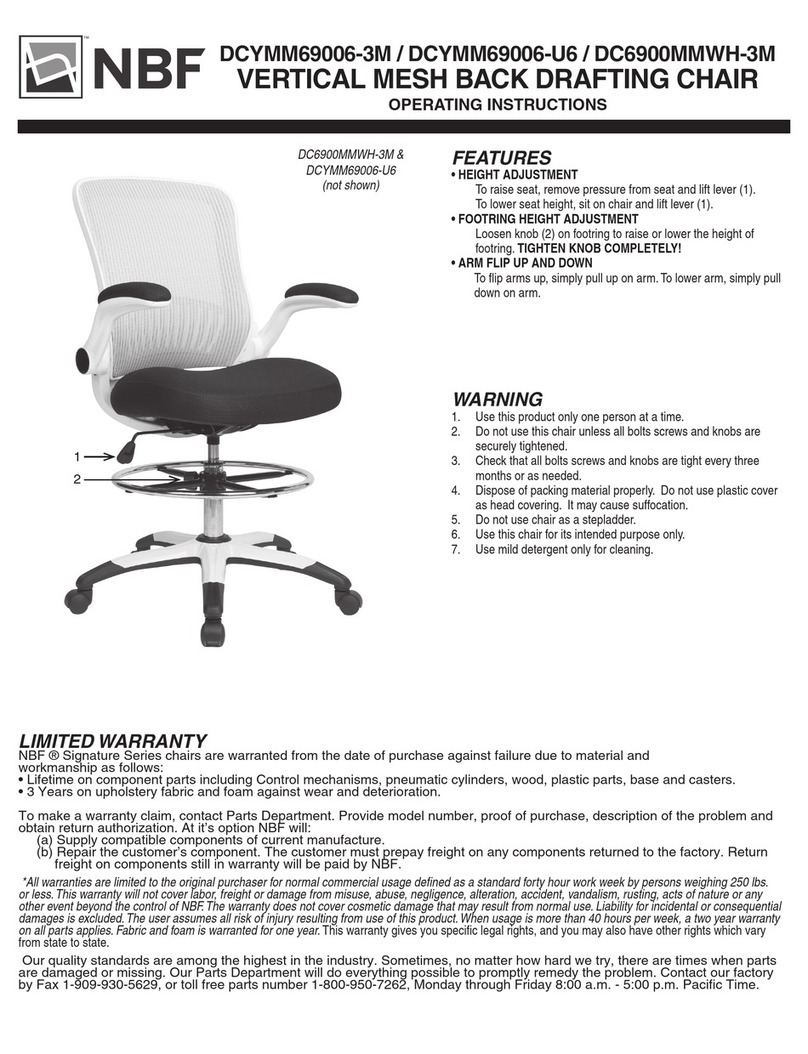
Warnings
1. This product should be used by only one person at a time.
2. Do not use this chair unless all bolts, screws and knobs are securely tightened.
3. Save spanner wrench. Check that all bolts, screws and knobs are tight every three months or as needed.
4. Dispose of packing material properly. Do not use the plastic cover as a head covering.
It may cause suffocation.
5. Do not use the chair as a stepladder. Use this chair for its intended purpose only.
C2CHAIR
PART A
CHAIR BACK
QTY: 1
SPANNER
(SAVE FOR FUTURE
TIGHTENING)
34
12
CUSTOMER SERVICE HOTLINE
800-626-6060
WWW.NBF.COM
BACK SET
QTY:1
SEAT SET
QTY:1
ARM RESTS
QTY:2
SEAT LIFT
QTY:1
BASE
QTY:1
CASTER
QTY:5
SCREWS
QTY:11
SPANNER
(SAVE FOR FUTURE
TIGHTENING)
CUSTOMER SERVICE HOTLINE
800-626-6060
Remove all parts from carton and verify part quantities as indicated on parts list.
Insert the caster into the hole at the bottom of the five star base
Insert the the bottom end of the seat lift into the center hole of the base
1
2
Connect the back set and seat set as photo shown,keep the hole of back set,aligned
with the hole of seat set.Then fixed back set and seat set with five screws by spanner
3
Place the chair body onto the small end of the seat lift
4
Insert armrests into holes located at both sides of the seat.Insert six screws into
the holes from the underside of the seat.Wrench it with spanner.
5
Attention:MAKE SURE ALL SCREWS ARE FULLY TIGHTENED BEFORE USING CHAIR.
PARTS INSTRUCTIONS
x5
1 2
3 4
5
Warnings
1.This product should be only one person at a time.
2.Do not use the chair unless all screws are securely tightened.
3.Check that all screws are tight every three months or as needed.
4.Dispose of packing material properly.Do not use the plastic cover as
a head covering.It may cause suffocation.
5.Do not use the chair as a stepladder.
6.Use this chair for its intended purpose only.
7.Use a soft cloth to clean the chair.Do not use water or chemicals on the
aluminum parts.
A S SE MBLY I N S TRUCTIONS
Congratulations on the purchase of your new Signature Series chair!
A R RIS CHA IR
PART B
SEAT CUSHION
QTY: 1
PART C
ARMRESTS (L/R)
QTY: 2
PART D
SEAT LIFT
QTY: 1
PART E
BASE
QTY: 1
PART F
CASTER
QTY: 5
PART G
SCREW
QTY: 11
BACK SET
QTY:1
SEAT SET
QTY:1
ARM RESTS
QTY:2
SEAT LIFT
QTY:1
BASE
QTY:1
CASTER
QTY:5
SCREWS
QTY:11
SPANNER
(SAVE FOR FUTURE
TIGHTENING)
CUSTOMER SERVICE HOTLINE
800-626-6060
Remove all parts from carton and verify part quantities as indicated on parts list.
Insert the caster into the hole at the bottom of the five star base
Insert the the bottom end of the seat lift into the center hole of the base
1
2
Connect the back set and seat set as photo shown,keep the hole of back set,aligned
with the hole of seat set.Then fixed back set and seat set with five screws by spanner
3
Place the chair body onto the small end of the seat lift
4
Insert armrests into holes located at both sides of the seat.Insert six screws into
the holes from the underside of the seat.Wrench it with spanner.
5
Attention:MAKE SURE ALL SCREWS ARE FULLY TIGHTENED BEFORE USING CHAIR.
PARTS INSTRUCTIONS
x5
1 2
3 4
5
Warnings
1.This product should be only one person at a time.
2.Do not use the chair unless all screws are securely tightened.
3.Check that all screws are tight every three months or as needed.
4.Dispose of packing material properly.Do not use the plastic cover as
a head covering.It may cause suffocation.
5.Do not use the chair as a stepladder.
6.Use this chair for its intended purpose only.
7.Use a soft cloth to clean the chair.Do not use water or chemicals on the
aluminum parts.
A S SE MBLY I N S TRUCTIONS
Congratulations on the purchase of your new Signature Series chair!
A R RIS CHAIR
1
2
3
4
5
5
BACK SET
QTY:1
SEAT SET
QTY:1
ARM RESTS
QTY:2
SEAT LIFT
QTY:1
BASE
QTY:1
CASTER
QTY:5
SCREWS
QTY:11
SPANNER
(SAVE FOR FUTURE
TIGHTENING)
CUSTOMER SERVICE HOTLINE
800-626-6060
Remove all parts from carton and verify part quantities as indicated on parts list.
Insert the caster into the hole at the bottom of the five star base
Insert the the bottom end of the seat lift into the center hole of the base
1
2
Connect the back set and seat set as photo shown,keep the hole of back set,aligned
with the hole of seat set.Then fixed back set and seat set with five screws by spanner
3
Place the chair body onto the small end of the seat lift
4
Insert armrests into holes located at both sides of the seat.Insert six screws into
the holes from the underside of the seat.Wrench it with spanner.
5
Attention:MAKE SURE ALL SCREWS ARE FULLY TIGHTENED BEFORE USING CHAIR.
PARTS INSTRUCTIONS
x5
1 2
3 4
5
Warnings
1.This product should be only one person at a time.
2.Do not use the chair unless all screws are securely tightened.
3.Check that all screws are tight every three months or as needed.
4.Dispose of packing material properly.Do not use the plastic cover as
a head covering.It may cause suffocation.
5.Do not use the chair as a stepladder.
6.Use this chair for its intended purpose only.
7.Use a soft cloth to clean the chair.Do not use water or chemicals on the
aluminum parts.
A S SE MBLY I N S TRUCTIONS
Congratulations on the purchase of your new Signature Series chair!
A R RIS CHA IR
BACK SET
QTY:1
SEAT SET
QTY:1
ARM RESTS
QTY:2
SEAT LIFT
QTY:1
BASE
QTY:1
CASTER
QTY:5
SCREWS
QTY:11
SPANNER
(SAVE FOR FUTURE
TIGHTENING)
CUSTOMER SERVICE HOTLINE
800-626-6060
Remove all parts from carton and verify part quantities as indicated on parts list.
Insert the caster into the hole at the bottom of the five star base
Insert the the bottom end of the seat lift into the center hole of the base
1
2
Connect the back set and seat set as photo shown,keep the hole of back set,aligned
with the hole of seat set.Then fixed back set and seat set with five screws by spanner
3
Place the chair body onto the small end of the seat lift
4
Insert armrests into holes located at both sides of the seat.Insert six screws into
the holes from the underside of the seat.Wrench it with spanner.
5
Attention:MAKE SURE ALL SCREWS ARE FULLY TIGHTENED BEFORE USING CHAIR.
PARTS INSTRUCTIONS
x5
1 2
3 4
5
Warnings
1.This product should be only one person at a time.
2.Do not use the chair unless all screws are securely tightened.
3.Check that all screws are tight every three months or as needed.
4.Dispose of packing material properly.Do not use the plastic cover as
a head covering.It may cause suffocation.
5.Do not use the chair as a stepladder.
6.Use this chair for its intended purpose only.
7.Use a soft cloth to clean the chair.Do not use water or chemicals on the
aluminum parts.
A S SE MBLY I N S TRUCTI O NS
Congratulations on the purchase of your new Signature Series chair!
A R RIS CHA IR
BACK SET
QTY:1
SEAT SET
QTY:1
ARM RESTS
QTY:2
SEAT LIFT
QTY:1
BASE
QTY:1
CASTER
QTY:5
SCREWS
QTY:11
SPANNER
(SAVE FOR FUTURE
TIGHTENING)
CUSTOMER SERVICE HOTLINE
800-626-6060
Remove all parts from carton and verify part quantities as indicated on parts list.
Insert the caster into the hole at the bottom of the five star base
Insert the the bottom end of the seat lift into the center hole of the base
1
2
Connect the back set and seat set as photo shown,keep the hole of back set,aligned
with the hole of seat set.Then fixed back set and seat set with five screws by spanner
3
Place the chair body onto the small end of the seat lift
4
Insert armrests into holes located at both sides of the seat.Insert six screws into
the holes from the underside of the seat.Wrench it with spanner.
5
Attention:MAKE SURE ALL SCREWS ARE FULLY TIGHTENED BEFORE USING CHAIR.
PARTS INSTRUCTIONS
x5
1 2
3 4
5
Warnings
1.This product should be only one person at a time.
2.Do not use the chair unless all screws are securely tightened.
3.Check that all screws are tight every three months or as needed.
4.Dispose of packing material properly.Do not use the plastic cover as
a head covering.It may cause suffocation.
5.Do not use the chair as a stepladder.
6.Use this chair for its intended purpose only.
7.Use a soft cloth to clean the chair.Do not use water or chemicals on the
aluminum parts.
ASSE MBLY I NSTRUCTIONS
Congratulations on the purchase of your new Signature Series chair!
ARRIS CHAIR
BACK SET
QTY:1
SEAT SET
QTY:1
ARM RESTS
QTY:2
SEAT LIFT
QTY:1
BASE
QTY:1
CASTER
QTY:5
SCREWS
QTY:11
SPANNER
(SAVE FOR FUTURE
TIGHTENING)
CUSTOMER SERVICE HOTLINE
800-626-6060
Remove all parts from carton and verify part quantities as indicated on parts list.
Insert the caster into the hole at the bottom of the five star base
Insert the the bottom end of the seat lift into the center hole of the base
1
2
Connect the back set and seat set as photo shown,keep the hole of back set,aligned
with the hole of seat set.Then fixed back set and seat set with five screws by spanner
3
Place the chair body onto the small end of the seat lift
4
Insert armrests into holes located at both sides of the seat.Insert six screws into
the holes from the underside of the seat.Wrench it with spanner.
5
Attention:MAKE SURE ALL SCREWS ARE FULLY TIGHTENED BEFORE USING CHAIR.
PARTS INSTRUCTIONS
x5
1 2
3 4
5
Warnings
1.This product should be only one person at a time.
2.Do not use the chair unless all screws are securely tightened.
3.Check that all screws are tight every three months or as needed.
4.Dispose of packing material properly.Do not use the plastic cover as
a head covering.It may cause suffocation.
5.Do not use the chair as a stepladder.
6.Use this chair for its intended purpose only.
7.Use a soft cloth to clean the chair.Do not use water or chemicals on the
aluminum parts.
A S SE MBLY I N S TRUCTIONS
Congratulations on the purchase of your new Signature Series chair!
A R RIS CHA IR
BACK SET
QTY:1
SEAT SET
QTY:1
ARM RESTS
QTY:2
SEAT LIFT
QTY:1
BASE
QTY:1
CASTER
QTY:5
SCREWS
QTY:11
SPANNER
(SAVE FOR FUTURE
TIGHTENING)
CUSTOMER SERVICE HOTLINE
800-626-6060
Remove all parts from carton and verify part quantities as indicated on parts list.
Insert the caster into the hole at the bottom of the five star base
Insert the the bottom end of the seat lift into the center hole of the base
1
2
Connect the back set and seat set as photo shown,keep the hole of back set,aligned
with the hole of seat set.Then fixed back set and seat set with five screws by spanner
3
Place the chair body onto the small end of the seat lift
4
Insert armrests into holes located at both sides of the seat.Insert six screws into
the holes from the underside of the seat.Wrench it with spanner.
5
Attention:MAKE SURE ALL SCREWS ARE FULLY TIGHTENED BEFORE USING CHAIR.
PARTS INSTRUCTIONS
x5
1 2
3 4
5
Warnings
1.This product should be only one person at a time.
2.Do not use the chair unless all screws are securely tightened.
3.Check that all screws are tight every three months or as needed.
4.Dispose of packing material properly.Do not use the plastic cover as
a head covering.It may cause suffocation.
5.Do not use the chair as a stepladder.
6.Use this chair for its intended purpose only.
7.Use a soft cloth to clean the chair.Do not use water or chemicals on the
aluminum parts.
A S SE MBLY I N S TRUCTIONS
Congratulations on the purchase of your new Signature Series chair!
ARRIS CHA IR
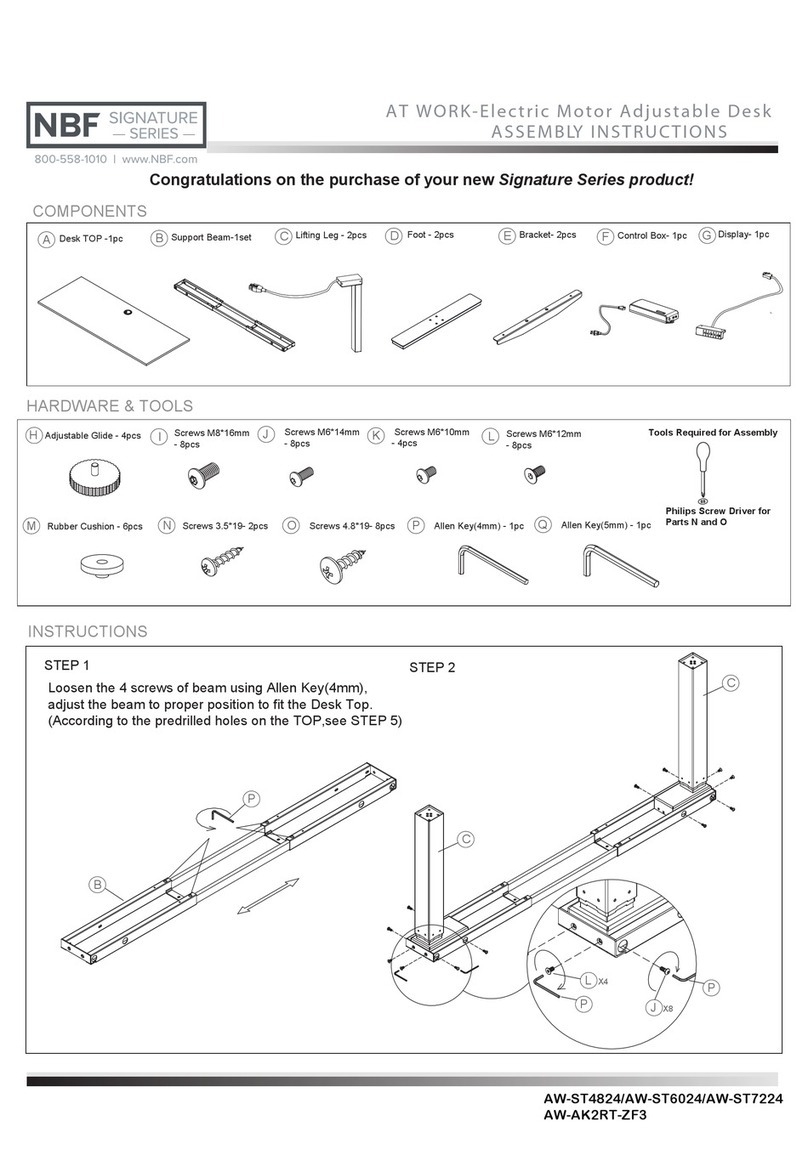
Remove all parts from carton and verify part quantities as indicated on parts list.
Insert the bottom end of the seat lift (D) into the center hole of the base (E).
Connect the chair back (A) and seat cushion (B) as shown, aligning the hole in the seat back
with the hole in the seat cushion. Using the spanner, connect the seat back to the seat
Place the chair body onto the small end of the seat lift (D)
Insert armrests (C) into holes located at sides of seat. Insert six screws into the holes from the
underside of the seat. Tighten screws (G) with spanner.
Attention: MAKE SURE ALL SCREWS ARE FULLY TIGHTENED BEFORE USING CHAIR.
E
F
D
E
AB
G (Qty 5)
G (Qty 6)
A
B
D
E
E
A
B
D
CC
800-558-1010
www.NBF.com