Nokia HF-310 User manual
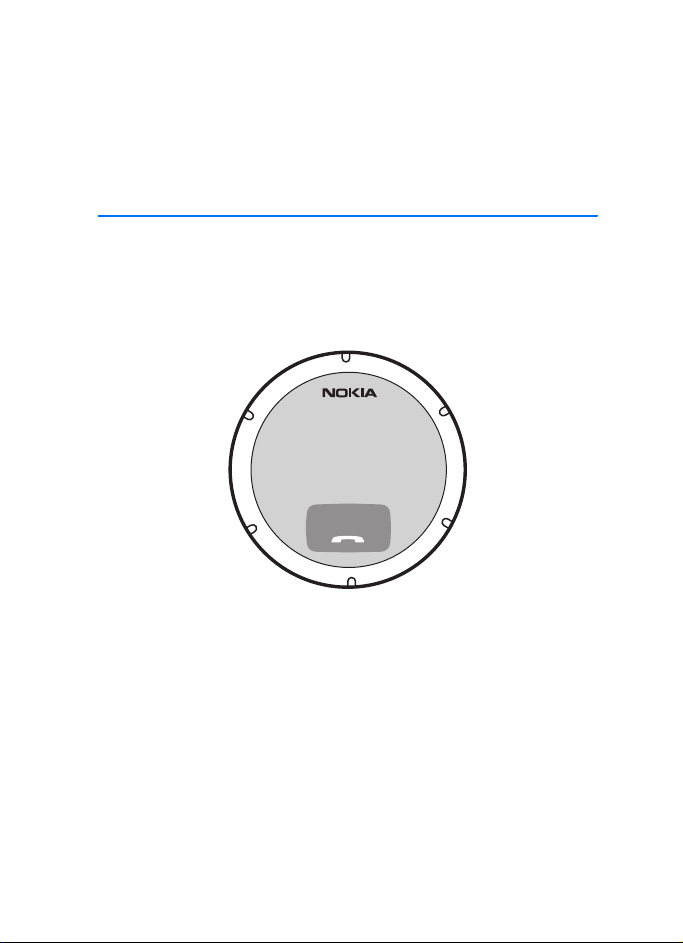
Nokia Speakerphone HF-310
User Guide
9213540
Issue 1 EN

DECLARATION OF CONFORMITY
Hereby, NOKIA CORPORATION declares that this HF-310 product is in compliance with the
essential requirements and other relevant provisions of Directive 1999/5/EC. The product is
in conformity with the limits defined in Directive 2004/104/EC (amending Directive 72/245/
EEC), Annex I, paragraph 6.5, 6.6, 6.8 and 6.9. A copy of the Declaration of Conformity can be
found at http://www.nokia.com/phones/declaration_of_conformity.
© 2009 Nokia. All rights reserved.
Nokia, Nokia Connecting People and the Nokia Original Accessories logo are trademarks or
registered trademarks of Nokia Corporation. Nokia tune is a sound mark of Nokia
Corporation. Other product and company names mentioned herein may be trademarks or
tradenames of their respective owners.
Reproduction, transfer, distribution, or storage of part or all of the contents in this document
in any form without the prior written permission of Nokia is prohibited.
Bluetooth is a registered trademark of Bluetooth SIG, Inc.
Nokia operates a policy of ongoing development. Nokia reserves the right to make changes
and improvements to any of the products described in this document without prior notice.
TO THE MAXIMUM EXTENT PERMITTED BY APPLICABLE LAW, UNDER NO CIRCUMSTANCES
SHALL NOKIA OR ANY OF ITS LICENSORS BE RESPONSIBLE FOR ANY LOSS OF DATA OR
INCOME OR ANY SPECIAL, INCIDENTAL, CONSEQUENTIAL OR INDIRECT DAMAGES
HOWSOEVER CAUSED.
THE CONTENTS OF THIS DOCUMENT ARE PROVIDED "AS IS". EXCEPT AS REQUIRED BY
APPLICABLE LAW, NO WARRANTIES OF ANY KIND, EITHER EXPRESS OR IMPLIED, INCLUDING,
BUT NOT LIMITED TO, THE IMPLIED WARRANTIES OF MERCHANTABILITY AND FITNESS FOR A
PARTICULAR PURPOSE, ARE MADE IN RELATION TO THE ACCURACY, RELIABILITY OR
CONTENTS OF THIS DOCUMENT. NOKIA RESERVES THE RIGHT TO REVISE THIS DOCUMENT OR
WITHDRAW IT AT ANY TIME WITHOUT PRIOR NOTICE.
The availability of particular products may vary by region. Please check with your Nokia
dealer for details.
Export controls
This device may contain commodities, technology or software subject to export laws and
regulations from the US and other countries. Diversion contrary to law is prohibited.
9213540/Issue 1 EN

3
Contents
For your safety......................... 4
1. Introduction ......................... 5
Bluetooth wireless technology .......... 5
2. Get started............................ 6
Charge the battery ................................ 6
Switch on or off..................................... 7
Switch on ............................................. 7
Switch off............................................. 7
Pair and connect with
another device........................................ 8
Disconnect the speakerphone ........ 8
Connect the speakerphone
manually............................................... 9
3. Mount in a car ................... 10
General safety instructions............... 10
Attach to a sunvisor ........................... 10
Attach to a windscreen ..................... 11
Attach to a dashboard ....................... 12
4. Basic use ............................. 14
Make or end a call .............................. 14
Answer or reject a call ....................... 14
Adjust volume....................................... 14
Switch a call to the connected
device...................................................... 14
Clear settings or reset........................ 15
Troubleshooting ................................... 15
5. Battery and charger
information............................. 16
Care and maintenance ........... 17
Additional safety
information............................. 19

For your safety
4
For your safety
Read these simple guidelines. Not following them may be dangerous or illegal.
Read the complete user guide for further information.
ROAD SAFETY COMES FIRST
Obey all local laws. Always keep your hands free to operate the
vehicle while driving. Your first consideration while driving should
be road safety.
INTERFERENCE
All wireless devices may be susceptible to interference, which could
affect performance.

Introduction
5
1. Introduction
With the Nokia Speakerphone HF-310, you can make and answer calls
hands free.
You can connect the speakerphone to a compatible mobile device that
supports Bluetooth wireless technology.
Read this user guide carefully before using the speakerphone. Also, read
the user guide for the device that you connect to the speakerphone. For
the latest version of the user guide and additional information related to
your Nokia product, see www.nokia.com/support or your local Nokia
website.
This product may contain small parts. Keep them out of the reach of
small children. The surface of this device does not contain nickel in the
platings. The surface of this device contains stainless steel.
■Bluetooth wireless technology
In a Bluetooth connection, the mobile device and the speakerphone
should be within 10 meters (33 feet) of each other. Connections can be
subject to interference from other electronic devices.
The speakerphone is compliant with the Bluetooth Specification 2.1
supporting the Hands-Free Profile (HFP) 1.5. Check with the
manufacturers of other devices to determine their compatibility with
this device.

Get started
6
2. Get started
The speakerphone contains the
following parts:
1. Power key
2. Microphone
3. Speaker
4. Volume wheel
5. Indicator light
6. Answer/end key
7. Charger connector
Before using the speakerphone,
you must charge the battery and
pair the speakerphone with a
compatible device.
Parts of the speakerphone are
magnetic. Metallic materials may be attracted to the speakerphone. Do not place
credit cards or other magnetic storage media near the speakerphone, because
information stored on them may be erased.
■Charge the battery
Before charging the battery, carefully read “Battery and charger
information”, p. 16.
Warning: Use only chargers approved by Nokia for use with this
particular model. The use of any other types may invalidate any
approval or warranty, and may be dangerous.
When you disconnect the power cord of any accessory, grasp and pull the plug,
not the cord.
1. Connect the charger cable to the charger connector.
2. Connect the charger to the power source. For example, connect the
DC-4 charger to the cigarette lighter socket of your car or the AC-5
charger to a wall outlet. During charging, the red indicator light is
1
2
34
76
5

Get started
7
displayed. Charging the battery fully may take up to 2 hours and 10
minutes.
If you use a charger that is connected to the cigarette lighter socket,
power must be supplied by a 12-volt car battery. Ensure that the
charger is properly inserted in the cigarette lighter socket and does
not interfere with the normal operation of the car.
In some car models, the cigarette lighter socket is powered by the car
battery even when you remove the ignition key. In those cases, the
car battery might be discharged even if the speakerphone is not in
use. For more information, contact the vehicle manufacturer.
3. When the battery is fully charged, the speakerphone beeps.
Disconnect the charger from the speakerphone, then from the power
source.
The fully charged battery has power for up to 30 hours of talk time or up
to 40 days of standby time.
When the battery charge is low, the red indicator light flashes slowly
and the speakerphone beeps about every 5 minutes. Recharge the
battery.
■Switch on or off
Switch on
To switch on, press the power key. The speakerphone plays an ascending
sequence of beeps, and the green indicator light flashes once. The
speakerphone tries to connect to the device that was last connected to
it.
When the speakerphone is connected to your device and ready for use,
the green indicator light flashes slowly.
Switch off
To switch off, press and hold the power key for about 2 seconds. The
speakerphone plays a descending sequence of beeps, and the red
indicator light flashes once.

Get started
8
If the speakerphone is not connected to a device within about 30
minutes, it switches off automatically.
■Pair and connect with another device
1. Ensure that the speakerphone is switched off and your mobile device
is switched on.
2. If you have not previously paired the speakerphone with a device,
switch on the speakerphone. The speakerphone enters pairing mode,
and the green indicator light flashes quickly.
If you have previously paired the speakerphone with another device,
switch off the device, and switch on the speakerphone.
3. Within about 5 minutes, activate the Bluetooth feature on the
mobile device, and set the device to search for Bluetooth devices. For
details, see the user guide of your device.
4. In your device, select the speakerphone (Nokia HF-310) from the list
of found devices.
5. Enter the Bluetooth passcode 0000 to pair and connect the
speakerphone to your device. In some devices, you may need to make
the connection separately after pairing.
If pairing succeeds, the speakerphone is shown on the list of currently
paired Bluetooth devices in your mobile device.
When the speakerphone is connected to your device and ready for use,
the green indicator light flashes slowly.
You can pair the speakerphone with up to four devices but connect it to
only one device at a time.
Disconnect the speakerphone
To disconnect the speakerphone from your mobile device, do one of the
following:
• Switch off the speakerphone.
• Disconnect the speakerphone in the Bluetooth menu of your device.

Get started
9
• Move the speakerphone more than 10 metres (33 feet) away from
the device.
You do not need to delete a pairing with the speakerphone to disconnect
it.
Connect the speakerphone manually
When you switch on the speakerphone, it tries to connect to the device
that was last connected to it.
To manually connect the speakerphone to the last used device (for
example, after connection loss), ensure that the other device is switched
on, and press and hold the answer/end key for about 2 seconds.
Alternatively, switch the speakerphone off and back on. To connect the
speakerphone to another paired device, make the connection in the
Bluetooth menu of the device.
You may be able to set your mobile device so that the speakerphone
connects to it automatically. To activate this feature in a Nokia device,
change the paired device settings in the Bluetooth menu.
Mount in a car
10
3. Mount in a car
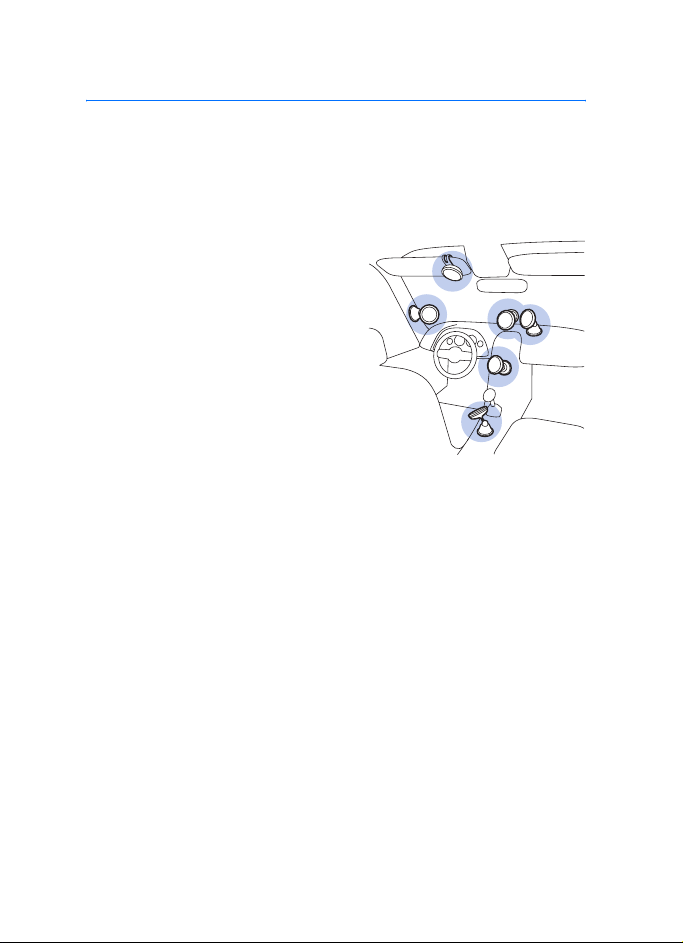
You can attach the speakerphone to the sunvisor, windscreen, or
dashboard in your car.
■General safety instructions
The figure shows possible mounting
locations.
When you install the speakerphone in
a car, ensure that it does not interfere
with or hinder the systems used in the
operation of the vehicle (for example,
airbags) or disturb your field of vision
while driving.
Check that the deployment of the
airbags is not blocked or impaired in
any way. Only operate the speakerphone if it is safe to do so under all
driving conditions.
To use the speakerphone when it is attached to the sunvisor, ensure that
the sunvisor is up against the car roof.
Do not adjust the mounting device while driving.
■Attach to a sunvisor
You can attach the speakerphone to the sunvisor of your car using the
supplied clip.
Table of contents
Other Nokia Telephone manuals

Nokia
Nokia 500i User manual

Nokia
Nokia 3310 3G User manual

Nokia
Nokia 5310 XpressMusic User manual

Nokia
Nokia 110 2019 User manual
Nokia
Nokia 6288 User manual

Nokia
Nokia 5710 XpressAudio User manual

Nokia
Nokia 1208 User manual

Nokia
Nokia 2780 Flip User manual

Nokia
Nokia C1-00 User manual
Nokia
Nokia 02714V5 User manual